Monthly
$5/ month
1,000 credits a month Billed monthly · $5 per 1k
- Every endpoint: property, search, listings
- REST API and MCP for AI agents
- Bulk jobs with webhooks
- 200 requests / min
- Top-ups at $4 / 1k
- Email support
Cancel anytime
ZillAPI Bulk Export
Turn a Zillow search or your own address list into a clean spreadsheet, from your ZillAPI account. Nothing to install.
 Excel (.xlsx)
 CSV
 JSON
 JSON Lines
 TSV
 GeoJSON
 KML
 SQL (PostgreSQL / SQLite)
 XML
 Google Sheets (via CSV)
ZillAPI is independent and not affiliated with Zillow Group.
For sale, for rent or sold homes, or your own list of addresses and Zillow links.
Run it from your ZillAPI account. Big exports can take a few minutes; you'll find them in your History.
Get the file in the format you need: Excel, CSV, JSON and more.
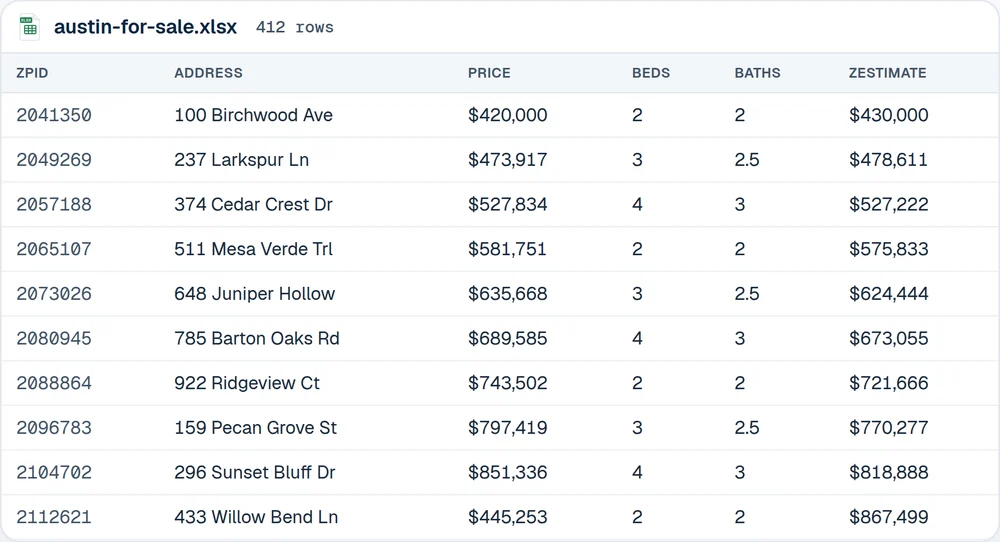
Every export comes back with 200+ fields per home.
Bulk Export is included with the Monthly and Annual plans. Every row uses 1 credit from your plan.
$5/ month
1,000 credits a month Billed monthly · $5 per 1k
Cancel anytime
$4.50/ month
12,000 credits a year, 1,000 each month Billed $54 / year · $4.50 per 1k
10% less than Monthly
The same exports run through the ZillAPI batch and search endpoints, with a webhook when a job finishes.
Connect the ZillAPI MCP server and ask your assistant to export a list. You set a credit limit, so an export never spends more than you allow.
Read https://zillapi.com/agents.md and connect the ZillAPI MCP server. Then export these addresses to a CSV with a credit limit of 500.ZillAPI Bulk Export turns a Zillow search link, an area, or your own list of addresses into a spreadsheet or data file, such as Excel or CSV. Every export comes back with 200+ fields per home, including price, price and tax history, schools, the listing agent and, when Zillow has it, the Zestimate. It runs from your ZillAPI account on ZillAPI's servers, with nothing to install. ZillAPI is independent and not affiliated with Zillow Group.
Bulk Export is included with the ZillAPI Monthly and Annual plans. Every row uses 1 credit, the same credits as the ZillAPI API and MCP server. Before an export runs, your account shows how many rows to expect and the credits it will use, and you can download a sample file from this page.
No. ZillAPI Bulk Export runs from your ZillAPI account, with nothing to install. You paste a Zillow search link, pick an area, or upload an address list, and the export runs on ZillAPI's servers, not in your browser. You don't need to keep Zillow open while it runs.
For-sale, for-rent and sold homes from a Zillow search link or an area, or your own list of addresses or Zillow links. Each row is one home with its full property record, with columns such as address, price, beds, baths, living area, Zestimate, Rent Zestimate, price history, days on Zillow and listing agent.
Paste or upload up to 5,000 addresses or Zillow links per export: ZillAPI runs the list in parts of up to 500 and shows it as one export with one progress bar. A search returns up to 500 homes per export. Before an export runs, your account shows the exact row count for an address list, and up to 500 rows for a search.
Every export returns 200+ fields per home: price, Zestimate and Rent Zestimate, beds, baths, living and lot area, year built, full price history, tax history, nearby schools, all photos, HOA fee, parcel number, MLS ID and listing agent or broker. Address lists, Zillow links and searches all return the same full records. Some fields, such as the Zestimate and the HOA fee, are only filled when Zillow has them.
Yes. Download your export as Excel or CSV, or in formats such as JSON and GeoJSON. A CSV opens in Google Sheets with File > Import. To refresh data inside a spreadsheet instead, see the ZillAPI guides for Excel and Google Sheets.
Each row uses 1 credit. Before an export starts, your account shows the credits it needs: the exact number for an address list, and at most 500 for a search, because you only pay for the rows you get. Those credits are set aside when the export starts, so it never stops part-way for lack of credits. If you don't have enough, the export doesn't start: top up, then run it. If any part fails, you aren't charged for it.
Yes. Choose For sale, For rent or Sold before you run the export. Sold exports cover recently sold homes and include the sale price and the price history, with sale dates, where Zillow shows them.
Yes. The same account works with the ZillAPI REST API, which has batch jobs and a webhook when a job is done, and with the ZillAPI MCP server. In Claude, ChatGPT or Cursor, your assistant can start an export, check on it and give you the CSV download link. You set a credit limit, so it never spends more than you allow.
ZillAPI returns publicly available property information through its own service, and you're responsible for how you use it, including fair housing, privacy and marketing rules and ZillAPI's Terms of Service. ZillAPI is independent and not affiliated with or endorsed by Zillow Group.
You don't set up or run a scraper. You give ZillAPI Bulk Export a search, an area or an address list in your ZillAPI account, run the export, and download a file. Every export comes back as full property records with 200+ fields per home, and the same account works from code and AI assistants when you outgrow the page.
ZillAPI is an independent service and is not affiliated with or endorsed by Zillow Group. Bulk Export returns publicly available property information through ZillAPI's own service. You're responsible for how you use the data, including fair housing, privacy and marketing rules that apply to you, and our Terms of Service. Further reading: Zillow scraping vs API.