You can wire Zillow data into Claude, ChatGPT, or any MCP client in about 80 lines of TypeScript. I will show you the working server.
The Model Context Protocol (MCP) is the open standard most LLMs use to talk to external tools in 2026. One server, one config entry, and the model can look up properties, fetch Zestimates, and search listings without you writing custom function-calling glue per vendor.
This post is the working skeleton, the tool definitions, the Claude Desktop config, and the gotchas that bite teams in production.
What MCP actually is
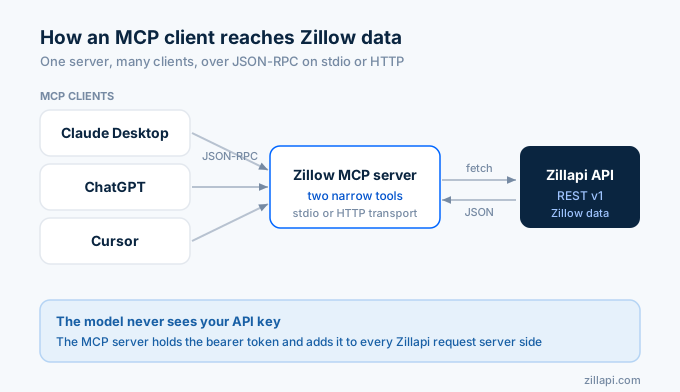
MCP is a JSON-RPC 2.0 protocol that flows over one of two transports. Standard input/output for locally-spawned servers, or HTTP with Server-Sent Events for remote ones.
The protocol defines three primitives a server can expose. Tools are functions the model can call. Resources are read-only data the model can read. Prompts are parameterized templates the user can invoke.
For Zillow data, tools are the relevant primitive.
The protocol was introduced by Anthropic in November 2024. In December 2025, Anthropic donated MCP to the Agentic AI Foundation, a directed fund under the Linux Foundation. By 2026 it is supported across Claude Desktop, Claude Code, the OpenAI Agents SDK, ChatGPT clients, Cursor, and a long tail of agent frameworks.
Why expose Zillapi as MCP
Zillapi already has an OpenAPI 3.1 spec at /openapi.json. Some MCP code generators consume OpenAPI directly and produce a server.
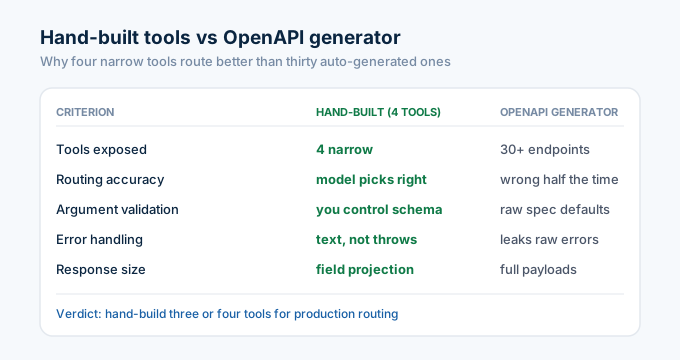
I do not recommend that path for production. OpenAPI-to-MCP generators tend to expose every endpoint as a tool. A model facing 30 tools picks the wrong one half the time.
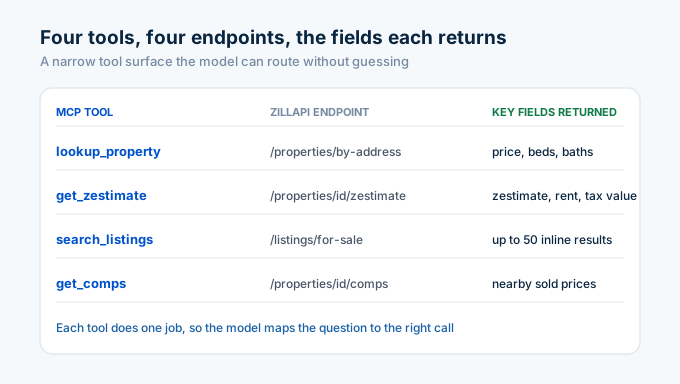
A hand-built MCP server gives you control over which endpoints become tools, how arguments are validated, and how errors propagate to the model. For Zillow specifically, the right shape is three or four narrow tools.
lookup_property, search_listings, get_zestimate, and optionally get_comps. Each does one thing. The model routes correctly because the tool descriptions are unambiguous.
Server skeleton in TypeScript
Install the MCP TypeScript SDK.
npm install @modelcontextprotocol/sdkCreate mcp-zillow-server.ts.
import { Server } from "@modelcontextprotocol/sdk/server/index.js";import { StdioServerTransport } from "@modelcontextprotocol/sdk/server/stdio.js";import {  CallToolRequestSchema,  ListToolsRequestSchema,} from "@modelcontextprotocol/sdk/types.js";
const ZILLAPI_KEY = process.env.ZILLAPI_KEY;if (!ZILLAPI_KEY) throw new Error("ZILLAPI_KEY is required");
const BASE = "https://api.zillapi.com/v1";
const server = new Server(  { name: "zillow-mcp", version: "0.1.0" },  { capabilities: { tools: {} } },);
// 1. Advertise the toolsserver.setRequestHandler(ListToolsRequestSchema, async () => ({  tools: [    {      name: "lookup_property",      description:        "Look up a U.S. property by Zillow zpid (numeric id) or full street address. Returns price, beds, baths, year built, Zestimate, and address.",      inputSchema: {        type: "object",        properties: {          zpid: { type: "string", description: "Zillow property id, numeric." },          address: {            type: "string",            description: "Full street address with city, state, and zip.",          },        },      },    },    {      name: "get_zestimate",      description:        "Fetch only the Zestimate cluster for a property: Zestimate, rent Zestimate, tax-assessed value, last sold price.",      inputSchema: {        type: "object",        properties: {          zpid: { type: "string", description: "Zillow property id." },        },        required: ["zpid"],      },    },  ],}));
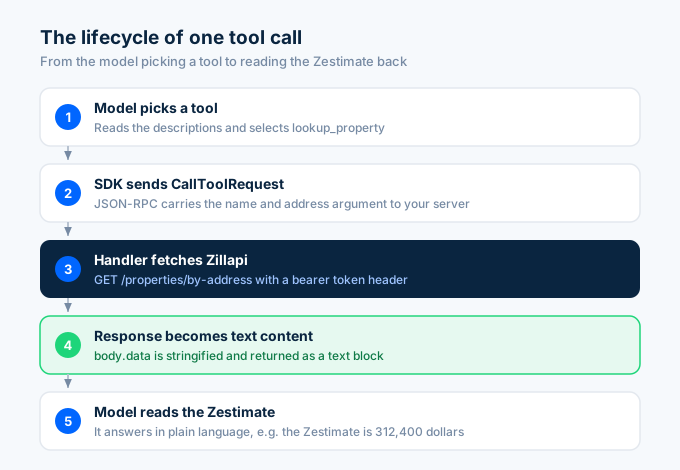
// 2. Implement the tool callsserver.setRequestHandler(CallToolRequestSchema, async (req) => {  const { name, arguments: args } = req.params;
  if (name === "lookup_property") {    const url = args.zpid      ? `${BASE}/properties/${encodeURIComponent(args.zpid as string)}`      : `${BASE}/properties/by-address?address=${encodeURIComponent(args.address as string)}`;
    const r = await fetch(url, {      headers: { authorization: `Bearer ${ZILLAPI_KEY}` },    });    const body = await r.json();    return {      content: [{ type: "text", text: JSON.stringify(body.data, null, 2) }],    };  }
  if (name === "get_zestimate") {    const r = await fetch(      `${BASE}/properties/${encodeURIComponent(args.zpid as string)}/zestimate`,      { headers: { authorization: `Bearer ${ZILLAPI_KEY}` } },    );    const body = await r.json();    return {      content: [{ type: "text", text: JSON.stringify(body.data, null, 2) }],    };  }
  throw new Error(`unknown tool: ${name}`);});
// 3. Start over stdioconst transport = new StdioServerTransport();await server.connect(transport);
Compile and run.
npx tsc mcp-zillow-server.ts && node mcp-zillow-server.jsThat is the whole server. About 80 lines, two tools, one transport. It works.
Wiring it to Claude Desktop
Claude Desktop reads MCP server config from claude_desktop_config.json. On macOS that file lives at ~/Library/Application Support/Claude/claude_desktop_config.json.
Add an entry.
{ "mcpServers": { "zillow": { "command": "node", "args": ["/absolute/path/to/mcp-zillow-server.js"], "env": { "ZILLAPI_KEY": "zk_AbCdEf..." } } }}Restart Claude Desktop. The lookup_property and get_zestimate tools appear in the tool picker, and Claude can call them inline.
Wiring it to Claude Code or other MCP clients
Claude Code reads the same kind of config from .mcp.json or your shell environment. Cursor reads its own equivalent. The OpenAI Agents SDK has native MCP client support as of 2025.
The MCP SDK ships transports for stdio (the example above) and HTTP/SSE if you want to run the server as a long-lived web service. For a hosted MCP server, swap StdioServerTransport for the HTTP transport and serve over HTTPS.
Hosted MCP is the right shape if you want one server to serve many users. Each request carries an auth header, you map that header to the correct Zillapi tenant key, and the same server handles everyone.
Adding search_listings
A second tool that wraps Zillapi’s search endpoint.
{ name: "search_listings", description: "Search active for-sale listings inside a bounding box or city. Returns up to 50 inline results.", inputSchema: { type: "object", properties: { location: { type: "string", description: "City, state. e.g. 'Austin, TX'." }, min_price: { type: "number" }, max_price: { type: "number" }, min_beds: { type: "number" }, max_items: { type: "number", default: 25 }, }, required: ["location"], },}Implementation.
if (name === "search_listings") { const r = await fetch(`${BASE}/listings/for-sale`, { method: "POST", headers: { authorization: `Bearer ${ZILLAPI_KEY}`, "content-type": "application/json", }, body: JSON.stringify({ filters: { status: "for_sale", location: args.location, price: { min: args.min_price, max: args.max_price }, beds: { min: args.min_beds }, }, maxItems: args.max_items ?? 25, }), }); const body = await r.json(); return { content: [{ type: "text", text: JSON.stringify(body.data, null, 2) }], };}Now the model can answer “show me 3-bedroom houses under $500k in Austin” by calling search_listings, then drill into individual properties via lookup_property or get_zestimate.
Gotchas worth knowing
Cache aggressively in the agent loop. Zillapi caches upstream, but a long agent run can rehit the same zpid several times. Memoize at the server level too.
Trim the response. Property records are large. Use Zillapi’s field projection (?fields=zpid,price,zestimate) before returning to the model so you do not burn context.
Surface errors as text. Do not throw on a 404. Return { error: "not_found" } as the tool result. Models recover gracefully from text errors and badly from exceptions.
Set a realistic timeout. 60 seconds is the right ceiling per Zillapi call. Shorter and you will false-fail on cold caches.
Cap tool calls per turn. Set the agent loop to bail after 10 to 15 tool calls. Agents that loop forever burn credits and confuse users.
Do not embed your API key in a public MCP server. If you publish the server, require the user to set their own ZILLAPI_KEY in the env. For hosted MCP, accept an auth header per request and resolve it to the right tenant key server-side.
Resources, not just tools
I told you above that tools are the relevant primitive for Zillow data. That is mostly true. There is one case where resources are useful too.
If you maintain a small set of saved searches or watchlists per user, exposing them as MCP resources lets the model load them on demand without burning a tool call. The user says “show me my saved Austin search” and the model reads the resource directly.
server.setRequestHandler(ListResourcesRequestSchema, async () => ({ resources: [ { uri: "zillow://watchlist/me", name: "My watched properties", mimeType: "application/json", }, ],}));For most read-mostly use cases, tools alone are enough. Add resources only when you have user-specific state that the model should be able to reach without explicit instruction.
Cost considerations
A small word on credits. Each LLM tool call that hits Zillapi costs one or more credits depending on the endpoint. An agent that loops through 50 properties to compute investor metrics will burn 50+ credits per turn unless you cache.
Two patterns keep the bill manageable. Field projection trims context and saves tokens, which is an LLM cost win, not a Zillapi cost win. In-process memoization on the MCP server side keeps Zillapi credit usage flat for repeated zpids in the same session.
If your agent surfaces show real users running open-ended searches, log the tool-call count per turn. The first time you see one user burn 200 calls in a single conversation you will want to know about it.
When to pick MCP vs raw function calling
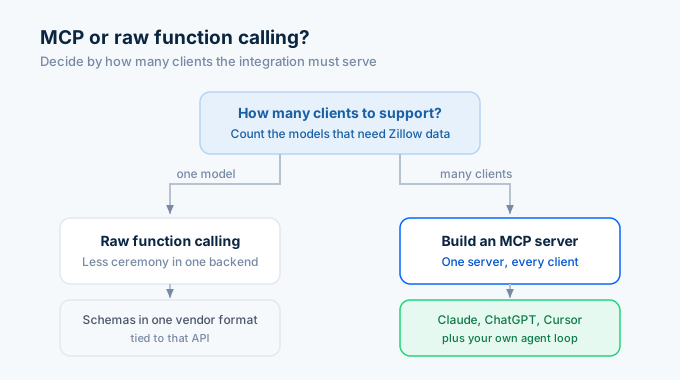
Both work. Pick by the question “how many clients do I need to support”.
If you only target one model (say, Claude in your own backend), raw function calling against the Anthropic API is slightly less ceremony. You write the tool schemas in Anthropic’s format, dispatch the calls, ship.
If you want one integration to work in Claude Desktop, ChatGPT, Cursor, and your own agent loop, build MCP. One server, every client.
For Zillow data specifically, MCP wins for most teams because property lookup is exactly the kind of cross-cutting capability users want available in whatever LLM they happen to be using.
For an in-depth function-calling alternative, see Using LLMs with Zillow data: function-calling templates.
Frequently asked questions
What is the Model Context Protocol?
MCP is an open JSON-RPC 2.0 protocol that lets LLMs talk to external tools, data sources, and resources. It is the dominant way Claude, ChatGPT, and most agent frameworks call third-party services in 2026. Anthropic donated it to the Linux Foundation’s Agentic AI Foundation in December 2025.
Do I need to write a custom MCP server for Zillow data?
For production, yes. OpenAPI-to-MCP generators exist but tend to expose every endpoint as a tool, which confuses the model. A hand-built server with three or four narrow tools (lookup, search, comps, Zestimate) routes better.
Can ChatGPT use an MCP server?
Yes. OpenAI added MCP support to the Agents SDK and ChatGPT clients in 2025 and 2026. Any MCP-compatible client can use the same Zillow MCP server you build for Claude.
What transports does MCP support?
Two. Standard input/output (stdio) for locally spawned servers and HTTP with Server-Sent Events for remote servers. Stdio is simpler for local dev. HTTP is what you ship for hosted, multi-tenant cases.
How do I deploy an MCP server publicly?
Swap StdioServerTransport for an HTTP transport, host it on your platform of choice (Vercel, Cloudflare Workers, a plain Node server), and require an auth header that resolves to a tenant-specific Zillapi key. Do not embed your own key in a public server.
Why not just call the Zillow API directly from the LLM with function calling?
You can. Function calling and MCP solve overlapping problems. MCP is portable across clients (one server, many models), function calling is per-vendor. Pick MCP when you want one integration to work in Claude Desktop, ChatGPT, Cursor, and your own agent loop.
A note on testing your MCP server
Test the server outside Claude Desktop before you wire it up. The MCP SDK ships an inspector that lets you call tools manually.
npx @modelcontextprotocol/inspector node mcp-zillow-server.jsThe inspector opens a UI where you can list tools, call them with sample arguments, and see the raw responses. Catch your bugs here, not in the LLM loop where the failure mode is “the model says something weird”.
Once the inspector is green, you wire to Claude Desktop and the LLM-side debugging starts. Tool descriptions are the most common source of issues. If the model picks the wrong tool or skips a tool entirely, the description usually needs work.
Get started
Sign up for Zillapi and grab a key. The server above starts working with one environment variable and an 80-line TypeScript file.
For an MCP server you can clone instead of writing from scratch, the Zillapi GitHub has a reference implementation. For function-calling templates that work without MCP, see Using LLMs with Zillow data.
Zillapi is an independent service and is not affiliated with, endorsed by, or sponsored by Zillow Group, Inc. “Zillow” and “Zestimate” are registered trademarks of Zillow Group, Inc. Use of those marks on this site is descriptive (nominative fair use). Read our full trademark posture.