Zillow LLM function calling means defining three narrow tools (lookup_property, search_listings, get_comps), wiring them to a property data API, and letting the model decide which tool to call. Drop-in templates for Claude and OpenAI follow.
You want an LLM to answer “what is the Zestimate on this property?” and “find me 3-bedroom houses under $500k in Austin.” You do not want to write a custom backend for that.
You do not have to. Define three tools (lookup, search, comps), point them at a Zillow data API like Zillapi, and let the model decide when to call which.
This post is the drop-in tool definitions for Claude and OpenAI, the dispatcher code that runs the tools, and the patterns that keep the agent loop cheap and accurate.
Why three tools, not one
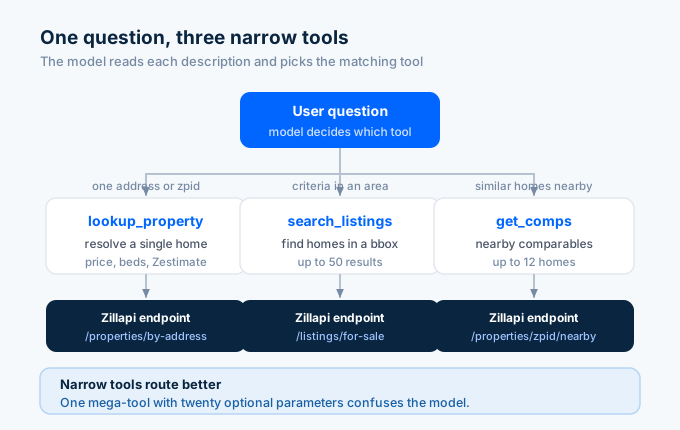
LLMs route well when tools have narrow, distinct purposes. A single zillow_query tool with twenty optional parameters confuses the model. The model has to read the description three times to figure out which arguments matter for the user’s question.
Three tools each doing one thing work better in practice. Zillapi’s surface is shaped to match.
| Tool | Endpoint | When the model should call it |
|---|---|---|
lookup_property |
/v1/properties/{zpid} or /v1/properties/by-address |
User asks about a specific property by URL, address, or zpid. |
search_listings |
/v1/listings/for-sale |
User asks for homes matching criteria in a city or area. |
get_comps |
/v1/properties/{zpid}/nearby |
User asks for comparables, similar homes nearby, or pricing context. |
Each tool description is unambiguous. The model picks correctly the first time.
Anthropic (Claude) tool definitions
Drop these into your Claude messages call as the tools array.
import anthropic, os, requests
client = anthropic.Anthropic()ZILLAPI = "https://api.zillapi.com/v1"HEADERS = {"Authorization": f"Bearer {os.environ['ZILLAPI_KEY']}"}
TOOLS = [    {        "name": "lookup_property",        "description": "Look up a U.S. property by Zillow zpid (numeric id) or full street address. Returns price, beds, baths, year built, Zestimate, and address.",        "input_schema": {            "type": "object",            "properties": {                "zpid": {"type": "string", "description": "Zillow property id, numeric."},                "address": {"type": "string", "description": "Full street address with city, state, and zip."},            },        },    },    {        "name": "search_listings",        "description": "Search active for-sale listings inside a geographic bounding box. Returns up to 50 results inline.",        "input_schema": {            "type": "object",            "properties": {                "bbox": {                    "type": "object",                    "description": "Geographic bounding box (lat/lon). Open the area on zillow.com and copy the visible map's corners.",                    "properties": {                        "west":  {"type": "number"},                        "south": {"type": "number"},                        "east":  {"type": "number"},                        "north": {"type": "number"}                    },                    "required": ["west","south","east","north"]                },                "min_price": {"type": "number"},                "max_price": {"type": "number"},                "min_beds":  {"type": "number"},                "max_items": {"type": "number"},            },            "required": ["bbox"],        },    },    {        "name": "get_comps",        "description": "Get comparable nearby listings for a Zillow property. Returns up to 12 nearby homes with similar characteristics.",        "input_schema": {            "type": "object",            "properties": {                "zpid": {"type": "string"},            },            "required": ["zpid"],        },    },]
The shape follows Anthropic’s tool use spec. The descriptions are the most important field. Models route based on the description, not the name.
Tool execution glue
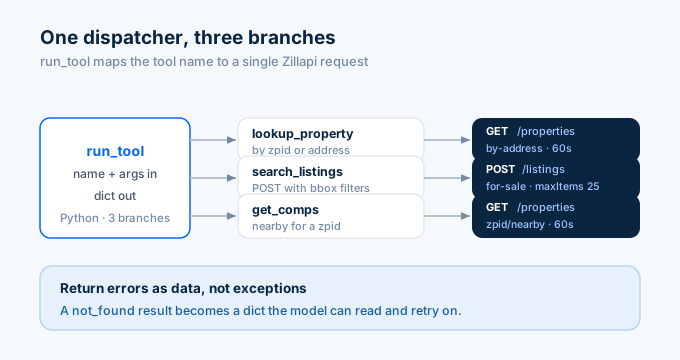
A small dispatcher that runs whichever tool the model picked.
def run_tool(name, args):    if name == "lookup_property":        if args.get("zpid"):            r = requests.get(f"{ZILLAPI}/properties/{args['zpid']}", headers=HEADERS, timeout=60)        else:            r = requests.get(f"{ZILLAPI}/properties/by-address", params={"address": args["address"]}, headers=HEADERS, timeout=60)        return r.json().get("data") or {"error": "not_found"}
    if name == "search_listings":        body = {            "filters": {                "bbox": args["bbox"],                **({"price": {"min": args.get("min_price"), "max": args.get("max_price")}}                   if args.get("min_price") or args.get("max_price") else {}),                **({"beds": {"min": args["min_beds"]}} if args.get("min_beds") else {}),            },            "maxItems": args.get("max_items", 25),        }        r = requests.post(f"{ZILLAPI}/listings/for-sale", json=body, headers=HEADERS, timeout=60)        return r.json().get("data") or []
    if name == "get_comps":        r = requests.get(f"{ZILLAPI}/properties/{args['zpid']}/nearby", headers=HEADERS, timeout=60)        return r.json().get("data") or []
    return {"error": f"unknown tool: {name}"}
That is the entire dispatcher. Three branches, each one HTTP call, each one returns a dict the model can read.
The Claude agent loop
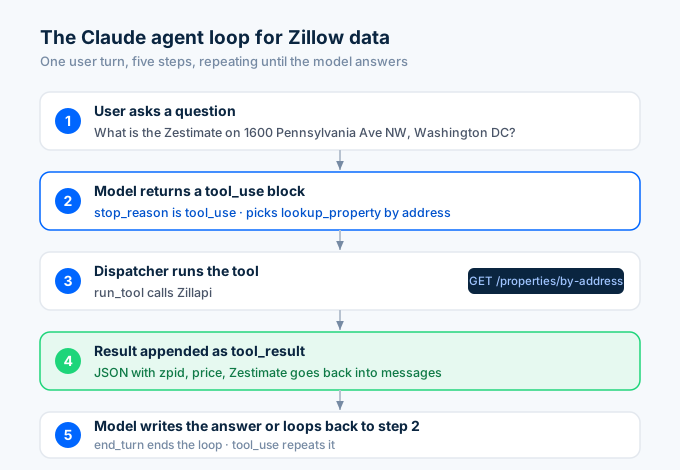
The model picks a tool, you run it, you feed the result back, the model writes the answer.
messages = [{"role": "user", "content": "What's the Zestimate on 1600 Pennsylvania Ave NW, Washington DC 20500?"}]
while True:    resp = client.messages.create(        model="claude-opus-4-7",        max_tokens=1024,        tools=TOOLS,        messages=messages,    )
    if resp.stop_reason == "end_turn":        print(resp.content[0].text)        break
    if resp.stop_reason == "tool_use":        tool_use = next(b for b in resp.content if b.type == "tool_use")        result = run_tool(tool_use.name, tool_use.input)
        messages.append({"role": "assistant", "content": resp.content})        messages.append({            "role": "user",            "content": [{                "type": "tool_result",                "tool_use_id": tool_use.id,                "content": str(result),            }],        })
The model picks lookup_property with address="1600 Pennsylvania Ave NW, Washington DC 20500". The dispatcher hits Zillapi. The result goes back to the model. The model writes the answer.
That is the entire pattern.
OpenAI tool definitions
The same three tools in OpenAI’s function-calling shape.
from openai import OpenAIclient = OpenAI()
OPENAI_TOOLS = [    {        "type": "function",        "function": {            "name": "lookup_property",            "description": "Look up a U.S. property by Zillow zpid or full street address.",            "parameters": {                "type": "object",                "properties": {                    "zpid": {"type": "string"},                    "address": {"type": "string"},                },            },        },    },    {        "type": "function",        "function": {            "name": "search_listings",            "description": "Search active for-sale listings inside a geographic bounding box.",            "parameters": {                "type": "object",                "properties": {                    "bbox": {                        "type": "object",                        "properties": {                            "west":  {"type": "number"},                            "south": {"type": "number"},                            "east":  {"type": "number"},                            "north": {"type": "number"}                        },                        "required": ["west","south","east","north"]                    },                    "min_price": {"type": "number"},                    "max_price": {"type": "number"},                    "min_beds":  {"type": "number"},                    "max_items": {"type": "number"},                },                "required": ["bbox"],            },        },    },    {        "type": "function",        "function": {            "name": "get_comps",            "description": "Get nearby comparable listings for a zpid.",            "parameters": {                "type": "object",                "properties": {"zpid": {"type": "string"}},                "required": ["zpid"],            },        },    },]
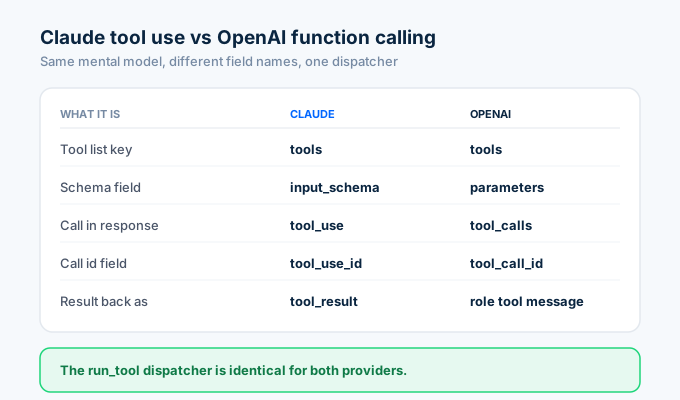
The OpenAI loop differs only in field names. tool_calls instead of tool_use. tool_call_id instead of tool_use_id. The dispatcher (run_tool) is identical.
Patterns that keep the loop cheap
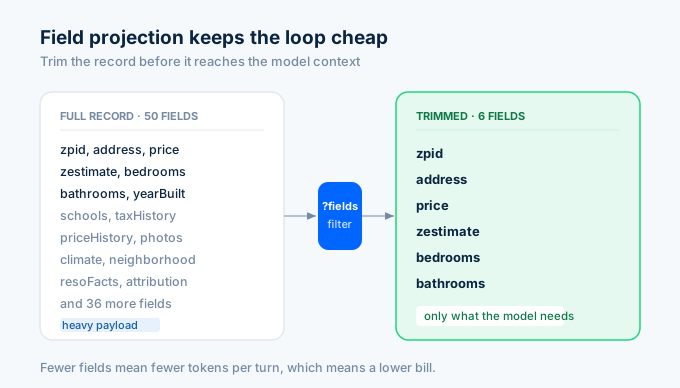
Field projection. Property records are large. Pre-trim with Zillapi’s ?fields= parameter before returning to the model.
r = requests.get( f"{ZILLAPI}/properties/{zpid}", params={"fields": "zpid,address,price,zestimate,bedrooms,bathrooms,yearBuilt"}, headers=HEADERS,)The full property record can run 50 fields. The model usually needs five or six. Cutting the rest saves both tokens and dollars.
Cache by zpid in your dispatcher. A single agent turn can hit the same zpid through multiple tool calls. The user asks “what is the Zestimate?” and follow-up “what year was it built?” both resolve to the same zpid. Memoize.
from functools import lru_cache
@lru_cache(maxsize=512)def cached_property(zpid: str):    return requests.get(f"{ZILLAPI}/properties/{zpid}", headers=HEADERS).json()["data"]
Return structured errors as text. Do not throw on not_found. Return {"error": "not_found"}. The model handles errors-as-data well. Exceptions kill the loop and force the user to start over.
Set a tool-call cap. Bound the loop at 10 to 15 tool calls per user turn. Agents that run forever burn credits and confuse the user.
MAX_TURNS = 12turn = 0while turn < MAX_TURNS: turn += 1 # ... loop bodyif turn >= MAX_TURNS: print("Hit tool-call cap. Returning best-effort answer.")Stream long search results in chunks. If a search_listings call returns 50 properties, do not hand all 50 to the model. Hand it the top 10 and tell the model it can ask for more.
When to pick MCP over raw function calling
Both approaches work. The trade-off is portability vs ceremony.
Raw function calling is slightly less ceremony. You write the tool schemas in the vendor’s format, dispatch the calls, ship. It works inside one application.
MCP wins when you want one server to serve many clients. Build the Zillow MCP server once and Claude Desktop, ChatGPT, Cursor, and your own custom agent can all use it without you writing per-vendor glue.
For Zillow data specifically, MCP is the better long-term bet because property lookup is the kind of cross-cutting capability users want in whatever LLM they happen to be using.
For the MCP path, see Building an MCP server for Zillow data.
Common failure modes and how to fix them
Three things go wrong most often when you wire an LLM to a Zillow data API.
The model picks the wrong tool. This usually means your tool descriptions are ambiguous. Read them and ask: if I had only the description, would I know which tool to pick? If the answer is “kind of”, rewrite. Be specific about when each tool fires.
The model invents zpids. If you ask the model “what’s the Zestimate on 1600 Pennsylvania Ave NW?” without providing tools, it will sometimes hallucinate a zpid and call your get_zestimate tool with garbage. The fix is to make the tool descriptions explicit: lookup_property is the only way to resolve an address to a zpid, and get_zestimate requires a zpid that came from lookup_property.
The loop runs too long on broad searches. If a user says “find me homes in California”, the model may try to drill into individual properties for hundreds of zpids. Cap the depth. Have the tool return at most 10 candidates and tell the model in the description that follow-up calls cost extra credits.
A small system prompt at the top of the conversation also helps. “Use the smallest number of tool calls that answers the question. Prefer trimmed responses over full property records.”
A working real-world example
A real estate investor agent that takes “find me cash-flow properties in Austin under $400k” and returns ranked candidates.
The model calls search_listings(bbox={"west": -97.94, "south": 30.10, "east": -97.56, "north": 30.52}, max_price=400000) (the Austin metro bbox). It gets 50 properties. It calls lookup_property for each (or in parallel, depending on your loop) to pull rent_zestimate and compute gross yield. It ranks by yield. It writes the answer.
That whole flow is maybe 15 tool calls and three model turns. With caching and field projection, it costs you well under a dollar of API usage at most pricing tiers.
The agent does not need new code per question. It uses the same three tools you already defined.
Frequently asked questions
What is function calling for an LLM?
Function calling lets the model call external code with structured arguments. You define tools (name, description, JSON schema). The model decides when to call them based on the user’s request. Your code runs the tool and returns the result back to the model.
Should I use three tools or one mega-tool for Zillow data?
Three. LLMs route well when each tool has a narrow, distinct purpose. A single zillow_query with twenty optional parameters confuses the model. Lookup, search, and comps as three tools work better in practice.
How do I prevent the model from looping forever on tool calls?
Set a tool-call cap per user turn (10 to 15 is reasonable), surface errors as text rather than exceptions, and cache responses by zpid in your dispatcher so repeated calls return instantly without re-hitting the API.
What is the difference between Claude tool use and OpenAI function calling?
The shape of the tool definitions and the field names in the response (tool_use vs tool_calls, tool_use_id vs tool_call_id). The mental model is the same. The same dispatcher code works for both.
Should I use MCP or raw function calling for Zillow?
MCP if you want one integration that works across Claude Desktop, ChatGPT, Cursor, and your own agents. Raw function calling if you only target one model and one client. Both can hit the same Zillapi endpoints.
How do I keep my LLM context window from filling up with property records?
Field projection. Use Zillapi’s ?fields= parameter to return only the fields you need before the response goes back to the model. A trimmed response keeps the loop fast and the bill low.
When the model gets it wrong
Tool routing is not perfect. Models occasionally call the wrong tool, pass malformed arguments, or hallucinate parameters that do not exist in your schema.
The defensive pattern is simple. In your dispatcher, validate inputs against the schema before hitting the API. If the model passes a non-numeric min_price, return {"error": "min_price must be a number"} and let the model retry.
Models recover well from structured error feedback. They do not recover from silent failures or framework exceptions. Make every error a string the model can read and act on.
A second pattern: log every tool call with the model’s input, your dispatched URL, and the response status. When something looks wrong in production, the trace tells you whether the model misrouted or the API misbehaved. Without the trace, debugging is guesswork.
Get started
Sign up for Zillapi and drop the templates above into your existing agent code. The OpenAPI spec at /openapi.json lets you generate broader tool sets if you need them.
For an MCP-based path that works with Claude Desktop and Claude Code natively, see Building an MCP server for Zillow data.
Zillapi is an independent service and is not affiliated with, endorsed by, or sponsored by Zillow Group, Inc. “Zillow” and “Zestimate” are registered trademarks of Zillow Group, Inc. Use of those marks on this site is descriptive (nominative fair use). Read our full trademark posture.