Most real estate investors don’t write code. They use spreadsheets.
If you need Zillow property data in Excel or Google Sheets (Zestimates, tax records, price history, school ratings), you need a way to get it there without manually copying from Zillow.com one property at a time.
The old Zillow API had Excel tutorials everywhere. That API died in September 2021. The Chrome extensions that replaced it break every few weeks when Zillow updates their anti-bot defenses.
In 2026, the reliable path is a REST API that returns structured data you can pipe into any spreadsheet. Here’s how to do it with Google Sheets, Excel, and plain CSV files.
How do I get Zillow data into Google Sheets?
Google Apps Script lets you create custom spreadsheet functions that call external APIs. You write a function once, and then use it like any built-in formula. Type =ZILLOW("123 Main St, Austin, TX") in a cell and get back a Zestimate.
Here’s the complete script. Open your Google Sheet, go to Extensions → Apps Script, paste this, and save:
function ZILLOW(address) {  const API_KEY = PropertiesService.getScriptProperties().getProperty("ZILLAPI_KEY");
  const url = "https://api.zillapi.com/v1/properties/by-address"    + "?address=" + encodeURIComponent(address)    + "&fields=zestimate,rentZestimate,bedrooms,bathrooms,livingArea,yearBuilt,taxAssessedValue,homeStatus";
  const res = UrlFetchApp.fetch(url, {    headers: { Authorization: "Bearer " + API_KEY },    muteHttpExceptions: true  });
  if (res.getResponseCode() !== 200) return "Error: " + res.getResponseCode();
  const d = JSON.parse(res.getContentText()).data;  return [[d.zestimate, d.rentZestimate, d.bedrooms, d.bathrooms, d.livingArea, d.yearBuilt, d.taxAssessedValue, d.homeStatus]];}
Before running it, store your API key securely. In the Apps Script editor, go to Project Settings → Script Properties → Add Property. Set the key as ZILLAPI_KEY and the value as your API key from zillapi.com.
Now in your spreadsheet, add headers in row 1:
| A | B | C | D | E | F | G | H | I |
|---|---|---|---|---|---|---|---|---|
| Address | Zestimate | Rent Estimate | Beds | Baths | Sqft | Year Built | Tax Assessed | Status |
Put an address in cell A2. Then in cell B2, type:
=ZILLOW(A2)The function spills across columns B through I with all the property data. Drag the formula down for more addresses.
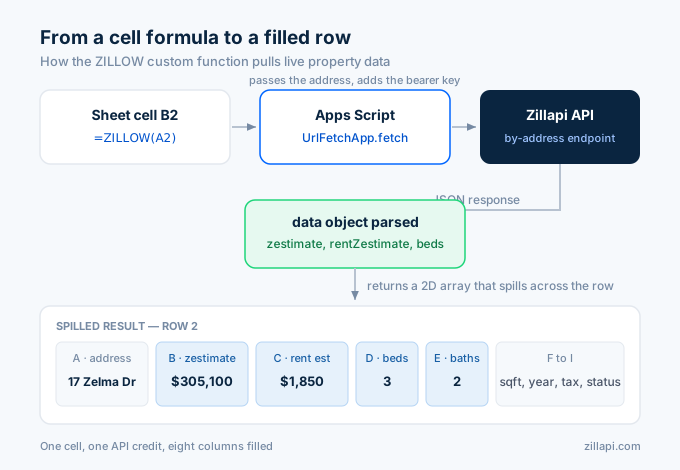
One thing to know: Google Apps Script has a 6-minute execution limit per function call and a 20,000-call daily limit on UrlFetchApp. For most spreadsheet use cases, you’ll never hit either limit. But if you’re pulling 500+ properties, do it in batches across multiple days or use the CSV export method below.
How do I get Zillow data into Excel?
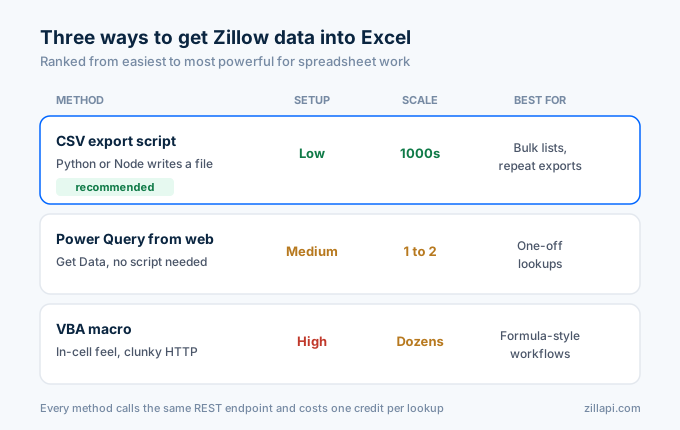
Excel doesn’t have a built-in way to call REST APIs from a formula like Google Sheets does. You have three options, ranked from easiest to most powerful.
Option 1: Import a CSV file. The simplest approach. Use a short script to pull property data from the API and save it as a CSV file. Then open that CSV in Excel. No Power Query, no VBA, no add-ins.
Here’s the Python script (you can also use the JavaScript version):
import requests, os, csv
API_KEY = os.environ["ZILLAPI_KEY"]HEADERS = {"Authorization": f"Bearer {API_KEY}"}
addresses = [    "1600 Pennsylvania Ave NW, Washington DC 20500",    "100 Main St, Washington DC 29601",    "45 Augusta St, Washington DC 29601",]
fields = ["zestimate", "rentZestimate", "bedrooms", "bathrooms", "livingArea", "yearBuilt", "taxAssessedValue"]
with open("zillow_data.csv", "w", newline="") as f:    writer = csv.writer(f)    writer.writerow(["address"] + fields)
    for addr in addresses:        r = requests.get(            "https://api.zillapi.com/v1/properties/by-address",            params={"address": addr, "fields": ",".join(fields)},            headers=HEADERS,        )        if r.status_code == 200:            d = r.json()["data"]            writer.writerow([addr] + [d.get(f) for f in fields])        else:            writer.writerow([addr] + ["Error"] * len(fields))
print(f"Saved {len(addresses)} properties to zillow_data.csv")
Run it, double-click the CSV file, and it opens in Excel with clean columns. For 100 properties, the script takes about 30 seconds.
Option 2: Power Query (Get Data from Web). Excel’s Power Query can pull data from any REST API endpoint. Go to Data → Get Data → From Other Sources → From Web. Enter the URL:
https://api.zillapi.com/v1/properties/by-address?address=1600+Pennsylvania+Ave+NW%2C+Washington+DC+20500&fields=zestimate,rentZestimate,bedrooms,bathrooms,livingAreaIn the Advanced section, add a header: Authorization with value Bearer zk_your_key_here. Click OK, and Power Query will load the JSON response into a table.
The downside of Power Query is that each property requires a separate query or a custom M function to loop through a list. For one or two lookups, it works great. For dozens, the CSV method is faster.
Option 3: VBA macro. If you want a formula-like experience in Excel similar to the Google Sheets approach, you can write a VBA macro. But VBA’s HTTP handling is clunky compared to Apps Script, and most developers I talk to prefer the CSV route. I won’t include a full VBA example here because the CSV method is simpler and more reliable.
How do I pull Zestimates for a list of addresses?
This is the most common use case. You have 50 or 200 addresses in a spreadsheet and you want Zestimates for all of them.
In Google Sheets, put your addresses in column A (rows 2 through 201). Put =ZILLOW(A2) in cell B2. Drag it down to B201. Each cell triggers one API call. Google Sheets will process them, but it takes a few seconds per call because Apps Script runs synchronously.
For larger lists, the CSV export is faster. Here’s a Node.js version that processes addresses from a text file:
import { readFileSync, writeFileSync } from "fs";
const API_KEY = process.env.ZILLAPI_KEY;const addresses = readFileSync("addresses.txt", "utf-8").split("\n").filter(Boolean);const fields = ["zestimate", "rentZestimate", "bedrooms", "bathrooms", "livingArea", "yearBuilt", "taxAssessedValue"];
const results = [["address", ...fields].join(",")];
for (const addr of addresses) {  const params = new URLSearchParams({ address: addr, fields: fields.join(",") });  const res = await fetch(    `https://api.zillapi.com/v1/properties/by-address?${params}`,    { headers: { Authorization: `Bearer ${API_KEY}` } }  );
  if (res.ok) {    const { data } = await res.json();    results.push([addr, ...fields.map(f => data[f] ?? "")].join(","));  } else {    results.push([addr, ...fields.map(() => "Error")].join(","));  }}
writeFileSync("zillow_data.csv", results.join("\n"));console.log(`Saved ${addresses.length} properties to zillow_data.csv`);
Create a text file called addresses.txt with one address per line. Run the script. Open the CSV in Excel or Google Sheets. Done.
At 200 requests per minute on the free and monthly plans, 1,000 addresses takes about 5 minutes. Each lookup costs 1 credit.
What data can I pull into a spreadsheet?
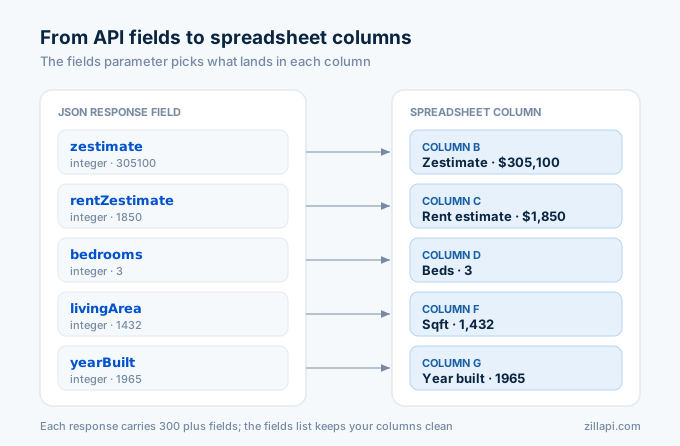
Every Zillapi API call returns 300+ fields. You don’t need all of them in a spreadsheet. Here are the fields real estate investors and analysts use most:
| Field | Type | Example | What it tells you |
|---|---|---|---|
| zestimate | integer | 305100 | Zillow’s home value estimate in dollars |
| rentZestimate | integer | 1850 | Zillow’s monthly rent estimate in dollars |
| price | integer | 295000 | Current listing price (if listed) |
| bedrooms | integer | 3 | Number of bedrooms |
| bathrooms | integer | 2 | Number of bathrooms |
| livingArea | integer | 1432 | Square footage |
| lotSize | integer | 8712 | Lot size in square feet |
| yearBuilt | integer | 1965 | Year the home was built |
| taxAssessedValue | integer | 187400 | County tax assessment in dollars |
| homeStatus | string | NOT_LISTED | Listing status |
| homeType | string | SINGLE_FAMILY | Property type |
| priceHistory | array | […] | Past sales and price changes |
The fields parameter in the API call lets you choose exactly which fields come back. Use it to keep your CSV files clean:
fields=zestimate,rentZestimate,bedrooms,bathrooms,livingArea,yearBuilt,taxAssessedValueOne field combination investors love is zestimate plus rentZestimate. Divide annual rent by the Zestimate and you get a gross rent yield in one formula: =(rentZestimate*12)/zestimate. For the example property above, that’s (1850*12)/305100 = 7.3%.
Why don’t the old Zillow Excel methods work anymore?
If you’ve searched for this topic before, you’ve probably found tutorials from 2019 and 2020 that walk through a process that no longer exists.
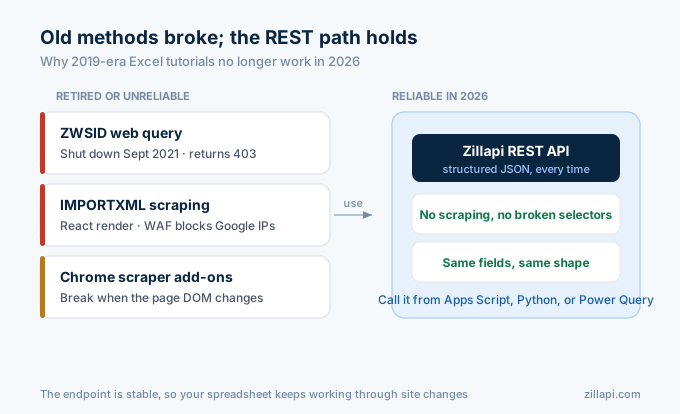
The old Zillow API (ZWSID) was free. Any developer could get a key at zillow.com/howto/api and pull Zestimates into Excel with a simple web query. Zillow shut that API down on September 30, 2021. Every ZWSID key returns 403 errors now. There is no reactivation process.
The Google Apps Script gists you find on GitHub (the ones that use IMPORTXML or scrape Zillow HTML with regex) stopped working around the same time. Zillow switched to React-based rendering, so the property data doesn’t exist in the raw HTML anymore. Even if you get past that, Zillow’s Imperva WAF blocks automated requests from Google’s servers.
Chrome extensions like “Zillow Data Exporter” and “Export Zillow data to Excel” work intermittently. They scrape the rendered page in your browser, which avoids the server-side blocking. But they break when Zillow changes their DOM structure, which happens regularly. And they only export what’s visible on the page, with no API-level depth.
The reliable approach in 2026 is a REST API that returns structured JSON. You call it from Apps Script, a Python script, or Power Query. The data comes back the same way every time. No scraping. No anti-bot workarounds. No broken selectors.
What does this cost?
Zillapi’s pricing is straightforward. You get 100 free credits at signup. No credit card.
| Plan | Credits | Cost | Per property |
|---|---|---|---|
| Free | 100 (one-time) | $0 | $0.00 |
| Monthly | 1,000/month | $5/mo | $0.005 |
| Annual | 12,000/year | $54/yr | $0.0045 |
For a real estate investor tracking a portfolio of 50 properties monthly, that’s 50 credits per month. The $5 monthly plan covers it with 950 credits to spare.
For a data analyst running a one-time comp analysis on 100 properties, the free tier covers it entirely. Sign up, run the script, get your CSV, done.
Compare that to the alternatives. Chrome extensions are free but unreliable. Apify scrapers cost $0.002 to $0.01 per property but take 2 to 10 seconds each and break regularly. Manual copy-paste from Zillow.com takes about 2 minutes per property. At 100 properties, that’s over 3 hours of your time.
How do I get started?
Go to zillapi.com. Sign up with your email. Get 100 free credits.
If you use Google Sheets, paste the Apps Script function above, set your API key in Script Properties, and type =ZILLOW("your address here") in a cell. You’ll see property data fill your spreadsheet in seconds.
If you use Excel, run the Python or Node.js CSV export script. Three minutes of setup. Thirty seconds of runtime. Clean data in your spreadsheet.
For the full developer walkthrough with more code examples, check out our Python tutorial or JavaScript tutorial. For pricing details, see the complete cost breakdown.
Frequently asked questions
Can I import Zillow data into Excel with an API?
Yes. Zillapi is a REST API that returns Zillow property data as JSON. You can import that data into Excel using Power Query, a CSV export script, or a VBA macro. Each API call returns 300+ fields including Zestimates, tax records, price history, and school ratings for any U.S. property. You get 100 free API credits at signup with no credit card required.
How do I get Zillow data into Google Sheets?
Use Google Apps Script to call the Zillapi REST API. Create a custom function called ZILLOW that takes an address, calls the /v1/properties/by-address endpoint, and returns property data directly into your spreadsheet cells. The script is about 15 lines of code. Each lookup costs 1 API credit. You can also use the ImportJSON add-on if you prefer no-code.
Is there a Zillow Excel add-in?
There is no official Zillow Excel add-in. Zillow shut down their public API in September 2021 and never released a spreadsheet plugin. Third-party Chrome extensions exist for manual export, but they break frequently due to anti-bot defenses. The reliable approach in 2026 is using a REST API like Zillapi with Excel Power Query or a CSV export script.
How do I pull Zestimates into a spreadsheet?
Call the Zillapi API with a property address and read the zestimate field from the JSON response. In Google Sheets, use an Apps Script custom function. In Excel, use Power Query or import a CSV file generated by a Python or Node.js script. Each API call returns the Zestimate as an integer in dollars along with 300+ other property fields.
Can I get Zillow data for multiple properties in a spreadsheet?
Yes. In Google Sheets, apply the custom ZILLOW function down a column of addresses. In Excel, run a script that loops through addresses, calls the API for each one, and exports the results as a CSV file. At 200 requests per minute, you can pull 1,000 properties in about 5 minutes. Each lookup costs 1 API credit.
Is the Zillow spreadsheet data free?
Zillapi offers 100 free API credits at signup with no credit card required. Each credit equals one property lookup returning Zestimates and 300+ fields. That covers 100 properties for free. After the free credits, paid plans start at $5 per month for 1,000 lookups. There is no ongoing free tier, but 100 credits is enough to test a complete spreadsheet workflow.