Real estate agents, investors, and analysts live in spreadsheets. They don’t want to write Python. They want to type a formula, pass an address, and see the Zestimate appear in the cell.
Google Sheets can do this. You don’t need an add-on. You don’t need Zapier. You need a 30-line Apps Script function and an API key.
Here’s how to pull Zillow Zestimates, rent estimates, tax data, and 300+ other property fields into any Google Sheet with a custom formula.
How do I create a =ZILLOW() formula in Google Sheets?
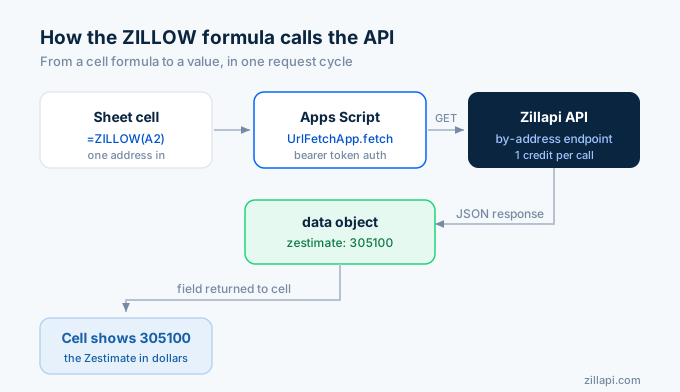
Open any Google Sheet. Go to Extensions > Apps Script. Delete the placeholder code and paste this:
/** * Pull Zillow property data into Google Sheets. * * @param {string} address - U.S. property address * @param {string} field - Field to return (default: "zestimate") * @return {number|string} The requested property field value * @customfunction */function ZILLOW(address, field) {  if (!address) return "Enter an address";  field = field || "zestimate";
  const API_KEY = PropertiesService.getScriptProperties().getProperty("ZILLAPI_KEY");  if (!API_KEY) return "Set API key in Script Properties";
  // Check cache first  const cache = CacheService.getScriptCache();  const cacheKey = "zillow_" + Utilities.base64Encode(address);  const cached = cache.get(cacheKey);
  let data;  if (cached) {    data = JSON.parse(cached);  } else {    const url = "https://api.zillapi.com/v1/properties/by-address?"      + "address=" + encodeURIComponent(address);
    const response = UrlFetchApp.fetch(url, {      headers: { "Authorization": "Bearer " + API_KEY },      muteHttpExceptions: true,    });
    if (response.getResponseCode() !== 200) {      return "Error: " + response.getResponseCode();    }
    data = JSON.parse(response.getContentText()).data;
    // Cache for 24 hours (86400 seconds)    cache.put(cacheKey, JSON.stringify(data), 86400);  }
  // Handle nested fields like "address.city"  const parts = field.split(".");  let value = data;  for (const part of parts) {    if (value === null || value === undefined) return "N/A";    value = value[part];  }
  return value !== null && value !== undefined ? value : "N/A";}
Save the script (Ctrl+S). Close the Apps Script editor.
Now go back to your sheet and type:
=ZILLOW("1600 Pennsylvania Ave NW, Washington DC 20500")The cell shows 305100. That’s the Zestimate in dollars.
How do I set up the API key?
You need to store your API key in Script Properties so it’s not visible in the formula or the code.
- Go to zillapi.com and sign up. Get your
zk_...key from the dashboard. - In Apps Script, click the gear icon (Project Settings) in the left sidebar.
- Scroll to Script Properties and click “Add script property.”
- Set the property name to
ZILLAPI_KEYand the value to yourzk_...key. - Click Save.
The function reads the key from Script Properties every time it runs. Your API key never appears in the spreadsheet cells or the formula bar.
What fields can I pull?
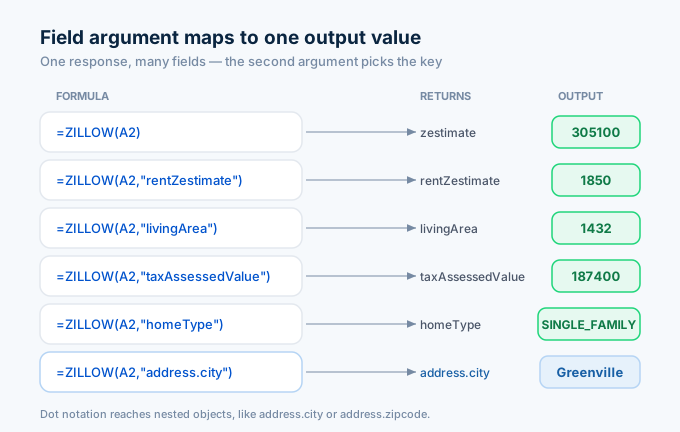
The second parameter of the ZILLOW function accepts any field name from the API response. Here are the most useful ones:
| Formula | Returns | Example output |
|---|---|---|
=ZILLOW("address") |
Zestimate (default) | 305100 |
=ZILLOW("address", "rentZestimate") |
Monthly rent estimate | 1850 |
=ZILLOW("address", "bedrooms") |
Bedroom count | 3 |
=ZILLOW("address", "bathrooms") |
Bathroom count | 2 |
=ZILLOW("address", "livingArea") |
Square footage | 1432 |
=ZILLOW("address", "yearBuilt") |
Year built | 1965 |
=ZILLOW("address", "homeType") |
Property type | SINGLE_FAMILY |
=ZILLOW("address", "taxAssessedValue") |
Tax assessed value | 187400 |
=ZILLOW("address", "taxAnnualAmount") |
Annual property tax | 2340 |
=ZILLOW("address", "price") |
Listing price (if listed) | 295000 |
=ZILLOW("address", "homeStatus") |
Listing status | FOR_SALE |
=ZILLOW("address", "address.city") |
City name | Washington |
=ZILLOW("address", "address.zipcode") |
ZIP code | 20500 |
Nested fields work with dot notation. address.city reaches into the address object and pulls the city name. The function handles this automatically.
How do I build a property comparison sheet?
Put addresses in column A and formulas across the top row. Here’s a layout that covers the basics:
| A | B | C | D | E | F | G | |
|---|---|---|---|---|---|---|---|
| 1 | Address | Zestimate | Rent Est. | Beds | Baths | Sqft | Yield |
| 2 | 1600 Pennsylvania Ave NW, Washington DC 20500 | =ZILLOW(A2) |
=ZILLOW(A2,"rentZestimate") |
=ZILLOW(A2,"bedrooms") |
=ZILLOW(A2,"bathrooms") |
=ZILLOW(A2,"livingArea") |
=C2*12/B2 |
| 3 | 100 Main St, Washington DC 29601 | =ZILLOW(A3) |
=ZILLOW(A3,"rentZestimate") |
=ZILLOW(A3,"bedrooms") |
=ZILLOW(A3,"bathrooms") |
=ZILLOW(A3,"livingArea") |
=C3*12/B3 |
Column G calculates gross rent yield from the Zestimate and rent estimate. No code needed. It’s just a regular spreadsheet formula dividing annual rent by home value.
Drag the formulas down for as many addresses as you have. Each row makes one API call (cached for 24 hours), so 50 properties use 50 credits on the first load and zero credits on subsequent views within the cache window.
How does the caching work?
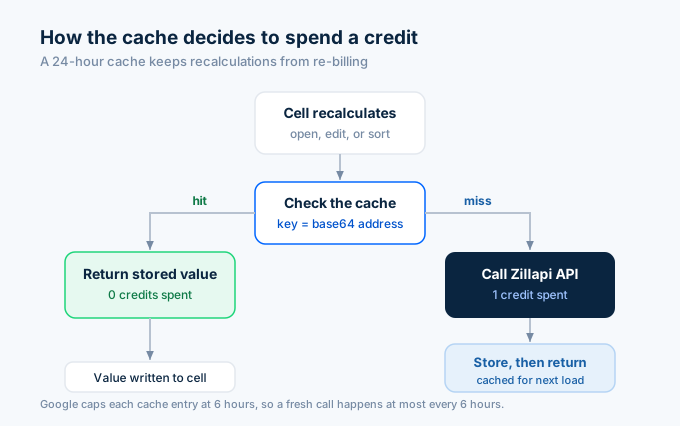
The script uses Google’s CacheService to store API responses for 24 hours. This matters for three reasons.
First, Google Sheets recalculates custom functions whenever you open the sheet, edit a cell, or sort the data. Without caching, a sheet with 50 properties would burn 50 credits every time someone opens it.
Second, CacheService has a 6-hour maximum TTL per entry. The code sets 86400 seconds (24 hours), but Google caps it at 21600 seconds (6 hours) silently. After 6 hours, the next recalculation triggers a fresh API call. For most use cases, this is fine because Zestimates don’t change hourly.
Third, the cache is per-user. If two people open the same sheet, each one gets their own cache. This means each user triggers their own API calls on the first load.
For sheets that rarely change, you can add a manual refresh button instead of relying on automatic recalculation:
function refreshAllProperties() {  const sheet = SpreadsheetApp.getActiveSheet();  const cache = CacheService.getScriptCache();
  // Clear all cached data  const lastRow = sheet.getLastRow();  for (let i = 2; i <= lastRow; i++) {    const address = sheet.getRange(i, 1).getValue();    if (address) {      const cacheKey = "zillow_" + Utilities.base64Encode(address);      cache.remove(cacheKey);    }  }
  // Force recalculation  SpreadsheetApp.flush();}
Add this function to your Apps Script, then create a button in the sheet (Insert > Drawing > create a button shape) and assign the refreshAllProperties function to it. Click the button when you want fresh data.
How do I build a rental portfolio tracker?
For landlords and property managers tracking multiple units, here’s a more complete template:
| A | B | C | D | E | F | G | H | |
|---|---|---|---|---|---|---|---|---|
| 1 | Address | Zestimate | Rent Est. | Actual Rent | Tax | Yield | Rent Gap | Type |
| 2 | (your address) | =ZILLOW(A2) |
=ZILLOW(A2,"rentZestimate") |
1700 | =ZILLOW(A2,"taxAnnualAmount") |
=D2*12/B2 |
=D2-C2 |
=ZILLOW(A2,"homeType") |
Column D is your actual collected rent (entered manually). Column F calculates yield based on actual rent, not the estimate. Column G shows the gap between what you’re charging and what Zillow thinks the property should rent for. Negative means you’re undercharging.
This layout costs 4 credits per property (4 ZILLOW calls per row). With caching, that’s 4 credits per property every 6 hours at most. For a 20-unit portfolio, that’s 80 credits on the first load, then zero until the cache expires.
Why not use IMPORTDATA or web scraping?
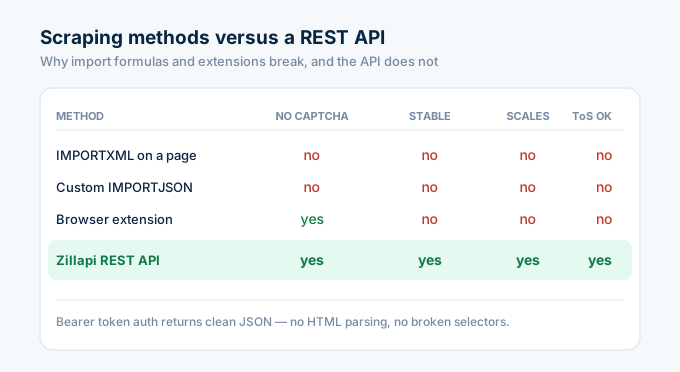
Three reasons people try scraping Zillow into Google Sheets, and three reasons it fails.
Most people start with IMPORTXML or IMPORTDATA pointed at a Zillow property page URL. Zillow blocks these requests. The page returns a captcha challenge instead of property data. Even if it worked once, it breaks within hours.
Then they try custom IMPORTJSON scripts that fetch Zillow pages and parse HTML. Zillow’s page structure changes frequently, breaking the selectors. And Zillow rate-limits automated requests aggressively. Your sheet fills with #ERROR! cells.
Some turn to browser extensions like Bardeen that automate Zillow page visits. These work for a handful of properties but don’t scale. They require your browser to be open, they’re slow (loading full web pages), and they violate Zillow’s terms of service.
A REST API with bearer token auth avoids all of these problems. UrlFetchApp makes a clean HTTP request. The API returns structured JSON. No HTML parsing, no captchas, no broken selectors. The data is the same every time.
Can I use this with Google Sheets add-ons?
Yes, if you prefer a no-code approach. Two add-ons connect APIs to Google Sheets:
API Connector by Mixed Analytics imports data from any REST API. You configure the endpoint URL, headers, and output location in a visual interface. It costs $0-49/month depending on the plan, on top of the API credits.
Apipheny works the same way. Point it at the Zillapi endpoint, set the bearer token header, and map the response fields to columns. It costs $0-12/month.
Both add-ons add cost and complexity. The Apps Script function above does the same thing for free with more flexibility. But if you’re uncomfortable with code, the add-ons are a valid path.
How much does this cost?
Each ZILLOW formula call uses 1 API credit. The 24-hour cache prevents redundant calls.
| Scenario | Credits per load | Cost (monthly plan) |
|---|---|---|
| 10-property comparison sheet | 10 | $0.05 |
| 50-property screening sheet | 50 | $0.25 |
| 20-unit portfolio tracker (4 fields each) | 80 | $0.40 |
| Daily refresh of 50 properties × 30 days | 1,500 | $7.50 |
The free tier gives you 100 credits. That covers a 25-property comparison sheet with 4 fields each, or a 100-property sheet with just Zestimates.
| Plan | Credits | Cost | Properties (1 field each) |
|---|---|---|---|
| Free | 100 (one-time) | $0 | 100 |
| Monthly | 1,000/month | $5/mo | 1,000 |
| Annual | 12,000/year | $54/yr | 12,000 |
No credit card needed for the free tier.
Get Zestimates in your sheet in 5 minutes
Go to zillapi.com. Sign up. Get your API key.
Open a Google Sheet. Paste the Apps Script function. Set your key in Script Properties. Type =ZILLOW("your address here") in a cell.
You’ll have Zillow data in your spreadsheet before your next meeting starts.
For the Excel version with Power Query, see our Excel tutorial. For Python and JavaScript code, see the Python guide or JavaScript guide. For getting your API key, see our step-by-step walkthrough.
Frequently asked questions
Can I pull Zillow data into Google Sheets?
Yes. Create a custom function in Google Apps Script that calls the Zillapi REST API with UrlFetchApp. The function takes a property address and returns the Zestimate, rent estimate, or any other field. Type =ZILLOW("123 Main St") in a cell and the value appears. No add-ons, no browser extensions, no scraping. Each lookup costs 1 API credit ($0.005).
Do I need an add-on to get Zillow data in Google Sheets?
No. Google Apps Script is built into every Google Sheet for free. You write a custom function in the script editor that calls the Zillapi API endpoint with UrlFetchApp. The function works like any built-in spreadsheet formula. Add-ons like API Connector and Apipheny work too, but they add unnecessary cost and complexity for this use case.
Why does IMPORTDATA or IMPORTJSON not work for Zillow?
IMPORTDATA and custom IMPORTJSON scripts that scrape Zillow pages break regularly. Zillow blocks automated requests with captchas and rate limiting. A REST API with bearer token auth avoids these problems entirely. The API returns clean JSON that Apps Script parses directly. No HTML scraping, no captcha issues, no broken formulas.
How much does it cost to pull Zillow data into Google Sheets?
Zillapi gives 100 free credits at signup with no credit card. Each formula call uses 1 credit and returns the requested property data. For a sheet with 50 property addresses, that is 50 credits. After the free tier, plans start at $5 per month for 1,000 credits. Each credit returns 300+ fields per property.
Can I pull data for multiple properties at once in Google Sheets?
Yes. Put your addresses in column A and use the ZILLOW formula in column B. Google Sheets evaluates each cell independently, so 50 addresses trigger 50 API calls. To avoid rate limits, add a cache layer in your Apps Script that stores results for 24 hours. This prevents re-fetching data every time the sheet recalculates.
Can I get rent estimates in Google Sheets?
Yes. The same Apps Script function returns any field from the API response. Use =ZILLOW("address", "rentZestimate") to get the monthly rent estimate, =ZILLOW("address", "zestimate") for the home value, or =ZILLOW("address", "taxAssessedValue") for the tax assessment. One function handles every field.