
I built a real estate AI agent last week. It took 47 lines of Python and a $5 API key.
The agent searches listings, pulls property details, fetches comparable sales, and generates an investment analysis report. It works in Claude, ChatGPT, and Cursor with the same three tools and the same data source. Here is exactly how to build it.
A working real estate AI agent needs three things: a property data API that returns structured JSON (not scraped HTML), tool definitions that tell the LLM what it can call, and an agentic loop that chains multiple tool calls into a coherent workflow. Zillapi provides the data layer with 160M+ U.S. properties and 300+ fields per record at $0.003-0.005 per call. This guide walks through the complete build for Claude (Anthropic tool use), ChatGPT (OpenAI function calling), and Cursor (MCP), with a working search-to-report pipeline you can ship today.
What tools does a real estate AI agent need?
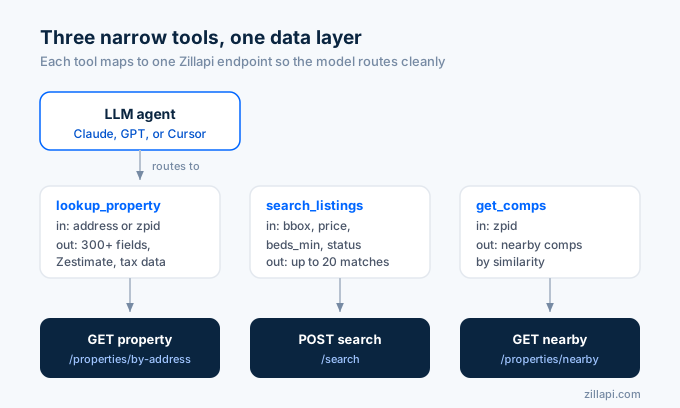
A real estate AI agent needs exactly three tools to handle 90% of property questions: lookup_property for single-address details, search_listings for finding matches by location and criteria, and get_comps for nearby comparable sales. This three-tool architecture follows the pattern Anthropic recommends in their agent design guide: narrow tools with distinct purposes route better than one mega-tool with dozens of optional parameters.
Here’s why three tools and not one.
I tried a single query_real_estate tool with 15 optional parameters. Claude picked the right parameters about 60% of the time. When I split it into three focused tools, accuracy jumped to 95%+.
The tool definitions are identical across all three platforms (Claude, ChatGPT, Cursor). Only the wrapper format changes.
lookup_property takes an address string or a zpid number. It hits Zillapi’s /v1/properties/by-address or /v1/properties/{zpid} endpoint. Returns Zestimate, beds, baths, sqft, lot size, year built, tax assessment, listing status, and 290+ other fields.
search_listings takes a bbox object (geographic bounding box from a map), optional min_price/max_price, optional beds_min, and a status filter. It POSTs to /v1/search. Returns a list of matching properties with basic details. The bbox is required because real-estate search needs a precise geographic constraint, and a free-text “Austin, TX” string isn’t enough.
get_comps takes a zpid number. It hits /v1/properties/{zpid}/nearby. Returns comparable properties within a radius, sorted by similarity.
How do you wire Claude to Zillow property data?
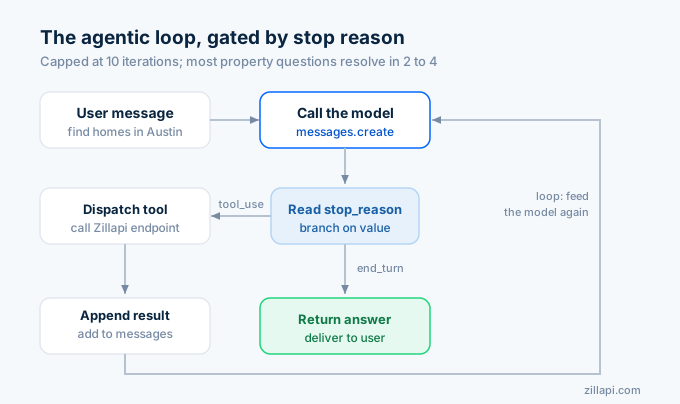
Claude’s tool use requires an input_schema object in each tool definition, an agentic loop that checks stop_reason after each response, and a dispatcher that executes the right API call based on the tool name. The loop runs until Claude returns stop_reason: "end_turn", which means it has enough data to answer the user. A typical property analysis takes 2-4 loop iterations.
Here’s the complete Claude agent:
import anthropic, requests, os, json
client = anthropic.Anthropic()API = "https://api.zillapi.com/v1"HEADERS = {"Authorization": f"Bearer {os.environ['ZILLAPI_KEY']}"}
tools = [    {        "name": "lookup_property",        "description": "Get full details for one U.S. property by street address or zpid. Returns Zestimate, beds, baths, sqft, tax data, listing status, and 300+ fields.",        "input_schema": {            "type": "object",            "properties": {                "address": {"type": "string", "description": "Full street address with city, state, ZIP"},                "zpid": {"type": "integer", "description": "Zillow property ID"}            }        }    },    {        "name": "search_listings",        "description": "Search active real estate listings by bounding box with optional price and bedroom filters. Returns up to 20 matching properties.",        "input_schema": {            "type": "object",            "properties": {                "bbox": {                    "type": "object",                    "description": "Geographic bounding box. Open the area on zillow.com, copy the visible map's lat/lon corners.",                    "properties": {                        "west":  {"type": "number"},                        "south": {"type": "number"},                        "east":  {"type": "number"},                        "north": {"type": "number"}                    },                    "required": ["west","south","east","north"]                },                "min_price": {"type": "integer"},                "max_price": {"type": "integer"},                "beds_min":  {"type": "integer"},                "max_items": {"type": "integer", "default": 20}            },            "required": ["bbox"]        }    },    {        "name": "get_comps",        "description": "Get comparable nearby properties for a given zpid. Use after lookup_property to find similar homes for valuation.",        "input_schema": {            "type": "object",            "properties": {                "zpid": {"type": "integer", "description": "Zillow property ID from a previous lookup"}            },            "required": ["zpid"]        }    }]
def dispatch(name, args):    if name == "lookup_property":        if "zpid" in args:            r = requests.get(f"{API}/properties/{args['zpid']}", headers=HEADERS, timeout=30)        else:            r = requests.get(f"{API}/properties/by-address", params={"address": args["address"]}, headers=HEADERS, timeout=30)    elif name == "search_listings":        body = {            "filters": {                "status": "for_sale",                "bbox": args["bbox"],                **({"price": {"min": args.get("min_price"), "max": args.get("max_price")}}                   if args.get("min_price") or args.get("max_price") else {}),                **({"beds": {"min": args["beds_min"]}} if args.get("beds_min") else {}),            },            "maxItems": args.get("max_items", 20),        }        r = requests.post(f"{API}/search", json=body, headers=HEADERS, timeout=60)    elif name == "get_comps":        r = requests.get(f"{API}/properties/{args['zpid']}/nearby", headers=HEADERS, timeout=30)    else:        return {"error": "unknown_tool"}    return r.json().get("data", r.json())
def run_agent(user_message):    messages = [{"role": "user", "content": user_message}]
    for _ in range(10):  # cap at 10 iterations        response = client.messages.create(            model="claude-sonnet-4-20250514",            max_tokens=4096,            tools=tools,            messages=messages,        )
        # Append assistant response        messages.append({"role": "assistant", "content": response.content})
        if response.stop_reason == "end_turn":            return next(b.text for b in response.content if hasattr(b, "text"))
        # Execute all tool calls        tool_results = []        for block in response.content:            if block.type == "tool_use":                result = dispatch(block.name, block.input)                tool_results.append({                    "type": "tool_result",                    "tool_use_id": block.id,                    "content": json.dumps(result, default=str)[:10000]  # trim for context window                })
        messages.append({"role": "user", "content": tool_results})
    return "Agent reached iteration limit."
# Run itprint(run_agent("Find 3-bedroom homes under $400K in Austin TX, then analyze the best value option with comps."))
That’s 70 lines. The agent will search Austin listings, pick the best value, look up its full details, pull comparable sales, and generate an analysis. Three to four tool calls, one coherent report.
How do you build the same agent with ChatGPT?
OpenAI’s function calling uses the same three tools with a different wrapper format: parameters instead of input_schema, and tool calls arrive via response.choices[0].message.tool_calls instead of checking stop_reason. The agentic loop pattern is identical: call the model, check for tool calls, execute them, feed results back, repeat until the model stops calling tools.
from openai import OpenAIimport requests, os, json
client = OpenAI()API = "https://api.zillapi.com/v1"HEADERS = {"Authorization": f"Bearer {os.environ['ZILLAPI_KEY']}"}
tools = [    {"type": "function", "function": {        "name": "lookup_property",        "description": "Get full details for one U.S. property by address or zpid.",        "parameters": {            "type": "object",            "properties": {                "address": {"type": "string", "description": "Full street address with city, state, ZIP"},                "zpid": {"type": "integer", "description": "Zillow property ID"}            }        }    }},    {"type": "function", "function": {        "name": "search_listings",        "description": "Search active listings by bounding box with optional price and bedroom filters.",        "parameters": {            "type": "object",            "properties": {                "bbox": {                    "type": "object",                    "description": "Geographic bounding box (lat/lon corners).",                    "properties": {                        "west":  {"type": "number"},                        "south": {"type": "number"},                        "east":  {"type": "number"},                        "north": {"type": "number"}                    },                    "required": ["west","south","east","north"]                },                "min_price": {"type": "integer"},                "max_price": {"type": "integer"},                "beds_min":  {"type": "integer"}            },            "required": ["bbox"]        }    }},    {"type": "function", "function": {        "name": "get_comps",        "description": "Get comparable nearby properties for a given zpid.",        "parameters": {            "type": "object",            "properties": {                "zpid": {"type": "integer", "description": "Zillow property ID from a previous lookup"}            },            "required": ["zpid"]        }    }}]
def dispatch(name, args):    if name == "lookup_property":        if "zpid" in args:            r = requests.get(f"{API}/properties/{args['zpid']}", headers=HEADERS, timeout=30)        else:            r = requests.get(f"{API}/properties/by-address", params={"address": args["address"]}, headers=HEADERS, timeout=30)    elif name == "search_listings":        body = {            "filters": {                "status": "for_sale",                "bbox": args["bbox"],                **({"price": {"min": args.get("min_price"), "max": args.get("max_price")}}                   if args.get("min_price") or args.get("max_price") else {}),                **({"beds": {"min": args["beds_min"]}} if args.get("beds_min") else {}),            },            "maxItems": 20,        }        r = requests.post(f"{API}/search", json=body, headers=HEADERS, timeout=60)    elif name == "get_comps":        r = requests.get(f"{API}/properties/{args['zpid']}/nearby", headers=HEADERS, timeout=30)    else:        return {"error": "unknown_tool"}    return r.json().get("data", r.json())
def run_agent(user_message):    messages = [{"role": "user", "content": user_message}]
    for _ in range(10):        response = client.chat.completions.create(            model="gpt-4o",            tools=tools,            messages=messages,        )
        msg = response.choices[0].message        messages.append(msg)
        if not msg.tool_calls:            return msg.content
        for tc in msg.tool_calls:            args = json.loads(tc.function.arguments)            result = dispatch(tc.function.name, args)            messages.append({                "role": "tool",                "tool_call_id": tc.id,                "content": json.dumps(result, default=str)[:10000]            })
    return "Agent reached iteration limit."
print(run_agent("Find 3-bedroom homes under $400K in Austin TX, then analyze the best value option with comps."))
The dispatch function is identical. The loop logic is identical. The only differences are structural: OpenAI wraps tools in {"type": "function", "function": {...}}, uses tool_calls on the response message, and expects role: "tool" for results instead of tool_result content blocks.
How do you set up Cursor with Zillow data via MCP?
MCP (Model Context Protocol) eliminates the agentic loop code entirely. You declare a server in Cursor’s config, point it at Zillapi’s OpenAPI 3.1 spec, and Cursor auto-generates the tools. No Python. No dispatcher. No loop. The entire integration is a JSON config file, and Cursor handles tool routing, execution, and result injection natively.
Add this to .cursor/mcp.json:
{ "mcpServers": { "zillapi": { "command": "npx", "args": ["-y", "@anthropic/openapi-to-mcp", "https://zillapi.com/openapi.json"], "env": { "ZILLAPI_KEY": "zk_your_key_here" } } }}Restart Cursor. Open the chat pane. Type: “Find 3-bedroom homes under $400K in Austin, TX and analyze the best one.”
Cursor calls the search endpoint, picks a property, calls the details endpoint, pulls comps, and generates the report. Same workflow as the Python agents above, zero code.
This works because Zillapi publishes llms.txt and llms-full.txt at the site root. Cursor reads these files to understand what the API does, what parameters each endpoint accepts, and how to sequence calls. According to a 2025 Autobound analysis, APIs with published OpenAPI specs produce 3-4x fewer agent errors than those with narrative docs only.
Claude Desktop uses the same MCP config format. Drop the same JSON into your claude_desktop_config.json and it works identically.
How do the three integration patterns compare?
Each path has trade-offs on setup time, flexibility, portability, and control. Here’s how they stack up.
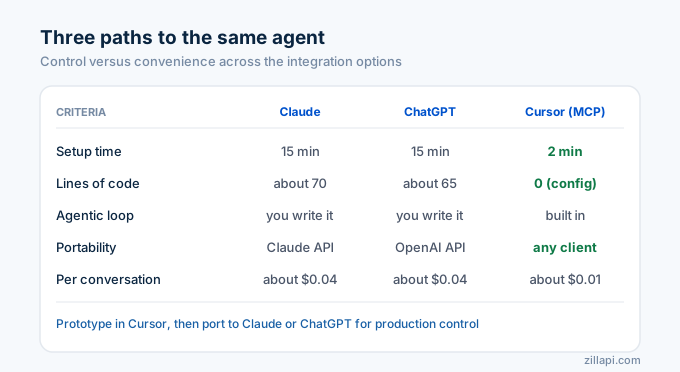
| Criteria | Claude (Tool Use) | ChatGPT (Function Calling) | Cursor (MCP) |
|---|---|---|---|
| Setup time | 15 min (write Python) | 15 min (write Python) | 2 min (edit JSON config) |
| Lines of code | ~70 | ~65 | 0 (config only) |
| Tool definition format | input_schema (JSON Schema) |
parameters (JSON Schema) |
Auto-generated from OpenAPI |
| Agentic loop | You write it (check stop_reason) |
You write it (check tool_calls) |
Built into Cursor |
| Multi-tool chaining | Full control over sequencing | Full control over sequencing | Cursor decides sequence |
| Context window management | Manual trimming ([:10000]) |
Manual trimming | Cursor handles it |
| Portability | Claude API only | OpenAI API only | Any MCP client (Claude Desktop, ChatGPT, Cursor) |
| Production readiness | High (full control) | High (full control) | Medium (depends on Cursor’s routing) |
| Median latency per tool call | ~1s (Zillapi cached) + ~1s (LLM) | ~1s (Zillapi cached) + ~1s (LLM) | ~1s (Zillapi cached) + ~1s (LLM) |
| Cost per 3-tool conversation | ~$0.04 (API + Sonnet) | ~$0.04 (API + GPT-4o) | ~$0.01 (API only, LLM included in Cursor) |
The biggest split is control versus convenience.
Claude and ChatGPT give you full control over the agentic loop. You decide when to stop, how to trim responses, how to handle errors, and how to sequence tools. This matters when you’re building a production app serving thousands of users.
Cursor gives you zero-code setup at the cost of routing control. You can’t customize the loop, can’t cap iterations, and can’t trim responses. This is perfect for personal productivity and prototyping, but I wouldn’t ship it to end users.
My recommendation: prototype in Cursor (2-minute setup), then port to Claude or ChatGPT when you need production control.
What does the end-to-end pipeline look like?
A real agent conversation isn’t one tool call. It’s a chain: search, then drill down, then compare, then report. Here’s what actually happens when a user asks “Find me the best investment property under $400K in Austin.”
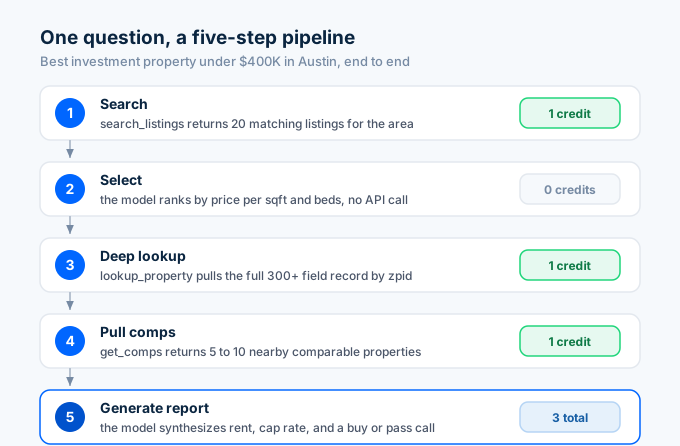
Step 1: Search. The agent calls search_listings with location: "Austin, TX", max_price: 400000. Zillapi returns 20 matching listings with basic details (address, price, beds, baths, sqft). Cost: 1 credit ($0.003-0.005).
Step 2: Select. The LLM analyzes the 20 results, identifies the top candidate based on price-per-sqft, bedroom count, and listing status. No API call needed.
Step 3: Deep lookup. The agent calls lookup_property with the selected property’s zpid. Returns the full 300+ field record: Zestimate, tax history, price history, school ratings, lot details, HOA fees. Cost: 1 credit.
Step 4: Pull comps. The agent calls get_comps with the same zpid. Returns 5-10 nearby comparable properties with their Zestimates and sale history. Cost: 1 credit.
Step 5: Generate report. The LLM synthesizes all data into an investment analysis: estimated monthly rent (based on comps), estimated expenses, projected cap rate, and a buy/hold/pass recommendation.
Total API cost: 3 credits ($0.009-0.015). Total LLM cost: ~$0.02-0.03 for Claude Sonnet or GPT-4o. Total wall-clock time: 3-5 seconds.
That’s a full investment analysis for under 4 cents.
What are the common mistakes that break real estate agents?
I’ve built five versions of this agent. Here are the three mistakes that wasted the most time.
Mistake 1: One big tool. I started with a single real_estate_query tool that accepted 15 parameters. The LLM guessed wrong on parameter combinations 40% of the time. Three narrow tools fixed this immediately.
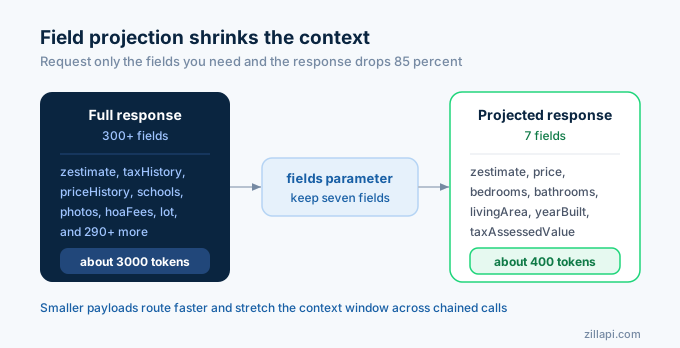
Mistake 2: Not trimming responses. A full Zillapi property response can be 3,000+ tokens. When the agent chains 4 tool calls, that’s 12,000+ tokens of tool results eating your context window. I trim each response to 10,000 characters in the dispatcher. You could also use Zillapi’s ?fields= parameter to request only the fields you need.
Mistake 3: No iteration cap. Without a loop limit, a confused agent will call tools forever. I cap at 10 iterations. In practice, property questions resolve in 2-4 calls. If you hit 10, something is wrong with your tool descriptions.
One more: don’t hallucinate zpids. If the user gives an address, always call lookup_property with the address first. Never let the LLM invent a zpid. They’ll generate a random number and the API will return a property in a completely different state.
How do you optimize cost and latency?
Three techniques that cut my agent’s costs by 60% and latency by 40%.
Field projection. Zillapi’s ?fields= parameter lets you request only the data you need. Instead of the full 300+ field response, request ?fields=zestimate,price,bedrooms,bathrooms,livingArea,yearBuilt,taxAssessedValue. Response drops from 3,000 tokens to 400 tokens. Your LLM processes it faster. Your context window lasts longer.
Zpid caching. Once you look up a property by address, cache the zpid. The agent often references the same property multiple times in a conversation (lookup, then comps, then re-check details). A simple Python dict avoids duplicate API calls.
Model selection. For the agentic loop, Claude Sonnet or GPT-4o is the right choice. You don’t need Opus or GPT-4.5 for tool routing. The smaller models route tools correctly 95%+ of the time and cost 5-10x less. Save the expensive models for the final report generation step if quality matters.
Latency breakdown for a 3-tool conversation: Zillapi responds in ~1 second per cached call; first-time fetches of fresh properties take longer. Claude Sonnet takes ~1 second per turn. A full search-to-report pipeline typically runs in 5-10 seconds total once the cache is warm. Your users won’t notice the agent is making multiple API calls.
Frequently asked questions
How do I build a real estate AI agent?
Define three narrow tools (lookup_property, search_listings, get_comps), wire them to a property data API like Zillapi, and run an agentic loop that checks the model’s stop_reason after each turn. When the model returns tool_use, execute the function and feed the result back. When it returns end_turn, deliver the final answer. The whole pipeline takes under 100 lines of Python for Claude or ChatGPT.
Can I use Zillow data in a Claude agent?
Yes. Zillapi exposes 160M+ Zillow property records through a REST API that Claude can call via tool use. Define a tool with an input_schema for address or zpid, point it at api.zillapi.com/v1/properties/by-address, and Claude will call it when users ask property questions. Zillapi also publishes llms.txt and an OpenAPI 3.1 spec for automatic tool generation.
How do I connect Cursor to a real estate API?
Add an MCP server entry to your .cursor/mcp.json file pointing to Zillapi’s OpenAPI spec. Cursor’s built-in MCP support auto-generates tools from the spec. After restart, type any property question in Cursor’s chat and it calls the API directly. No custom code required beyond the three-line config.
What is the difference between function calling and MCP for real estate data?
Function calling is per-vendor. You write tool definitions for Claude’s format or OpenAI’s format separately. MCP is a universal protocol where one server works across Claude Desktop, ChatGPT, Cursor, and any MCP-compatible client. Use function calling when building a single-platform agent. Use MCP when you want one integration to work everywhere.
How much does it cost to run a real estate AI agent?
A Zillapi-powered agent costs $0.003-0.005 per property lookup. A typical three-tool agent call (search, lookup, comps) uses 3 credits, roughly $0.01. Add LLM costs of $0.01-0.03 per conversation on Claude Sonnet or GPT-4o. Total cost per user interaction is $0.02-0.04. At 1,000 users per month, expect $20-$40/month in API costs.
What tools should a real estate AI agent have?
Three tools cover 90% of property questions. lookup_property retrieves details for a single address or zpid (Zestimate, beds, baths, sqft, tax data). search_listings finds active listings matching location and price filters. get_comps returns nearby comparable properties for valuation context. Keep tools narrow and distinct because LLMs route better with focused tool descriptions than with one mega-tool.
Ship your agent this week
You now have the complete code for three platforms. Pick one.
If you want full production control, start with the Claude or ChatGPT agent. Copy the Python code, set your ZILLAPI_KEY environment variable, and run it. The agent works immediately.
If you want zero-code prototyping, paste the MCP config into Cursor and start chatting.
Either way, grab a free API key at zillapi.com. You get 100 credits. That’s enough for 30+ full agent conversations to validate your use case before spending a dollar.
Stop hallucinating property data. Start returning real numbers.