Every house flip starts with one question: what will this property be worth after the renovation?
That number is the ARV. After repair value. It determines whether a deal makes money or loses money. Get it wrong by 10% and your projected $40,000 profit becomes a $10,000 loss.
Most investors estimate ARV by browsing Zillow, eyeballing a few recent sales, and making a guess. That works when you’re looking at one property. It falls apart when you’re screening 50 deals a week.
An API automates the process. Pull the subject property, find comparable sales, filter to true comps, calculate price per square foot, and get an ARV in under 3 seconds. Here’s how.
What is ARV and why does it matter?
ARV is the estimated market value of a property after all repairs and renovations are finished. Not what it’s worth today in its current condition. What it will be worth after the work is done.
The formula is simple in theory:
ARV = Median Price Per Sqft of Comparable Sales x Subject Property SqftThe hard part is finding the right comps. A comparable sale needs to match the subject property’s renovated condition, not its current condition. You want recently sold homes that look like what your property will look like after the rehab.
ARV drives three critical decisions for flippers and wholesalers:
Should I buy this property? If the ARV minus repair costs minus all other costs leaves less than $20,000 in profit, most flippers walk away.
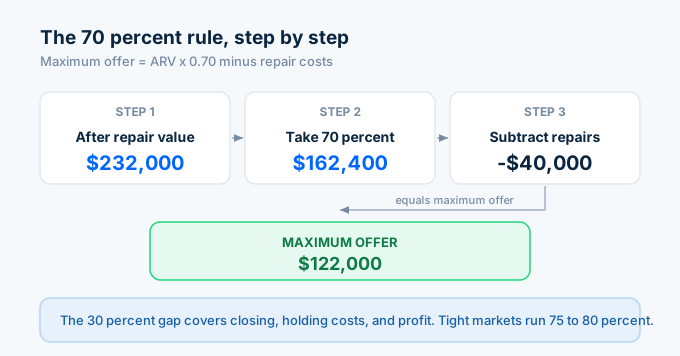
What should I offer? The 70% rule says your maximum offer is 70% of ARV minus repair costs. Without an accurate ARV, you can’t calculate a safe offer price.
Should I wholesale this deal or flip it myself? If the spread between purchase price and ARV is thin, wholesaling the contract for a quick assignment fee might be smarter than taking on the rehab risk.
How do I calculate ARV with API data?
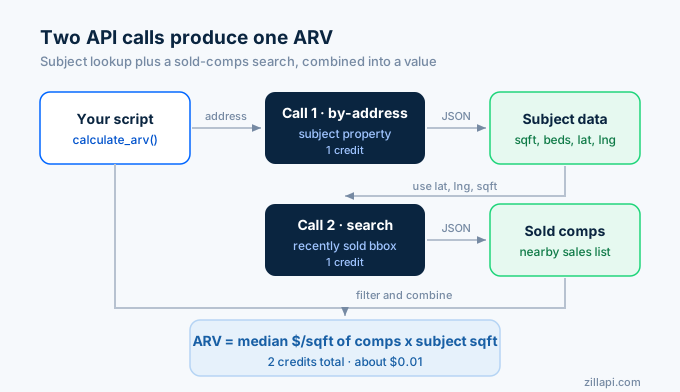
Two API calls. One for the subject property. One search for recently sold comps.
import requests, os, statistics, time
API_KEY = os.environ["ZILLAPI_KEY"]HEADERS = {"Authorization": f"Bearer {API_KEY}"}
def calculate_arv(address, comp_radius=0.015, max_sqft_diff=0.25, max_bed_diff=1):    """    Calculate ARV using comparable recently sold properties.
    comp_radius: ~1 mile in lat/lng degrees    max_sqft_diff: max % difference in square footage (0.25 = 25%)    max_bed_diff: max bedroom count difference    """    # Step 1: Get the subject property    r = requests.get(        "https://api.zillapi.com/v1/properties/by-address",        params={"address": address},        headers=HEADERS,    )    subject = r.json()["data"]
    sqft = subject.get("livingArea", 0)    beds = subject.get("bedrooms", 0)    lat = subject.get("latitude", 0)    lng = subject.get("longitude", 0)    home_type = subject.get("homeType", "SINGLE_FAMILY")
    if not sqft or not lat:        return {"error": "Missing property data"}
    # Step 2: Search for recently sold comps nearby    comps_response = requests.post(        "https://api.zillapi.com/v1/search",        json={            "bbox": {                "north": lat + comp_radius,                "south": lat - comp_radius,                "east": lng + comp_radius,                "west": lng - comp_radius,            },            "listingStatus": "RECENTLY_SOLD",            "homeType": [home_type],        },        headers=HEADERS,    ).json()["data"]
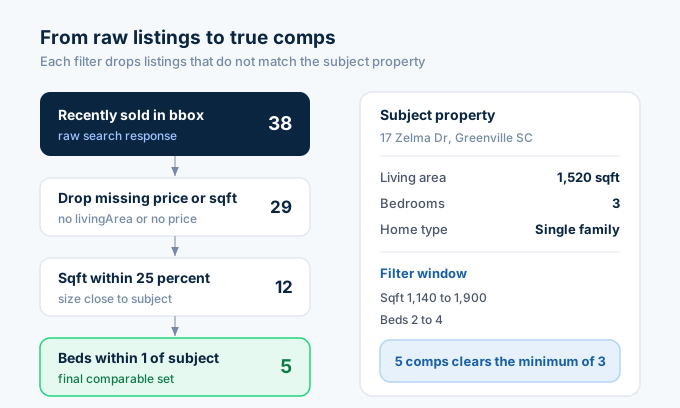
    # Step 3: Filter to true comparables    comps = []    for p in comps_response:        p_sqft = p.get("livingArea", 0)        p_beds = p.get("bedrooms", 0)        p_price = p.get("price", 0)
        if not p_sqft or not p_price:            continue        if abs(p_sqft - sqft) > sqft * max_sqft_diff:            continue        if abs(p_beds - beds) > max_bed_diff:            continue
        comps.append({            "address": p["address"]["streetAddress"],            "price": p_price,            "sqft": p_sqft,            "beds": p_beds,            "baths": p.get("bathrooms", 0),            "price_per_sqft": round(p_price / p_sqft),        })
    if len(comps) < 3:        return {"error": f"Only {len(comps)} comps found. Need at least 3."}
    # Step 4: Calculate ARV    prices_per_sqft = [c["price_per_sqft"] for c in comps]    median_ppsf = statistics.median(prices_per_sqft)    arv = round(median_ppsf * sqft, -3)  # Round to nearest $1,000
    return {        "address": subject["address"]["streetAddress"],        "subject_sqft": sqft,        "subject_beds": beds,        "subject_baths": subject.get("bathrooms", 0),        "current_zestimate": subject.get("zestimate", 0),        "comp_count": len(comps),        "median_price_per_sqft": median_ppsf,        "arv": arv,        "comps": sorted(comps, key=lambda x: x["price_per_sqft"])[:6],    }
result = calculate_arv("1600 Pennsylvania Ave NW, Washington DC 20500")if "error" not in result:    print(f"Subject: {result['address']}")    print(f"Sqft: {result['subject_sqft']:,}")    print(f"Current Zestimate: ${result['current_zestimate']:,}")    print(f"Comps Used: {result['comp_count']}")    print(f"Median $/sqft: ${result['median_price_per_sqft']}")    print(f"Calculated ARV: ${result['arv']:,}")    print(f"\nComparable Sales:")    for c in result["comps"]:        print(f"  {c['address']} - ${c['price']:,} - {c['sqft']:,} sqft - ${c['price_per_sqft']}/sqft")
Two credits. One for the subject property. One for the comp search. Total cost: $0.01.
How do I apply the 70% rule?
The 70% rule is the most common formula flippers use to calculate a maximum offer price. It builds in margin for closing costs, holding costs, and profit.
def flip_analysis(address, repair_cost, holding_months=4):    """    Complete flip analysis with ARV, 70% rule, and profit projection.    """    arv_data = calculate_arv(address)    if "error" in arv_data:        return arv_data
    arv = arv_data["arv"]    zestimate = arv_data["current_zestimate"]
    # 70% rule: max offer    max_offer_70 = round(arv * 0.70 - repair_cost, -3)
    # More detailed profit analysis    purchase_price = zestimate  # Using current value as proxy    closing_buy = purchase_price * 0.03  # 3% buyer closing costs    closing_sell = arv * 0.06  # 6% seller closing (agent commissions)    holding_cost = (purchase_price * 0.08 / 12) * holding_months  # 8% annual (taxes, insurance, loan interest)
    total_cost = purchase_price + repair_cost + closing_buy + closing_sell + holding_cost    gross_profit = arv - total_cost    roi = (gross_profit / (purchase_price + repair_cost) * 100) if (purchase_price + repair_cost) else 0
    return {        "address": arv_data["address"],        "arv": arv,        "current_value": zestimate,        "repair_cost": repair_cost,        "max_offer_70_rule": max_offer_70,        "purchase_price": purchase_price,        "closing_buy": round(closing_buy),        "closing_sell": round(closing_sell),        "holding_cost": round(holding_cost),        "total_cost": round(total_cost),        "gross_profit": round(gross_profit),        "roi": round(roi, 1),        "comp_count": arv_data["comp_count"],        "median_ppsf": arv_data["median_price_per_sqft"],    }
# Analyze a potential flip: $40K rehab budgetdeal = flip_analysis("1600 Pennsylvania Ave NW, Washington DC 20500", repair_cost=40000)if "error" not in deal:    print(f"Property: {deal['address']}")    print(f"ARV: ${deal['arv']:,}")    print(f"Current Value: ${deal['current_value']:,}")    print(f"Repair Budget: ${deal['repair_cost']:,}")    print(f"Max Offer (70% rule): ${deal['max_offer_70_rule']:,}")    print(f"\nProfit Breakdown:")    print(f"  Purchase: ${deal['purchase_price']:,}")    print(f"  Repairs: ${deal['repair_cost']:,}")    print(f"  Buyer Closing: ${deal['closing_buy']:,}")    print(f"  Seller Closing: ${deal['closing_sell']:,}")    print(f"  Holding Costs: ${deal['holding_cost']:,}")    print(f"  Total Cost: ${deal['total_cost']:,}")    print(f"  Gross Profit: ${deal['gross_profit']:,}")    print(f"  ROI: {deal['roi']}%")
The 70% rule is a screening tool, not a final analysis. Some markets run tighter margins and experienced flippers work at 75% or 80%. The detailed profit breakdown above gives you the full picture regardless of which rule you follow.
How do I screen deals in bulk?
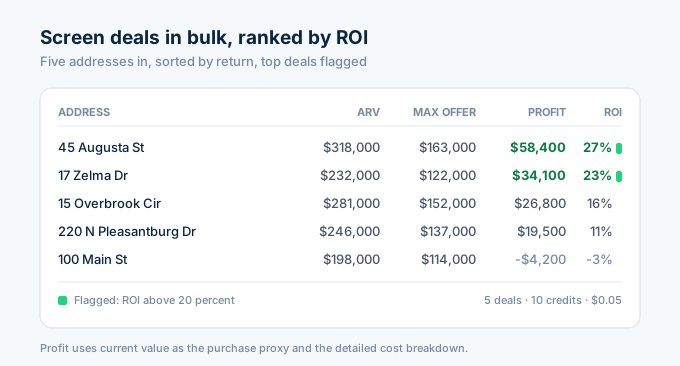
Wholesalers and investors who source deals at scale need to screen dozens of properties quickly. Pull the data, run the numbers, and rank by profit potential:
def screen_deals(addresses, repair_estimates):    """Screen multiple properties for flip potential."""    deals = []    for addr, repair in zip(addresses, repair_estimates):        result = flip_analysis(addr, repair)        if "error" not in result:            deals.append(result)        time.sleep(0.35)
    # Sort by ROI    deals.sort(key=lambda x: x["roi"], reverse=True)    return deals
# Screen 5 potential dealsaddresses = [    "1600 Pennsylvania Ave NW, Washington DC 20500",    "100 Main St, Washington DC 29601",    "45 Augusta St, Washington DC 29601",    "220 N Pleasantburg Dr, Washington DC 29607",    "15 Overbrook Cir, Washington DC 29607",]repairs = [40000, 25000, 60000, 35000, 45000]
deals = screen_deals(addresses, repairs)
print(f"{'Address':<35} {'ARV':>10} {'Max Offer':>10} {'Profit':>10} {'ROI':>6}")print("-" * 75)for d in deals:    flag = " ***" if d["roi"] > 20 else ""    print(f"{d['address']:<35} ${d['arv']:>9,} ${d['max_offer_70_rule']:>9,} "          f"${d['gross_profit']:>9,} {d['roi']:>5}%{flag}")
Each property takes 2 API calls (subject lookup + comp search). Screening 5 properties costs 10 credits ($0.05). Screening 50 properties costs 100 credits ($0.50).
The *** flag marks deals with ROI above 20%. Those go to the top of your follow-up list.
How do I find comps that match the renovated condition?
The hardest part of ARV calculation is matching comps to the renovated state, not the current state. If your subject property is a 3-bed/1-bath that you plan to convert to a 3-bed/2-bath, your comps should be 3-bed/2-bath homes.
Adjust the comp filter to match your planned renovation:
def arv_with_renovation(address, planned_beds, planned_baths, planned_sqft=None):    """    Calculate ARV based on the planned post-renovation specs.    Use this when the renovation changes bed/bath count or adds square footage.    """    r = requests.get(        "https://api.zillapi.com/v1/properties/by-address",        params={"address": address},        headers=HEADERS,    )    subject = r.json()["data"]
    target_sqft = planned_sqft or subject.get("livingArea", 0)    lat = subject.get("latitude", 0)    lng = subject.get("longitude", 0)
    # Search for comps matching the RENOVATED specs    comps_response = requests.post(        "https://api.zillapi.com/v1/search",        json={            "bbox": {                "north": lat + 0.015,                "south": lat - 0.015,                "east": lng + 0.015,                "west": lng - 0.015,            },            "listingStatus": "RECENTLY_SOLD",            "homeType": [subject.get("homeType", "SINGLE_FAMILY")],            "minBeds": planned_beds,        },        headers=HEADERS,    ).json()["data"]
    comps = []    for p in comps_response:        p_sqft = p.get("livingArea", 0)        p_beds = p.get("bedrooms", 0)        p_baths = p.get("bathrooms", 0)        p_price = p.get("price", 0)
        if not p_sqft or not p_price:            continue        if abs(p_sqft - target_sqft) > target_sqft * 0.25:            continue        if p_beds != planned_beds:            continue        if abs(p_baths - planned_baths) > 0.5:            continue
        comps.append({            "address": p["address"]["streetAddress"],            "price": p_price,            "sqft": p_sqft,            "price_per_sqft": round(p_price / p_sqft),        })
    if len(comps) < 3:        return {"error": f"Only {len(comps)} matching comps"}
    median_ppsf = statistics.median([c["price_per_sqft"] for c in comps])    arv = round(median_ppsf * target_sqft, -3)
    return {        "address": subject["address"]["streetAddress"],        "current_beds": subject.get("bedrooms", 0),        "current_baths": subject.get("bathrooms", 0),        "planned_beds": planned_beds,        "planned_baths": planned_baths,        "target_sqft": target_sqft,        "arv": arv,        "comp_count": len(comps),        "median_ppsf": median_ppsf,    }
# Property is currently 3bd/1ba, renovation adds a second bathroomresult = arv_with_renovation(    "1600 Pennsylvania Ave NW, Washington DC 20500",    planned_beds=3,    planned_baths=2,)if "error" not in result:    print(f"Current: {result['current_beds']}bd/{result['current_baths']}ba")    print(f"Planned: {result['planned_beds']}bd/{result['planned_baths']}ba")    print(f"ARV (post-renovation): ${result['arv']:,}")    print(f"Based on {result['comp_count']} comps at ${result['median_ppsf']}/sqft")
This is critical for accurate ARV. A 3-bed/1-bath property in a neighborhood of 3-bed/2-bath homes will see a significant value jump from adding that second bathroom. Using current-condition comps would underestimate the ARV.
How does API-calculated ARV compare to manual methods?
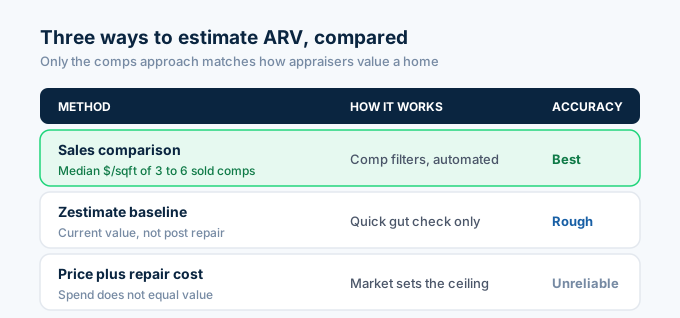
Three common ways to estimate ARV, ranked by accuracy:
The best method is the sales comparison approach with tight comp filters. This is what appraisers use and what the code above automates. Find 3 to 6 recently sold properties with similar size, beds, baths, and condition. Calculate price per square foot. Multiply by your property’s square footage. The API automates this in 2 calls.
The second method is using the Zestimate as a baseline. Zillow’s Zestimate reflects the property’s current condition, not its post-renovation condition. It’s useful as a quick gut check but not as an ARV for a property that needs significant work. The Zestimate will almost always be lower than the true ARV because it doesn’t account for planned improvements.
The worst method is adding purchase price plus renovation costs. Cost does not equal value. You can spend $80,000 renovating a property in a neighborhood where no home has ever sold above $200,000. The market sets the ceiling, not your renovation budget.
How much does ARV analysis cost?
| Workflow | API calls | Credits | Cost |
|---|---|---|---|
| Single property ARV | 2 | 2 | $0.01 |
| Flip analysis with profit breakdown | 2 | 2 | $0.01 |
| Screen 10 deals | 20 | 20 | $0.10 |
| Screen 50 deals | 100 | 100 | $0.50 |
| Daily screening (10 deals x 30 days) | 600 | 600 | $3.00 |
The free tier (100 credits) covers screening 50 properties. That’s enough to evaluate a full month of deal flow for a part-time flipper.
The $5 monthly plan handles 500 ARV calculations. For a wholesaler screening 10 deals per day, that covers the entire month with room to spare.
Start calculating ARV in 60 seconds
Go to zillapi.com and sign up. Get 100 free credits with no credit card.
Look up a property you know. Check the Zestimate. Then run the ARV calculation with the comp search. Compare the ARV to the Zestimate. If the property needs work, the ARV based on renovated comps should be higher.
For the full investment analysis workflow with cap rate and cash flow, see the investor guide. For comp analysis beyond ARV, see the comps API guide. For CMA generation, see the agents guide. For getting your API key, follow the step-by-step walkthrough.
Frequently asked questions
What is ARV in real estate?
ARV stands for after repair value. It is the estimated market value of a property after all renovations and repairs are complete. Flippers and wholesalers use ARV to decide whether a deal is profitable before buying. You calculate ARV by finding recently sold comparable properties in similar condition to your planned renovation, calculating their median price per square foot, and multiplying by your subject property’s square footage.
How do I calculate ARV with an API?
Search for recently sold properties near the subject property using the Zillapi search endpoint with RECENTLY_SOLD status. Filter the results to comparable homes by bedroom count, square footage range, and home type. Calculate the median price per square foot from the filtered comps. Multiply that number by the subject property’s square footage. The result is the ARV. Two API calls total, costing 2 credits ($0.01).
What is the 70% rule in house flipping?
The 70% rule states that a flipper should pay no more than 70% of the ARV minus estimated repair costs. The formula is Maximum Offer equals ARV times 0.70 minus Repair Costs. If a property has an ARV of $300,000 and needs $50,000 in repairs, the maximum offer is $300,000 times 0.70 minus $50,000, which equals $160,000. This leaves room for closing costs, holding costs, and profit.
How many comps do I need to calculate ARV?
Use 3 to 6 comparable sales for a reliable ARV. Fewer than 3 comps makes the estimate unreliable. More than 6 dilutes accuracy because you start including less comparable properties. Filter comps by proximity (within 1 mile), recency (sold within 6 months), similar size (within 25% of square footage), and similar bedroom count (within 1 bedroom of the subject property).
Can I automate ARV calculations with an API?
Yes. Write a Python function that takes an address and repair budget as inputs, pulls the subject property data, searches for recently sold comps nearby, filters to comparable properties, calculates the median price per square foot, and returns the ARV along with the maximum offer using the 70% rule. The entire workflow runs in 2 API calls and takes under 3 seconds.
How accurate is an API-calculated ARV compared to an appraisal?
An API-calculated ARV using comparable sales follows the same methodology as a licensed appraiser’s sales comparison approach. The accuracy depends on comp quality. With 3 to 6 recent comparable sales in the same neighborhood, the estimate typically falls within 5 to 10% of a formal appraisal. The API gives you a fast screening number. A formal appraisal gives you a bankable number. Use the API for deal screening and the appraiser for financing.