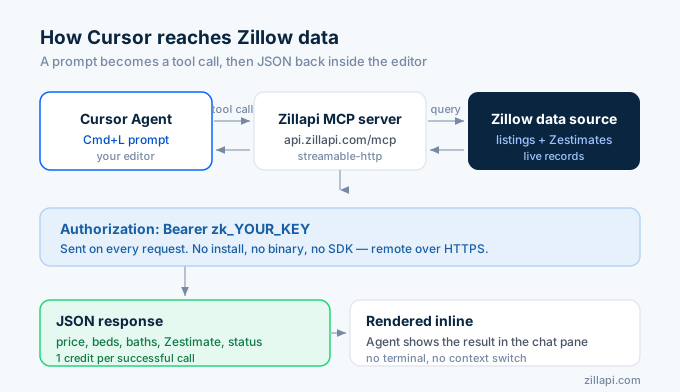
Connect Cursor’s Agent to live Zillow property data in two minutes. Get a free Zillapi key (100 credits, no card required), add one entry under Features → MCP, and the Agent gets property lookups, Zestimates, and listing search inside Cmd+L. No terminal. No code change. No SDK.
This guide is the exact settings path, the JSON config shape, the cache pitfall, and the prompts to confirm it works.
Step 1: Get a Zillapi API key
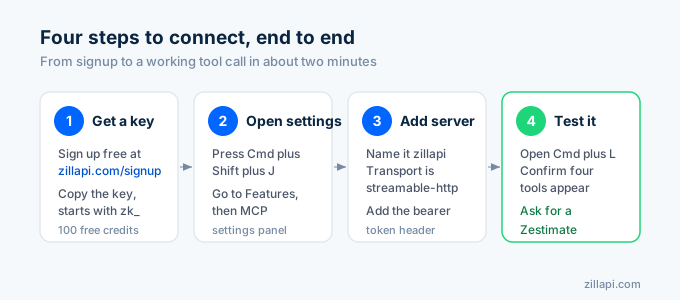
Sign up at zillapi.com/signup. 100 free credits, no card. Your key looks like zk_..., so copy it from the dashboard.
Step 2: Open Cursor’s MCP settings
Cmd+Shift+J on macOS or Ctrl+Shift+J on Windows opens the Cursor settings panel.
Navigate to Features → MCP. You’ll see any existing MCP servers and a button to add a new one.
Step 3: Add the Zillapi server
Click Add new MCP server and fill in:
- Name:
zillapi - Transport:
streamable-http - URL:
https://api.zillapi.com/mcp - Headers:
Authorization=Bearer zk_YOUR_KEY
Replace zk_YOUR_KEY with the value from your dashboard. Save.
Cursor stores this in one of two places depending on what you pick:
- Global →
~/.cursor/mcp.json - Project →
.cursor/mcp.jsonin the workspace root (commit this if you want teammates to inherit)
The raw JSON shape, in case you’d rather edit by hand:
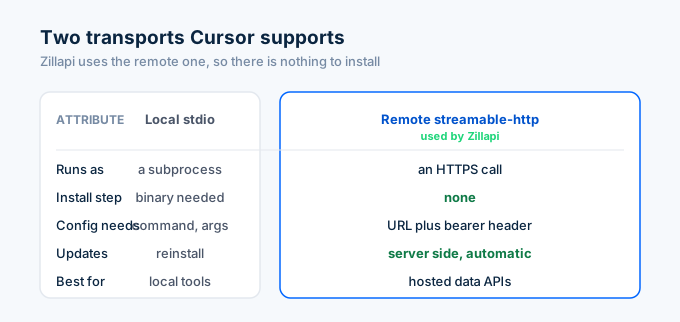
{ "mcpServers": { "zillapi": { "transport": "streamable-http", "url": "https://api.zillapi.com/mcp", "headers": { "Authorization": "Bearer zk_YOUR_KEY" } } }}Cursor supports two kinds of MCP server. Zillapi is the remote kind, which is why there is no binary to install and no command to run.
Step 4: Confirm and test
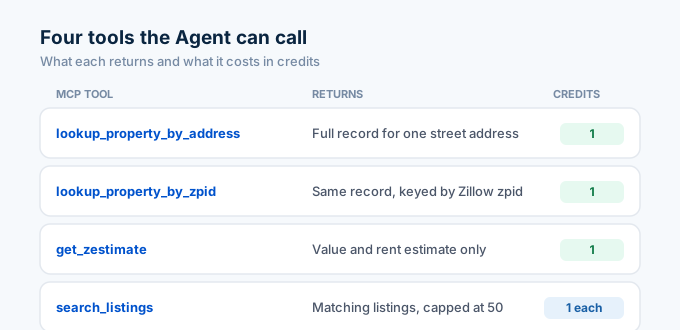
Open the Cursor Agent with Cmd+L (or Ctrl+L on Windows). Look in the available-tools tray. You should see zillapi listed with four tools:
lookup_property_by_addresslookup_property_by_zpidget_zestimatesearch_listings
Test with a prompt:
- “What’s the Zestimate on 1600 Pennsylvania Ave NW, Washington DC?”
- “Find for-rent listings under $2,500 in Brooklyn NY.”
- “Pull the full record for zpid 12345678.”
The Agent picks the right tool, calls the Zillapi MCP server, and shows the result inline.
Those four steps, start to finish, look like this.
Troubleshooting
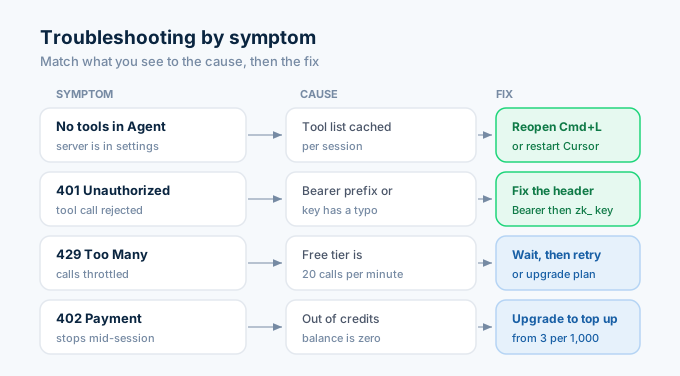
The server appears in settings but no tools show up in the Agent. Cursor caches the tool list per session. Close the Cmd+L pane and reopen it. If still missing, restart Cursor entirely.
The Agent says it called the tool but got 401 Unauthorized. The Authorization header is missing the Bearer prefix or has a typo in the key. Open settings, edit the server, and make sure the value is exactly Bearer followed by your zk_ key.
The settings panel doesn’t have a “Features → MCP” section. Update Cursor. MCP support landed in 0.42 and got the dedicated UI in 0.45. Check Cursor → About.
Calls return 429 Too Many Requests. Free tier is 20 calls/min. Wait a minute, retry, or upgrade. Cursor will sometimes batch tool calls during long agent runs, which spikes the rate. Monthly ($5/mo, 200/min) handles that comfortably.
You hit a calls return 402 Payment Required mid-session. You’re out of credits. Top up at $4 per 1,000 on Monthly, $3 per 1,000 on Annual. Free tier does not support top-ups, so upgrade first.
What this unlocks inside Cursor
Once zillapi is wired up, every Cursor session (Agent, Composer, and Chat) can pull Zillow data on demand. A few patterns that work well:
- Scaffolding a real-estate app: paste a Zillow URL, ask Cursor to scaffold a property card component using the actual response shape.
- Test data generation: ask Cursor to pull 10 real listings in your area and seed your dev database from the response.
- API exploration: ask “what does the response from lookup_property_by_zpid look like?” and Cursor calls the tool with a sample zpid and shows you live JSON instead of out-of-date docs.
- Comparable sales scripts: have Cursor write a Python script that loops over sold listings and computes price-per-sqft averages.
Each pattern leans on the same four tools the Agent sees once the server is connected. Here is what each one returns and what it costs.
The same Zillapi key works in Claude Desktop, Claude Code, ChatGPT, and the open-source skills repo. One key, every agent.
Don’t have a key yet? Sign up free at zillapi.com/signup for 100 credits, no card required. Paid plans start at $5/month if you outgrow it.