Every property on Zillow has a page packed with data. Zestimates, tax assessments, price history, school ratings, square footage, lot size, photos. Hundreds of data points that investors, agents, and developers need in their applications.
Zillow doesn’t give you API access to that data anymore. They shut down the public API in September 2021. But third-party REST APIs return the same property data through standard HTTP endpoints that work with any programming language.
Here’s how to access 300+ property data fields through an API, what those fields contain, and how to use them.
How do I get Zillow property data through an API?
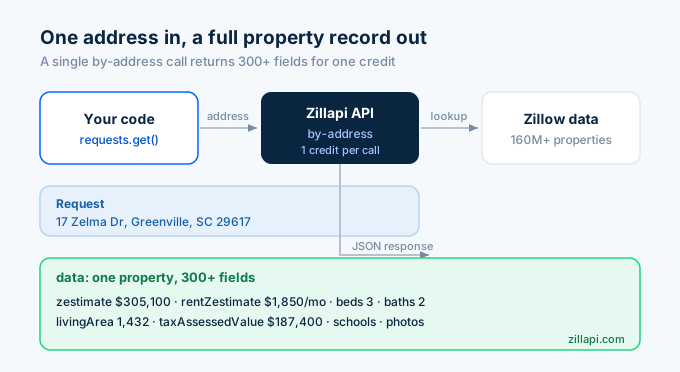
Call the Zillapi /v1/properties/by-address endpoint with any U.S. address. The JSON response includes 300+ fields covering everything from the Zestimate to tax records to school ratings. One API call. One credit. The full property record.
import requests, os
r = requests.get(    "https://api.zillapi.com/v1/properties/by-address",    params={"address": "1600 Pennsylvania Ave NW, Washington DC 20500"},    headers={"Authorization": f"Bearer {os.environ['ZILLAPI_KEY']}"},)data = r.json()["data"]
print(f"Address: {data['address']['streetAddress']}")print(f"Zestimate: ${data['zestimate']:,}")print(f"Rent Zestimate: ${data['rentZestimate']:,}/mo")print(f"Beds: {data['bedrooms']} | Baths: {data['bathrooms']}")print(f"Sqft: {data['livingArea']:,}")print(f"Year Built: {data['yearBuilt']}")print(f"Home Type: {data['homeType']}")print(f"Tax Assessed: ${data['taxAssessedValue']:,}")
Output:
Address: 1600 Pennsylvania Ave NWZestimate: $305,100Rent Zestimate: $1,850/moBeds: 3 | Baths: 2Sqft: 1,432Year Built: 1965Home Type: SINGLE_FAMILYTax Assessed: $187,400That single call returns everything. You don’t need separate endpoints for Zestimates, tax records, or listing details. It’s all in one response.
What property data fields does the API return?
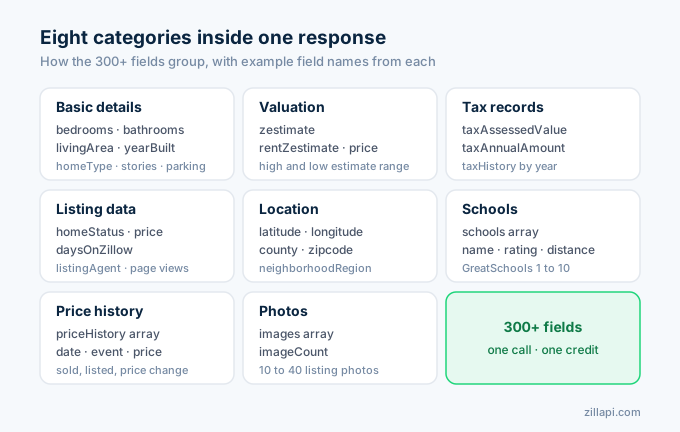
The 300+ fields break down into eight categories. Here’s what each category contains and when you’d use it.
Basic property details
The core physical attributes of the property.
| Field | Type | Example | Description |
|---|---|---|---|
| bedrooms | integer | 3 | Bedroom count |
| bathrooms | integer | 2 | Bathroom count |
| livingArea | integer | 1432 | Interior square footage |
| lotAreaValue | float | 0.28 | Lot size |
| lotAreaUnit | string | acres | Lot size unit |
| yearBuilt | integer | 1965 | Year the structure was built |
| homeType | string | SINGLE_FAMILY | Property classification |
| stories | integer | 1 | Number of stories |
| parking | integer | 2 | Garage/parking spaces |
| hasGarage | boolean | true | Whether the property has a garage |
Valuation data
The numbers investors and agents care about most.
| Field | Type | Example | Description |
|---|---|---|---|
| zestimate | integer | 305100 | Zillow’s estimated home value in dollars |
| rentZestimate | integer | 1850 | Zillow’s estimated monthly rent in dollars |
| zestimateHighPercent | string | 321000 | High end of the Zestimate range |
| zestimateLowPercent | string | 289000 | Low end of the Zestimate range |
| price | integer | 295000 | Current listing price (if listed) |
Tax and assessment records
County-level data for tax analysis and valuation.
| Field | Type | Example | Description |
|---|---|---|---|
| taxAssessedValue | integer | 187400 | County assessed value in dollars |
| taxAnnualAmount | integer | 2340 | Yearly property tax in dollars |
| taxHistory | array | […] | Year-by-year assessment and tax records |
Listing and market data
Information about the property’s listing status and market activity.
| Field | Type | Example | Description |
|---|---|---|---|
| homeStatus | string | FOR_SALE | Current listing status |
| daysOnZillow | integer | 14 | Days the listing has been active |
| pageViewCount | integer | 342 | Zillow page views (recent) |
| favoriteCount | integer | 28 | Times users saved/favorited the listing |
| listingAgent | object | {...} |
Agent name, phone, and brokerage |
Location data
Geographic identifiers and coordinates.
| Field | Type | Example | Description |
|---|---|---|---|
| latitude | float | 34.8721 | Latitude coordinate |
| longitude | float | -82.3904 | Longitude coordinate |
| county | string | Washington | County name |
| zipcode | string | 20500 | ZIP code |
| neighborhoodRegion | object | {...} |
Neighborhood name and boundaries |
School ratings
Nearby schools with GreatSchools ratings.
| Field | Type | Example | Description |
|---|---|---|---|
| schools | array | […] | Nearby schools |
| schools[].name | string | Washington Elementary | School name |
| schools[].rating | integer | 7 | GreatSchools rating (1-10) |
| schools[].distance | float | 0.4 | Distance in miles |
| schools[].level | string | Elementary | Grade level |
Price history
Every recorded sale, listing, and price change.
| Field | Type | Example | Description |
|---|---|---|---|
| priceHistory | array | […] | Historical price events |
| priceHistory[].date | string | 2020-06-15 | Event date |
| priceHistory[].event | string | Sold | Event type (Sold, Listed, Price change) |
| priceHistory[].price | integer | 245000 | Price at that event |
Photos
Listing photos from the Zillow property page.
| Field | Type | Example | Description |
|---|---|---|---|
| images | array | […] | Photo URLs |
| imageCount | integer | 24 | Total photo count |
This is not the complete list. The full response includes mortgage estimates, HOA details, heating/cooling types, roof material, foundation type, and dozens more. The fields parameter lets you request only the categories you need.
Three ways to look up any property
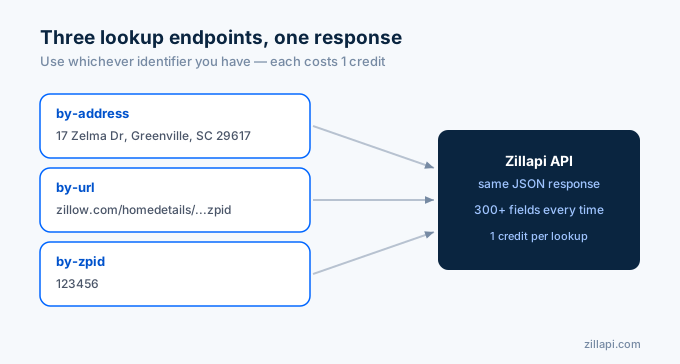
Zillapi offers three lookup endpoints. Each one returns the same 300+ field response. Use whichever identifier you have.
By address
The most common method. Pass any U.S. street address as a string.
r = requests.get( "https://api.zillapi.com/v1/properties/by-address", params={"address": "1600 Pennsylvania Ave NW, Washington DC 20500"}, headers={"Authorization": f"Bearer {os.environ['ZILLAPI_KEY']}"},)The API handles address normalization. Abbreviations like “St” vs “Street” and “Dr” vs “Drive” resolve to the same property. You don’t need to preformat addresses.
By Zillow URL
If you have a Zillow property page URL, pass it directly.
r = requests.get( "https://api.zillapi.com/v1/properties/by-url", params={"url": "https://www.zillow.com/homedetails/1600-Pennsylvania-Ave-NW-Washington-DC-20500/123456_zpid/"}, headers={"Authorization": f"Bearer {os.environ['ZILLAPI_KEY']}"},)This is useful when users paste Zillow links into your application. You don’t need to parse the URL to extract the address or ZPID. Just pass the entire URL.
By ZPID
The Zillow Property ID is a numeric identifier unique to each property on Zillow.
r = requests.get( "https://api.zillapi.com/v1/properties/by-zpid", params={"zpid": "123456"}, headers={"Authorization": f"Bearer {os.environ['ZILLAPI_KEY']}"},)ZPIDs are useful when you’ve already looked up a property and want to refresh the data later. Store the ZPID from the first lookup, then use it for subsequent calls without re-sending the address string.
All three endpoints cost 1 credit per call.
How do I trim the response to specific fields?
The full 300+ field response is about 3,000 tokens of JSON. If you only need a few fields, the fields parameter cuts the response down to exactly what you requested.
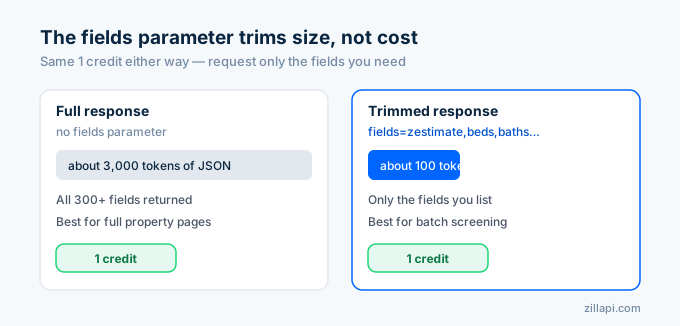
# Full response: ~3,000 tokensr = requests.get(    "https://api.zillapi.com/v1/properties/by-address",    params={"address": "1600 Pennsylvania Ave NW, Washington DC 20500"},    headers={"Authorization": f"Bearer {os.environ['ZILLAPI_KEY']}"},)
# Trimmed response: ~100 tokensr = requests.get(    "https://api.zillapi.com/v1/properties/by-address",    params={        "address": "1600 Pennsylvania Ave NW, Washington DC 20500",        "fields": "zestimate,rentZestimate,bedrooms,bathrooms,livingArea,taxAssessedValue",    },    headers={"Authorization": f"Bearer {os.environ['ZILLAPI_KEY']}"},)
The credit cost is the same either way. But the trimmed response transfers faster and uses less memory when you’re processing thousands of properties. For batch operations, always specify fields.
Common field combinations by use case:
# Investor screeningfields = "zestimate,rentZestimate,price,bedrooms,bathrooms,livingArea,taxAssessedValue"
# Listing displayfields = "address,price,bedrooms,bathrooms,livingArea,images,homeStatus,listingAgent"
# Tax analysisfields = "address,taxAssessedValue,taxAnnualAmount,taxHistory,zestimate"
# School researchfields = "address,schools,zestimate,bedrooms"
How do I search for properties across an area?
The search endpoint finds properties within a geographic bounding box. Filter by listing status, price, bedrooms, and property type.
r = requests.post(    "https://api.zillapi.com/v1/search",    json={        "bbox": {            "west": -82.45,            "south": 34.80,            "east": -82.35,            "north": 34.90,        },        "listingStatus": "FOR_SALE",        "maxPrice": 400000,        "minBedrooms": 3,        "homeType": ["SINGLE_FAMILY"],    },    headers={"Authorization": f"Bearer {os.environ['ZILLAPI_KEY']}"},)
listings = r.json()["data"]print(f"Found {len(listings)} properties")
for p in listings[:5]:    addr = p['address']['streetAddress']    price = f"${p['price']:,}" if p.get('price') else "N/A"    zest = f"${p['zestimate']:,}" if p.get('zestimate') else "N/A"    print(f"  {addr}: Listed {price} | Zestimate {zest}")
One search call costs 1 credit regardless of how many results come back.
The listingStatus filter accepts FOR_SALE, FOR_RENT, and RECENTLY_SOLD. Combined with the property lookup endpoints, these cover every common property data workflow.
What can you build with 300+ fields per property?
The depth of the field set is what separates this from simpler property APIs. Here are the use cases I see developers building most.
The most common is property valuation tools. Pull the Zestimate, rent Zestimate, tax assessment, and price history to give users a multi-angle view of a property’s value. One call gives you four independent valuation signals.
Rental analysis comes next. Compare the rent Zestimate to the Zestimate to calculate gross yield, then pull tax data to estimate net operating income. The rental data API guide walks through the math.
Investors build screening platforms that batch-process hundreds of addresses and rank them by yield, price-to-rent ratio, or comp-derived value. The comps API guide shows how to pull comparable sales.
For family-focused apps, school-aware property searches filter listings by GreatSchools rating and display school data alongside property details. Parents searching for homes in good school districts use this constantly.
Some developers build listing alert systems that monitor specific areas for new listings using the search endpoint and send notifications when properties match saved criteria. The webhooks guide covers the async approach.
And there’s a growing niche in tax appeal tools. Compare the county’s assessed value to the Zestimate and recent comps. If the assessment is significantly higher than market value, the property owner may have grounds for a tax appeal.
How does this compare to other property data APIs?
Several APIs provide property data. They differ in field count, data source, and pricing.
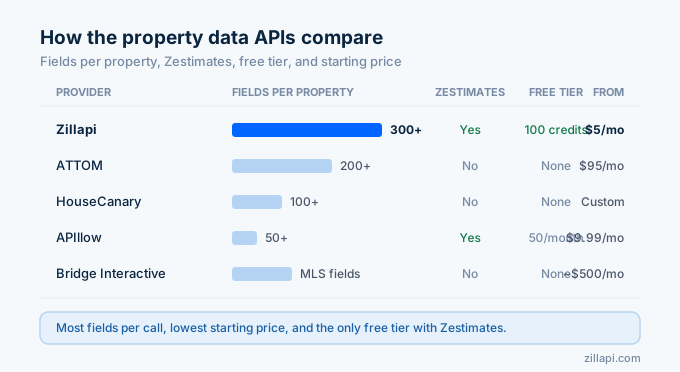
| Provider | Fields per property | Zestimates | Free tier | Starting price | Coverage |
|---|---|---|---|---|---|
| Zillapi | 300+ | Yes | 100 credits | $5/mo | 160M+ properties |
| APIllow | 50+ | Yes | 50/month | $9.99/mo | U.S. coverage |
| ATTOM | 200+ | No | None | $95/mo | 155M+ properties |
| Realty Mole | 50+ | No | Limited | Varies | U.S. coverage |
| HouseCanary | 100+ | No | None | Custom | Nationwide |
| Bridge Interactive | MLS fields | No | None | ~$500/mo | MLS-dependent |
Two things stand out.
Zillapi returns the most fields per call of any self-serve API. ATTOM is close at 200+ fields, but starts at $95 per month with no free tier. Bridge Interactive returns MLS-specific fields but requires MLS affiliation and does not include Zestimates.
The field-count gap matters because it determines how many API calls you need. If a provider returns 50 fields and you need tax history, school ratings, and photos, you might need 3 calls to get what Zillapi returns in 1. That triples your effective cost.
How much does property data access cost?
Every Zillapi call returns the full 300+ field response for 1 credit. No separate charges for premium fields like Zestimates or tax records. No per-field pricing.
| Plan | Credits | Cost | Per property |
|---|---|---|---|
| Free | 100 (one-time) | $0 | $0.00 |
| Monthly | 1,000/month | $5/mo | $0.005 |
| Annual | 12,000/year | $54/yr | $0.0045 |
No credit card needed for the free tier. 100 full property lookups for $0.
Top-up credits cost $4 per 1,000 on the monthly plan and $3 per 1,000 on annual. When you run out of credits, API calls return a 402 error. No surprise charges. You add credits when you’re ready.
For a complete pricing comparison across all providers, see our pricing breakdown.
Get your first property record in 60 seconds
Go to zillapi.com. Sign up with your email. Get 100 free credits. No credit card.
Look up a property you know. Scroll through the 300+ fields in the JSON response. Check whether the Zestimate matches Zillow.com. Look at the tax records, school ratings, and price history. If the data covers your use case, you’ve found your property data API.
For language-specific tutorials, see our Python guide, JavaScript guide, PHP guide, or Excel guide. For getting your API key, see our step-by-step guide.
Frequently asked questions
Is there a Zillow property data API in 2026?
Not from Zillow directly for most developers. Zillow retired the public ZWSID API on September 30, 2021 and replaced it with Bridge Interactive, which requires MLS affiliation. Third-party REST APIs like Zillapi return the same Zillow property data through standard HTTP endpoints. Zillapi returns 300+ fields per property including Zestimates, tax records, price history, photos, and school ratings across 160M+ U.S. properties.
How many data fields does the Zillow property API return?
Zillapi returns 300+ fields per property lookup. These cover basic details (beds, baths, sqft, year built), valuations (Zestimate, rent Zestimate), tax records (assessed value, tax history), listing data (price, status, agent info), location data (lat/lng, county, neighborhood), school ratings, price history, and photos. You can trim the response to specific fields using the fields parameter.
What is the cheapest way to get Zillow property data through an API?
Zillapi’s annual plan costs $54 per year for 12,000 credits, which works out to $0.0045 per property lookup. Each call returns the full 300+ field response. The free tier gives you 100 credits at signup with no credit card. For comparison, ATTOM starts at $95 per month and Bridge Interactive starts around $500 per month.
Can I look up a property by address, URL, or ZPID?
Yes. Zillapi offers three lookup endpoints. The /v1/properties/by-address endpoint takes a street address string. The /v1/properties/by-url endpoint takes a Zillow.com property page URL. The /v1/properties/by-zpid endpoint takes a Zillow Property ID number. All three return the same 300+ field JSON response and cost 1 credit each.
Does the Zillow property data API include tax records?
Yes. Every property response includes taxAssessedValue (the county’s assessed value in dollars), taxAnnualAmount (yearly property tax in dollars), and a taxHistory array with year-by-year assessment and tax payment records. This data comes from county assessor records and updates annually when new assessments are filed.
Can I get property photos through the API?
Yes. The property response includes an images array with URLs to every photo from the listing. These are the same photos you see on the Zillow.com property page. The array includes interior shots, exterior shots, and aerial views when available. Photo count varies by property, typically 10 to 40 images for listed properties.