Buyers don’t just buy a house. They buy a neighborhood. The school district, the walkability, the commute, the nearby parks. Every real estate app needs location context alongside property data. But getting that context used to mean calling three or four different APIs and stitching the results together.
It doesn’t have to work that way. A single property lookup can return the house and everything around it.
Here’s how to pull school ratings, neighborhood boundaries, and location data for any U.S. property through a REST API, and how to use that data to build school-filtered searches, neighborhood comparisons, and area scoring tools.
What neighborhood data does the API return?
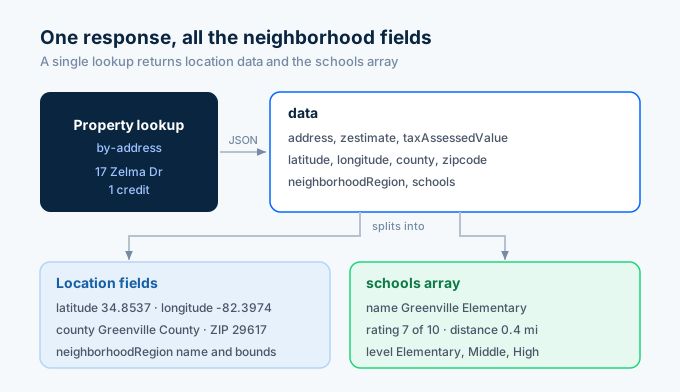
Every Zillapi property response includes location and neighborhood fields alongside the Zestimate, tax records, and everything else. You don’t need a separate call or a separate credit for neighborhood data. It’s always there.
| Field | Type | Example | What it tells you |
|---|---|---|---|
| latitude | float | 34.8537 | Property latitude |
| longitude | float | -82.3974 | Property longitude |
| address.city | string | Washington | City name |
| address.state | string | SC | State code |
| address.zipcode | string | 20500 | ZIP code |
| county | string | Washington County | County name |
| neighborhoodRegion | object | {...} |
Neighborhood name and boundaries |
| schools | array | […] | Nearby schools with ratings |
The schools array is the most useful neighborhood field for most developers. Each entry contains a school name, GreatSchools rating (1 to 10), distance from the property in miles, and grade level.
| School field | Type | Example |
|---|---|---|
| schools[].name | string | Washington Elementary |
| schools[].rating | integer | 7 |
| schools[].distance | float | 0.4 |
| schools[].level | string | Elementary |
This is the same school data you see on Zillow property pages. It comes from GreatSchools.org, which rates over 100,000 public and charter schools across the U.S.
How do I pull neighborhood data for a property?
One API call. The neighborhood fields come back as part of the standard property response.
import requests, os
API_KEY = os.environ["ZILLAPI_KEY"]HEADERS = {"Authorization": f"Bearer {API_KEY}"}
r = requests.get(    "https://api.zillapi.com/v1/properties/by-address",    params={        "address": "1600 Pennsylvania Ave NW, Washington DC 20500",        "fields": "address,latitude,longitude,county,neighborhoodRegion,schools,zestimate",    },    headers=HEADERS,)data = r.json()["data"]
print(f"Address: {data['address']['streetAddress']}")print(f"City: {data['address']['city']}, {data['address']['state']}")print(f"ZIP: {data['address']['zipcode']}")print(f"County: {data.get('county', 'N/A')}")print(f"Coordinates: {data['latitude']}, {data['longitude']}")print(f"Zestimate: ${data['zestimate']:,}")
print("\nNearby Schools:")for school in data.get("schools", []):    name = school.get("name", "Unknown")    rating = school.get("rating", "N/A")    distance = school.get("distance", "?")    level = school.get("level", "")    print(f"  {name} ({level}) - Rating: {rating}/10 - {distance} mi")
Output:
Address: 1600 Pennsylvania Ave NWCity: Washington DCZIP: 20500County: Washington CountyCoordinates: 34.8537, -82.3974Zestimate: $305,100
Nearby Schools:  Washington Elementary (Elementary) - Rating: 7/10 - 0.4 mi  Hughes Academy (Middle) - Rating: 6/10 - 1.2 mi  Washington High (High) - Rating: 5/10 - 1.8 mi
One credit. You get the property data and the school ratings in the same call.
How do I filter properties by school rating?
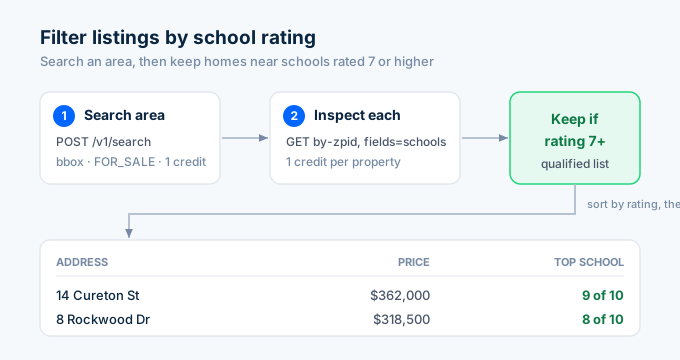
Parents searching for homes in good school districts is one of the most common real estate search patterns. Here’s how to build a school-filtered property search:
import time
def find_homes_near_good_schools(bbox, min_rating=7, min_beds=3, max_price=500000):    """Find properties near schools rated 7+ on GreatSchools."""    # Step 1: Search for properties in the area    search_response = requests.post(        "https://api.zillapi.com/v1/search",        json={            "bbox": bbox,            "listingStatus": "FOR_SALE",            "homeType": ["SINGLE_FAMILY"],            "minBeds": min_beds,            "maxPrice": max_price,        },        headers=HEADERS,    ).json()["data"]
    print(f"Found {len(search_response)} listings in area")
    # Step 2: Pull detailed data for each property    qualified = []    for listing in search_response[:20]:        zpid = listing.get("zpid")        if not zpid:            continue
        detail = requests.get(            "https://api.zillapi.com/v1/properties/by-zpid",            params={                "zpid": zpid,                "fields": "address,zestimate,price,bedrooms,bathrooms,livingArea,schools",            },            headers=HEADERS,        ).json()["data"]
        schools = detail.get("schools", [])        top_rating = max((s.get("rating", 0) for s in schools), default=0)
        if top_rating >= min_rating:            qualified.append({                "address": detail["address"]["streetAddress"],                "price": detail.get("price") or detail.get("zestimate", 0),                "beds": detail.get("bedrooms", 0),                "baths": detail.get("bathrooms", 0),                "sqft": detail.get("livingArea", 0),                "top_school_rating": top_rating,                "school_count": len(schools),                "best_school": max(schools, key=lambda s: s.get("rating", 0)).get("name", "Unknown"),            })
        time.sleep(0.35)
    # Sort by school rating, then price    qualified.sort(key=lambda x: (-x["top_school_rating"], x["price"]))    return qualified
results = find_homes_near_good_schools(    bbox={"north": 34.90, "south": 34.80, "east": -82.35, "west": -82.45},    min_rating=7,    min_beds=3,    max_price=400000,)
print(f"\n{len(results)} homes near schools rated 7+:\n")for r in results:    print(f"{r['address']} - ${r['price']:,} - {r['beds']}bd/{r['baths']}ba")    print(f"  Best school: {r['best_school']} (rating: {r['top_school_rating']}/10)")
The search costs 1 credit. Each detail lookup costs 1 credit. For 20 properties, that’s 21 credits ($0.105). Your users get a school-filtered search that Zillow doesn’t offer as a standalone feature.
How do I compare neighborhoods?
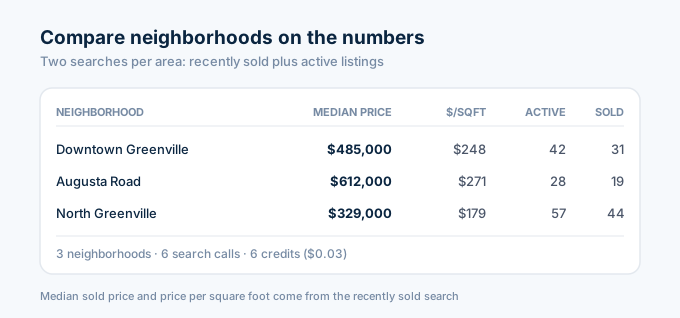
Investors and relocating buyers want to compare areas side by side. Pull recently sold data for each neighborhood and calculate the key metrics:
import statistics
def neighborhood_profile(bbox, name):    """Build a data profile for a neighborhood."""    # Pull recently sold properties    sold = requests.post(        "https://api.zillapi.com/v1/search",        json={            "bbox": bbox,            "listingStatus": "RECENTLY_SOLD",            "homeType": ["SINGLE_FAMILY"],        },        headers=HEADERS,    ).json()["data"]
    # Pull active listings    active = requests.post(        "https://api.zillapi.com/v1/search",        json={            "bbox": bbox,            "listingStatus": "FOR_SALE",            "homeType": ["SINGLE_FAMILY"],        },        headers=HEADERS,    ).json()["data"]
    # Calculate price stats    sold_prices = [p["price"] for p in sold if p.get("price")]    active_prices = [p["price"] for p in active if p.get("price")]
    # Calculate price per sqft    ppsf_values = []    for p in sold:        if p.get("price") and p.get("livingArea"):            ppsf_values.append(p["price"] / p["livingArea"])
    profile = {        "name": name,        "active_listings": len(active),        "recent_sales": len(sold),    }
    if sold_prices:        profile["median_sold_price"] = statistics.median(sold_prices)        profile["avg_sold_price"] = round(statistics.mean(sold_prices))
    if active_prices:        profile["median_list_price"] = statistics.median(active_prices)
    if ppsf_values:        profile["median_price_per_sqft"] = round(statistics.median(ppsf_values))
    return profile
# Compare three Washington neighborhoodsareas = [    {        "name": "Downtown Washington",        "bbox": {"north": 34.86, "south": 34.84, "east": -82.38, "west": -82.41},    },    {        "name": "Augusta Road",        "bbox": {"north": 34.84, "south": 34.82, "east": -82.38, "west": -82.41},    },    {        "name": "North Washington",        "bbox": {"north": 34.92, "south": 34.88, "east": -82.36, "west": -82.42},    },]
profiles = []for area in areas:    profile = neighborhood_profile(area["bbox"], area["name"])    profiles.append(profile)
# Display comparisonprint(f"{'Neighborhood':<22} {'Median Price':>14} {'$/sqft':>8} {'Active':>8} {'Sold':>6}")print("-" * 62)for p in profiles:    median = p.get("median_sold_price", 0)    ppsf = p.get("median_price_per_sqft", 0)    print(f"{p['name']:<22} ${median:>13,.0f} ${ppsf:>6} {p['active_listings']:>8} {p['recent_sales']:>6}")
Each neighborhood takes 2 credits (one search for sold, one for active). Comparing 3 neighborhoods costs 6 credits ($0.03). That’s a data-driven neighborhood comparison for three cents.
How do I build a school rating overlay for a map?
If you’re building a property search app, users want to see schools on the map alongside listings. Pull the school data from property results and plot them:
def extract_schools_from_area(bbox):    """Get all unique schools from properties in an area."""    # Search for properties    listings = requests.post(        "https://api.zillapi.com/v1/search",        json={            "bbox": bbox,            "listingStatus": "FOR_SALE",            "homeType": ["SINGLE_FAMILY"],        },        headers=HEADERS,    ).json()["data"]
    # Collect unique schools from all property responses    seen_schools = {}    for listing in listings[:30]:        zpid = listing.get("zpid")        if not zpid:            continue
        detail = requests.get(            "https://api.zillapi.com/v1/properties/by-zpid",            params={"zpid": zpid, "fields": "schools,latitude,longitude"},            headers=HEADERS,        ).json()["data"]
        for school in detail.get("schools", []):            name = school.get("name", "")            if name and name not in seen_schools:                seen_schools[name] = {                    "name": name,                    "rating": school.get("rating", 0),                    "level": school.get("level", ""),                    "distance_from": detail.get("latitude", 0),                }
    # Sort by rating    schools = sorted(seen_schools.values(), key=lambda s: -s["rating"])    return schools
schools = extract_schools_from_area(    bbox={"north": 34.90, "south": 34.80, "east": -82.35, "west": -82.45})
print(f"Found {len(schools)} unique schools:\n")for s in schools:    stars = "★" * s["rating"] + "☆" * (10 - s["rating"])    print(f"  {s['name']} ({s['level']})")    print(f"  Rating: {s['rating']}/10 {stars}\n")
Pass the school data to your frontend mapping library (Mapbox, Google Maps, Leaflet) and render school markers with color-coded ratings. Green for 8+, yellow for 5-7, red for below 5. Parents scanning the map can instantly see which neighborhoods have the best schools.
How do I score a neighborhood for investment?
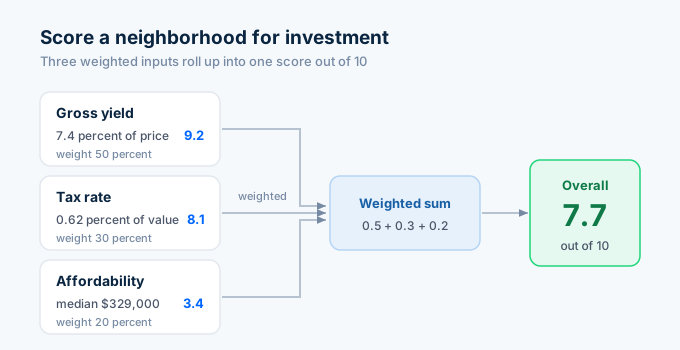
Investors care about different neighborhood metrics than homebuyers. They want to know price-to-rent ratios, tax rates, and whether values are appreciating. Build a score from the data:
def investment_neighborhood_score(bbox, name):    """Score a neighborhood for investment potential."""    sold = requests.post(        "https://api.zillapi.com/v1/search",        json={            "bbox": bbox,            "listingStatus": "RECENTLY_SOLD",            "homeType": ["SINGLE_FAMILY"],        },        headers=HEADERS,    ).json()["data"]
    yields = []    tax_rates = []    prices = []
    for p in sold:        price = p.get("price", 0)        rent = p.get("rentZestimate", 0)        tax = p.get("taxAnnualAmount", 0)        zest = p.get("zestimate", 0)
        if price and rent:            gross_yield = (rent * 12) / price * 100            yields.append(gross_yield)
        if tax and zest:            tax_rate = tax / zest * 100            tax_rates.append(tax_rate)
        if price:            prices.append(price)
    if not yields:        return None
    avg_yield = statistics.mean(yields)    avg_tax_rate = statistics.mean(tax_rates) if tax_rates else 0    median_price = statistics.median(prices) if prices else 0
    # Score: higher yield = better, lower tax rate = better    yield_score = min(avg_yield / 0.8, 10)  # 8% yield = perfect 10    tax_score = max(10 - avg_tax_rate * 3, 0)  # lower tax = higher score    affordability_score = max(10 - median_price / 50000, 0)  # lower price = higher score
    overall = round((yield_score * 0.5 + tax_score * 0.3 + affordability_score * 0.2), 1)
    return {        "name": name,        "sample_size": len(sold),        "median_price": median_price,        "avg_gross_yield": round(avg_yield, 1),        "avg_tax_rate": round(avg_tax_rate, 2),        "yield_score": round(yield_score, 1),        "tax_score": round(tax_score, 1),        "affordability_score": round(affordability_score, 1),        "overall_score": overall,    }
score = investment_neighborhood_score(    bbox={"north": 34.88, "south": 34.82, "east": -82.37, "west": -82.43},    name="Downtown Washington",)
if score:    print(f"Investment Score: {score['name']}")    print(f"Overall: {score['overall_score']}/10")    print(f"Median Price: ${score['median_price']:,.0f}")    print(f"Avg Gross Yield: {score['avg_gross_yield']}%")    print(f"Avg Tax Rate: {score['avg_tax_rate']}%")    print(f"Sample Size: {score['sample_size']} properties")
One search call per neighborhood. If the search returns properties with rent estimates and tax data already populated, you don’t need individual lookups. One credit per neighborhood scored.
For the full investment analysis workflow, see the investor API guide.
How does this compare to dedicated neighborhood APIs?
Several providers specialize in neighborhood-level data. They differ in what they cover and what they cost.
| Provider | School data | Crime data | Demographics | Walk Score | Free tier | Starting price |
|---|---|---|---|---|---|---|
| Zillapi | GreatSchools ratings | No | No | No | 100 credits | $5/mo |
| ATTOM Community | GreatSchools + private | Crime stats | Census data | No | None | $95/mo |
| NeighborhoodScout | School performance | Crime rates | Full census | No | None | Custom |
| Walk Score API | No | No | No | Walk + Transit + Bike | Limited | $0.01/call |
| GreatSchools API | Full school profiles | No | No | No | Limited | Custom |
Two things to know from this comparison.
Zillapi gives you school ratings as a bonus. Every property lookup includes the schools array at no extra cost. If school ratings are the main neighborhood data you need, you don’t need a second API. You already have it.
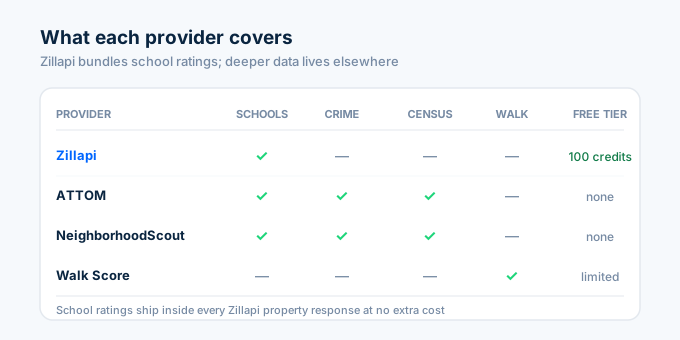
ATTOM and NeighborhoodScout go much deeper. They cover crime statistics, census demographics, income levels, population density, and environmental risk factors. If your application needs to display crime heat maps or demographic breakdowns, those providers handle data that Zillapi doesn’t cover. The trade-off is price. ATTOM starts at $95 per month. NeighborhoodScout requires custom pricing.
Walk Score has its own API if walkability is critical to your product. It costs about $0.01 per call and returns Walk Score, Transit Score, and Bike Score. You can call Walk Score alongside Zillapi to combine property data with walkability metrics.
How much does neighborhood data cost?
Neighborhood data is included in every Zillapi property response. No separate endpoint. No premium tier. No add-on fee.
| Plan | Credits | Cost | Neighborhood lookups |
|---|---|---|---|
| Free | 100 (one-time) | $0 | 100 |
| Monthly | 1,000/month | $5/mo | 1,000 |
| Annual | 12,000/year | $54/yr | 12,000 |
No credit card needed for the free tier.
A neighborhood comparison tool that compares 5 areas costs 10 credits ($0.05). A school-filtered search across 50 properties costs about 51 credits ($0.26). A full neighborhood scoring analysis for an investment market costs 1 credit per area.
Start pulling neighborhood data in 60 seconds
Go to zillapi.com and sign up. Get 100 free credits with no credit card.
Look up your own address. Scroll to the schools array in the JSON response. Check if the GreatSchools ratings match what you see on Zillow. Then try a search in your target market and build a neighborhood comparison.
For the full property field reference, see the property data API guide. For comp analysis and CMA tools, see the comps API guide. For investment screening by neighborhood, see the investor API guide. For getting your API key, follow the step-by-step walkthrough.
Frequently asked questions
Can I get neighborhood data through the Zillow API?
Not from Zillow directly. Zillow retired the public API in 2021. Third-party REST APIs like Zillapi return neighborhood data as part of every property response. This includes nearby schools with GreatSchools ratings, neighborhood name and boundaries, county, latitude and longitude, and ZIP code. One API call returns the property details and all the location context around it for 1 credit.
Does the API include school ratings?
Yes. Every property response includes a schools array with nearby schools. Each entry has the school name, GreatSchools rating (1 to 10), distance in miles from the property, and grade level (Elementary, Middle, or High). This is the same school data displayed on Zillow property pages. It comes from GreatSchools.org and covers public and charter schools.
How do I filter properties by school rating?
Search for properties in an area using the search endpoint, then pull detailed data for each result. Check the schools array and filter for properties where at least one nearby school has a GreatSchools rating of 7 or higher. This two-step process costs 1 credit for the search plus 1 credit per property you inspect. A typical search returns 20 to 50 results.
What location fields does the API return?
Every property response includes latitude, longitude, county, city, state, ZIP code, neighborhood region name and boundaries, and a street address object. The neighborhood region includes the neighborhood name as displayed on Zillow. These fields let you plot properties on a map, group them by area, and build location-aware search tools.
Can I compare neighborhoods using the API?
Yes. Search for recently sold properties in two or more areas using bounding box coordinates. Calculate the median sale price, average school rating, and price per square foot for each area. This gives you a data-driven neighborhood comparison. Each search costs 1 credit, so comparing 5 neighborhoods costs 5 credits ($0.025).
How much does neighborhood data cost through the API?
Neighborhood data is included in every Zillapi property response at no extra charge. There is no separate neighborhood endpoint or premium tier. One credit ($0.005) returns the full property record with schools, location data, and neighborhood context. The free tier gives you 100 credits at signup with no credit card required.