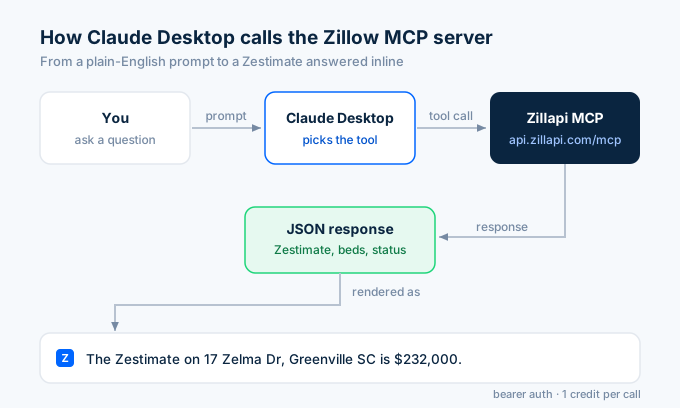
Wire Claude Desktop to live Zillow property data in under two minutes. Get a free Zillapi key (100 credits, no card required), paste a five-line block into claude_desktop_config.json, restart Claude, and ask “What’s the Zestimate on 1600 Pennsylvania Ave?” The model picks the right tool and returns the figure.
This guide is the exact config, the file paths for macOS and Windows, the three errors that trip people up, and a few example prompts to test with after install.
Step 1: Get a Zillapi API key
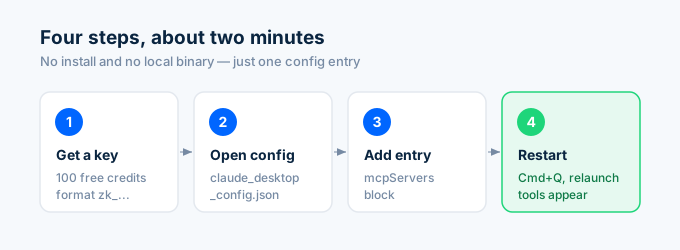
Sign up at zillapi.com/signup. 100 free credits, no card required.
In your dashboard, copy the API key. It starts with zk_ followed by a random string. Treat it like a password. Anyone with the key can spend your credits.
Step 2: Open the Claude Desktop config
The file lives in different places on each operating system.
macOS:
~/Library/Application Support/Claude/claude_desktop_config.jsonWindows:
%APPDATA%\Claude\claude_desktop_config.jsonLinux:
~/.config/Claude/claude_desktop_config.jsonIf the file does not exist yet, create it. The contents must be valid JSON, even if mcpServers is the only key.
Step 3: Add the Zillapi MCP server entry
Paste this block. If you already have other MCP servers, add the zillapi entry inside your existing mcpServers object.
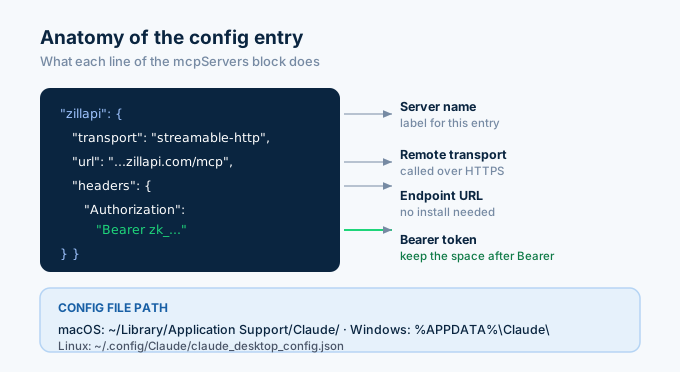
{ "mcpServers": { "zillapi": { "transport": "streamable-http", "url": "https://api.zillapi.com/mcp", "headers": { "Authorization": "Bearer zk_YOUR_KEY_HERE" } } }}Replace zk_YOUR_KEY_HERE with the key from step 1. Save the file.
Step 4: Restart Claude Desktop
Quit Claude Desktop completely. On macOS that means Cmd+Q, not just closing the window. On Windows, right-click the system tray icon and pick Quit.
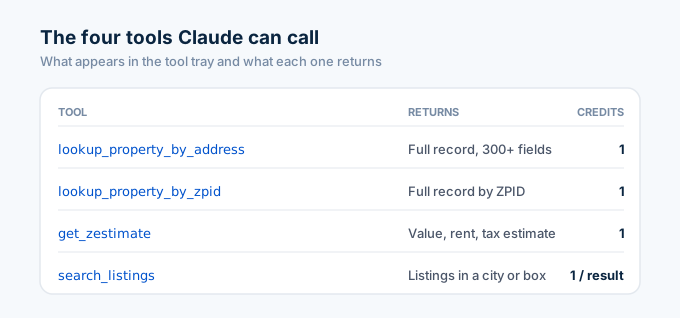
Relaunch. The four Zillapi tools (lookup_property_by_address, lookup_property_by_zpid, get_zestimate, and search_listings) show up in the tool tray.
Test it
Try one of these prompts:
- “What’s the Zestimate on 1600 Pennsylvania Ave NW, Washington DC 20500?”
- “Find 3-bedroom houses under $500k in Austin TX.”
- “Pull the full record for this Zillow URL:
https://www.zillow.com/homedetails/...” - “Who’s the listing agent on this property?”
Claude picks the right tool, calls the MCP server, and returns the answer inline.
Troubleshooting
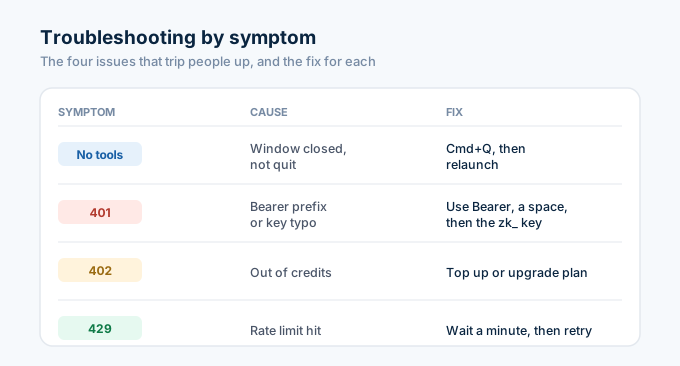
The tools do not appear after restart. You probably did not fully quit Claude, closing the window is not enough. Use Cmd+Q on macOS or right-click the tray icon and select Quit on Windows.
The config file looks right but tools still missing. Validate the JSON. A single trailing comma will silently break the entire mcpServers block. Run cat claude_desktop_config.json | python3 -m json.tool to check.
Claude says it called the tool but got 401 Unauthorized. Your Authorization header is missing the Bearer prefix or has a typo in the key. The value must be exactly Bearer (with the space) followed by your zk_ key.
It worked yesterday, today it returns 429 Too Many Requests. You hit the rate limit for your plan: 20 requests per minute on Free, 200 on Monthly, 300 on Annual. Wait a minute, then retry. If you need more headroom, upgrade at zillapi.com/pricing.
Calls return 402 Payment Required. You ran out of credits. On Monthly and Annual plans you can top up at $4 or $3 per 1,000 credits. Free plan does not support top-ups, so upgrade first.
What you can do once installed
The MCP server exposes the same surface as the REST API. From inside a Claude conversation you can:
- Pull a complete property record from a pasted Zillow URL (300+ fields).
- Get the Zestimate, rent Zestimate, and tax-assessed value for any address.
- Search for-sale or for-rent listings within a bounding box (
w,s,e,n) or a pasted Zillow search URL. - Pull comparable sold properties for an investor pitch.
- Get the listing agent’s contact details for any active listing.
Same key works for Claude Code, Cursor, ChatGPT custom GPTs, and the local agent skills at github.com/ZeroPointRepo/zillow-skills. Install once, use everywhere.
Don’t have a key yet? Sign up free at zillapi.com/signup for 100 credits, no card required. Paid plans start at $5/month if you outgrow it.