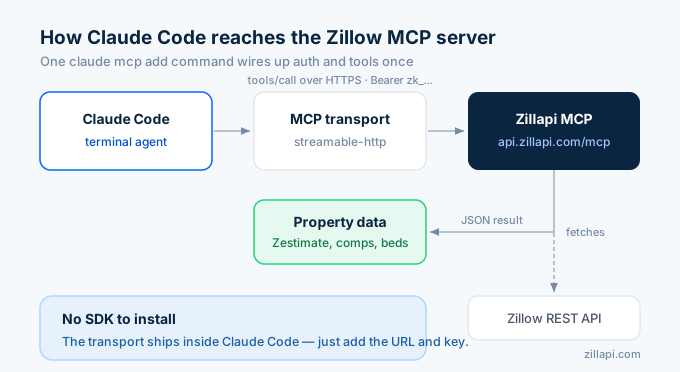
Wire Zillow data into Claude Code with one command. Get a free Zillapi key (100 credits, no card required), run claude mcp add with the streamable-http transport and the server URL, and the agent has property lookups, Zestimates, and listing search available in every session.
This guide is the one-line install, the scope flag you actually want, the verification commands, and the four prompts that prove it works.
The 60-second install
claude mcp add \ --transport http zillapi \ https://api.zillapi.com/mcp \ --header "Authorization=Bearer zk_YOUR_KEY"That’s it. Replace zk_YOUR_KEY with the API key from your Zillapi dashboard (sign up first if you haven’t, 100 free credits, no card).
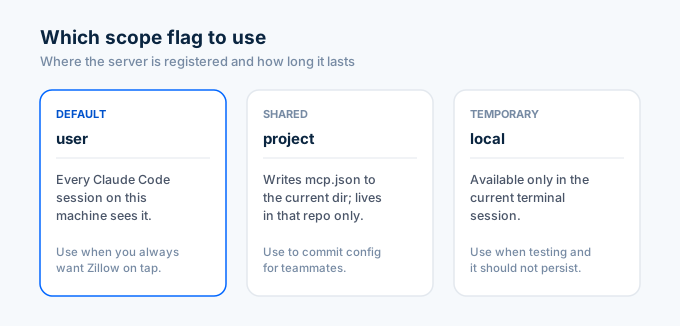
The default scope is user, which means every Claude Code session on your machine sees the Zillapi server. If you only want it in one project, add --scope project and the entry goes in a .mcp.json file at the project root, where you can commit it for teammates.
Verify the connection
claude mcp listYou should see:
zillapi https://api.zillapi.com/mcp connectedInside a Claude Code session, type /mcp to inspect the server. The four tools (lookup_property_by_address, lookup_property_by_zpid, get_zestimate, search_listings) should appear under zillapi.
Try it
In a Claude Code session, ask:
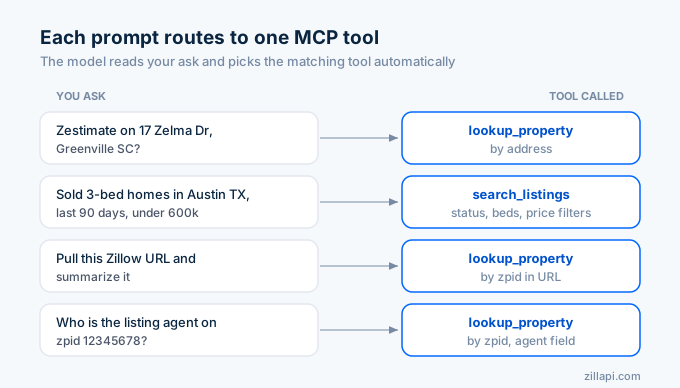
- “Look up 1600 Pennsylvania Ave NW, Washington DC and tell me the Zestimate and last sale price.”
- “Find sold 3-bedroom houses in Austin TX in the last 90 days under $600k.”
- “Pull this Zillow URL and summarize what’s interesting about it.”
- “Who’s the listing agent on zpid 12345678?”
The agent picks the right tool, calls the MCP server, and returns structured data inline. You can pipe that into a script, a CSV, or just keep iterating.
Scope flags, which to use
| Scope | What it does | Use when |
|---|---|---|
--scope user (default) | Available in every Claude Code session on this machine | You always want Zillow data on-tap |
--scope project | Writes .mcp.json to the current dir; available only in this project | You’re building a real-estate-specific app and want teammates to inherit the config |
--scope local | Available only in the current terminal session | You’re experimenting and don’t want the entry to persist |
For most users, the default (user scope) is right.
Troubleshooting
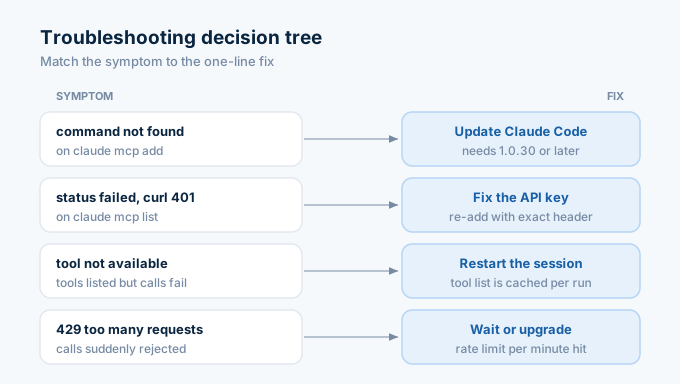
claude mcp add says “command not found”. Update Claude Code. The mcp add command is in 1.0.30 and later. Run claude --version to check.
claude mcp list shows status failed. Run claude mcp get zillapi to see the resolved URL and headers, then test the URL with curl:
curl -X POST https://api.zillapi.com/mcp \ -H "Authorization: Bearer zk_YOUR_KEY" \ -H "Content-Type: application/json" \ -d '{"jsonrpc":"2.0","id":1,"method":"tools/list"}'If curl returns 401, the key is wrong. If it returns 200, the issue is in how the header was added. Re-run claude mcp add with the exact syntax above.
Tools show up but every call returns “Tool not available”. Restart the Claude Code session. The tool list is cached per session and only refreshes on start.
Calls return 429 Too Many Requests. Rate limit. Free plan is 20/min, Monthly is 200/min, Annual is 300/min. Wait a minute, then retry. Or upgrade at zillapi.com/pricing.
What you can build with this
Claude Code with the Zillapi MCP server connected is a thin shell on top of 300+ property fields. A few starting points:
- A script that drops a CSV of comps for any address.
- An overnight job that pulls fresh Zestimates for a watch list of zpids.
- A REPL where you paste a Zillow URL and get an investor pitch back.
- A test harness that snapshots listing data across your target ZIP codes.
The same Zillapi key works in Claude Desktop, Cursor, ChatGPT, and the standalone agent skills at github.com/ZeroPointRepo/zillow-skills.
Don’t have a key yet? Sign up free at zillapi.com/signup for 100 credits, no card required. Paid plans start at $5/month if you outgrow it.