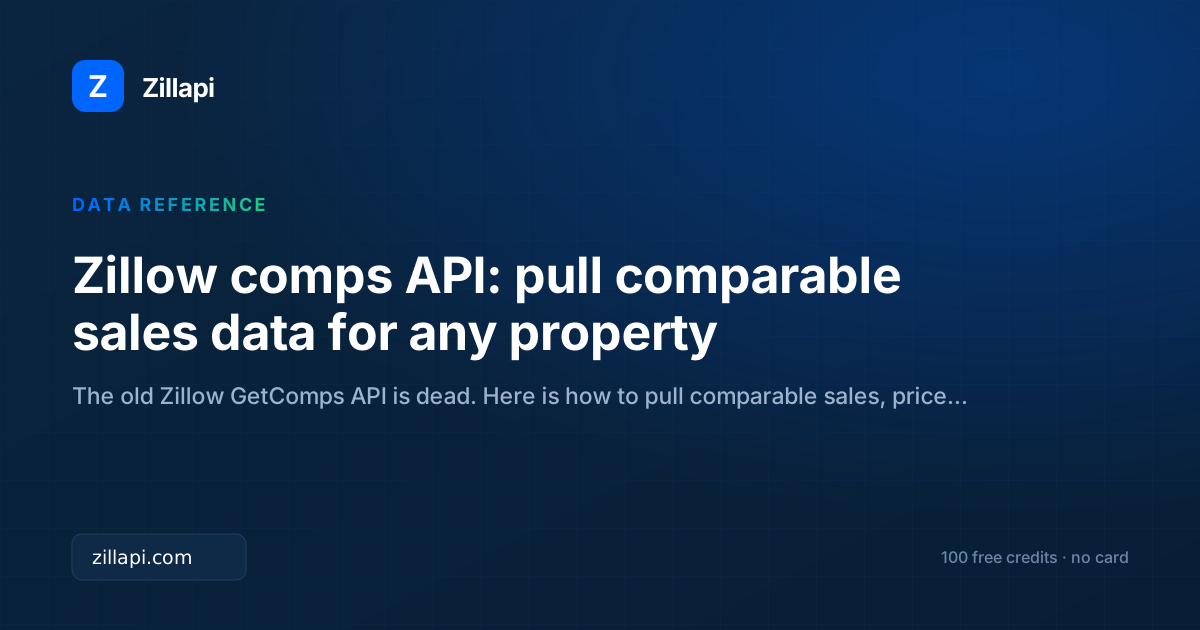
Zillow’s GetComps and GetDeepComps endpoints died on September 30, 2021. If you’ve been searching for the Zillow comps API, you’re looking for something that no longer exists in its original form.
But the underlying data is still there. Recently sold properties, sale prices, property details, price per square foot. You just access it differently now.
Here’s how to pull comparable sales data, build comp analyses, and automate CMAs with working code.
What happened to the Zillow GetComps API?
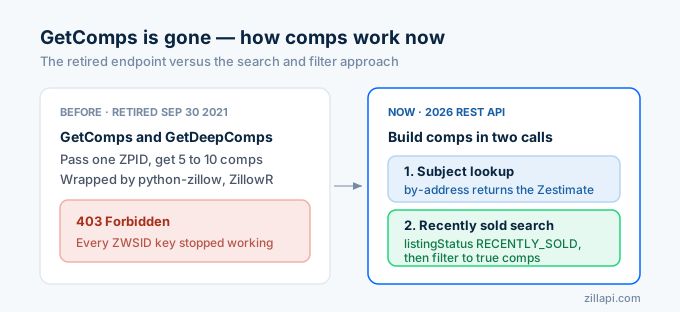
Zillow retired the entire public Web Services API on September 30, 2021. That included GetComps (which returned 5 comparable properties) and GetDeepComps (which returned 10 with extended data). Every ZWSID key stopped working that day.
The old endpoints were simple. You passed a ZPID, and Zillow returned a handful of comparable properties with their Zestimates and basic details. Libraries like python-zillow and ZillowR wrapped these calls in language-specific packages. All of them return 403 errors now.
Zillow replaced the public API with Bridge Interactive, which requires MLS affiliation and does not expose Zestimates or the comp-matching logic.
In 2026, the path to Zillow comparable sales data runs through third-party REST APIs. The approach is different from GetComps, but the data is richer.
How do I pull comparable sales through an API?
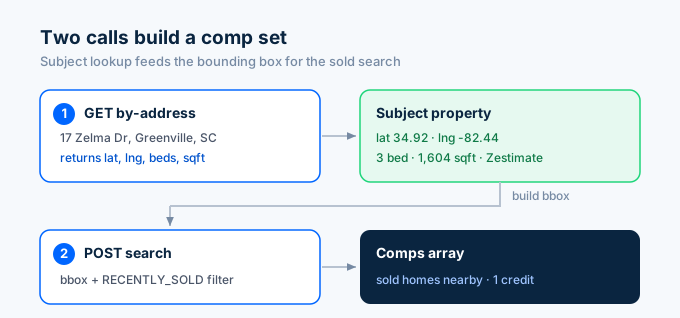
Instead of a single “get comps” endpoint, you build comparable sales from two pieces: the subject property lookup and a search for recently sold properties nearby.
Step 1: Get the subject property.
import requests, os
API_KEY = os.environ['ZILLAPI_KEY']HEADERS = {"Authorization": f"Bearer {API_KEY}"}
# Look up the subject propertyr = requests.get(    "https://api.zillapi.com/v1/properties/by-address",    params={"address": "1600 Pennsylvania Ave NW, Washington DC 20500"},    headers=HEADERS,)subject = r.json()["data"]
print(f"Subject: {subject['address']['streetAddress']}")print(f"Zestimate: ${subject['zestimate']:,}")print(f"Beds: {subject['bedrooms']} | Baths: {subject['bathrooms']}")print(f"Sqft: {subject['livingArea']:,}")print(f"Year Built: {subject['yearBuilt']}")
Step 2: Search for recently sold properties nearby.
# Build a bounding box ~0.5 miles around the subjectlat = subject['latitude']lng = subject['longitude']offset = 0.007  # roughly 0.5 miles
r = requests.post(    "https://api.zillapi.com/v1/search",    json={        "bbox": {            "west": lng - offset,            "east": lng + offset,            "south": lat - offset,            "north": lat + offset,        },        "listingStatus": "RECENTLY_SOLD",        "homeType": [subject.get("homeType", "SINGLE_FAMILY")],    },    headers=HEADERS,)comps = r.json()["data"]print(f"\nFound {len(comps)} recently sold properties nearby")
That’s two API calls, two credits. You now have the subject property and every recently sold property within half a mile.
How do I filter for true comparables?
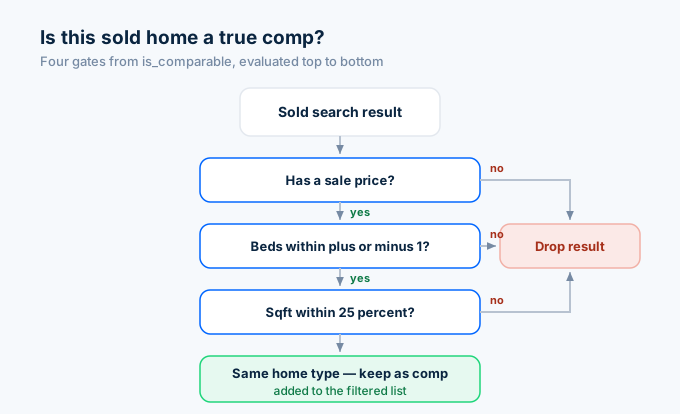
Raw search results include everything that sold nearby. A 1-bedroom condo is not comparable to a 4-bedroom house. You need to filter by similarity.
def is_comparable(subject, comp, bed_range=1, sqft_pct=0.25):    """Filter comps by similarity to the subject property."""    # Must have sale price    if not comp.get('price'):        return False
    # Bedroom count within range    if abs(comp.get('bedrooms', 0) - subject['bedrooms']) > bed_range:        return False
    # Square footage within percentage    if subject.get('livingArea') and comp.get('livingArea'):        sqft_diff = abs(comp['livingArea'] - subject['livingArea']) / subject['livingArea']        if sqft_diff > sqft_pct:            return False
    # Same property type    if comp.get('homeType') != subject.get('homeType'):        return False
    return True
# Filter to true compsfiltered = [c for c in comps if is_comparable(subject, c)]print(f"Filtered to {len(filtered)} comparable properties")
This filters out properties that differ too much from the subject. The defaults allow plus or minus 1 bedroom and 25% square footage variance. Adjust those thresholds based on your market density. In suburban areas, you might loosen them. In dense urban areas, you can tighten them.
How do I calculate price per square foot for comps?
Price per square foot is the standard metric for comparing properties. It normalizes the sale price against the property size so you can compare a 1,200 sqft home to a 1,600 sqft home on equal terms.
# Calculate price per sqft for each compfor comp in filtered:    if comp.get('livingArea') and comp.get('price'):        comp['pricePerSqft'] = round(comp['price'] / comp['livingArea'], 2)
# Sort by price per sqftfiltered.sort(key=lambda c: c.get('pricePerSqft', 0))
print("\nComparable Sales:")print(f"{'Address':<35} {'Price':>12} {'Sqft':>8} {'$/Sqft':>8} {'Beds':>5}")print("-" * 72)
for comp in filtered[:10]:    addr = comp['address']['streetAddress'][:34]    price = f"${comp['price']:,}"    sqft = f"{comp.get('livingArea', 'N/A'):,}"    ppsf = f"${comp.get('pricePerSqft', 0):,.0f}"    beds = str(comp.get('bedrooms', '?'))    print(f"{addr:<35} {price:>12} {sqft:>8} {ppsf:>8} {beds:>5}")
# Calculate average and median price per sqftppsf_values = [c['pricePerSqft'] for c in filtered if c.get('pricePerSqft')]if ppsf_values:    avg_ppsf = sum(ppsf_values) / len(ppsf_values)    sorted_ppsf = sorted(ppsf_values)    median_ppsf = sorted_ppsf[len(sorted_ppsf) // 2]    print(f"\nAverage $/sqft: ${avg_ppsf:,.0f}")    print(f"Median $/sqft: ${median_ppsf:,.0f}")
The average and median price per square foot tell you different things. The average is sensitive to outliers (one luxury sale can skew it). The median gives you the middle of the market. Most appraisers and investors look at both.
How do I build an automated CMA?
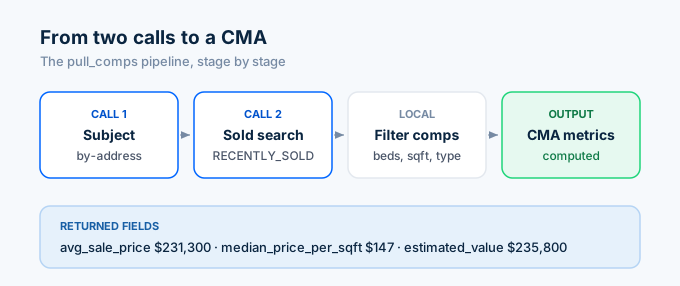
A comparative market analysis combines the subject property, filtered comps, and calculated metrics into a single report. Here’s a complete script that does it in two API calls:
import requests, os, statistics
API_KEY = os.environ['ZILLAPI_KEY']HEADERS = {"Authorization": f"Bearer {API_KEY}"}
def pull_comps(address, radius_miles=0.5, bed_range=1, sqft_pct=0.25):    """Pull subject + comps and return a CMA summary."""
    # 1. Get the subject property    r = requests.get(        "https://api.zillapi.com/v1/properties/by-address",        params={"address": address},        headers=HEADERS,    )    subject = r.json()["data"]
    # 2. Search recently sold nearby    offset = radius_miles * 0.0145  # degrees per mile (approx)    lat, lng = subject['latitude'], subject['longitude']
    r = requests.post(        "https://api.zillapi.com/v1/search",        json={            "bbox": {                "west": lng - offset,                "east": lng + offset,                "south": lat - offset,                "north": lat + offset,            },            "listingStatus": "RECENTLY_SOLD",            "homeType": [subject.get("homeType", "SINGLE_FAMILY")],        },        headers=HEADERS,    )    raw_comps = r.json()["data"]
    # 3. Filter to true comparables    filtered = []    for c in raw_comps:        if not c.get('price') or not c.get('livingArea'):            continue        if abs(c.get('bedrooms', 0) - subject['bedrooms']) > bed_range:            continue        if abs(c['livingArea'] - subject['livingArea']) / subject['livingArea'] > sqft_pct:            continue        if c.get('homeType') != subject.get('homeType'):            continue        c['pricePerSqft'] = round(c['price'] / c['livingArea'], 2)        filtered.append(c)
    # 4. Calculate CMA metrics    if not filtered:        return {"subject": subject, "comps": [], "error": "No comps found"}
    prices = [c['price'] for c in filtered]    ppsf = [c['pricePerSqft'] for c in filtered]
    cma = {        "subject": {            "address": subject['address']['streetAddress'],            "zestimate": subject['zestimate'],            "beds": subject['bedrooms'],            "baths": subject['bathrooms'],            "sqft": subject['livingArea'],        },        "comp_count": len(filtered),        "avg_sale_price": round(statistics.mean(prices)),        "median_sale_price": round(statistics.median(prices)),        "avg_price_per_sqft": round(statistics.mean(ppsf), 2),        "median_price_per_sqft": round(statistics.median(ppsf), 2),        "estimated_value": round(statistics.median(ppsf) * subject['livingArea']),        "comps": filtered[:10],    }    return cma
# Run the CMAcma = pull_comps("1600 Pennsylvania Ave NW, Washington DC 20500")
print(f"Subject: {cma['subject']['address']}")print(f"Zestimate: ${cma['subject']['zestimate']:,}")print(f"Comps found: {cma['comp_count']}")print(f"Avg sale price: ${cma['avg_sale_price']:,}")print(f"Median $/sqft: ${cma['median_price_per_sqft']:,}")print(f"Estimated value (median $/sqft × sqft): ${cma['estimated_value']:,}")
Two credits. That’s all it costs. One for the subject property, one for the comp search. The script returns a complete CMA with comp count, average and median sale prices, price per square foot metrics, and a comp-derived value estimate.
How do I get price history for a property?
Every property lookup includes a priceHistory array with past sales, price changes, and listing events. This is useful for tracking how a comp’s value changed over time.
r = requests.get(    "https://api.zillapi.com/v1/properties/by-address",    params={"address": "1600 Pennsylvania Ave NW, Washington DC 20500"},    headers=HEADERS,)data = r.json()["data"]
print("Price History:")for event in data.get("priceHistory", [])[:5]:    date = event.get("date", "Unknown")    event_type = event.get("event", "Unknown")    price = event.get("price")    price_str = f"${price:,}" if price else "N/A"    print(f"  {date}: {event_type} at {price_str}")
The price history shows every recorded sale, listing, and price change. For comp analysis, you care about the most recent sale. For investment analysis, the full history shows you how the property’s value has trended.
How does this compare to other comps APIs?
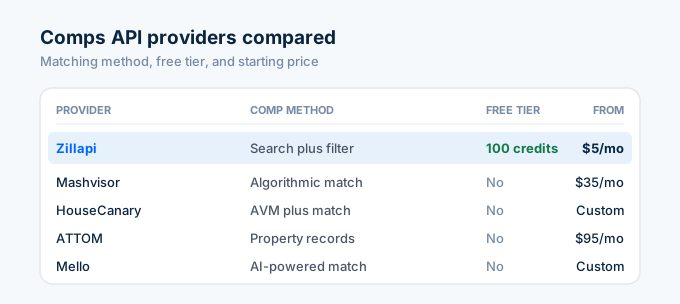
Several providers offer comparable sales data. They differ in methodology, pricing, and what “comps” means.
| Provider | Comp method | Data source | Free tier | Starting price | Coverage |
|---|---|---|---|---|---|
| Zillapi | Search + filter | Zillow | 100 credits | $5/mo | 160M+ properties |
| Mashvisor | Algorithmic matching | MLS + public records | No | $35/mo | Major metros |
| HouseCanary | AVM + matching | Proprietary + MLS | No | Custom | Nationwide |
| ATTOM | Property records | Public records + MLS | No | $95/mo | 155M+ properties |
| Mello | AI-powered matching | Public records | No | Custom | Nationwide |
Two things matter when choosing a comps API.
First, the matching method. Mashvisor and HouseCanary select comps for you using algorithms. With Zillapi, you run the search and apply your own filters. The algorithmic approach is faster to implement. The search-and-filter approach gives you full control over what counts as a comp.
Second, cost. A single comp analysis with Zillapi costs 2 credits ($0.01). Mashvisor starts at $35 per month. ATTOM starts at $95 per month. If you’re running a handful of CMAs per day, the per-analysis cost difference adds up fast.
What can you build with comp data from an API?
Four things developers build most with comp data.
The most common is automated CMA tools. Real estate agents paste an address, the tool pulls comps, calculates metrics, and generates a PDF report. The entire workflow runs in under 2 seconds with 2 API calls.
Next is investment screening dashboards. Investors upload a list of addresses, the tool pulls Zestimates and comps for each one, then flags properties where the asking price is below the comp-derived value. Potential deals bubble to the top.
Appraisers build support tools on top of comp data. The API provides the raw data (sale prices, dates, property attributes). The appraiser applies adjustments and professional judgment.
Then there’s lending and underwriting platforms. Lenders need property valuations for mortgage decisions. Automated comp analysis provides a fast initial screen before ordering a full appraisal. The AI agent guide shows how to wire this into a conversational interface.
How much does comp data cost?
Comp analysis with Zillapi costs 2 credits per property: 1 for the subject lookup and 1 for the comp search. On the monthly plan, that’s $0.01 per CMA.
| Plan | Credits | Cost | CMAs per plan |
|---|---|---|---|
| Free | 100 (one-time) | $0 | 50 |
| Monthly | 1,000/month | $5/mo | 500 |
| Annual | 12,000/year | $54/yr | 6,000 |
No credit card needed for the free tier. 50 complete comp analyses for $0.
For a real estate agent running 20 CMAs per week, the $5 monthly plan covers it with credits to spare. For a platform running hundreds of analyses daily, the annual plan at $54/year is the clear starting point, with top-ups at $3 per 1,000 credits.
Pull your first comps in 60 seconds
Go to zillapi.com. Sign up with your email. Get 100 free credits.
Copy the CMA script from above, set your API key as an environment variable, and run it against a property you know. Compare the comp-derived value to the Zestimate. If the numbers are close, you’ve validated the data. If they diverge, dig into the individual comps to understand why.
For more code examples, see our Python tutorial or JavaScript tutorial. For rental comps and rent estimates, see the rental data API guide. For getting your API key, see our step-by-step guide.
Frequently asked questions
Is the Zillow GetComps API still available?
No. Zillow retired the GetComps and GetDeepComps endpoints on September 30, 2021 along with the entire ZWSID API. Every existing key stopped working that day. The old Python and PHP libraries that called those endpoints all return 403 errors now. To pull comparable sales data in 2026, use the Zillapi search endpoint with a RECENTLY_SOLD filter and build comps from the results.
How do I get comparable sales data from Zillow through an API?
Use the Zillapi /v1/search endpoint with listingStatus set to RECENTLY_SOLD. Pass a bounding box around your subject property and filter by homeType, bedroom count, and price range to narrow the results to true comparables. Each result includes the sale price, sale date, property details, and Zestimate. One search call costs 1 credit regardless of how many comps come back.
Can I build a CMA with the Zillow API?
Yes. Pull the subject property with the /v1/properties/by-address endpoint to get its details and Zestimate. Then search for recently sold properties nearby with similar characteristics. Compare price per square foot, adjust for differences in bedrooms and lot size, and calculate a weighted average. Two API calls give you everything you need for a basic comparative market analysis.
What is the cheapest comps API for real estate?
Zillapi costs $0.005 per call and returns comparable sales data through the search endpoint. Mashvisor starts at $35 per month. HouseCanary offers custom pricing. ATTOM starts at $95 per month. Zillapi’s 100 free credits at signup let you test comp workflows at zero cost with no credit card required.
How accurate are Zillow comps compared to MLS comps?
Zillow comps reflect publicly recorded sale prices and property details from county records. MLS comps may include additional data like days on market, seller concessions, and listing agent remarks that are not in public records. For automated screening and initial analysis, Zillow comp data is accurate on sale prices and property attributes. For formal appraisals, lenders typically require MLS-sourced comps.
How many comparable sales can I pull per API call?
The Zillapi search endpoint returns all matching properties within your bounding box and filters in a single call for 1 credit. There is no per-result charge. A typical comp search within a half-mile radius returns 10 to 50 recently sold properties depending on the market density. You control the result count by tightening or loosening your geographic and attribute filters.