Zapier connects over 7,000 apps with no code. You build workflows called Zaps by picking a trigger, adding action steps, and mapping data between them. The whole thing runs automatically.
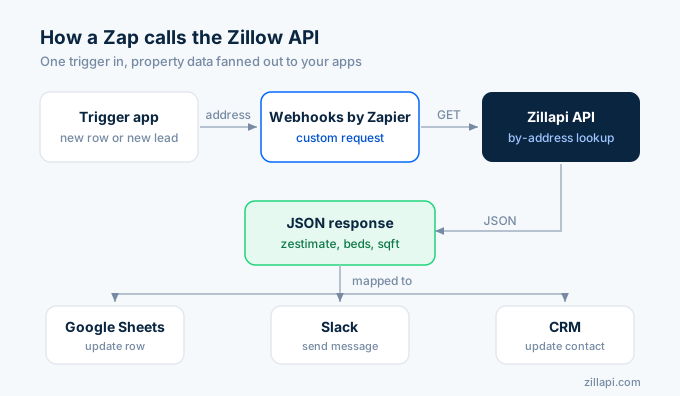
The Zillow API fits into any Zap as an action step. When a new lead hits your CRM, Zapier calls the API, pulls the property details, and pushes them wherever you need. No Python. No terminal. Just a visual builder.
Here is how to set up property data automation in Zapier using the Zillapi REST API.
What can you automate?
Zapier handles the plumbing between apps. The API handles the property data. Together they cover the most common real estate automation workflows.
| Workflow | Trigger | API action | Output |
|---|---|---|---|
| Lead enrichment | New CRM lead | Look up property by address | Update lead with Zestimate, beds, baths, sqft |
| Portfolio alerts | Daily schedule | Pull Zestimates for watchlist | Slack message if value changed 5%+ |
| Deal screening | New Google Sheets row | Look up property + comps | Flag if price is below Zestimate |
| Listing monitor | New form submission | Search properties in ZIP code | Email digest of matching listings |
| Investor reports | Weekly schedule | Pull values for portfolio | Google Sheets update with current values |
| CRM sync | New property record | Full property lookup | Fill in 20+ fields automatically |
Each API call costs 1 credit ($0.005). Most Zaps use 1 call per trigger event. For API key setup, see the step-by-step guide.
How do I set up the API connection in Zapier?
Zapier does not have a native Zillapi app. You connect through the Webhooks by Zapier action, which lets you call any REST API directly.
Here is the setup, step by step.
Step 1: Create a new Zap
Log in to Zapier and click “Create Zap” in the top left. Pick your trigger app. For this walkthrough, use Google Sheets as the trigger with “New Spreadsheet Row” as the trigger event. Connect your Google account and select a sheet that has a column with property addresses.
Step 2: Add the Webhooks action
Click the plus button to add an action step. Search for “Webhooks by Zapier” and select it. Choose “Custom Request” as the action event.
Step 3: Configure the API call
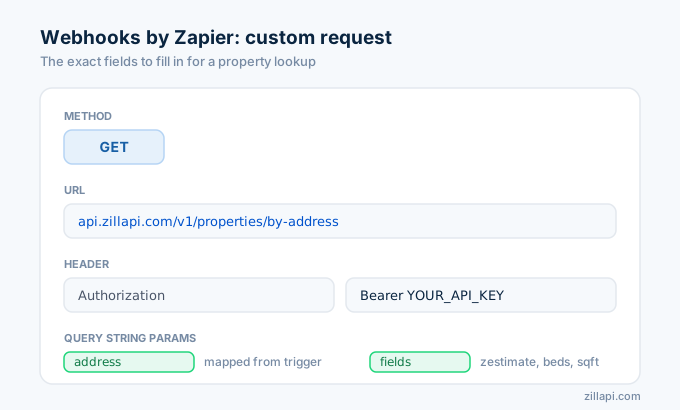
Fill in these fields in the Webhooks setup form:
Method: GET
URL: https://api.zillapi.com/v1/properties/by-address
Headers:
| Key | Value |
|---|---|
| Authorization | Bearer YOUR_API_KEY |
| Content-Type | application/json |
Query String Params:
| Key | Value |
|---|---|
| address | (map this to the address column from your Google Sheets trigger) |
| fields | address,zestimate,rentZestimate,bedrooms,bathrooms,livingArea,yearBuilt,homeType,lotAreaValue |
Replace YOUR_API_KEY with your actual key from zillapi.com. To map the address, click in the value field and select the address column from your trigger step.
Step 4: Test the step
Click “Test step.” Zapier sends the request to the API and shows you the response. You should see the property data in the output panel. Zapier parses the JSON automatically, so every field becomes a mappable value for later steps.
If the test returns an error, check that your API key is correct and the address format includes street, city, state, and ZIP.
Step 5: Add output actions
Now add whatever downstream steps you need. Click the plus button again and add:
Google Sheets (Update Row): write the Zestimate, bedrooms, bathrooms, and square footage back to columns in your spreadsheet.
Slack (Send Message): post a summary of the property to a channel.
Gmail (Send Email): email the property details to a team member.
HubSpot (Update Contact): attach property data to the lead’s CRM record.
You can chain as many output steps as you want. Each Zap runs every time a new row appears in your sheet.
How do I enrich leads automatically?
Lead enrichment is the most popular use case. A new lead comes in with just a name and property address. Zapier fills in the rest.
Trigger: New contact in HubSpot (or Salesforce, Pipedrive, or any CRM)
Action 1: Webhooks by Zapier, Custom Request
- Method: GET
- URL:
https://api.zillapi.com/v1/properties/by-address - Headers: Authorization: Bearer YOUR_API_KEY
- Query Params: address = (mapped from CRM address field), fields = zestimate,rentZestimate,bedrooms,bathrooms,livingArea,yearBuilt,homeType
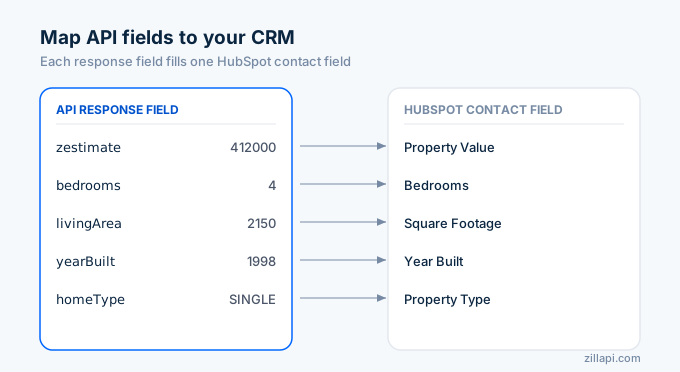
Action 2: Update contact in HubSpot
- Map zestimate to “Property Value” custom field
- Map bedrooms to “Bedrooms” custom field
- Map livingArea to “Square Footage” custom field
- Map yearBuilt to “Year Built” custom field
- Map homeType to “Property Type” custom field
Every new lead gets property data attached within seconds. No manual lookup required.
This workflow costs 1 API credit per lead. An agent handling 100 leads per month spends $0.50 on API calls.
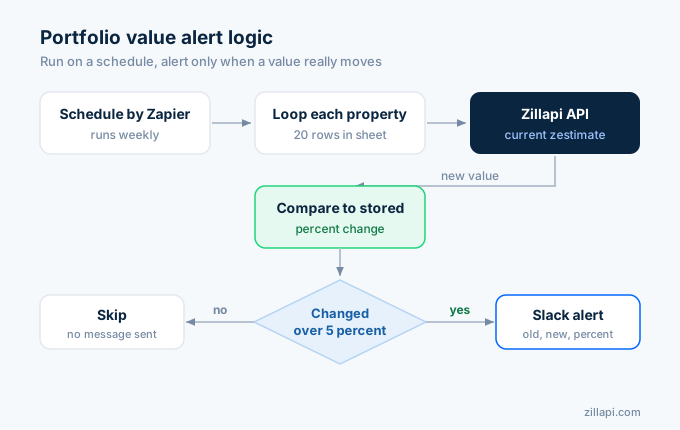
How do I set up portfolio value alerts?
Investors and agents tracking a portfolio of properties want to know when values change. Zapier can run this check on a schedule and alert you only when something moves.
Trigger: Schedule by Zapier, set to run daily or weekly
Action 1: Google Sheets (Get Many Rows), pull all rows from your portfolio spreadsheet
For each property row, you need a Looping by Zapier step (available on Zapier’s paid plans):
Action 2 (inside loop): Webhooks by Zapier, Custom Request
- Method: GET
- URL:
https://api.zillapi.com/v1/properties/by-address - Query Params: address = (current row’s address), fields = zestimate,rentZestimate
Action 3 (inside loop): Compare the new Zestimate to the previous value stored in your sheet.
Action 4 (inside loop): Filter by Zapier, only continue if the value changed by more than 5%.
Action 5: Slack (Send Message)
- Channel: #portfolio-alerts
- Message: “Value alert: [address] moved from $[old] to $[new] ([percent]% change)”
A 20-property portfolio checked weekly uses 20 API credits per week. That is 80 credits per month, or $0.40.
How do I screen deals from a spreadsheet?
Wholesalers and investors often dump potential deals into a spreadsheet. Zapier can screen each one against the API and flag the good ones.
Trigger: New row in Google Sheets (the deal pipeline sheet)
Action 1: Webhooks by Zapier, Custom Request
- Pulls the Zestimate and property details for the address in the new row
Action 2: Formatter by Zapier (Math operation)
- Calculate discount: (Zestimate minus asking price) divided by Zestimate times 100
Action 3: Filter by Zapier
- Only continue if discount is greater than 15%
Action 4: Slack (Send Message)
- Post to #deals channel: “[address] listed at $[price], Zestimate $[zestimate], [discount]% below market”
Action 5: Google Sheets (Update Row)
- Write the Zestimate, discount percentage, and “FLAGGED” status back to the row
Deals priced 15% or more below the Zestimate get flagged automatically. Everything else gets skipped. You only look at the deals worth your time.
How do I build a listing alert email?
Real estate agents can send clients automated property updates by combining the search endpoint with Zapier’s email actions.
Trigger: Schedule by Zapier (daily)
Action 1: Webhooks by Zapier, Custom Request
- Method: POST
- URL:
https://api.zillapi.com/v1/search - Headers: Authorization: Bearer YOUR_API_KEY, Content-Type: application/json
- Data (raw JSON):
{ "location": "Washington DC", "listingStatus": "FOR_SALE", "homeType": ["SINGLE_FAMILY"], "minPrice": 200000, "maxPrice": 400000, "minBedrooms": 3}Action 2: Formatter by Zapier
- Format the results into a readable list with addresses, prices, and bedroom counts
Action 3: Gmail (Send Email)
- To: your client’s email
- Subject: “New listings in Washington DC today”
- Body: the formatted listing summary
Your client gets a daily email with fresh listings that match their criteria. One search API call per day costs 1 credit.
What are the Zapier plan limits?
Zapier has a free tier and several paid plans. Your choice depends on how many Zaps run per month.
| Zapier plan | Monthly tasks | Multi-step Zaps | Loops | Monthly cost |
|---|---|---|---|---|
| Free | 100 | No | No | $0 |
| Starter | 750 | Yes | No | $29.99 |
| Professional | 2,000 | Yes | Yes | $73.50 |
| Team | 50,000 | Yes | Yes | $103.50 |
The free plan works for simple two-step Zaps like lead enrichment. Portfolio monitoring with loops requires the Professional plan.
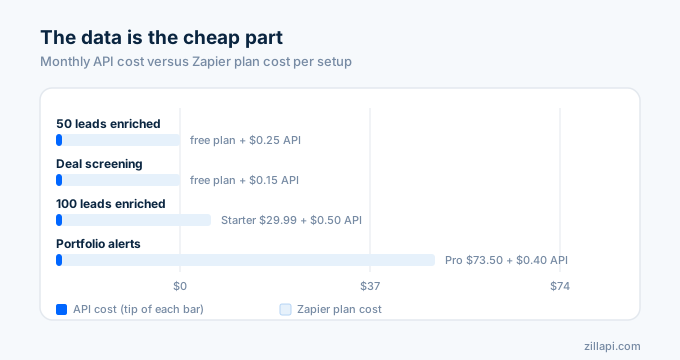
Combined costs for a typical setup:
| Use case | API credits/mo | API cost | Zapier plan | Total |
|---|---|---|---|---|
| 50 leads enriched | 50 | $0.25 | Free | $0.25 |
| 100 leads enriched | 100 | $0.50 | Starter | $30.49 |
| 20-property portfolio alerts (weekly) | 80 | $0.40 | Professional | $73.90 |
| Deal screening (30 deals/mo) | 30 | $0.15 | Free | $0.15 |
The API cost is almost always smaller than the Zapier cost. At $0.005 per lookup, the data is the cheap part of the automation.
Tips for reliable Zaps
Test every Zap with a real address before turning it on. Use a known property address and confirm that the API response includes the fields you mapped.
Store your API key in a safe place. Zapier saves it in the Webhooks step configuration. If you need to rotate the key, update it in every Zap that uses it.
Use the “fields” query parameter to request only the data you need. Smaller responses are faster and easier to map in Zapier. Requesting every field when you only need the Zestimate wastes time in the mapping step.
Add a Zapier error handler step to catch API failures. If the address is invalid or the API is temporarily down, the error handler can log the failure to a Google Sheet or send you an alert instead of silently failing.
For addresses coming from form submissions, normalize the format before sending to the API. “123 Main St” works. “123 main street, apt 2, washington dc 29601” also works. But partial addresses without a city or state may not return results.
How do I get started?
Go to zillapi.com and sign up. You get 100 free credits with no credit card required. Then log in to Zapier, create a new Zap, and follow the setup steps above.
Start with lead enrichment. It is the simplest workflow (two steps) and shows value immediately. Once that works, add portfolio alerts and deal screening.
For the Python version of these workflows (if you outgrow Zapier’s limits), see the Python tutorial. For a visual dashboard alternative, see the Streamlit guide. For the Make.com version of no-code automation, see the Make guide.
Frequently asked questions
Can I connect the Zillow API to Zapier?
Yes. Use the Webhooks by Zapier action to call the Zillapi REST API from any Zap. Set the action to a Custom Request with a GET method, enter the API endpoint URL, add your API key in the headers, and pass the property address as a query parameter. Zapier returns the full JSON response. You can then map any field to downstream steps like Google Sheets, Slack, email, or your CRM.
How do I enrich real estate leads with property data in Zapier?
Create a Zap that triggers when a new lead arrives in your CRM or Google Sheet. Add a Webhooks by Zapier step that calls the Zillapi property lookup endpoint with the lead’s address. Map the returned Zestimate, bedrooms, bathrooms, and square footage back to your CRM record. The lead now has full property details attached. Each lookup costs 1 credit ($0.005).
Do I need to write code to use the Zillow API with Zapier?
No. Zapier’s Webhooks by Zapier action handles the API call without any code. You configure the HTTP method, URL, headers, and query parameters in a visual form. Zapier parses the JSON response automatically and lets you map individual fields to other apps. The entire setup takes about 10 minutes.
How much does it cost to automate property lookups with Zapier?
The API costs $5 per month for 1,000 property lookups or $54 per year for 12,000 lookups. Zapier’s free plan includes 100 tasks per month. A Zap that enriches 50 leads per month uses 50 API credits ($0.25) and 50 Zapier tasks. The combined cost is under $6 per month for both platforms. You get 100 free API credits at signup.
What Zapier triggers work with property data lookups?
Any trigger that includes a property address works. Common triggers include new row in Google Sheets, new lead in HubSpot or Salesforce, new form submission in Typeform or JotForm, new email in Gmail, and new record in Airtable. The trigger passes the address to the Webhooks step, which calls the API and returns property details for downstream actions.
Can I send property alerts to Slack or email with Zapier?
Yes. Build a Zap with a schedule trigger that runs daily or weekly. Use Webhooks by Zapier to pull the current Zestimate for a list of properties. Add a filter step that checks if the value changed by more than a set threshold. If it did, send a Slack message or email with the property address, old value, new value, and percent change. This creates an automated portfolio monitoring system with no code.