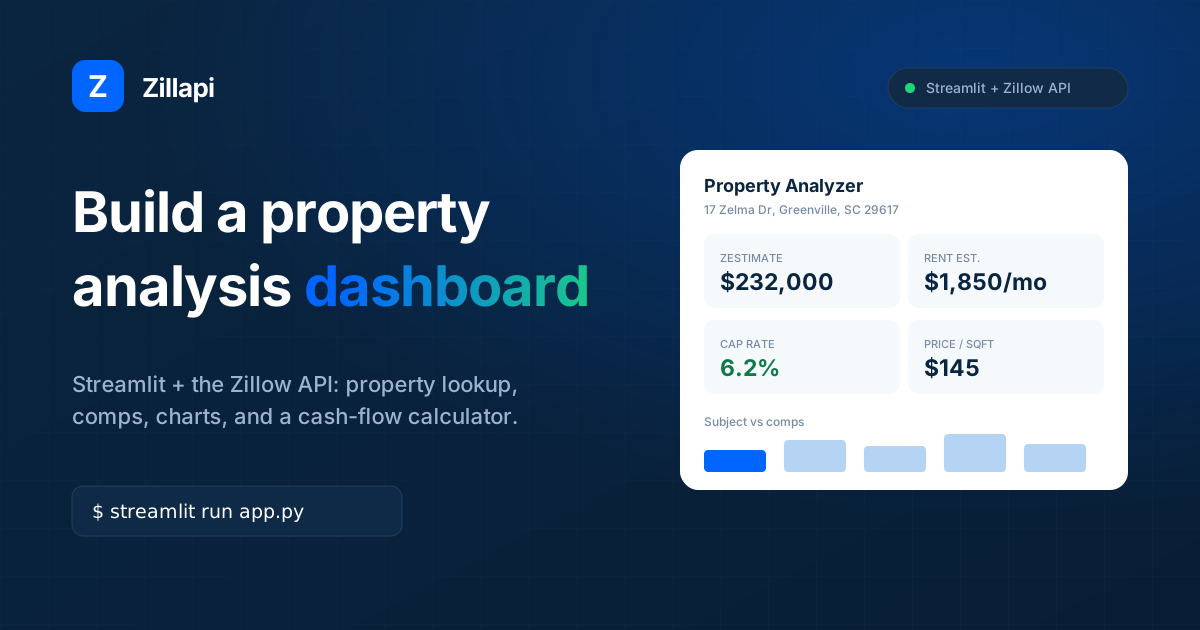
Every real estate investor eventually builds a spreadsheet. They paste in addresses, manually look up Zestimates, type in comps, and calculate returns by hand. The spreadsheet grows until it breaks.
A dashboard does the same job but pulls the data automatically. Type an address, get the valuation, see the comps, run the numbers. No copy-pasting. No stale data.
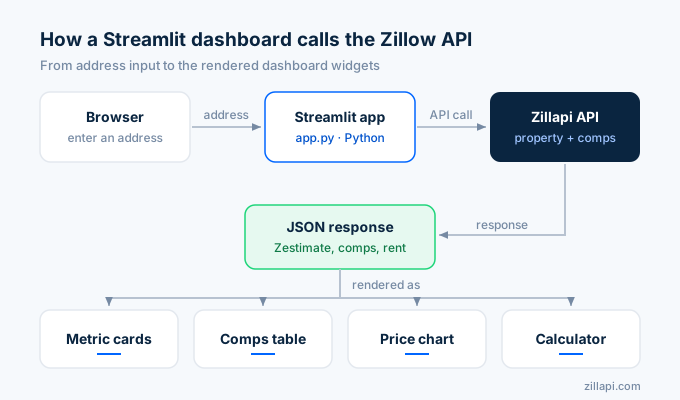
Streamlit makes this easy. It is a Python framework that turns scripts into web apps. You write Python. Streamlit handles the HTML, the layout, and the interactivity. Connect it to a property data API and you have a working dashboard in under an hour.
Here is how to build one from scratch.
What do I need to get started?
Three things. Python, a Zillapi key, and the Streamlit library.
Install the dependencies:
pip install streamlit requests pandasGet your free API key at zillapi.com. You get 100 credits at signup with no credit card. For the full setup walkthrough, see the API key guide.
Create a file called app.py. That is your entire dashboard.
How do I build the property lookup panel?
Start with a search box and a property summary. The user types an address, the app calls the API, and the results appear instantly.
import streamlit as stimport requestsimport pandas as pd
st.set_page_config(page_title="Property Analyzer", layout="wide")st.title("Property Analysis Dashboard")
API_KEY = st.secrets.get("ZILLAPI_KEY", "")HEADERS = {"Authorization": f"Bearer {API_KEY}"}
address = st.text_input("Enter a property address", "1600 Pennsylvania Ave NW, Washington DC 20500")
if st.button("Analyze Property"):    with st.spinner("Pulling property data..."):        r = requests.get(            "https://api.zillapi.com/v1/properties/by-address",            params={                "address": address,                "fields": "address,zestimate,taxAssessedValue,price,bedrooms,bathrooms,livingArea,lotAreaValue,yearBuilt,homeStatus,homeType,daysOnZillow,rentZestimate,schools,photos",            },            headers=HEADERS,        )        data = r.json()["data"]
    # Property header    st.header(data["address"]["streetAddress"])    st.caption(f"{data['address'].get('city', '')}, {data['address'].get('state', '')} {data['address'].get('zipcode', '')}")
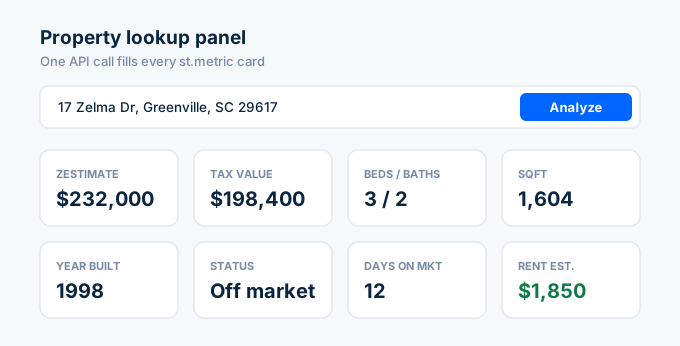
    # Key metrics row    col1, col2, col3, col4 = st.columns(4)    col1.metric("Zestimate", f"${data.get('zestimate', 0):,}")    col2.metric("Tax Value", f"${data.get('taxAssessedValue', 0):,}")    col3.metric("Beds / Baths", f"{data.get('bedrooms', '?')} / {data.get('bathrooms', '?')}")    col4.metric("Sqft", f"{data.get('livingArea', 0):,}")
    # Second row    col5, col6, col7, col8 = st.columns(4)    col5.metric("Year Built", data.get("yearBuilt", "N/A"))    col6.metric("Status", data.get("homeStatus", "N/A"))    col7.metric("Days on Market", data.get("daysOnZillow", "N/A"))    col8.metric("Rent Estimate", f"${data.get('rentZestimate', 0):,}/mo")
Run it with streamlit run app.py. Your browser opens and you see a search box with metric cards below it. One API call populates the entire panel.
How do I add a comps table?
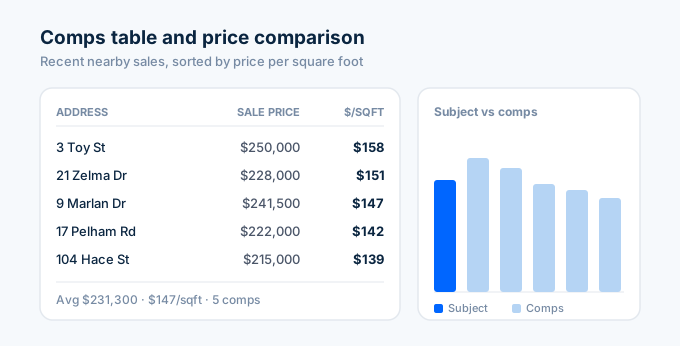
Comparable sales are the backbone of any property analysis. Pull recently sold homes nearby and display them in a sortable table.
Add this code below the property lookup:
    # Comps section    st.subheader("Comparable Sales")
    lat = data.get("latitude", 38.91)    lng = data.get("longitude", -77.03)    beds = data.get("bedrooms", 3)
    comps_r = requests.post(        "https://api.zillapi.com/v1/search",        json={            "bbox": {                "north": lat + 0.01,                "south": lat - 0.01,                "east": lng + 0.01,                "west": lng - 0.01,            },            "listingStatus": "RECENTLY_SOLD",            "homeType": ["SINGLE_FAMILY"],            "minBeds": max(beds - 1, 1),            "maxBeds": beds + 1,        },        headers=HEADERS,    )    comps = comps_r.json()["data"]
    # Build comps dataframe    comp_rows = []    for comp in comps[:10]:        comp_sqft = comp.get("livingArea", 0)        comp_price = comp.get("price", 0)        if comp_sqft and comp_price:            comp_rows.append({                "Address": comp["address"]["streetAddress"],                "Sale Price": comp_price,                "Sqft": comp_sqft,                "$/Sqft": round(comp_price / comp_sqft, 2),                "Beds": comp.get("bedrooms", "?"),                "Baths": comp.get("bathrooms", "?"),            })
    if comp_rows:        df = pd.DataFrame(comp_rows)        df = df.sort_values("$/Sqft", ascending=False)
        # Summary metrics        avg_price = int(df["Sale Price"].mean())        avg_ppsf = round(df["$/Sqft"].mean(), 2)        c1, c2, c3 = st.columns(3)        c1.metric("Avg Comp Price", f"${avg_price:,}")        c2.metric("Avg $/Sqft", f"${avg_ppsf}")        c3.metric("Comps Found", len(comp_rows))
        # Display table        st.dataframe(df, use_container_width=True, hide_index=True)    else:        st.warning("No comparable sales found nearby.")
The comps table is sortable by any column. Click a header to sort by price, square footage, or price per square foot. Streamlit handles that automatically.
For more on how the comps search works, see the comps API guide.
How do I add charts?
Numbers in a table are useful. A chart makes the comparison visual. Add a bar chart that shows the subject property against its comps:
    # Price comparison chart    if comp_rows:        st.subheader("Price Comparison")
        chart_data = df[["Address", "Sale Price"]].copy()        # Add subject property        subject_row = pd.DataFrame([{            "Address": data["address"]["streetAddress"] + " (Subject)",            "Sale Price": data.get("zestimate", 0),        }])        chart_data = pd.concat([subject_row, chart_data], ignore_index=True)
        st.bar_chart(chart_data, x="Address", y="Sale Price")
The subject property shows up first in the chart with its Zestimate. The comps follow with their actual sale prices. One glance tells you whether the property is priced above or below the market.
How do I build an investment calculator?
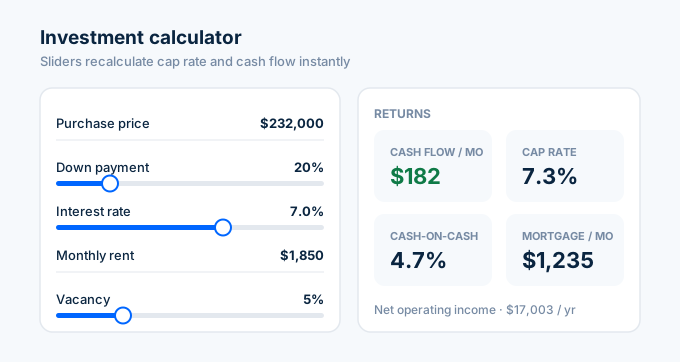
Investors need more than valuations. They need cap rate, monthly cash flow, and return on investment. Add an interactive calculator with sliders for the assumptions:
    # Investment calculator    st.subheader("Investment Calculator")
    zestimate = data.get("zestimate", 0)    rent = data.get("rentZestimate", 0)
    calc_col1, calc_col2 = st.columns(2)    with calc_col1:        purchase_price = st.number_input("Purchase Price ($)", value=zestimate, step=5000)        down_pct = st.slider("Down Payment (%)", 0, 100, 20)        interest_rate = st.slider("Interest Rate (%)", 2.0, 10.0, 7.0, 0.25)        loan_term = st.selectbox("Loan Term (years)", [30, 15], index=0)
    with calc_col2:        monthly_rent = st.number_input("Monthly Rent ($)", value=rent, step=50)        vacancy_pct = st.slider("Vacancy (%)", 0, 20, 5)        mgmt_pct = st.slider("Management Fee (%)", 0, 15, 8)        monthly_expenses = st.number_input("Other Monthly Expenses ($)", value=200, step=50)
    # Calculate mortgage payment    down_payment = purchase_price * down_pct / 100    loan_amount = purchase_price - down_payment    monthly_rate = interest_rate / 100 / 12    num_payments = loan_term * 12
    if monthly_rate > 0:        mortgage = loan_amount * (monthly_rate * (1 + monthly_rate) ** num_payments) / ((1 + monthly_rate) ** num_payments - 1)    else:        mortgage = loan_amount / num_payments
    # Calculate returns    effective_rent = monthly_rent * (1 - vacancy_pct / 100)    mgmt_fee = effective_rent * mgmt_pct / 100    total_expenses = mortgage + mgmt_fee + monthly_expenses    cash_flow = effective_rent - total_expenses
    annual_noi = (effective_rent - mgmt_fee - monthly_expenses) * 12    cap_rate = round(annual_noi / purchase_price * 100, 2) if purchase_price else 0    cash_on_cash = round(cash_flow * 12 / down_payment * 100, 2) if down_payment else 0
    # Display results    st.divider()    r1, r2, r3, r4 = st.columns(4)    r1.metric("Monthly Cash Flow", f"${cash_flow:,.0f}")    r2.metric("Cap Rate", f"{cap_rate}%")    r3.metric("Cash-on-Cash Return", f"{cash_on_cash}%")    r4.metric("Monthly Mortgage", f"${mortgage:,.0f}")
    # Breakdown table    breakdown = pd.DataFrame([        {"Item": "Gross Rent", "Monthly": f"${monthly_rent:,}", "Annual": f"${monthly_rent * 12:,}"},        {"Item": "Vacancy Loss", "Monthly": f"-${monthly_rent * vacancy_pct / 100:,.0f}", "Annual": f"-${monthly_rent * vacancy_pct / 100 * 12:,.0f}"},        {"Item": "Management Fee", "Monthly": f"-${mgmt_fee:,.0f}", "Annual": f"-${mgmt_fee * 12:,.0f}"},        {"Item": "Other Expenses", "Monthly": f"-${monthly_expenses:,}", "Annual": f"-${monthly_expenses * 12:,}"},        {"Item": "Mortgage", "Monthly": f"-${mortgage:,.0f}", "Annual": f"-${mortgage * 12:,.0f}"},        {"Item": "Cash Flow", "Monthly": f"${cash_flow:,.0f}", "Annual": f"${cash_flow * 12:,.0f}"},    ])    st.dataframe(breakdown, use_container_width=True, hide_index=True)
The sliders update the calculations instantly. Change the down payment from 20% to 25% and watch the cash flow recalculate. Drag the interest rate up and see how it affects your monthly payment. No spreadsheet formula debugging needed.
For more on NOI and cap rate calculations, see the NOI guide.
How do I compare multiple properties?
Analyzing one property at a time is fine for a quick check. But investors comparing three or four deals need a side-by-side view.
Add a multi-property comparison tab:
# Multi-property comparison (add as a separate section or tab)st.divider()st.header("Compare Properties")
compare_addresses = st.text_area(    "Enter addresses (one per line)",    "1600 Pennsylvania Ave NW, Washington DC 20500\n100 Main St, Washington DC 20001")
if st.button("Compare"):    addresses = [a.strip() for a in compare_addresses.strip().split("\n") if a.strip()]
    rows = []    for addr in addresses:        r = requests.get(            "https://api.zillapi.com/v1/properties/by-address",            params={                "address": addr,                "fields": "address,zestimate,taxAssessedValue,bedrooms,bathrooms,livingArea,yearBuilt,rentZestimate",            },            headers=HEADERS,        )        d = r.json()["data"]
        zest = d.get("zestimate", 0)        rent = d.get("rentZestimate", 0)        sqft = d.get("livingArea", 0)
        rows.append({            "Address": d["address"]["streetAddress"],            "Zestimate": zest,            "Tax Value": d.get("taxAssessedValue", 0),            "Beds": d.get("bedrooms"),            "Baths": d.get("bathrooms"),            "Sqft": sqft,            "Year": d.get("yearBuilt"),            "Rent Est.": rent,            "$/Sqft": round(zest / sqft, 2) if sqft else 0,            "Gross Yield": f"{round(rent * 12 / zest * 100, 1)}%" if zest and rent else "N/A",        })
    compare_df = pd.DataFrame(rows)    st.dataframe(compare_df, use_container_width=True, hide_index=True)
    # Comparison chart    st.bar_chart(compare_df, x="Address", y="Zestimate")
Paste five addresses, hit Compare, and get a table with Zestimate, rent estimate, price per square foot, and gross yield for each property. Five API calls, five rows, one decision.
How do I store the API key securely?
Never hardcode your API key in the Python file. Streamlit has a built-in secrets manager.
Create a file at .streamlit/secrets.toml:
ZILLAPI_KEY = "your-api-key-here"Add .streamlit/secrets.toml to your .gitignore so it never gets pushed to GitHub:
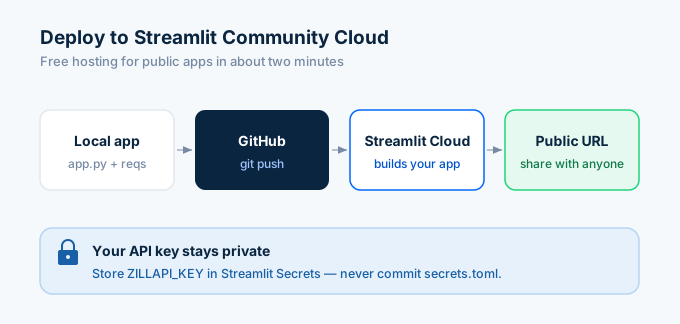
.streamlit/secrets.tomlIn your app, access it with st.secrets["ZILLAPI_KEY"]. When you deploy to Streamlit Cloud, paste the key into the Secrets section of your app settings. The key stays private even if the app is public.
How do I deploy the dashboard?
Streamlit Community Cloud hosts public apps for free. The deployment process takes about two minutes.
Push your code to a GitHub repository. Make sure your repo has app.py and a requirements.txt:
streamlitrequestspandasGo to share.streamlit.io, connect your GitHub account, select the repository, and click Deploy. Streamlit builds the app and gives you a public URL.
Anyone with the link can use your dashboard. The API calls happen server-side, so your key stays hidden. Viewers never see it.
For private dashboards, Streamlit Teams lets you restrict access. Or self-host with streamlit run app.py on any server.
How much does this cost?
The full stack is nearly free for personal use:
| Component | Cost |
|---|---|
| Streamlit | Free (open source) |
| Streamlit Cloud hosting | Free (public apps) |
| Zillapi free tier | $0 (100 credits at signup) |
| Zillapi monthly plan | $5/mo (1,000 credits) |
| Zillapi annual plan | $54/yr (12,000 credits) |
A typical dashboard session uses 3 to 5 API calls per property analysis. One for the property lookup, one for the comps search, and a few for detailed comp data. On the $5 plan, that is 200 to 300 property analyses per month.
For the full API pricing breakdown, see the property data API guide.
What else can I add?
Once the core dashboard works, you can extend it:
Map view with property pins using st.map() or the pydeck integration. Pass latitude and longitude from the API response.
School ratings panel using the schools array that comes back with every property lookup. See the neighborhood data guide for the full schools workflow.
Price history charts if you pull historical Zestimates. Plot value over time to see whether a market is trending up or down.
PDF export using the fpdf2 library. Generate a one-page property report that investors can download and share.
Saved searches using Streamlit session state. Let users save addresses and come back to their analysis later.
How do I get started?
Install Streamlit, grab your free API key, and copy the code above into app.py. Run streamlit run app.py and you have a working dashboard in under five minutes.
Start with the property lookup panel. Add the comps table next. Then the investment calculator. Build one section at a time and test as you go.
For the full Python API reference, see the Python tutorial. For API key setup, see the step-by-step guide.
Frequently asked questions
Can I build a real estate dashboard with Streamlit and the Zillow API?
Yes. Streamlit is a Python framework that turns scripts into web apps with no frontend code. Connect it to a property data API and you get an interactive dashboard where users type an address, see the Zestimate, browse comps, and run investment calculations. The entire app runs in about 150 lines of Python. Streamlit is free and open source.
How do I connect Streamlit to a property data API?
Install streamlit and requests with pip. Store your API key in a Streamlit secrets file or environment variable. Use requests.get() inside your Streamlit app to call the API when the user submits an address. Parse the JSON response and display the data using st.metric(), st.dataframe(), and st.bar_chart(). Each API call costs 1 credit ($0.005).
What can I show on a real estate Streamlit dashboard?
A property lookup panel with Zestimate, tax value, beds, baths, and square footage. A comparable sales table with recent sales nearby sorted by price per square foot. A bar chart comparing the subject property to comps. An investment calculator with cap rate, cash flow, and ROI. A multi-property comparison view. All of this runs from a single Python file.
How much does it cost to run a Streamlit property dashboard?
Streamlit itself is free. The API costs $5 per month for 1,000 property lookups, or you can start with 100 free credits at signup. A typical dashboard session uses 5 to 10 API calls per property lookup (1 for the property, 1 for comps search, and a few for detailed comp data). Hosting on Streamlit Community Cloud is free for public apps.
Can I deploy a Streamlit real estate app for free?
Yes. Streamlit Community Cloud hosts public apps for free. Push your code to a GitHub repository, connect it to Streamlit Cloud, and your dashboard gets a public URL. Store your API key in Streamlit secrets so it stays private. The free tier supports unlimited viewers. For private apps, Streamlit Teams starts at $250 per month.
Do I need frontend experience to build a property dashboard?
No. Streamlit handles all the HTML, CSS, and JavaScript automatically. You write pure Python. Call st.title() for a heading, st.text_input() for a search box, st.metric() for big numbers, and st.dataframe() for tables. If you can write a Python script, you can build a Streamlit dashboard. No React, no HTML templates, no CSS files.