A property page with no structured data is a wall of text to a search engine. It has to guess what the price is, where the home is, and how many bedrooms it has.
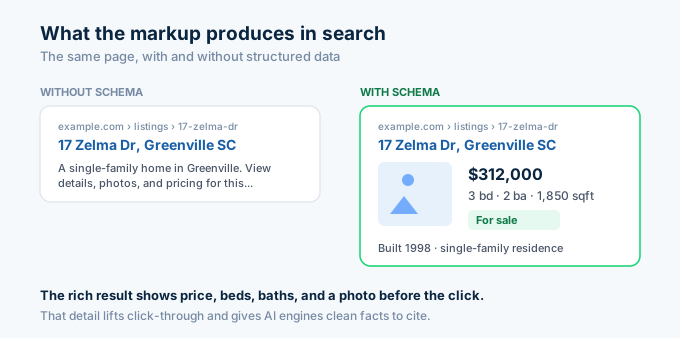
Schema markup removes the guessing. It hands the price, address, beds, baths, and size to search engines and AI systems as labeled fields. That is the difference between a plain blue link and a rich result with photos and details, and between being skipped and being cited in an AI answer.
The catch is that the markup has to be accurate and complete. Minimal or wrong schema can hurt you. The Zillow API gives you accurate property data to build it from.
Here is how to generate valid property schema markup with Python and the Zillow API.
Why does structured data matter now?
Structured data feeds two systems: classic search rich results and AI answer engines. Both read it to understand your page.
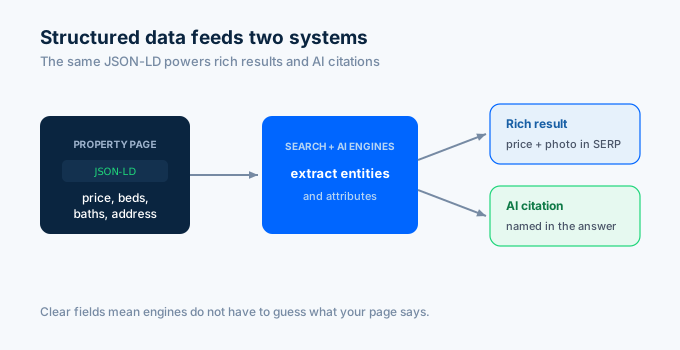
For classic search, schema turns a text link into a rich result that shows price, beds, baths, and a photo in the listing. That lifts click-through.
For AI engines, schema is the translation layer. AI systems pull entities and attributes from structured data to understand and cite a page. Well-marked pages are far more likely to land in AI overviews. The data is clear on one point: completeness matters, which we cover below.
What schema types should I use?
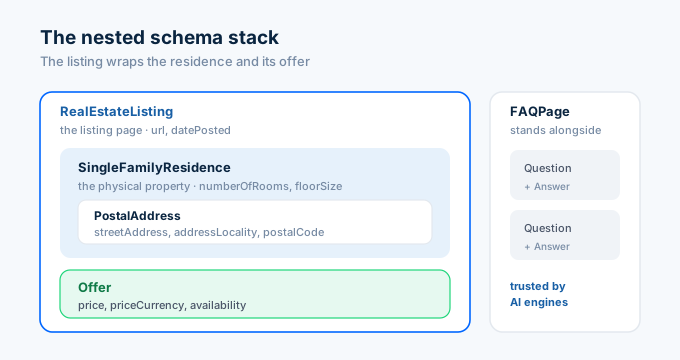
A property page uses a small stack of nested types. The listing wraps the property, and the property holds an offer.
| Schema type | What it describes | Key fields |
|---|---|---|
| RealEstateListing | The listing page itself | url, datePosted |
| SingleFamilyResidence | The physical property | address, numberOfRooms, floorSize |
| Offer | The price and availability | price, priceCurrency, availability |
| PostalAddress | The location | streetAddress, addressLocality, postalCode |
| FAQPage | Questions on the page | question and answer pairs |
RealEstateListing is the listing context. SingleFamilyResidence is the home. You nest the residence inside the listing so engines see both the offer and the property it points to.
How do I generate the markup from API data?
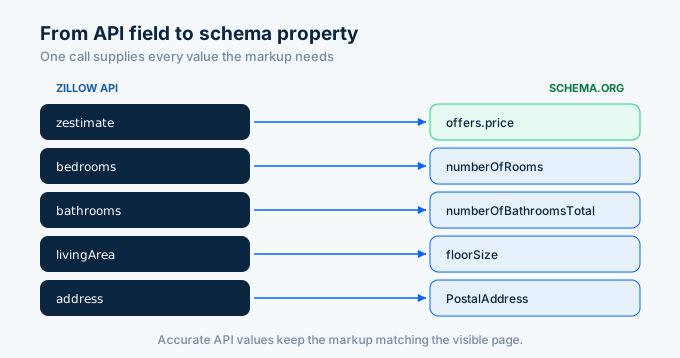
Pull the property data once, then map each field to its schema.org property. The API supplies accurate values, so your markup matches what visitors see.
import requests, os, json
API_KEY = os.environ["ZILLAPI_KEY"]HEADERS = {"Authorization": f"Bearer {API_KEY}"}
def build_property_schema(address, page_url):    """Generate RealEstateListing JSON-LD from Zillow API data."""    data = requests.get(        "https://api.zillapi.com/v1/properties/by-address",        params={            "address": address,            "fields": "address,zestimate,bedrooms,bathrooms,livingArea,yearBuilt,homeType",        },        headers=HEADERS,    ).json()["data"]
    addr = data["address"]
    schema = {        "@context": "https://schema.org",        "@type": "RealEstateListing",        "url": page_url,        "name": f"{addr['streetAddress']}, {addr['city']}, {addr['state']} {addr['zipcode']}",        "mainEntity": {            "@type": "SingleFamilyResidence",            "address": {                "@type": "PostalAddress",                "streetAddress": addr["streetAddress"],                "addressLocality": addr["city"],                "addressRegion": addr["state"],                "postalCode": addr["zipcode"],                "addressCountry": "US",            },            "numberOfRooms": data.get("bedrooms"),            "numberOfBathroomsTotal": data.get("bathrooms"),            "floorSize": {                "@type": "QuantitativeValue",                "value": data.get("livingArea"),                "unitCode": "FTK",            },            "yearBuilt": data.get("yearBuilt"),        },        "offers": {            "@type": "Offer",            "price": data.get("zestimate"),            "priceCurrency": "USD",            "availability": "https://schema.org/InStock",        },    }
    return json.dumps(schema, indent=2)
jsonld = build_property_schema(    "1600 Pennsylvania Ave NW, Washington DC 20500",    "https://example.com/listings/1600-pennsylvania-ave-nw",)print(jsonld)
The function pulls the property record and maps each field to its schema.org property. One API call produces a complete, accurate JSON-LD object.
Note the unit code. FTK is the standard code for square feet in a QuantitativeValue. Small details like that keep your markup valid.
What does the finished markup look like?
The script outputs JSON-LD that you place in a script tag in the page head. Here is the result for the example property.
<script type="application/ld+json">{ "@context": "https://schema.org", "@type": "RealEstateListing", "url": "https://example.com/listings/1600-pennsylvania-ave-nw", "name": "1600 Pennsylvania Ave NW, Washington DC 20500", "mainEntity": { "@type": "SingleFamilyResidence", "address": { "@type": "PostalAddress", "streetAddress": "1600 Pennsylvania Ave NW", "addressLocality": "Washington", "addressRegion": "SC", "postalCode": "20500", "addressCountry": "US" }, "numberOfRooms": 3, "numberOfBathroomsTotal": 2, "floorSize": { "@type": "QuantitativeValue", "value": 1850, "unitCode": "FTK" }, "yearBuilt": 1998 }, "offers": { "@type": "Offer", "price": 312000, "priceCurrency": "USD", "availability": "https://schema.org/InStock" }}</script>Drop this into the head of the property page. Search engines read it on crawl, and AI systems read it on retrieval. The visible page should show the same price, address, and details.
How do I add FAQ schema for AI citation?
FAQ schema is one of the formats AI engines extract most reliably. Adding a few common questions to each property page raises your odds of being cited.
def build_faq_schema(address, zestimate, rent):    """Generate FAQPage JSON-LD for a property page."""    faqs = [        {            "q": f"What is the estimated value of {address}?",            "a": f"The current estimated value is ${zestimate:,}, based on recent "                 f"sales and market data for the area.",        },        {            "q": f"What is the estimated rent for {address}?",            "a": f"The estimated monthly rent is ${rent:,}, based on comparable "                 f"rentals nearby.",        },    ]
    schema = {        "@context": "https://schema.org",        "@type": "FAQPage",        "mainEntity": [            {                "@type": "Question",                "name": f["q"],                "acceptedAnswer": {"@type": "Answer", "text": f["a"]},            }            for f in faqs        ],    }    return json.dumps(schema, indent=2)
print(build_faq_schema("1600 Pennsylvania Ave NW", 312000, 1850))
The function builds a FAQPage from the property data. Each answer pulls real numbers from the API, so the content is accurate and specific rather than generic.
Only mark up questions and answers that actually appear on the page. Schema for hidden content violates the guidelines.
Why does completeness matter so much?
Here is the part most guides skip. Schema is not a checkbox. The quality of the markup decides whether it helps or hurts.
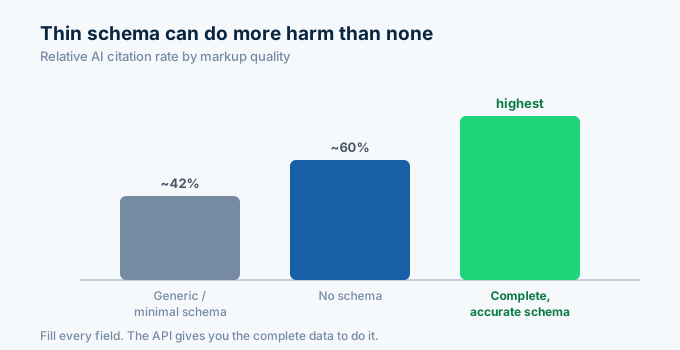
Studies of AI citation found that pages with generic, thin schema were cited less often than pages with no schema at all. Complete, accurate schema performed best by a wide margin.
The lesson is to fill in the fields. A RealEstateListing with only a name and a price is thin. One with the full address, room counts, floor size, year built, and a proper offer is complete. The API gives you every field you need to be on the right side of that line.
What are the common mistakes?
Keep the markup matching the visible page. If the schema price differs from the displayed price, search engines lower trust. Pull both from the same API data so they always agree.
Validate before you ship. Run the JSON-LD through the Schema Markup Validator and Google’s Rich Results Test. Fix any errors and warnings.
Do not mark up data you do not show. Schema describes what is on the page, not extra hidden facts. If you include FAQ schema, the questions and answers must appear on the page.
Keep it current. When a listing’s price or status changes, regenerate the schema. Stale markup that disagrees with the live page is worse than none.
How do I get started?
Go to zillapi.com and sign up. You get 100 free credits with no credit card required.
Start with one property page. Run the schema generator, paste the JSON-LD into the page head, and test it in Google’s Rich Results Test. Once it passes, wire the generator into your page build so every listing gets accurate markup automatically.
For pulling the underlying data, see the property data guide. For the full Python setup, see the Python tutorial. For building the pages themselves, see the Next.js guide.
Frequently asked questions
What schema type should I use for a property page?
Use RealEstateListing as the wrapper, with a nested residence type like SingleFamilyResidence for the property and an Offer for the price and availability. Add a FAQPage schema for any questions on the page. This combination tells search engines and AI systems the page is a property listing and gives them the price, address, size, and room counts as structured fields.
How do I generate schema markup from property data?
Pull the property’s address, value, beds, baths, and square footage from the Zillow API, then map each field to its schema.org property in a JSON-LD object. Output the JSON-LD in a script tag on the page. One API call gives you the accurate data, and a short script converts it to valid structured data. Each lookup costs 1 credit ($0.005).
Does schema markup help with AI search engines?
Yes. AI search engines extract entities and attributes from structured data to understand and cite pages. Well-implemented schema makes a page 2 to 4 times more likely to appear in AI overviews. But minimal or inaccurate schema can perform worse than none, so completeness and accuracy matter. Accurate API data helps your markup match what visitors see.
What is the difference between RealEstateListing and SingleFamilyResidence?
RealEstateListing is the listing context, the page that offers a property for sale or lease with a price and date. SingleFamilyResidence describes the physical property itself, including its address, room counts, and floor size. You nest the residence inside the listing so search engines see both the offer and the property it refers to.
Why does my schema markup need to match the visible page?
Search engines compare your structured data against the visible content. If the schema says the price is $312,000 but the page shows $280,000, that mismatch can trigger a penalty or reduced trust. Pulling both the visible content and the schema from the same API data keeps them consistent and avoids the discrepancy.
What format should property schema markup use?
Use JSON-LD. It is Google’s recommended format and the easiest to maintain because it sits in a single script tag separate from your HTML. Microdata and RDFa work but mix structured data into your markup, which is harder to keep correct. Every example in this guide uses JSON-LD.