Retool is the fastest way to build internal tools on top of an API. You drag components onto a canvas, point them at queries, and you have a working dashboard in an afternoon. No frontend build, no deploy pipeline.
The Zillow API drops into Retool as a REST resource. Once connected, you can build a property research tool: search by address, browse results in a table, and drill into the full record on click.
Here is how to connect the Zillapi REST API to Retool and build a property dashboard.
What can you build?
Retool supplies the interface. The API supplies the property data. Together they cover internal real estate tools.
| Tool | What it does | API endpoint |
|---|---|---|
| Property lookup | Search an address, see details | Property by address |
| Deal browser | Filter and scan listings | Search endpoint |
| Comp viewer | Show recent sales near a subject | Search (RECENTLY_SOLD) |
| Portfolio panel | Track values for owned properties | Property by address |
| Lead tool | Enrich a lead with property data | Property by address |
| Underwriting helper | Pull data into a calculator | Property by address |
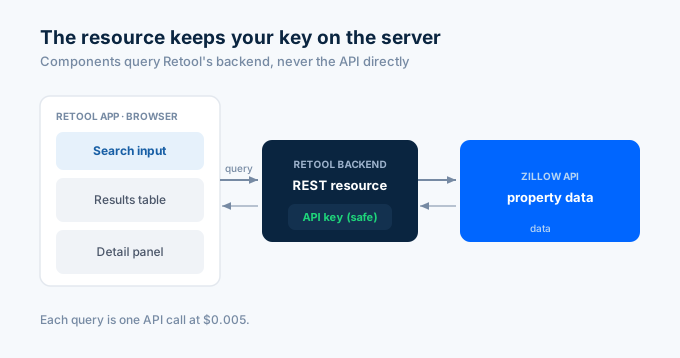
Each API call costs 1 credit ($0.005). For API key setup, see the step-by-step guide.
How do I connect the API as a resource?
Retool calls an external API a resource. You configure it once, then every query in your app can use it.
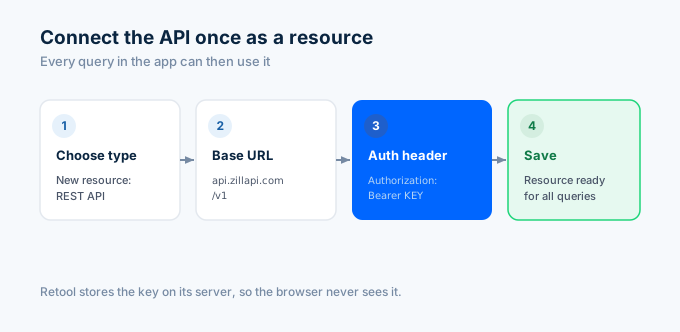
In Retool, go to Resources and create a new one. Choose “REST API.” Fill in these settings.
| Setting | Value |
|---|---|
| Name | Zillapi |
| Base URL | https://api.zillapi.com/v1 |
| Header | Authorization: Bearer YOUR_API_KEY |
Replace YOUR_API_KEY with your key from zillapi.com. Save the resource. Retool stores the key on its server, so it never reaches the browser.
Because the base URL is set on the resource, your queries only need the path, like /properties/by-address.
How do I build the search query?
Add a query that looks up a property by address. In the app editor, create a new query against the Zillapi resource.
| Query setting | Value |
|---|---|
| Resource | Zillapi |
| Method | GET |
| URL path | /properties/by-address |
| URL param: address | {{ addressInput.value }} |
| URL param: fields | address,zestimate,rentZestimate,bedrooms,bathrooms,livingArea,yearBuilt |
Name the query lookupProperty. The {{ addressInput.value }} expression reads the value from a text input component named addressInput. When the query runs, Retool fills the address from whatever the user typed.
Add a text input to the canvas named addressInput and a button. Set the button to trigger lookupProperty on click.
How do I show results in a table?
For a search that returns many properties, use the search endpoint and a table component.
Create a second query named searchProperties.
| Query setting | Value |
|---|---|
| Resource | Zillapi |
| Method | POST |
| URL path | /search |
| Body (JSON) | see below |
{ "location": "{{ locationInput.value }}", "listingStatus": "FOR_SALE", "homeType": ["SINGLE_FAMILY"], "minPrice": {{ minPriceInput.value || 0 }}, "maxPrice": {{ maxPriceInput.value || 9999999 }}}Then drag a Table component onto the canvas. Set its Data source to the query result.
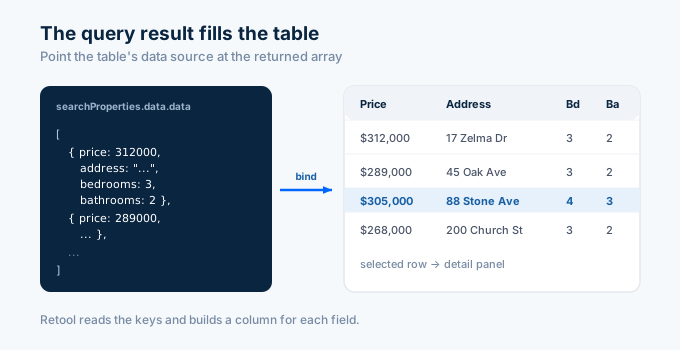
// Table component → Data source{{ searchProperties.data.data }}The expression points the table at the array the API returned. Retool reads the keys and creates a column for each. Hide the columns you do not need and rename the rest in the table settings.
When a user enters a location and runs the query, the table fills with matching properties.
How do I build the full dashboard?
A research dashboard has three parts: a search area, a results table, and a detail panel that shows the selected property.
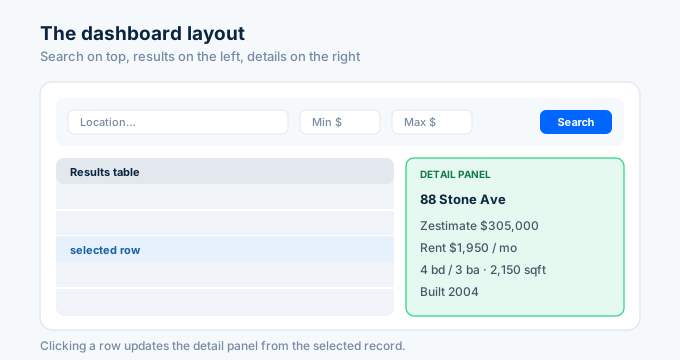
Lay out the canvas like this. A container at the top holds the location input, price filters, and the search button. The table sits below on the left. A container on the right holds the detail panel.
In the detail panel, add text components and bind each to the selected row.
// Detail panel text components{{ propertyTable.selectedRow.address.streetAddress }}{{ "$" + propertyTable.selectedRow.zestimate.toLocaleString() }}{{ propertyTable.selectedRow.bedrooms + " bd / " + propertyTable.selectedRow.bathrooms + " ba" }}{{ propertyTable.selectedRow.livingArea.toLocaleString() + " sqft" }}Each component reads from propertyTable.selectedRow, so the panel updates the moment a user clicks a different row. No extra query needed for data the table already holds.
How do I drill into full details on row click?
The search result has the basics. To pull the full 300-field record for a selected property, run a second query on row selection.
Create a query named propertyDetail.
| Query setting | Value |
|---|---|
| Resource | Zillapi |
| Method | GET |
| URL path | /properties/{{ propertyTable.selectedRow.zpid }} |
Then set the query to run automatically when the table selection changes. In the query settings, add an event so it triggers on propertyTable selection.
// propertyDetail runs when a row is selected; bind panel fields to it{{ propertyDetail.data.data.taxAssessedValue }}{{ propertyDetail.data.data.yearBuilt }}{{ propertyDetail.data.data.lotAreaValue }}Now clicking a row pulls the complete record into the detail panel. This is the master-detail pattern: a list query for the table, a detail query for the selection. Each row click costs 1 credit.
How does this compare to building from scratch?
You could build the same tool with a custom React frontend and a backend. Retool plus the API gets you there faster.
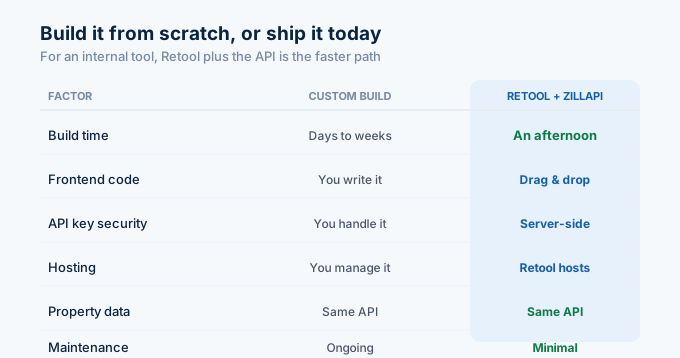
| Factor | Custom build | Retool + Zillapi |
|---|---|---|
| Build time | Days to weeks | An afternoon |
| Frontend code | You write it | Drag and drop |
| API key security | You handle it | Resource keeps it server-side |
| Hosting | You manage it | Retool hosts it |
| Property data | Same API | Same API |
| Maintenance | Ongoing | Minimal |
For a public, high-traffic product, a custom frontend gives you full control. For an internal tool your team uses, Retool plus the API is the faster path.
An internal tool serving 1,000 lookups a month costs $5 for the data. The API is the cheap part of the build.
How do I get started?
Go to zillapi.com and sign up. You get 100 free credits with no credit card required. Then open Retool, add the Zillapi REST resource, and build the search query.
Start with the property lookup query and a single text input. Confirm it returns data. Then add the table, the detail panel, and the row-click drill-down.
For the Next.js version of a property tool, see the Next.js guide. For the no-code database version, see the Airtable guide. For property field documentation, see the property data guide.
Frequently asked questions
Can I connect the Zillow API to Retool?
Yes. Add a REST API resource in Retool with the base URL set to the Zillapi endpoint and an Authorization header holding your API key. Then create queries that call the property and search endpoints. Bind the query results to a table or text components. The whole setup takes about 15 minutes. Each lookup costs 1 credit ($0.005), and the free tier gives 100 credits at signup.
How do I build a property dashboard in Retool?
Add a search input, a table, and a detail panel to the canvas. Wire a search query to the API that runs on the input value, and set the table’s data source to the query result. When a user selects a table row, a second query pulls the full property details into the panel. This gives you a working internal property research tool with no frontend code.
Do I need to code to use the Zillow API in Retool?
Barely. Retool is low-code. You configure the API resource in a form, and you write small JavaScript expressions in double curly braces to pass inputs and read results. The examples in this guide show exactly what to paste. Most of the work is dragging components and pointing them at queries.
How much does it cost to build a Retool property tool?
Retool has a free tier for small teams, with paid plans for larger ones. The API costs $5 per month for 1,000 property lookups or $54 per year for 12,000. An internal tool serving 1,000 lookups a month costs $5 for the data. You get 100 free API credits at signup with no credit card.
How do I keep my API key safe in Retool?
Store the API key in the resource configuration, not in a query or component. Retool keeps resource credentials on the server and does not expose them to the browser. Every query runs through Retool’s backend, so the key never reaches the client. For extra control, use Retool’s environment variables or secrets manager.
Can I trigger a property lookup from a table row in Retool?
Yes. Set a query to read the selected row of your table with a JavaScript expression, then pass a field like the address or zpid as a parameter. Set the query to run when the selection changes. The detail panel then shows the full record for whichever row the user clicks. This is the standard master-detail pattern in Retool.