If you’ve been using R for real estate analysis, you probably know the ZillowR package. It wrapped Zillow’s GetZestimate, GetComps, and GetDeepComps endpoints into clean R functions. It was great.
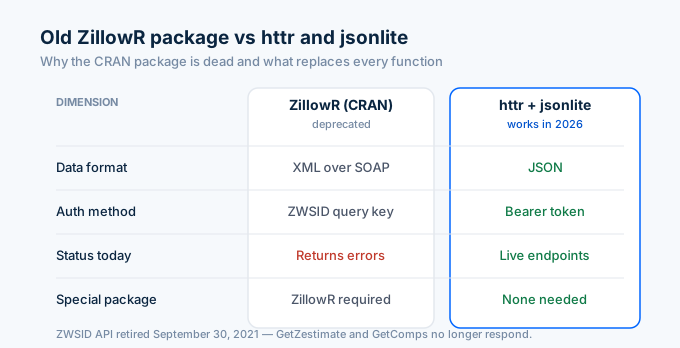
It stopped working on September 30, 2021. Zillow killed the API it depended on.
The package is still on CRAN, but every function returns errors now. The realEstAnalytics package that extended it is in the same state. If you install either one today, nothing works.
Here’s how to pull Zillow property data in R in 2026 using httr and jsonlite. No specialized package needed.
How do I look up a property in R?
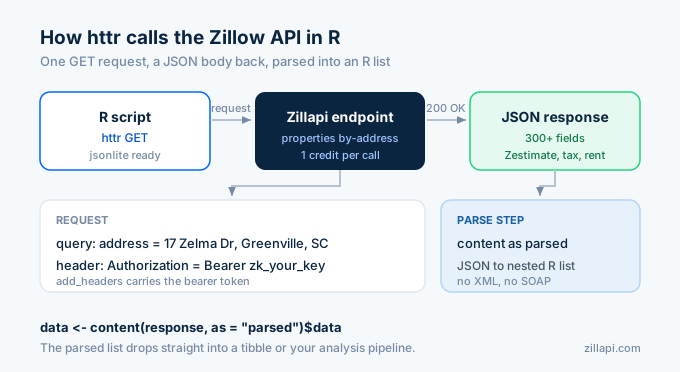
Call the Zillapi /v1/properties/by-address endpoint with httr. Parse the JSON response with jsonlite. The result is a nested list containing 300+ property fields including the Zestimate, rent Zestimate, tax records, and price history.
library(httr)library(jsonlite)
api_key <- Sys.getenv("ZILLAPI_KEY")
response <- GET(  "https://api.zillapi.com/v1/properties/by-address",  query = list(address = "1600 Pennsylvania Ave NW, Washington DC 20500"),  add_headers(Authorization = paste("Bearer", api_key)))
data <- content(response, as = "parsed")$data
cat(sprintf("Address: %s\n", data$address$streetAddress))cat(sprintf("Zestimate: $%s\n", format(data$zestimate, big.mark = ",")))cat(sprintf("Rent Zestimate: $%s/mo\n", format(data$rentZestimate, big.mark = ",")))cat(sprintf("Beds: %d | Baths: %d | Sqft: %s\n",    data$bedrooms, data$bathrooms, format(data$livingArea, big.mark = ",")))cat(sprintf("Year Built: %d\n", data$yearBuilt))cat(sprintf("Tax Assessed: $%s\n", format(data$taxAssessedValue, big.mark = ",")))
Output:
Address: 1600 Pennsylvania Ave NWZestimate: $305,100Rent Zestimate: $1,850/moBeds: 3 | Baths: 2 | Sqft: 1,432Year Built: 1965Tax Assessed: $187,400That’s the entire setup. httr::GET sends the request. content() parses the JSON into an R list. No XML parsing, no SOAP, no deprecated package.
How do I convert the response to a tibble?
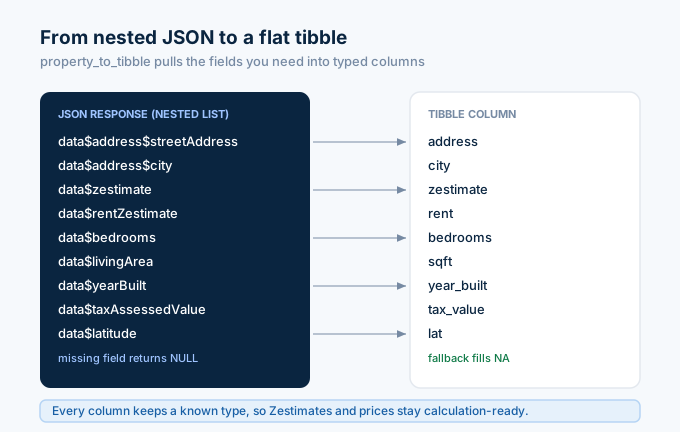
The API returns a nested JSON object. For analysis in the tidyverse, you want a flat tibble. Here’s how to extract the fields you need:
library(dplyr)library(tibble)
property_to_tibble <- function(data) {  tibble(    address     = data$address$streetAddress,    city        = data$address$city,    state       = data$address$state,    zipcode     = data$address$zipcode,    zestimate   = data$zestimate %||% NA_integer_,    rent        = data$rentZestimate %||% NA_integer_,    price       = data$price %||% NA_integer_,    bedrooms    = data$bedrooms %||% NA_integer_,    bathrooms   = data$bathrooms %||% NA_integer_,    sqft        = data$livingArea %||% NA_integer_,    year_built  = data$yearBuilt %||% NA_integer_,    home_type   = data$homeType %||% NA_character_,    tax_value   = data$taxAssessedValue %||% NA_integer_,    tax_annual  = data$taxAnnualAmount %||% NA_integer_,    lat         = data$latitude %||% NA_real_,    lng         = data$longitude %||% NA_real_  )}
prop <- property_to_tibble(data)print(prop)
The %||% operator handles missing fields gracefully. Some properties don’t have a listing price or tax record, so the fallback to NA keeps your tibble consistent. Every column has a known type regardless of what the API returns.
How do I batch lookup multiple properties?
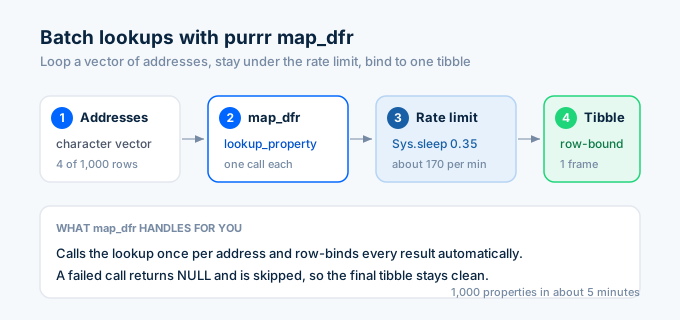
Use purrr::map_dfr to loop through addresses and bind results into a single tibble. Add a rate limiter to stay under the API’s 200 requests per minute limit.
library(purrr)
lookup_property <- function(address, api_key) {  response <- GET(    "https://api.zillapi.com/v1/properties/by-address",    query = list(      address = address,      fields = "zestimate,rentZestimate,bedrooms,bathrooms,livingArea,address,taxAssessedValue,taxAnnualAmount"    ),    add_headers(Authorization = paste("Bearer", api_key))  )
  if (status_code(response) != 200) {    warning(sprintf("Failed for %s: HTTP %d", address, status_code(response)))    return(NULL)  }
  Sys.sleep(0.35)  # rate limit: ~170/min  data <- content(response, as = "parsed")$data  property_to_tibble(data)}
addresses <- c(  "1600 Pennsylvania Ave NW, Washington DC 20500",  "100 Main St, Washington DC 29601",  "45 Augusta St, Washington DC 29601",  "220 N Pleasantburg Dr, Washington DC 29607")
properties <- map_dfr(addresses, lookup_property, api_key = api_key)print(properties)
map_dfr calls lookup_property for each address and row-binds the results. If a lookup fails, it returns NULL and map_dfr skips it. You end up with a clean tibble of all successful lookups.
The fields parameter trims the response to only the columns you need. That cuts the payload from ~3,000 tokens to under 200, which matters when you’re processing hundreds of properties.
How do I calculate investment metrics?
Once you have a tibble of properties, add investment columns with dplyr::mutate.
investment_analysis <- properties %>%  filter(!is.na(zestimate), !is.na(rent)) %>%  mutate(    gross_annual   = rent * 12,    gross_yield    = round((gross_annual / zestimate) * 100, 1),    one_pct_rule   = round((rent / zestimate) * 100, 2),    # Estimated expenses    vacancy        = gross_annual * 0.08,    insurance      = 1200,    maintenance    = zestimate * 0.01,    total_expenses = coalesce(tax_annual, 0) + vacancy + insurance + maintenance,    noi            = gross_annual - total_expenses,    cap_rate       = round((noi / zestimate) * 100, 1)  ) %>%  arrange(desc(gross_yield))
investment_analysis %>%  select(address, zestimate, rent, gross_yield, cap_rate) %>%  print()
Every standard investment metric works in a single mutate call. Gross yield, the 1% rule, NOI, and cap rate. The investor guide covers these formulas in detail with the math behind each one.
How do I search for listings?
The search endpoint takes a POST request with a bounding box and filters. Use httr::POST with a JSON body.
search_listings <- function(bbox, status = "FOR_SALE", max_price = NULL,                            min_beds = NULL, home_types = NULL, api_key) {  body <- list(    bbox = bbox,    listingStatus = status  )  if (!is.null(max_price)) body$maxPrice <- max_price  if (!is.null(min_beds)) body$minBedrooms <- min_beds  if (!is.null(home_types)) body$homeType <- home_types
  response <- POST(    "https://api.zillapi.com/v1/search",    body = toJSON(body, auto_unbox = TRUE),    content_type_json(),    add_headers(Authorization = paste("Bearer", api_key))  )
  if (status_code(response) != 200) {    warning(sprintf("Search failed: HTTP %d", status_code(response)))    return(tibble())  }
  results <- content(response, as = "parsed")$data  map_dfr(results, property_to_tibble)}
# Search Washington DCwashington <- search_listings(  bbox = list(west = -82.45, south = 34.80, east = -82.35, north = 34.90),  status = "FOR_SALE",  max_price = 400000,  min_beds = 3,  home_types = list("SINGLE_FAMILY", "TOWNHOUSE"),  api_key = api_key)
cat(sprintf("Found %d listings\n", nrow(washington)))washington %>%  select(address, price, zestimate, bedrooms, sqft) %>%  head(10) %>%  print()
One search call costs 1 credit regardless of how many listings come back. The map_dfr inside the function converts every listing into a row of the same tibble structure you used for individual lookups. That means you can pass search results directly into the investment analysis pipeline.
How do I visualize property data with ggplot2?
R’s plotting ecosystem is where this gets interesting. Here are two visualizations that investors and analysts build most.
Price vs. rent Zestimate scatter plot
library(ggplot2)
ggplot(washington, aes(x = zestimate, y = rent)) +  geom_point(aes(color = bedrooms), size = 3, alpha = 0.7) +  geom_smooth(method = "lm", se = FALSE, color = "gray40") +  scale_x_continuous(labels = scales::dollar_format()) +  scale_y_continuous(labels = scales::dollar_format()) +  scale_color_viridis_c() +  labs(    title = "Zestimate vs. Rent Zestimate",    subtitle = "Washington DC, FOR_SALE listings",    x = "Zestimate (Home Value)",    y = "Rent Zestimate (Monthly)",    color = "Beds"  ) +  theme_minimal()
Points above the trend line have higher rent relative to their value. Those are the properties with better yield potential.
Gross yield distribution
washington_inv <- washington %>%  filter(!is.na(zestimate), !is.na(rent), zestimate > 0) %>%  mutate(gross_yield = (rent * 12 / zestimate) * 100)
ggplot(washington_inv, aes(x = gross_yield)) +  geom_histogram(binwidth = 0.5, fill = "#2563eb", alpha = 0.8) +  geom_vline(xintercept = 6, linetype = "dashed", color = "red") +  annotate("text", x = 6.3, y = Inf, label = "6% threshold",           vjust = 2, color = "red", size = 3.5) +  labs(    title = "Gross Rent Yield Distribution",    subtitle = "Washington DC, FOR_SALE listings",    x = "Gross Yield (%)",    y = "Count"  ) +  theme_minimal()
The red dashed line marks the 6% yield threshold. Properties to the right of it are worth deeper analysis. This histogram takes one search call (1 credit) and shows you the yield distribution of an entire market in seconds.
How do I use this in an R Shiny app?
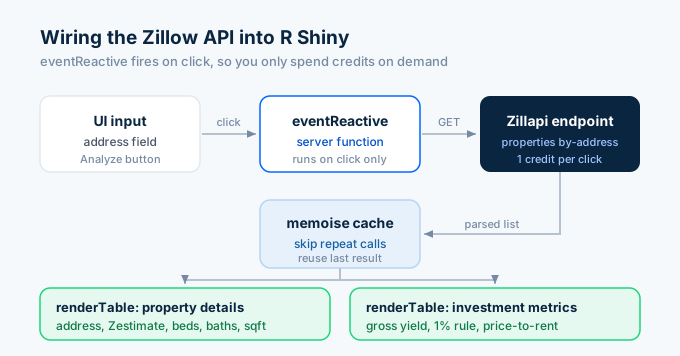
Shiny turns the API into an interactive dashboard. Here’s a minimal app that lets users enter an address and see the property analysis:
library(shiny)
ui <- fluidPage(  titlePanel("Property Analyzer"),  sidebarLayout(    sidebarPanel(      textInput("address", "Enter address:",                value = "1600 Pennsylvania Ave NW, Washington DC 20500"),      actionButton("lookup", "Analyze", class = "btn-primary")    ),    mainPanel(      h4("Property Details"),      tableOutput("details"),      h4("Investment Metrics"),      tableOutput("metrics")    )  ))
server <- function(input, output, session) {  prop_data <- eventReactive(input$lookup, {    response <- GET(      "https://api.zillapi.com/v1/properties/by-address",      query = list(address = input$address),      add_headers(Authorization = paste("Bearer", Sys.getenv("ZILLAPI_KEY")))    )    content(response, as = "parsed")$data  })
  output$details <- renderTable({    d <- prop_data()    tibble(      Field = c("Address", "Zestimate", "Rent Estimate", "Beds/Baths", "Sqft", "Year Built"),      Value = c(        d$address$streetAddress,        paste0("$", format(d$zestimate, big.mark = ",")),        paste0("$", format(d$rentZestimate, big.mark = ","), "/mo"),        paste0(d$bedrooms, " / ", d$bathrooms),        format(d$livingArea, big.mark = ","),        as.character(d$yearBuilt)      )    )  })
  output$metrics <- renderTable({    d <- prop_data()    rent <- d$rentZestimate    value <- d$zestimate    gross_yield <- round((rent * 12 / value) * 100, 1)    one_pct <- round((rent / value) * 100, 2)
    tibble(      Metric = c("Gross Yield", "1% Rule", "Annual Rent", "Price-to-Rent Ratio"),      Value = c(        paste0(gross_yield, "%"),        paste0(one_pct, "%"),        paste0("$", format(rent * 12, big.mark = ",")),        paste0(round(value / (rent * 12), 1), "x")      )    )  })}
shinyApp(ui, server)
The eventReactive fires only when the user clicks “Analyze,” so you don’t burn credits on every keystroke. For production Shiny apps, wrap the API call in memoise::memoise to cache results and avoid redundant lookups.
What happened to the old ZillowR package?
The ZillowR package (version 1.0.0 on CRAN) provided R functions for Zillow’s ZWSID API: GetZestimate, GetSearchResults, GetComps, GetDeepComps, and a few others. It parsed the XML responses into R lists automatically.
Zillow retired the ZWSID API on September 30, 2021. Every ZillowR function started returning errors that day. The package maintainer added a deprecation notice but left the package on CRAN for reference.
The realEstAnalytics package by stharms extended ZillowR with additional convenience functions and vignettes. It’s in the same state.
You don’t need a Zillow-specific R package in 2026. The replacement APIs return JSON (not XML), use bearer token auth (not query parameter keys), and work with httr and jsonlite directly. The code in this article replaces every function the old ZillowR package provided.
How much does this cost for R users?
The API doesn’t charge differently by language. R, Python, JavaScript, PHP, and cURL all hit the same endpoints at the same price.
| Plan | Credits | Cost | Property lookups |
|---|---|---|---|
| Free | 100 (one-time) | $0 | 100 |
| Monthly | 1,000/month | $5/mo | 1,000 |
| Annual | 12,000/year | $54/yr | 12,000 |
No credit card needed for the free tier. 100 property lookups for $0. That’s enough to build and test a complete R analysis pipeline.
Get your first property in R in 60 seconds
Go to zillapi.com. Sign up with your email. Get 100 free credits.
Set your API key as an environment variable in your .Renviron file:
ZILLAPI_KEY=zk_your_key_hereRestart R, copy the httr example from above, and run it. You’ll have Zillow property data in a tibble before you finish reading this sentence.
For tutorials in other languages, see our Python guide, JavaScript guide, or PHP guide. For investment analysis workflows, see the investor guide. For getting your API key, see our step-by-step walkthrough.
Frequently asked questions
Does the ZillowR package still work in 2026?
No. The ZillowR CRAN package depended on the Zillow ZWSID API, which Zillow retired on September 30, 2021. Functions like GetZestimate, GetComps, and GetDeepComps all return errors now. The package was formally deprecated on CRAN. To pull Zillow property data in R in 2026, use httr and jsonlite with a third-party REST API like Zillapi. No specialized R package is needed.
How do I get Zillow data in R without the ZillowR package?
Use httr to send a GET request to the Zillapi /v1/properties/by-address endpoint with your API key in the Authorization header. Parse the JSON response with jsonlite. The result is a nested list you can flatten into a tibble with one line of code. Each call returns 300+ property fields including Zestimates, tax records, and price history.
Can I do batch property lookups in R?
Yes. Use purrr::map_dfr to loop through a vector of addresses and bind the results into a single tibble. At 200 requests per minute on the monthly plan, you can process 1,000 properties in 5 minutes. Add Sys.sleep(0.35) between calls to stay under the rate limit. Each lookup costs 1 credit ($0.005).
Can I use the Zillow API with the tidyverse?
Yes. The JSON response converts cleanly into tibbles with tibble or as_tibble. You can pipe the results through dplyr for filtering and mutating, use ggplot2 for visualization, and use purrr for batch processing. The API returns numeric fields as integers, so Zestimates and prices work directly in calculations without type conversion.
How much does Zillow API access cost for R users?
Zillapi gives 100 free credits at signup with no credit card. Each API call costs 1 credit and returns 300+ fields. After the free credits, plans start at $5 per month for 1,000 credits. The API works the same regardless of which language you call it from. R, Python, and JavaScript all hit the same endpoints.
Can I pull Zillow data into an R Shiny app?
Yes. Call the Zillapi endpoint from inside a reactive expression in your Shiny server function. Cache the results with reactiveVal or memoise to avoid repeated API calls when users interact with the dashboard. The JSON response works directly with DT for tables, plotly for interactive charts, and leaflet for maps.