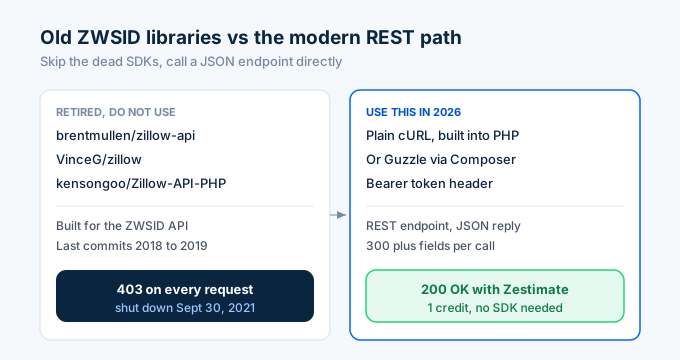
If you Google “Zillow API PHP,” you’ll find packages on Packagist and GitHub that haven’t been updated since 2019. They all depend on the ZWSID API that Zillow killed on September 30, 2021. Every one of them returns 403 errors now.
You don’t need a Zillow-specific PHP library in 2026. The modern path to Zillow property data is a REST API that returns JSON. PHP’s built-in cURL handles it. So does Guzzle. No special SDK required.
Here’s how to pull Zestimates, search listings, and build property tools with PHP using working code.
How do I look up a property with PHP?
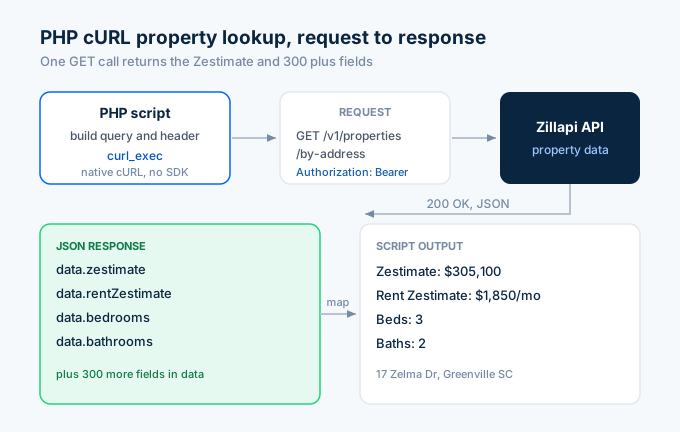
Call the Zillapi /v1/properties/by-address endpoint with any U.S. address. The JSON response includes the Zestimate, rent Zestimate, beds, baths, square footage, tax history, and 300+ other fields. One call. One credit. Plain cURL.
<?php$address = '1600 Pennsylvania Ave NW, Washington DC 20500';$apiKey  = getenv('ZILLAPI_KEY');
$url = 'https://api.zillapi.com/v1/properties/by-address?'     . http_build_query(['address' => $address]);
$ch = curl_init($url);curl_setopt_array($ch, [    CURLOPT_RETURNTRANSFER => true,    CURLOPT_HTTPHEADER     => ["Authorization: Bearer {$apiKey}"],]);
$response = curl_exec($ch);$status   = curl_getinfo($ch, CURLINFO_HTTP_CODE);curl_close($ch);
if ($status === 200) {    $data = json_decode($response, true)['data'];    echo "Zestimate: $" . number_format($data['zestimate']) . "\n";    echo "Rent Zestimate: $" . number_format($data['rentZestimate']) . "/mo\n";    echo "Beds: {$data['bedrooms']} | Baths: {$data['bathrooms']}\n";} else {    echo "Error: HTTP {$status}\n";}
Output:
Zestimate: $305,100Rent Zestimate: $1,850/moBeds: 3 | Baths: 2That’s the entire integration. Build the URL, set the bearer token header, decode the JSON. No XML parsing, no SOAP, no SDK installation.
You can also look up properties by Zillow URL or ZPID:
// By Zillow URL$url = 'https://api.zillapi.com/v1/properties/by-url?'     . http_build_query(['url' => 'https://www.zillow.com/homedetails/1600-Pennsylvania-Ave-NW-Washington-DC-20500/123456_zpid/']);
// By ZPID$url = 'https://api.zillapi.com/v1/properties/by-zpid?'     . http_build_query(['zpid' => '123456']);
All three endpoints return the same 300+ field response. Use whichever identifier you have.
How do I use Guzzle instead of cURL?
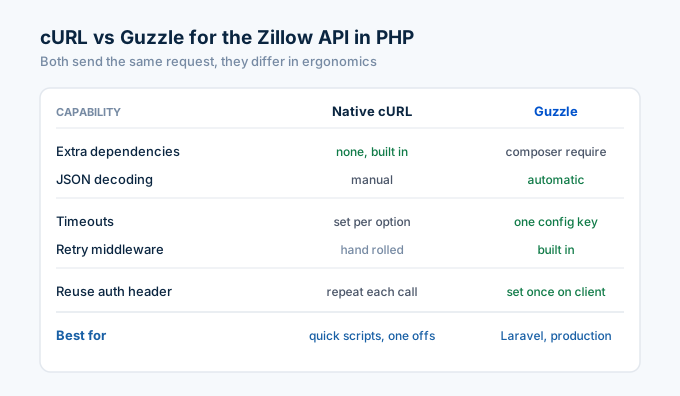
For production PHP applications, Guzzle gives you cleaner syntax, automatic JSON decoding, configurable timeouts, and retry middleware. Install it with Composer:
composer require guzzlehttp/guzzleThen the same property lookup becomes:
<?phprequire 'vendor/autoload.php';
use GuzzleHttp\Client;
$client = new Client([    'base_uri' => 'https://api.zillapi.com',    'headers'  => [        'Authorization' => 'Bearer ' . getenv('ZILLAPI_KEY'),    ],    'timeout' => 10,]);
$response = $client->get('/v1/properties/by-address', [    'query' => ['address' => '1600 Pennsylvania Ave NW, Washington DC 20500'],]);
$data = json_decode($response->getBody(), true)['data'];
echo "Zestimate: $" . number_format($data['zestimate']) . "\n";echo "Year Built: {$data['yearBuilt']}\n";echo "Living Area: " . number_format($data['livingArea']) . " sqft\n";
The base_uri and headers in the client constructor mean you set the API key once. Every subsequent call inherits it. That matters when you’re making dozens of calls in a single script.
How do I search for listings with PHP?
The search endpoint takes a POST request with a JSON body. Pass a bounding box to define the geographic area and add filters for price, bedrooms, property type, and listing status.
<?php$apiKey  = getenv('ZILLAPI_KEY');$payload = json_encode([    'bbox' => [        'west'  => -82.45,        'south' => 34.80,        'east'  => -82.35,        'north' => 34.90,    ],    'listingStatus' => 'FOR_SALE',    'maxPrice'      => 400000,    'minBedrooms'   => 3,    'homeType'      => ['SINGLE_FAMILY', 'TOWNHOUSE'],]);
$ch = curl_init('https://api.zillapi.com/v1/search');curl_setopt_array($ch, [    CURLOPT_RETURNTRANSFER => true,    CURLOPT_POST           => true,    CURLOPT_POSTFIELDS     => $payload,    CURLOPT_HTTPHEADER     => [        "Authorization: Bearer {$apiKey}",        'Content-Type: application/json',    ],]);
$response = curl_exec($ch);curl_close($ch);
$listings = json_decode($response, true)['data'];echo "Found " . count($listings) . " listings\n\n";
foreach (array_slice($listings, 0, 5) as $listing) {    $addr  = $listing['address']['streetAddress'];    $price = number_format($listing['price']);    $beds  = $listing['bedrooms'];    $baths = $listing['bathrooms'];    echo "  {$addr}: \${$price} - {$beds}bd/{$baths}ba\n";}
One search call costs 1 credit regardless of how many listings come back. The response includes each property’s listing price, Zestimate, photos, listing agent contact info, and the full field set.
How do I add Zillow data to WordPress?
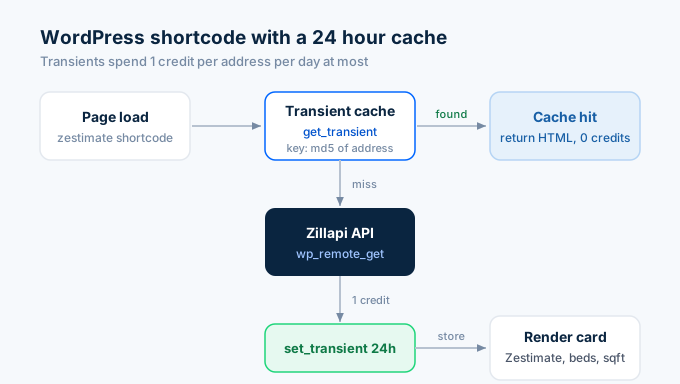
WordPress runs on PHP, so you can call the API directly from a plugin or theme function. The cleanest approach is a shortcode that caches results with the transients API.
<?php// Add this to your theme's functions.php or a custom plugin
function zillapi_zestimate_shortcode($atts) {    $atts = shortcode_atts(['address' => ''], $atts);    if (empty($atts['address'])) {        return '<p>Please provide an address.</p>';    }
    // Check cache first (24-hour TTL)    $cache_key = 'zillapi_' . md5($atts['address']);    $cached    = get_transient($cache_key);    if ($cached !== false) {        return $cached;    }
    // Call the API    $api_key  = defined('ZILLAPI_KEY') ? ZILLAPI_KEY : '';    $response = wp_remote_get(        'https://api.zillapi.com/v1/properties/by-address?'        . http_build_query(['address' => $atts['address']]),        ['headers' => ['Authorization' => "Bearer {$api_key}"]]    );
    if (is_wp_error($response)) {        return '<p>Could not fetch property data.</p>';    }
    $body = json_decode(wp_remote_retrieve_body($response), true);    $data = $body['data'];
    $html = sprintf(        '<div class="zillapi-card">            <strong>%s</strong><br>            Zestimate: $%s<br>            Rent Estimate: $%s/mo<br>            %d bed / %d bath / %s sqft        </div>',        esc_html($data['address']['streetAddress']),        number_format($data['zestimate']),        number_format($data['rentZestimate']),        $data['bedrooms'],        $data['bathrooms'],        number_format($data['livingArea'])    );
    // Cache for 24 hours    set_transient($cache_key, $html, DAY_IN_SECONDS);
    return $html;}add_shortcode('zestimate', 'zillapi_zestimate_shortcode');
Use it in any post or page:
[zestimate address="1600 Pennsylvania Ave NW, Washington DC 20500"]Store your API key in wp-config.php so it never appears in your plugin code:
define('ZILLAPI_KEY', 'zk_your_key_here');The transient cache prevents repeated API calls on every page load. A 24-hour TTL means each property uses 1 credit per day at most, no matter how many visitors view the page.
How do I use this in Laravel?
Laravel’s HTTP client wraps Guzzle with a cleaner API. Here’s a service class that handles property lookups:
<?php
namespace App\Services;
use Illuminate\Support\Facades\Http;use Illuminate\Support\Facades\Cache;
class ZillapiService{    private string $baseUrl = 'https://api.zillapi.com';    private string $apiKey;
    public function __construct()    {        $this->apiKey = config('services.zillapi.key');    }
    public function getProperty(string $address): array    {        return Cache::remember(            'property_' . md5($address),            now()->addHours(24),            fn () => Http::withToken($this->apiKey)                ->get("{$this->baseUrl}/v1/properties/by-address", [                    'address' => $address,                ])                ->throw()                ->json('data')        );    }
    public function search(array $filters): array    {        return Http::withToken($this->apiKey)            ->post("{$this->baseUrl}/v1/search", $filters)            ->throw()            ->json('data');    }}
Add your key to config/services.php:
'zillapi' => [ 'key' => env('ZILLAPI_KEY'),],And your .env:
ZILLAPI_KEY=zk_your_key_hereThen inject the service anywhere in your Laravel app:
// In a controllerpublic function show(Request $request, ZillapiService $zillapi){ $property = $zillapi->getProperty($request->input('address')); return view('property.show', compact('property'));}Laravel’s Cache::remember handles the caching. Http::withToken sets the bearer auth header. ->throw() converts 4xx and 5xx responses into exceptions your error handler catches.
How do I process properties in bulk?
For screening dozens or hundreds of properties, loop through your addresses with a rate limiter. The API allows 200 requests per minute on the monthly plan.
<?php$addresses = [    '1600 Pennsylvania Ave NW, Washington DC 20500',    '100 Main St, Washington DC 29601',    '45 Augusta St, Washington DC 29601',    // ... more addresses];
$apiKey  = getenv('ZILLAPI_KEY');$results = [];
foreach ($addresses as $i => $address) {    $url = 'https://api.zillapi.com/v1/properties/by-address?'         . http_build_query([             'address' => $address,             'fields'  => 'zestimate,rentZestimate,address,bedrooms,bathrooms',         ]);
    $ch = curl_init($url);    curl_setopt_array($ch, [        CURLOPT_RETURNTRANSFER => true,        CURLOPT_HTTPHEADER     => ["Authorization: Bearer {$apiKey}"],    ]);
    $response = curl_exec($ch);    $status   = curl_getinfo($ch, CURLINFO_HTTP_CODE);    curl_close($ch);
    if ($status === 200) {        $data = json_decode($response, true)['data'];        if ($data['zestimate'] && $data['rentZestimate']) {            $yield = ($data['rentZestimate'] * 12 / $data['zestimate']) * 100;            $results[] = [                'address' => $address,                'zestimate' => $data['zestimate'],                'rent' => $data['rentZestimate'],                'yield' => round($yield, 1),            ];        }    }
    // Rate limit: 200/min = 1 every 300ms    if (($i + 1) % 200 === 0) {        sleep(60);    }    usleep(300000); // 300ms between calls}
// Sort by yield descendingusort($results, fn($a, $b) => $b['yield'] <=> $a['yield']);
echo "Top properties by gross rent yield:\n";foreach (array_slice($results, 0, 10) as $r) {    echo "  {$r['address']}: \${$r['rent']}/mo rent, "       . "\$" . number_format($r['zestimate']) . " value, "       . "{$r['yield']}% yield\n";}
The fields parameter trims the response to only the fields you need. That cuts the payload from ~3,000 tokens to under 100, which speeds up processing when you’re running hundreds of lookups.
At 200 requests per minute, you can screen 1,000 properties in about 5 minutes. Each lookup costs 1 credit.
How do I handle errors properly?
Production code needs to handle rate limits, network failures, and invalid addresses. Here’s a helper function with retry logic:
<?phpfunction zillapi_request(string $endpoint, array $params = [], int $maxRetries = 3): ?array{    $apiKey  = getenv('ZILLAPI_KEY');    $url     = "https://api.zillapi.com{$endpoint}?" . http_build_query($params);    $attempt = 0;
    while ($attempt < $maxRetries) {        $ch = curl_init($url);        curl_setopt_array($ch, [            CURLOPT_RETURNTRANSFER => true,            CURLOPT_HTTPHEADER     => ["Authorization: Bearer {$apiKey}"],            CURLOPT_TIMEOUT        => 10,            CURLOPT_CONNECTTIMEOUT => 5,        ]);
        $response = curl_exec($ch);        $status   = curl_getinfo($ch, CURLINFO_HTTP_CODE);        $error    = curl_error($ch);        curl_close($ch);
        // cURL error (network failure)        if ($error) {            $attempt++;            sleep(pow(2, $attempt)); // exponential backoff            continue;        }
        // Success        if ($status === 200) {            return json_decode($response, true)['data'];        }
        // Rate limited: wait and retry        if ($status === 429) {            $attempt++;            sleep(pow(2, $attempt));            continue;        }
        // Client error (bad address, missing param): don't retry        if ($status >= 400 && $status < 500) {            error_log("Zillapi {$status}: {$response}");            return null;        }
        // Server error: retry        $attempt++;        sleep(pow(2, $attempt));    }
    error_log("Zillapi failed after {$maxRetries} retries: {$endpoint}");    return null;}
// Usage$data = zillapi_request('/v1/properties/by-address', [    'address' => '1600 Pennsylvania Ave NW, Washington DC 20500',]);
if ($data) {    echo "Zestimate: $" . number_format($data['zestimate']) . "\n";} else {    echo "Lookup failed.\n";}
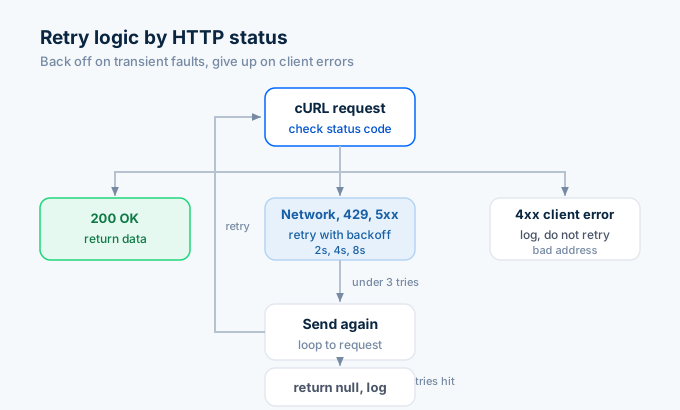
The function retries on network errors, 429 rate limits, and 5xx server errors with exponential backoff (2s, 4s, 8s). It gives up immediately on 4xx client errors like invalid addresses because retrying won’t fix those.
What fields does the API return?
Every property lookup returns 300+ fields. Here are the ones PHP developers use most:
| Field | Type | Example | What it tells you |
|---|---|---|---|
| zestimate | integer | 305100 | Zillow’s home value estimate in dollars |
| rentZestimate | integer | 1850 | Zillow’s monthly rent estimate in dollars |
| price | integer | 295000 | Current listing price (if listed) |
| bedrooms | integer | 3 | Bedroom count |
| bathrooms | integer | 2 | Bathroom count |
| livingArea | integer | 1432 | Square footage |
| yearBuilt | integer | 1965 | Year built |
| homeType | string | SINGLE_FAMILY | Property type |
| taxAssessedValue | integer | 187400 | County tax assessment |
| homeStatus | string | FOR_SALE | Current listing status |
| priceHistory | array | […] | Past sales and price changes |
| schools | array | […] | Nearby schools with ratings |
The fields parameter lets you request only what you need:
$params = [ 'address' => '1600 Pennsylvania Ave NW, Washington DC 20500', 'fields' => 'zestimate,rentZestimate,bedrooms,bathrooms,livingArea',];That cuts the response size significantly. Useful when you’re processing thousands of properties and want to minimize bandwidth and memory usage.
Why not use the old PHP Zillow libraries?
Three PHP packages for Zillow still appear in search results:
brentmullen/zillow-apion PackagistVinceG/zillowon GitHubkensongoo/Zillow-API-PHP-Libraryon GitHub
All three were built for the ZWSID API that Zillow retired on September 30, 2021. They return 403 errors on every request. The last commits on these repos are from 2018 and 2019.
You don’t need a Zillow-specific PHP library anymore. The replacement APIs use standard REST with JSON responses. PHP’s built-in cURL handles this natively. Guzzle handles it with cleaner syntax. Both approaches work without installing any Zillow-specific package.
Get your first Zestimate in 60 seconds
Go to zillapi.com. Sign up with your email. Get 100 free credits. No credit card.
Copy the cURL example from above, swap in your key, and run it. You’ll have a working Zillow data integration in PHP before your coffee gets cold.
For the full API reference, check our Python tutorial or JavaScript tutorial. For pricing details, see the complete cost breakdown. For getting your API key, see our step-by-step guide.
Frequently asked questions
Is there a Zillow API for PHP in 2026?
Not from Zillow directly. Zillow retired the public ZWSID API on September 30, 2021. The old PHP wrappers on Packagist (brentmullen/zillow-api) and GitHub (VinceG/zillow) no longer work. Third-party REST APIs like Zillapi return the same Zillow property data through standard HTTP endpoints. Any PHP version with cURL or Guzzle can call them. You get 100 free credits at signup with no credit card.
Do the old PHP Zillow libraries still work?
No. Every PHP library built for the Zillow ZWSID API stopped working on September 30, 2021. The packages on Packagist and GitHub all depend on endpoints Zillow shut down permanently. They return 403 errors on every request. You do not need a Zillow-specific PHP library in 2026 because the replacement APIs use standard REST with JSON responses that work with plain cURL or Guzzle.
Should I use cURL or Guzzle for the Zillow API in PHP?
For simple scripts and one-off lookups, native cURL works fine with zero dependencies. For production applications, Laravel projects, or anything that needs retries and connection pooling, use Guzzle. Guzzle adds automatic JSON decoding, configurable timeouts, and middleware support. Both methods send the same HTTP request to the same endpoint.
Can I use the Zillow API in WordPress with PHP?
Yes. Create a shortcode function that calls the Zillapi endpoint with wp_remote_get and caches the result with the WordPress transients API. The shortcode renders the Zestimate or property details anywhere you place it. Set the cache to 24 hours so you do not burn API credits on every page load. Store your API key in wp-config.php, not in the plugin code.
How much does Zillow API access cost for PHP developers?
Zillapi gives 100 free credits at signup with no credit card. Each successful API call costs 1 credit and returns 300+ fields including Zestimates, tax records, and listing data. After the free credits, plans start at $5 per month for 1,000 credits. The API works the same regardless of which language you call it from.
Can I search for property listings with PHP?
Yes. Send a POST request to the Zillapi /v1/search endpoint with a JSON body containing a bounding box, listing status, and optional filters like price range and bedroom count. The response is a JSON array of matching properties with listing details, photos, and Zestimates. One search call costs 1 credit regardless of how many results come back.