Next.js is the most popular React framework for production apps. It handles routing, server rendering, and API endpoints in one package. Developers use it to build real estate search tools, dashboards, and marketplaces.
The Zillow API fits cleanly into a Next.js app. You call it from a server-side route handler, which keeps your API key off the client. The frontend fetches property data from your own endpoint and renders it in React components.
Here is how to build a property search app with Next.js and the Zillapi REST API.
What are you building?
This guide builds a property search app with three parts: a server-side proxy, a search form, and a results grid.
| Part | What it does | Next.js feature |
|---|---|---|
| API proxy | Calls Zillapi with the key, returns data | Route handler (route.ts) |
| Search form | Collects filters from the user | Client component with state |
| Results grid | Renders property cards | Server or client component |
| Property page | Shows full details for one property | Dynamic route |
| Caching | Reduces repeat API calls | fetch revalidate option |
Each API call costs 1 credit ($0.005). For API key setup, see the step-by-step guide.
Why use a route handler instead of calling the API directly?
If you call the API from a client component, your API key ends up in the browser. Anyone can open the network tab, copy your key, and run up your bill.
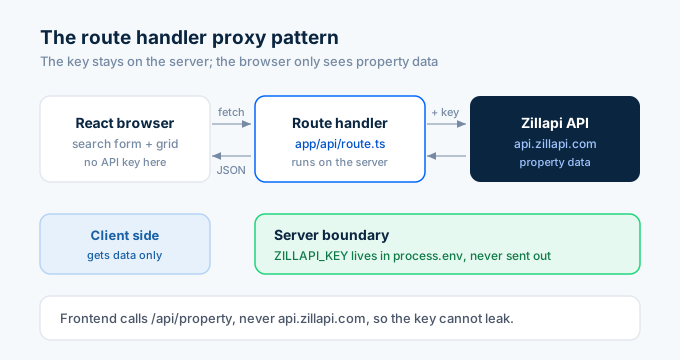
A route handler runs on the server. It adds the key to the request, calls the API, and returns only the property data to the browser. The key never leaves the server.
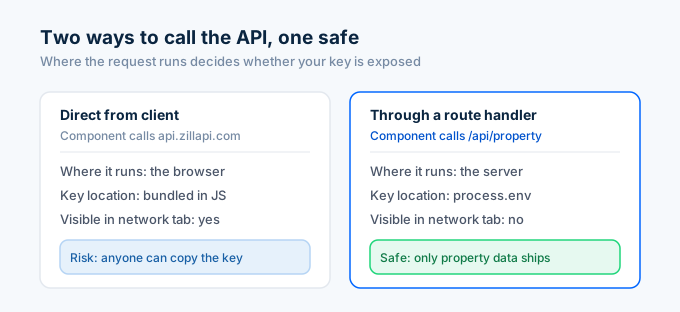
This is the proxy pattern. Your React code fetches from /api/properties, not from the Zillapi domain. Your key stays safe.
How do I set up the project?
Create a new Next.js app with the App Router and TypeScript.
npx create-next-app@latest property-search --typescript --app --tailwindcd property-searchAdd your API key to a .env.local file in the project root:
ZILLAPI_KEY=your_api_key_hereNext.js loads this into process.env on the server. Because it does not have the NEXT_PUBLIC_ prefix, it stays server-side only. The browser never sees it.
How do I build the API proxy?
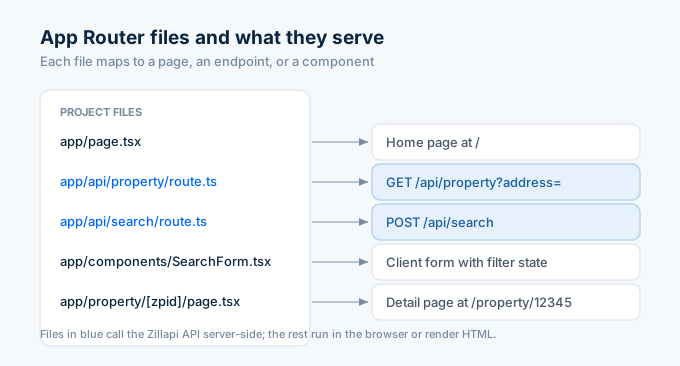
Create a route handler that proxies property lookups. Make a file at app/api/property/route.ts.
import { NextRequest, NextResponse } from "next/server";
export async function GET(request: NextRequest) {  const address = request.nextUrl.searchParams.get("address");
  if (!address) {    return NextResponse.json(      { error: "Address is required" },      { status: 400 }    );  }
  const params = new URLSearchParams({    address,    fields:      "address,zestimate,rentZestimate,bedrooms,bathrooms,livingArea,yearBuilt,homeType",  });
  const response = await fetch(    `https://api.zillapi.com/v1/properties/by-address?${params}`,    {      headers: {        Authorization: `Bearer ${process.env.ZILLAPI_KEY}`,      },      next: { revalidate: 86400 }, // cache for 24 hours    }  );
  if (!response.ok) {    return NextResponse.json(      { error: "Property not found" },      { status: response.status }    );  }
  const data = await response.json();  return NextResponse.json(data.data);}
This handler reads the address from the query string, calls the API with your key, and returns the property data. The revalidate: 86400 option caches each response for 24 hours, so repeat lookups of the same address do not spend new credits.
Your frontend now fetches from /api/property?address=... and never touches the API key.
How do I build the search proxy?
For a search app, you need a second route handler that proxies the search endpoint. Make a file at app/api/search/route.ts.
import { NextRequest, NextResponse } from "next/server";
export async function POST(request: NextRequest) {  const body = await request.json();
  const response = await fetch("https://api.zillapi.com/v1/search", {    method: "POST",    headers: {      Authorization: `Bearer ${process.env.ZILLAPI_KEY}`,      "Content-Type": "application/json",    },    body: JSON.stringify({      location: body.location,      listingStatus: "FOR_SALE",      homeType: body.homeType || ["SINGLE_FAMILY"],      minPrice: body.minPrice,      maxPrice: body.maxPrice,      minBedrooms: body.minBedrooms,    }),  });
  if (!response.ok) {    return NextResponse.json(      { error: "Search failed" },      { status: response.status }    );  }
  const data = await response.json();  return NextResponse.json(data.data);}
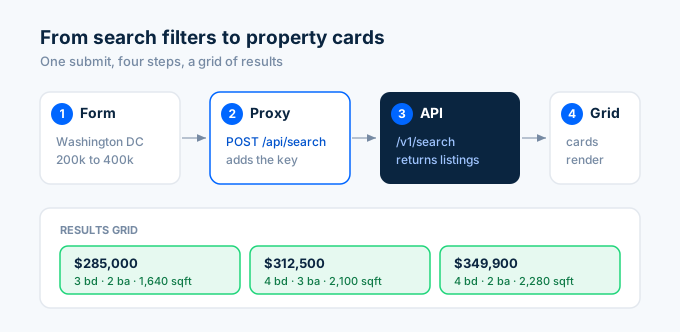
This handler takes search filters from the request body, forwards them to the API, and returns matching listings. The frontend posts filter values and gets back a list of properties.
How do I build the search form?
Create a client component for the search form. It collects filters and calls your search proxy. Make a file at app/components/SearchForm.tsx.
"use client";
import { useState } from "react";
interface Property {  zpid: string;  address: { streetAddress: string; city: string; state: string };  price: number;  bedrooms: number;  bathrooms: number;  livingArea: number;}
export default function SearchForm() {  const [location, setLocation] = useState("");  const [minPrice, setMinPrice] = useState("");  const [maxPrice, setMaxPrice] = useState("");  const [minBedrooms, setMinBedrooms] = useState("");  const [results, setResults] = useState<Property[]>([]);  const [loading, setLoading] = useState(false);
  async function handleSearch(e: React.FormEvent) {    e.preventDefault();    setLoading(true);
    const response = await fetch("/api/search", {      method: "POST",      headers: { "Content-Type": "application/json" },      body: JSON.stringify({        location,        minPrice: minPrice ? Number(minPrice) : undefined,        maxPrice: maxPrice ? Number(maxPrice) : undefined,        minBedrooms: minBedrooms ? Number(minBedrooms) : undefined,      }),    });
    const data = await response.json();    setResults(Array.isArray(data) ? data : []);    setLoading(false);  }
  return (    <div>      <form onSubmit={handleSearch} className="flex flex-wrap gap-3 mb-6">        <input          type="text"          placeholder="City or ZIP"          value={location}          onChange={(e) => setLocation(e.target.value)}          className="border rounded px-3 py-2"          required        />        <input          type="number"          placeholder="Min price"          value={minPrice}          onChange={(e) => setMinPrice(e.target.value)}          className="border rounded px-3 py-2 w-32"        />        <input          type="number"          placeholder="Max price"          value={maxPrice}          onChange={(e) => setMaxPrice(e.target.value)}          className="border rounded px-3 py-2 w-32"        />        <select          value={minBedrooms}          onChange={(e) => setMinBedrooms(e.target.value)}          className="border rounded px-3 py-2"        >          <option value="">Any beds</option>          <option value="1">1+ beds</option>          <option value="2">2+ beds</option>          <option value="3">3+ beds</option>          <option value="4">4+ beds</option>        </select>        <button          type="submit"          className="bg-blue-600 text-white rounded px-5 py-2"        >          Search        </button>      </form>
      {loading && <p>Searching...</p>}      <PropertyGrid properties={results} />    </div>  );}
The form holds each filter in React state. On submit, it posts the filters to your search proxy and stores the results. The PropertyGrid component renders them.
How do I render the results grid?
Add the grid component that displays each property as a card. Put this in the same file or import it.
function PropertyGrid({ properties }: { properties: Property[] }) {  if (properties.length === 0) {    return <p className="text-gray-500">No properties found.</p>;  }
  return (    <div className="grid grid-cols-1 md:grid-cols-3 gap-4">      {properties.map((p) => (        <div          key={p.zpid}          className="border rounded-lg p-4 hover:shadow-lg transition"        >          <h3 className="font-semibold text-lg">            ${p.price?.toLocaleString()}          </h3>          <p className="text-gray-700">            {p.address?.streetAddress}          </p>          <p className="text-gray-500 text-sm">            {p.address?.city}, {p.address?.state}          </p>          <div className="flex gap-4 mt-2 text-sm text-gray-600">            <span>{p.bedrooms} bd</span>            <span>{p.bathrooms} ba</span>            <span>{p.livingArea?.toLocaleString()} sqft</span>          </div>          <a            href={`/property/${p.zpid}`}            className="text-blue-600 text-sm mt-3 inline-block"          >            View details          </a>        </div>      ))}    </div>  );}
Each card shows the price, address, beds, baths, and square footage, with a link to the full property page. The grid uses Tailwind’s responsive classes to show one column on mobile and three on desktop.
How do I build the property detail page?
Use a dynamic route to show full details for one property. Create a file at app/property/[zpid]/page.tsx.
async function getProperty(zpid: string) {  const response = await fetch(    `https://api.zillapi.com/v1/properties/${zpid}`,    {      headers: {        Authorization: `Bearer ${process.env.ZILLAPI_KEY}`,      },      next: { revalidate: 86400 },    }  );  if (!response.ok) return null;  const data = await response.json();  return data.data;}
export default async function PropertyPage({  params,}: {  params: Promise<{ zpid: string }>;}) {  const { zpid } = await params;  const property = await getProperty(zpid);
  if (!property) {    return <div className="p-8">Property not found.</div>;  }
  return (    <div className="max-w-3xl mx-auto p-8">      <h1 className="text-2xl font-bold">        {property.address?.streetAddress}      </h1>      <p className="text-gray-500">        {property.address?.city}, {property.address?.state}{" "}        {property.address?.zipcode}      </p>
      <div className="mt-6 grid grid-cols-2 gap-4">        <Stat label="Zestimate" value={`$${property.zestimate?.toLocaleString()}`} />        <Stat label="Rent estimate" value={`$${property.rentZestimate?.toLocaleString()}/mo`} />        <Stat label="Bedrooms" value={property.bedrooms} />        <Stat label="Bathrooms" value={property.bathrooms} />        <Stat label="Square feet" value={property.livingArea?.toLocaleString()} />        <Stat label="Year built" value={property.yearBuilt} />      </div>    </div>  );}
function Stat({ label, value }: { label: string; value: any }) {  return (    <div className="border rounded-lg p-4">      <p className="text-gray-500 text-sm">{label}</p>      <p className="text-lg font-semibold">{value}</p>    </div>  );}
This is a server component. It fetches the property data on the server, so the API key stays safe without a separate route handler. The page renders full details for the property whose zpid is in the URL.
Server components are the simplest way to fetch data in the App Router. They run on the server, can read environment variables directly, and send only HTML to the browser.
How do I wire it all together?
Update your home page to render the search form. Edit app/page.tsx.
import SearchForm from "./components/SearchForm";
export default function Home() {  return (    <main className="max-w-5xl mx-auto p-8">      <h1 className="text-3xl font-bold mb-6">Property Search</h1>      <SearchForm />    </main>  );}
Run the dev server with npm run dev and open localhost:3000. Enter a city, set a price range, and search. The form posts to your proxy, the proxy calls the API, and the grid fills with results.
How do I cache to save credits?
The route handlers in this guide use next: { revalidate: 86400 }, which caches each API response for 24 hours. The first lookup of an address spends a credit. Repeat lookups within 24 hours serve from cache for free.
For a search app where many users look up the same popular properties, caching cuts your API usage sharply. Property data changes slowly, so a 24-hour cache keeps results fresh enough for most use cases.
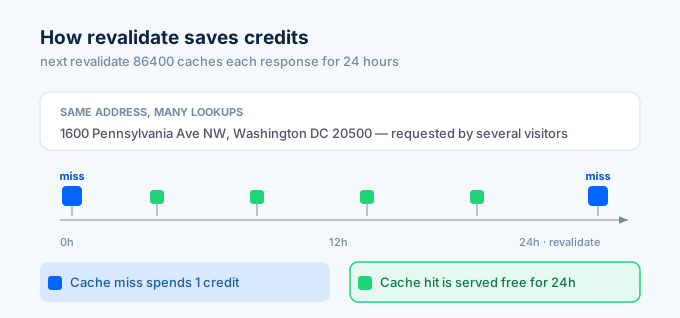
You can tune the cache window. For active listings that change often, use a shorter window like 3600 seconds (1 hour). For property details that rarely change, 86400 seconds or longer works fine.
What does it cost to run?
The two costs are the API and hosting.
| Component | Free tier | Paid |
|---|---|---|
| API lookups | 100 credits at signup | $5/mo (1,000) or $54/yr (12,000) |
| Vercel hosting | Hobby plan free | Pro at $20/mo for production |
For a search app serving 2,000 lookups per month with caching, expect about $10 for the API. Hosting on Vercel’s free tier covers hobby and early-stage projects.
| Monthly usage | API credits (with cache) | API cost |
|---|---|---|
| 1,000 searches, 50% cached | 500 | $2.50 |
| 5,000 searches, 60% cached | 2,000 | $10.00 |
| 10,000 searches, 70% cached | 3,000 | $15.00 |
Caching is the biggest lever on cost. The more users hit the same properties, the more you save.
How do I get started?
Go to zillapi.com and sign up. You get 100 free credits with no credit card required. Then scaffold a Next.js app and follow the steps above.
Start with the property proxy and a single lookup page. Confirm the API connection works and your key stays server-side. Then add the search form, results grid, and detail pages.
For the no-code version, see the Bubble guide. For the Python backend version, see the Python tutorial. For property field documentation, see the property data guide.
Frequently asked questions
How do I use the Zillow API in Next.js?
Create a route handler in your Next.js app that calls the Zillapi REST API server-side. The route handler adds your API key to the request headers and forwards the property data to your React components. This keeps the key off the client. Your frontend fetches from your own route handler, never directly from the API. Each lookup costs 1 credit ($0.005).
How do I keep my API key safe in Next.js?
Store the API key in an environment variable and call the API only from a server-side route handler. Never put the key in a client component or expose it with the NEXT_PUBLIC_ prefix. The route handler runs on the server, adds the key to the request, and returns only the property data to the browser. The key never reaches the client.
Can I build a property search app with Next.js and the Zillow API?
Yes. Use a route handler to proxy the Zillapi search endpoint, build a search form with React state, and render results in a grid of property cards. The form sends filters to your route handler, which calls the API and returns matching listings. This gives you a working property search app with server-side API security. The build takes a few hours.
Should I use the App Router or Pages Router for a real estate app?
Use the App Router for new projects. It is the current Next.js standard and uses route handlers in route.ts files for API endpoints. Server components can fetch data directly without client-side JavaScript. The Pages Router still works but Next.js recommends the App Router for new apps. The code in this guide uses the App Router.
How much does it cost to run a Next.js property app?
The API costs $5 per month for 1,000 property lookups or $54 per year for 12,000. Hosting on Vercel has a free tier for hobby projects. A search app serving 2,000 lookups per month costs about $10 for the API. You get 100 free API credits at signup with no credit card. Add caching to cut repeat lookups.
How do I cache property data in Next.js?
Next.js route handlers support the fetch cache and revalidate options. Set revalidate to a number of seconds to cache the API response and serve it without a new call until the time expires. For property data that changes slowly, a 24-hour cache (86400 seconds) cuts your API usage significantly while keeping data fresh enough for most apps.