A mortgage underwriter reviews dozens of loan files every day. Each one needs a property valuation, a collateral check, and a risk assessment. That means pulling up Zillow, checking the tax records, maybe ordering comps from an appraiser.
Most of that work is manual. Copy an address, paste it into a search box, screenshot the Zestimate, type it into the loan file. Multiply that by 30 loans a day.
It does not have to work that way. One API call returns the Zestimate, tax assessment, comparable sales, and property details for any U.S. address. Plug it into your loan origination system and the data fills itself in.
Here is how to automate mortgage underwriting workflows with Python and the Zillow API.
What property data do lenders need?
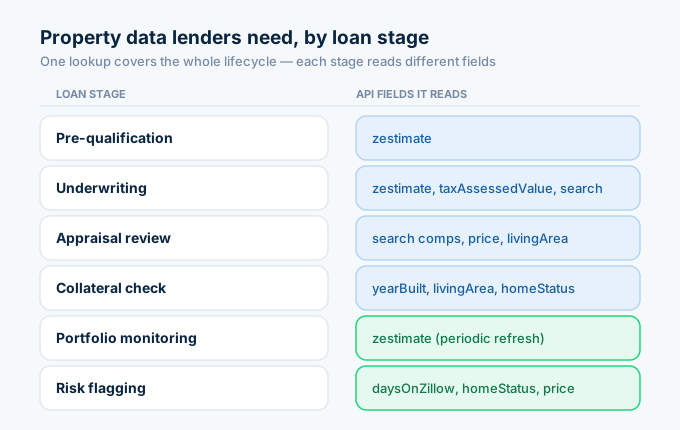
Lenders pull property data at every stage of the loan lifecycle. The fields change depending on whether you are pre-qualifying, underwriting, or monitoring an existing loan.
| Lending stage | Data needed | API field |
|---|---|---|
| Pre-qualification | Quick value estimate | zestimate |
| Underwriting | Detailed valuation, comps | zestimate, taxAssessedValue, search (RECENTLY_SOLD) |
| Appraisal review | Comparable sales, price per sqft | Search endpoint + property details |
| Collateral check | Property condition signals | yearBuilt, livingArea, homeStatus, daysOnZillow |
| Portfolio monitoring | Current value tracking | zestimate (periodic refresh) |
| Risk flagging | Market distress signals | daysOnZillow, homeStatus, price changes |
One API call returns all of these fields. That call costs 1 credit ($0.005).
For your API key, follow the step-by-step setup guide.
How do I calculate LTV with the API?
Loan-to-value ratio is the first number every underwriter checks. It determines the loan tier, the interest rate, and whether the borrower needs private mortgage insurance.
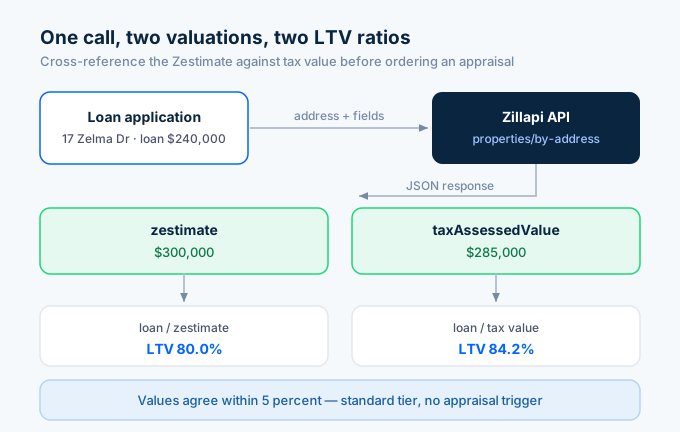
The formula is simple: LTV = Loan Amount / Property Value.
The API gives you two independent property values in a single call: the Zestimate and the tax assessed value.
import requests, os
API_KEY = os.environ["ZILLAPI_KEY"]HEADERS = {"Authorization": f"Bearer {API_KEY}"}
def calculate_ltv(address, loan_amount):    """Calculate LTV using Zestimate and tax assessed value."""    r = requests.get(        "https://api.zillapi.com/v1/properties/by-address",        params={            "address": address,            "fields": "address,zestimate,taxAssessedValue,bedrooms,bathrooms,livingArea,yearBuilt,homeStatus",        },        headers=HEADERS,    )    data = r.json()["data"]
    zestimate = data.get("zestimate", 0)    tax_value = data.get("taxAssessedValue", 0)
    ltv_zestimate = round(loan_amount / zestimate * 100, 1) if zestimate else None    ltv_tax = round(loan_amount / tax_value * 100, 1) if tax_value else None
    print(f"Property: {data['address']['streetAddress']}")    print(f"  {data.get('bedrooms')}bd/{data.get('bathrooms')}ba | {data.get('livingArea', 0):,} sqft | Built {data.get('yearBuilt', 'N/A')}")    print(f"\nLoan Amount: ${loan_amount:,}")    print(f"Zestimate:   ${zestimate:,}  →  LTV: {ltv_zestimate}%")    print(f"Tax Value:   ${tax_value:,}  →  LTV: {ltv_tax}%")
    # Risk tier    ltv = ltv_zestimate or ltv_tax    if ltv and ltv <= 80:        print(f"\nRisk Tier: STANDARD (LTV {ltv}% ≤ 80%)")        print("No PMI required.")    elif ltv and ltv <= 95:        print(f"\nRisk Tier: HIGH LTV (LTV {ltv}% > 80%)")        print("PMI required. Additional review recommended.")    elif ltv:        print(f"\nRisk Tier: VERY HIGH (LTV {ltv}% > 95%)")        print("May exceed agency guidelines. Manual review required.")
    return {        "address": data["address"]["streetAddress"],        "loan_amount": loan_amount,        "zestimate": zestimate,        "tax_value": tax_value,        "ltv_zestimate": ltv_zestimate,        "ltv_tax": ltv_tax,    }
result = calculate_ltv("1600 Pennsylvania Ave NW, Washington DC 20500", loan_amount=240000)
When the Zestimate and tax value differ by more than 15%, that is a signal to order a formal appraisal. If they agree within 5%, you have a strong preliminary valuation.
How do I validate an appraisal with comps?
Appraisal reviews catch inflated or deflated valuations. The underwriter pulls comparable sales and checks whether the appraised value falls within the range.
def validate_appraisal(address, appraised_value, tolerance=0.10):    """Check an appraised value against API comps."""    # Get subject property    subject = requests.get(        "https://api.zillapi.com/v1/properties/by-address",        params={            "address": address,            "fields": "zpid,address,bedrooms,bathrooms,livingArea,latitude,longitude,zestimate",        },        headers=HEADERS,    ).json()["data"]
    beds = subject.get("bedrooms", 3)    sqft = subject.get("livingArea", 1500)    lat = subject["latitude"]    lng = subject["longitude"]
    # Pull recent sales nearby    comps = requests.post(        "https://api.zillapi.com/v1/search",        json={            "bbox": {                "north": lat + 0.01,                "south": lat - 0.01,                "east": lng + 0.01,                "west": lng - 0.01,            },            "listingStatus": "RECENTLY_SOLD",            "homeType": ["SINGLE_FAMILY"],            "minBeds": max(beds - 1, 1),            "maxBeds": beds + 1,        },        headers=HEADERS,    ).json()["data"]
    # Filter by square footage similarity    valid = []    for comp in comps:        comp_sqft = comp.get("livingArea", 0)        comp_price = comp.get("price", 0)        if comp_sqft and comp_price and abs(comp_sqft - sqft) <= 300:            valid.append({                "address": comp["address"]["streetAddress"],                "price": comp_price,                "sqft": comp_sqft,                "ppsf": round(comp_price / comp_sqft, 2),            })
    if not valid:        print("No comparable sales found. Cannot validate.")        return None
    valid.sort(key=lambda c: c["ppsf"])    prices = [c["price"] for c in valid[:5]]    comp_low = min(prices)    comp_high = max(prices)    comp_median = sorted(prices)[len(prices) // 2]
    print(f"Property: {address}")    print(f"Appraised Value: ${appraised_value:,}")    print(f"Zestimate:       ${subject.get('zestimate', 0):,}")    print(f"\nComps ({len(valid[:5])} found):")    for c in valid[:5]:        print(f"  {c['address']} - ${c['price']:,} ({c['sqft']:,} sqft, ${c['ppsf']}/sqft)")
    print(f"\nComp Range: ${comp_low:,} to ${comp_high:,}")    print(f"Comp Median: ${comp_median:,}")
    # Check if appraisal falls within tolerance of comp range    low_bound = comp_low * (1 - tolerance)    high_bound = comp_high * (1 + tolerance)
    if low_bound <= appraised_value <= high_bound:        variance = round((appraised_value - comp_median) / comp_median * 100, 1)        print(f"\nResult: APPRAISAL SUPPORTED")        print(f"Variance from median: {variance}%")    elif appraised_value > high_bound:        overage = round((appraised_value - comp_high) / comp_high * 100, 1)        print(f"\nResult: APPRAISAL MAY BE INFLATED")        print(f"Exceeds highest comp by {overage}%. Review recommended.")    else:        underage = round((comp_low - appraised_value) / comp_low * 100, 1)        print(f"\nResult: APPRAISAL MAY BE LOW")        print(f"Below lowest comp by {underage}%.")
    return {        "appraised": appraised_value,        "comp_low": comp_low,        "comp_high": comp_high,        "comp_median": comp_median,        "supported": low_bound <= appraised_value <= high_bound,    }
result = validate_appraisal("1600 Pennsylvania Ave NW, Washington DC 20500", appraised_value=310000)
This is not a replacement for a licensed appraisal. It is a sanity check that takes two seconds instead of two hours. If the comps support the appraised value, the file moves forward. If they do not, the underwriter knows to dig deeper before approving the loan.
For a detailed breakdown of how the comps search works, see the comps API guide.
How do I screen collateral quality?
Beyond the dollar value, underwriters check the property itself. Age, condition, square footage, and listing status all signal risk.
def screen_collateral(address, loan_amount):    """Screen a property for collateral risk factors."""    data = requests.get(        "https://api.zillapi.com/v1/properties/by-address",        params={            "address": address,            "fields": "address,zestimate,taxAssessedValue,bedrooms,bathrooms,livingArea,lotAreaValue,yearBuilt,homeStatus,daysOnZillow,homeType",        },        headers=HEADERS,    ).json()["data"]
    flags = []    zestimate = data.get("zestimate", 0)    tax_value = data.get("taxAssessedValue", 0)    year_built = data.get("yearBuilt", 0)    sqft = data.get("livingArea", 0)    status = data.get("homeStatus", "")    days = data.get("daysOnZillow", 0)
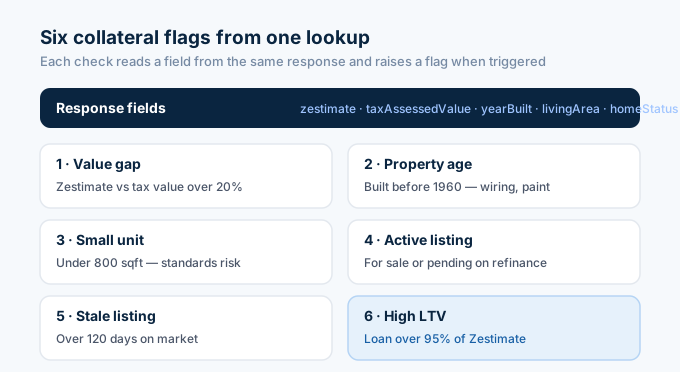
    # Flag 1: Value discrepancy    if zestimate and tax_value:        gap = abs(zestimate - tax_value) / max(zestimate, tax_value) * 100        if gap > 20:            flags.append(f"Zestimate and tax value differ by {round(gap)}%, order appraisal")
    # Flag 2: Age risk    if year_built and year_built < 1960:        flags.append(f"Built in {year_built}, check for lead paint, foundation, and wiring")
    # Flag 3: Small property    if sqft and sqft < 800:        flags.append(f"Only {sqft} sqft, may not meet minimum property standards")
    # Flag 4: Currently listed for sale    if status in ("FOR_SALE", "PENDING"):        flags.append(f"Property is {status}, verify borrower intent on refinance applications")
    # Flag 5: Long time on market    if days and days > 120:        flags.append(f"{days} days on market, potential marketability concern")
    # Flag 6: High LTV    if zestimate:        ltv = round(loan_amount / zestimate * 100, 1)        if ltv > 95:            flags.append(f"LTV is {ltv}%, exceeds standard agency limits")
    print(f"Collateral Screening: {data['address']['streetAddress']}")    print(f"  Type: {data.get('homeType', 'N/A')}")    print(f"  {data.get('bedrooms')}bd/{data.get('bathrooms')}ba | {sqft:,} sqft | Built {year_built}")    print(f"  Zestimate: ${zestimate:,} | Tax Value: ${tax_value:,}")    print(f"  Status: {status} | Days on Market: {days}")    print(f"\nLoan Amount: ${loan_amount:,}")
    if flags:        print(f"\n⚠ {len(flags)} risk flag(s) found:")        for i, flag in enumerate(flags, 1):            print(f"  {i}. {flag}")    else:        print("\n✓ No collateral risk flags detected.")
    return {"address": data["address"]["streetAddress"], "flags": flags}
screen = screen_collateral("1600 Pennsylvania Ave NW, Washington DC 20500", loan_amount=240000)
Six checks, one API call. The function catches value discrepancies, aging properties, small units, active listings during refinance applications, stale listings, and overleveraged loans.
Add your own flags based on your lending criteria. Some lenders flag manufactured homes, properties in flood zones, or homes with fewer than two bedrooms.
How do I process loan applications in bulk?
A loan officer submitting a batch of pre-qualification requests needs fast turnaround. This script processes an entire pipeline at once:
def batch_underwrite(applications):    """Process multiple loan applications with automated checks."""    results = []
    for app in applications:        address = app["address"]        loan_amount = app["loan_amount"]        borrower = app.get("borrower", "Unknown")
        data = requests.get(            "https://api.zillapi.com/v1/properties/by-address",            params={                "address": address,                "fields": "address,zestimate,taxAssessedValue,bedrooms,bathrooms,livingArea,yearBuilt,homeStatus",            },            headers=HEADERS,        ).json()["data"]
        zestimate = data.get("zestimate", 0)        tax_value = data.get("taxAssessedValue", 0)        prop_value = zestimate or tax_value
        if not prop_value:            results.append({                "borrower": borrower,                "address": address,                "decision": "MANUAL REVIEW",                "reason": "No valuation data available",            })            continue
        ltv = round(loan_amount / prop_value * 100, 1)
        # Automated decision logic        if ltv <= 80:            decision = "PRE-APPROVED"            reason = f"LTV {ltv}% within standard limits"        elif ltv <= 95:            decision = "CONDITIONAL"            reason = f"LTV {ltv}%, requires PMI and additional docs"        else:            decision = "DECLINE"            reason = f"LTV {ltv}% exceeds 95% limit"
        # Override: value discrepancy forces manual review        if zestimate and tax_value:            gap = abs(zestimate - tax_value) / max(zestimate, tax_value) * 100            if gap > 25:                decision = "MANUAL REVIEW"                reason = f"Zestimate/tax gap is {round(gap)}%, appraisal required"
        results.append({            "borrower": borrower,            "address": address,            "loan": loan_amount,            "value": prop_value,            "ltv": ltv,            "decision": decision,            "reason": reason,        })
    # Print results    print(f"{'='*70}")    print(f"BATCH UNDERWRITING RESULTS ({len(results)} applications)")    print(f"{'='*70}")    for r in results:        print(f"\n  {r['borrower']}, {r['address']}")        print(f"    Loan: ${r.get('loan', 0):,} | Value: ${r.get('value', 0):,} | LTV: {r.get('ltv', 'N/A')}%")        print(f"    Decision: {r['decision']}")        print(f"    Reason: {r['reason']}")
    approved = sum(1 for r in results if r["decision"] == "PRE-APPROVED")    conditional = sum(1 for r in results if r["decision"] == "CONDITIONAL")    declined = sum(1 for r in results if r["decision"] == "DECLINE")    manual = sum(1 for r in results if r["decision"] == "MANUAL REVIEW")
    print(f"\nSummary: {approved} approved, {conditional} conditional, {declined} declined, {manual} manual review")    return results
# Sample batchapplications = [    {"borrower": "Smith", "address": "1600 Pennsylvania Ave NW, Washington DC 20500", "loan_amount": 240000},    {"borrower": "Johnson", "address": "100 Main St, Washington DC 20001", "loan_amount": 350000},    {"borrower": "Williams", "address": "45 Oak Ave, Taylors, SC 29687", "loan_amount": 180000},]results = batch_underwrite(applications)
Three loan applications, three API calls, three decisions in under five seconds. Each application gets an LTV check, a value discrepancy check, and an automated risk tier assignment.
The logic here is simple on purpose. Your production system would add credit score thresholds, debt-to-income checks, and compliance rules. The property data from the API feeds into that larger decision engine.
How do I monitor a loan portfolio?
After closing, lenders need to track collateral values across their entire loan book. A property that drops 20% in value changes the risk profile of that loan.
def monitor_portfolio(portfolio):    """Track LTV drift across a loan portfolio."""    alerts = []
    print(f"{'='*70}")    print(f"PORTFOLIO MONITOR ({len(portfolio)} loans)")    print(f"{'='*70}")
    for loan in portfolio:        address = loan["address"]        original_value = loan["original_value"]        loan_balance = loan["loan_balance"]
        data = requests.get(            "https://api.zillapi.com/v1/properties/by-address",            params={"address": address, "fields": "zestimate,homeStatus"},            headers=HEADERS,        ).json()["data"]
        current_value = data.get("zestimate", 0)        status = data.get("homeStatus", "")
        if not current_value:            continue
        original_ltv = round(loan_balance / original_value * 100, 1)        current_ltv = round(loan_balance / current_value * 100, 1)        value_change = round((current_value - original_value) / original_value * 100, 1)
        print(f"\n  {address}")        print(f"    Original Value: ${original_value:,} → Current: ${current_value:,} ({value_change:+}%)")        print(f"    Balance: ${loan_balance:,}")        print(f"    LTV: {original_ltv}% → {current_ltv}%")
        # Alert conditions        if current_ltv > 95:            alert = f"CRITICAL: LTV now {current_ltv}% (was {original_ltv}%)"            alerts.append({"address": address, "alert": alert})            print(f"    🔴 {alert}")        elif current_ltv > 90:            alert = f"WARNING: LTV now {current_ltv}% (was {original_ltv}%)"            alerts.append({"address": address, "alert": alert})            print(f"    🟡 {alert}")        elif value_change < -10:            alert = f"VALUE DROP: Property down {abs(value_change)}% from origination"            alerts.append({"address": address, "alert": alert})            print(f"    🟡 {alert}")
        if status in ("FOR_SALE", "PENDING"):            alert = f"LISTING ALERT: Property is {status}"            alerts.append({"address": address, "alert": alert})            print(f"    🔴 {alert}")
    if alerts:        print(f"\n{len(alerts)} alert(s) require attention.")    else:        print(f"\nAll loans within normal parameters.")
    return alerts
portfolio = [    {"address": "1600 Pennsylvania Ave NW, Washington DC 20500", "original_value": 290000, "loan_balance": 232000},    {"address": "100 Main St, Washington DC 20001", "original_value": 410000, "loan_balance": 380000},    {"address": "45 Oak Ave, Taylors, SC 29687", "original_value": 220000, "loan_balance": 165000},]alerts = monitor_portfolio(portfolio)
Run this weekly or monthly across your entire loan book. Properties where LTV drifts above 90% get flagged. Properties that show up as actively listed get flagged too, because a borrower selling the collateral changes your risk exposure.
A portfolio of 500 loans takes 500 API calls. That is $2.50 per monitoring cycle.
How does this compare to enterprise AVM providers?
Enterprise AVM providers like HouseCanary, CoreLogic, and ATTOM serve institutional lenders. They offer compliance-grade valuations, confidence scores, and direct integrations with loan origination systems.
The trade-off is cost and complexity.
| Feature | Enterprise AVM (HouseCanary, CoreLogic) | Zillapi |
|---|---|---|
| Monthly cost | $2,000 to $10,000+ | $5 |
| Per-lookup cost | $0.50 to $5.00 | $0.005 |
| Confidence scores | Yes | No (use Zestimate accuracy stats) |
| Compliance grade | GSE-accepted | Screening tool only |
| Integration | LOS plugins | REST API (any language) |
| Comps data | Yes | Yes (via search endpoint) |
| Property details | Yes | Yes (300+ fields) |
| Setup time | Weeks to months | 60 seconds |
| Free tier | No | 100 credits |
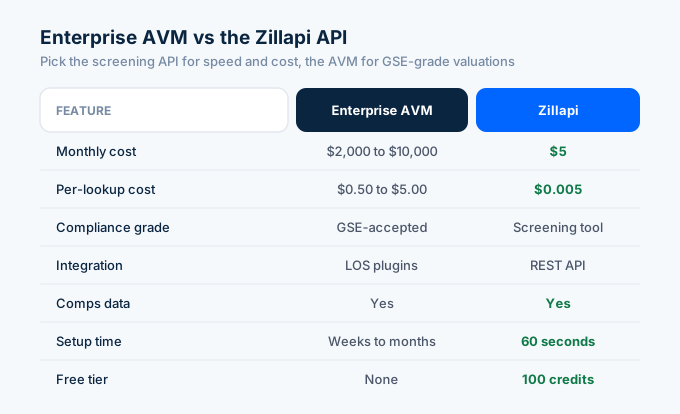
If you are a bank or credit union that needs GSE-compliant valuations for conventional conforming loans, you need an enterprise AVM. That is a regulatory requirement.
If you are a private lender, hard money lender, or fintech startup that needs fast property screening and portfolio monitoring, the $5 API covers your data needs at a fraction of the cost.
Many lenders use both. The API handles pre-qualification screening and portfolio monitoring. The enterprise AVM handles the formal valuation for the loan file.
What does an automated lending workflow look like?
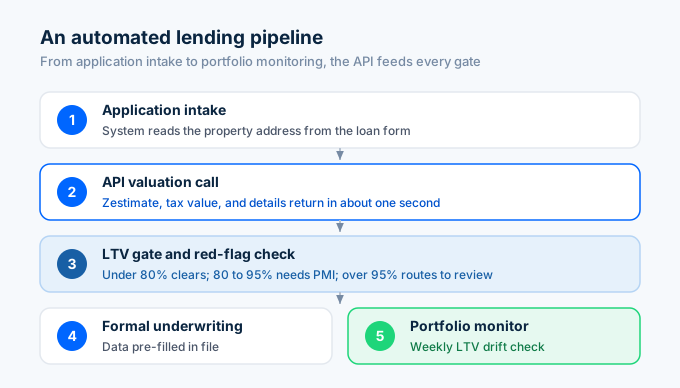
Here is how the pieces fit together in a production lending pipeline:
A new loan application comes in. Your system pulls the property address from the application form and calls the API. Within one second, you have the Zestimate, tax value, and property details.
The system calculates LTV using the Zestimate. If LTV is under 80%, the application gets a green light for standard processing. If LTV is between 80% and 95%, it gets flagged for PMI and additional documentation. Above 95%, it routes to manual review.
Next, the system checks for red flags. Is the property currently listed for sale during a refinance? Is there a large gap between the Zestimate and tax value? Was the home built before 1960? Any flag triggers a closer look.
If the application passes the automated checks, it moves to formal underwriting. The underwriter already has the property data pre-populated in the file. No manual lookups needed.
After closing, the loan enters the portfolio monitor. A weekly script checks current Zestimates against loan balances and flags any LTV drift.
For scheduling the monitoring script, see the automation guide.
How do I get started?
Go to zillapi.com and sign up. You get 100 free credits with no credit card required.
Run a few LTV calculations on properties in your pipeline. Compare the API valuations against your existing appraisal data. If the numbers track within an acceptable range, you have a screening tool that saves hours per week.
For the full Python setup, see the Python tutorial. For property field documentation, see the property data API guide. For comparable sales methodology, see the comps API guide.
Frequently asked questions
Can lenders use the Zillow API for underwriting?
Yes. Third-party REST APIs like Zillapi return Zestimates, tax assessments, comparable sales, and property details that support automated underwriting decisions. One API call returns 300+ fields for any U.S. property at $0.005 per lookup. Lenders use this data for LTV calculations, collateral validation, appraisal reviews, and portfolio monitoring. The free tier gives 100 credits at signup with no credit card required.
How accurate is the Zestimate for lending decisions?
Zillow reports a nationwide median error rate of 1.9% for on-market homes and 6.9% for off-market properties. That makes the Zestimate useful as a screening tool and second opinion, but not a replacement for a full appraisal on high-value loans. Many lenders use it as a pre-qualification check before ordering a formal appraisal, saving time and money on loans that would fail the valuation test anyway.
How do I calculate LTV with an API?
Pull the property Zestimate or tax assessed value through the API, then divide the loan amount by that value. For example, a $200,000 loan on a property with a $250,000 Zestimate gives an LTV of 80%. The API returns both the Zestimate and the tax assessed value in a single call, so you can cross-reference two independent valuations. Each lookup costs 1 credit.
Can I monitor a loan portfolio with the API?
Yes. Store the addresses or Zillow property IDs for every property in your loan book. Run a daily or weekly script that pulls current Zestimates for each one. Compare against the original loan amount to track LTV drift over time. Properties where the Zestimate drops below a threshold get flagged for review. This replaces manual spot checks with automated monitoring.
How much does a property valuation API cost for lenders?
Enterprise AVM providers like HouseCanary and CoreLogic charge thousands per month for institutional access. Zillapi costs $5 per month for 1,000 property lookups, or $54 per year for 12,000 lookups. A lender processing 200 loans per month needs about 600 credits for underwriting checks, costing $3 per month. The free tier gives 100 lookups at signup.
What property data do lenders get from the API?
Every API call returns the Zestimate, tax assessed value, comparable sales data, property details (bedrooms, bathrooms, square footage, lot size, year built), listing status, days on market, price history, school ratings, and photos. Lenders use the Zestimate and tax value for LTV screening, comps for appraisal validation, and listing status to detect properties already on the market during a refinance.