Real estate investors don’t browse Zillow one property at a time. They screen dozens, hundreds, sometimes thousands of properties looking for the ones where the numbers work. You can’t do that manually. You need an API.
The problem is Zillow killed their public API in 2021. And the investor-specific tools that exist (Mashvisor, DealCheck, Rentastic) either charge $35+ per month or don’t have APIs at all.
Here’s how to use a Zillow data API to screen investment properties, calculate every metric that matters, and find deals programmatically.
What investment metrics can I calculate from the API?
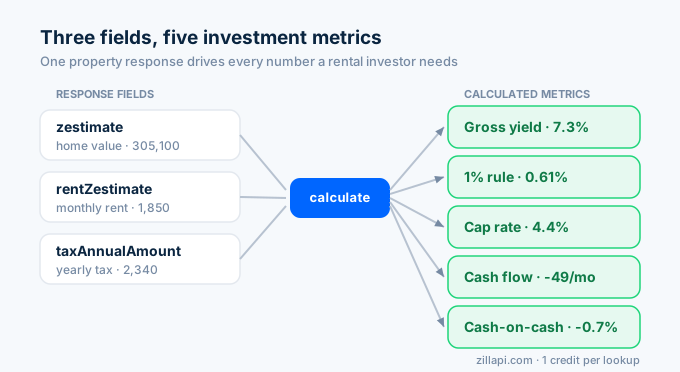
Every Zillapi property response includes three numbers that drive investment analysis: the zestimate (home value), rentZestimate (monthly rent), and taxAnnualAmount (yearly property tax). From those three inputs, you can calculate five metrics that matter to rental investors.
import requests, os
r = requests.get(    "https://api.zillapi.com/v1/properties/by-address",    params={"address": "1600 Pennsylvania Ave NW, Washington DC 20500"},    headers={"Authorization": f"Bearer {os.environ['ZILLAPI_KEY']}"},)d = r.json()["data"]
rent = d["rentZestimate"]       # $1,850/movalue = d["zestimate"]          # $305,100price = d.get("price", value)   # listing price or Zestimatetax = d.get("taxAnnualAmount", 0)  # $2,340/yr
Gross rent yield
The simplest screening metric. Annual rent divided by property value.
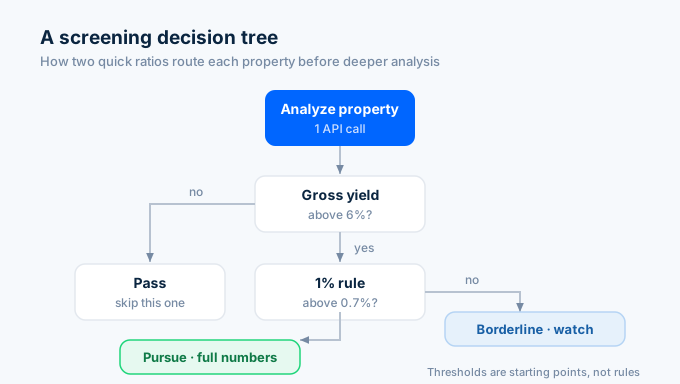
gross_yield = (rent * 12 / value) * 100print(f"Gross yield: {gross_yield:.1f}%")Anything above 6% is worth a closer look in most markets. Above 8% and you’re in strong cash flow territory.
The 1% rule
Monthly rent as a percentage of the purchase price. A quick filter that’s been around for decades.
one_pct = (rent / price) * 100print(f"1% rule: {one_pct:.2f}%")If this number hits 1.0% or higher, the property likely cash flows. Below 0.7% and it’s probably a cash flow negative investment in most scenarios. This property sits at 0.61%, which means it’s below the threshold.
Estimated cap rate
Net operating income divided by property value. This requires estimating expenses.
gross_annual = rent * 12                    # $22,200vacancy = gross_annual * 0.08               # 8% vacancyinsurance = 1200                            # estimated annualmaintenance = value * 0.01                  # 1% of valuetotal_expenses = tax + vacancy + insurance + maintenance
noi = gross_annual - total_expensescap_rate = (noi / value) * 100print(f"NOI: ${noi:,.0f}")print(f"Cap rate: {cap_rate:.1f}%")# NOI: $13,533# Cap rate: 4.4%
The expense estimates are rough. Actual insurance, maintenance, and vacancy rates vary by market. But this gives you a screening-quality cap rate from a single API call.
Monthly cash flow (with financing)
Most investors use leverage. Here’s cash flow with a 25% down, 7% interest, 30-year mortgage.
# Mortgage calculationdown_payment_pct = 0.25rate_annual = 0.07term_years = 30
loan = price * (1 - down_payment_pct)rate_monthly = rate_annual / 12n_payments = term_years * 12mortgage_payment = loan * (rate_monthly * (1 + rate_monthly)**n_payments) / ((1 + rate_monthly)**n_payments - 1)
# Monthly cash flowmonthly_income = rent * (1 - 0.08)  # after vacancymonthly_expenses = (tax / 12) + (insurance / 12) + (maintenance / 12) + mortgage_paymentcash_flow = monthly_income - monthly_expenses
print(f"Mortgage: ${mortgage_payment:,.0f}/mo")print(f"Cash flow: ${cash_flow:,.0f}/mo")# Mortgage: $1,473/mo# Cash flow: -$49/mo
Negative cash flow on this property with 25% down at 7%. That confirms what the 1% rule flagged. The numbers don’t work at this price point with current rates.
Cash-on-cash return
Annual cash flow divided by total cash invested. The return on your actual out-of-pocket dollars.
annual_cash_flow = cash_flow * 12cash_invested = price * down_payment_pct + 5000  # down payment + closing costscoc_return = (annual_cash_flow / cash_invested) * 100
print(f"Cash invested: ${cash_invested:,.0f}")print(f"Cash-on-cash return: {coc_return:.1f}%")# Cash invested: $81,275# Cash-on-cash return: -0.7%
All five metrics from one API call. One credit. You now know whether this property is worth pursuing before you’ve spent a minute on manual research.
How do I screen a single property?
Here’s a complete single-property analysis function that calculates everything at once:
import requests, os
HEADERS = {"Authorization": f"Bearer {os.environ['ZILLAPI_KEY']}"}
def analyze_investment(address, down_pct=0.25, rate=0.07, term=30):    """Full investment analysis from a single API call."""    r = requests.get(        "https://api.zillapi.com/v1/properties/by-address",        params={            "address": address,            "fields": "zestimate,rentZestimate,price,taxAnnualAmount,bedrooms,bathrooms,livingArea,address,homeType",        },        headers=HEADERS,    )    d = r.json()["data"]
    rent = d.get("rentZestimate", 0)    value = d.get("zestimate", 0)    price = d.get("price") or value    tax = d.get("taxAnnualAmount", 0)
    if not rent or not value:        return {"address": address, "error": "Missing rent or value data"}
    # Metrics    gross_yield = (rent * 12 / value) * 100    one_pct_rule = (rent / price) * 100
    # Expenses    gross_annual = rent * 12    vacancy = gross_annual * 0.08    insurance = 1200    maintenance = value * 0.01    noi = gross_annual - tax - vacancy - insurance - maintenance    cap_rate = (noi / value) * 100
    # Mortgage    loan = price * (1 - down_pct)    mr = rate / 12    n = term * 12    pmt = loan * (mr * (1 + mr)**n) / ((1 + mr)**n - 1) if loan > 0 else 0
    monthly_cf = (rent * 0.92) - (tax/12) - (insurance/12) - (maintenance/12) - pmt    annual_cf = monthly_cf * 12    cash_in = price * down_pct + 5000    coc = (annual_cf / cash_in) * 100 if cash_in > 0 else 0
    return {        "address": d["address"]["streetAddress"],        "price": price,        "zestimate": value,        "rent": rent,        "beds": d.get("bedrooms"),        "baths": d.get("bathrooms"),        "sqft": d.get("livingArea"),        "gross_yield": round(gross_yield, 1),        "one_pct_rule": round(one_pct_rule, 2),        "cap_rate": round(cap_rate, 1),        "noi": round(noi),        "monthly_cf": round(monthly_cf),        "coc_return": round(coc, 1),        "mortgage": round(pmt),    }
# Run itresult = analyze_investment("1600 Pennsylvania Ave NW, Washington DC 20500")for k, v in result.items():    print(f"  {k}: {v}")
That function is the core of every investment screening tool. Pass any address, get back every metric. One credit.
How do I batch screen hundreds of properties?
The real power is screening at scale. Loop through addresses, analyze each one, and rank by the metric that matters to you.
import time
addresses = [    "1600 Pennsylvania Ave NW, Washington DC 20500",    "100 Main St, Washington DC 29601",    "45 Augusta St, Washington DC 29601",    "220 N Pleasantburg Dr, Washington DC 29607",    "15 Overbrook Cir, Washington DC 29607",    # ... add more addresses]
results = []for i, addr in enumerate(addresses):    result = analyze_investment(addr)    if "error" not in result:        results.append(result)        print(f"[{i+1}/{len(addresses)}] {result['address']}: "              f"{result['gross_yield']}% yield, ${result['monthly_cf']}/mo CF")
    # Rate limit: stay under 200/min    time.sleep(0.35)
# Rank by gross yieldresults.sort(key=lambda x: x['gross_yield'], reverse=True)
print("\n--- Top deals by gross yield ---")for r in results[:10]:    print(f"  {r['address']}: {r['gross_yield']}% yield, "          f"${r['rent']:,}/mo rent, ${r['monthly_cf']:,}/mo cash flow")
At 200 requests per minute on the monthly plan, you can screen 1,000 properties in about 5 minutes. Each call costs 1 credit ($0.005). Screening 1,000 properties costs $5.
The fields parameter in the analyze_investment function trims each response to only the investment-relevant fields. That cuts the payload from ~3,000 tokens to under 200, which speeds up processing significantly.
How do I find deals with the search endpoint?
Instead of starting with a list of addresses, you can search an entire market for properties that match your criteria.
def find_deals(bbox, max_price=400000, min_beds=2, home_types=None, min_yield=6.0):    """Search a market and return properties above a yield threshold."""    if home_types is None:        home_types = ["SINGLE_FAMILY", "TOWNHOUSE"]
    r = requests.post(        "https://api.zillapi.com/v1/search",        json={            "bbox": bbox,            "listingStatus": "FOR_SALE",            "maxPrice": max_price,            "minBedrooms": min_beds,            "homeType": home_types,        },        headers=HEADERS,    )    listings = r.json()["data"]    print(f"Found {len(listings)} listings in area")
    deals = []    for p in listings:        rent = p.get("rentZestimate", 0)        price = p.get("price", 0)        if not rent or not price:            continue
        gross_yield = (rent * 12 / price) * 100        if gross_yield >= min_yield:            deals.append({                "address": p["address"]["streetAddress"],                "price": price,                "rent": rent,                "gross_yield": round(gross_yield, 1),                "beds": p.get("bedrooms"),                "baths": p.get("bathrooms"),                "sqft": p.get("livingArea"),            })
    deals.sort(key=lambda x: x["gross_yield"], reverse=True)    return deals
# Search Washington DCwashington_deals = find_deals(    bbox={"west": -82.50, "south": 34.75, "east": -82.30, "north": 34.95},    max_price=350000,    min_yield=7.0,)
print(f"\n{len(washington_deals)} deals above 7% yield:")for d in washington_deals[:10]:    print(f"  {d['address']}: ${d['price']:,} | ${d['rent']:,}/mo | {d['gross_yield']}% yield")
One search call. One credit. Every for-sale property in the bounding box comes back with a rent Zestimate so you can calculate yield on the spot. You don’t need to look up each property individually because the search results include Zestimates.
How do I build a complete deal pipeline?
Serious investors combine search and analysis into a pipeline: search a market, filter by yield, then run full analysis on the top candidates.
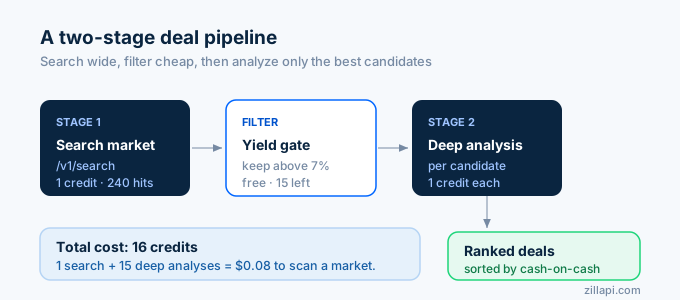
def deal_pipeline(bbox, max_price=400000, min_yield=6.5, top_n=20):    """    Stage 1: Search market (1 credit)    Stage 2: Full analysis on top candidates (1 credit each)    """    # Stage 1: Broad search    r = requests.post(        "https://api.zillapi.com/v1/search",        json={            "bbox": bbox,            "listingStatus": "FOR_SALE",            "maxPrice": max_price,            "homeType": ["SINGLE_FAMILY", "TOWNHOUSE", "CONDO"],        },        headers=HEADERS,    )    listings = r.json()["data"]    print(f"Stage 1: {len(listings)} listings found")
    # Quick yield filter    candidates = []    for p in listings:        rent = p.get("rentZestimate", 0)        price = p.get("price", 0)        if rent and price and (rent * 12 / price * 100) >= min_yield:            candidates.append(p)
    candidates.sort(key=lambda p: p["rentZestimate"] * 12 / p["price"], reverse=True)    print(f"Stage 1 filter: {len(candidates)} above {min_yield}% yield")
    # Stage 2: Deep analysis on top candidates    analyzed = []    for p in candidates[:top_n]:        addr = f"{p['address']['streetAddress']}, {p['address']['city']}, {p['address']['state']} {p['address']['zipcode']}"        result = analyze_investment(addr)        if "error" not in result:            analyzed.append(result)        time.sleep(0.35)
    analyzed.sort(key=lambda x: x["coc_return"], reverse=True)    print(f"Stage 2: Analyzed {len(analyzed)} properties\n")
    return analyzed
# Run the pipelinedeals = deal_pipeline(    bbox={"west": -82.50, "south": 34.75, "east": -82.30, "north": 34.95},    max_price=350000,    min_yield=7.0,    top_n=15,)
print("--- Best deals by cash-on-cash return ---")for d in deals[:5]:    print(f"  {d['address']}")    print(f"    Price: ${d['price']:,} | Rent: ${d['rent']:,}/mo")    print(f"    Yield: {d['gross_yield']}% | Cap: {d['cap_rate']}% | CoC: {d['coc_return']}%")    print(f"    Cash flow: ${d['monthly_cf']:,}/mo")    print()
The pipeline costs 1 credit for the search plus 1 credit per deep analysis. If you analyze the top 15 candidates, that’s 16 credits total ($0.08) to find the best deals in an entire market.
What about comparable sales for investment analysis?
Investors don’t just look at rent yield. They check whether the asking price is fair by comparing it to recent sales. The search endpoint with RECENTLY_SOLD gives you comps.
def get_comp_value(subject, radius_miles=0.5):    """Estimate property value from recent comparable sales."""    offset = radius_miles * 0.0145    lat, lng = subject['latitude'], subject['longitude']
    r = requests.post(        "https://api.zillapi.com/v1/search",        json={            "bbox": {                "west": lng - offset, "east": lng + offset,                "south": lat - offset, "north": lat + offset,            },            "listingStatus": "RECENTLY_SOLD",            "homeType": [subject.get("homeType", "SINGLE_FAMILY")],        },        headers=HEADERS,    )    comps = r.json()["data"]
    # Filter similar properties    valid = []    for c in comps:        if not c.get("price") or not c.get("livingArea"):            continue        if abs(c.get("bedrooms", 0) - subject["bedrooms"]) > 1:            continue        valid.append(c)
    if not valid:        return None
    prices_per_sqft = [c["price"] / c["livingArea"] for c in valid]    median_ppsf = sorted(prices_per_sqft)[len(prices_per_sqft) // 2]    comp_value = median_ppsf * subject["livingArea"]
    return round(comp_value)
If the asking price is 10% below the comp-derived value, you might have a deal worth pursuing. If it’s 15% above, the seller is probably overpricing. The comps API guide goes deeper on this workflow.
How does this compare to investor-specific tools?
Several platforms serve real estate investors. Most provide pre-calculated metrics through a dashboard, not an API.
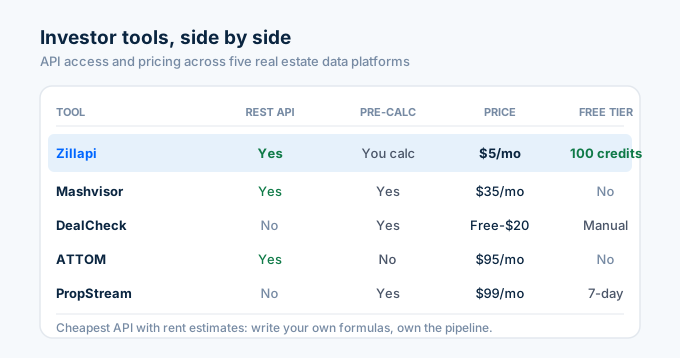
| Tool | API available | Pre-calculated metrics | Price | Free tier |
|---|---|---|---|---|
| Zillapi | Yes (REST) | No (you calculate) | $5/mo | 100 credits |
| Mashvisor | Yes (REST) | Yes (cap rate, cash flow) | $35/mo | No |
| DealCheck | No | Yes (full underwriting) | Free-$20/mo | Yes (manual only) |
| Rentastic | No | Yes (cap rate, cash flow) | Free-$15/mo | Yes (limited) |
| ATTOM | Yes (REST) | No | $95/mo | No |
| PropStream | No | Yes (comps, ARV) | $99/mo | 7-day trial |
The trade-off is clear. Mashvisor and DealCheck give you pre-calculated metrics in a dashboard. You don’t write code. But you pay $35-99 per month, and you’re locked into their interface.
With Zillapi, you write the calculation code yourself (the examples above are copy-paste ready). But you pay $5 per month, you own the pipeline, and you can customize every formula. If you want to weight vacancy at 10% instead of 8%, or use 6.5% interest instead of 7%, you change one number. No vendor lock-in.
For investors who code (or work with developers), the API approach costs less and gives more control. For investors who want a point-and-click dashboard, Mashvisor or DealCheck is faster to start.
How much does investment screening cost?
The math is simple. One property lookup costs 1 credit. One market search costs 1 credit.
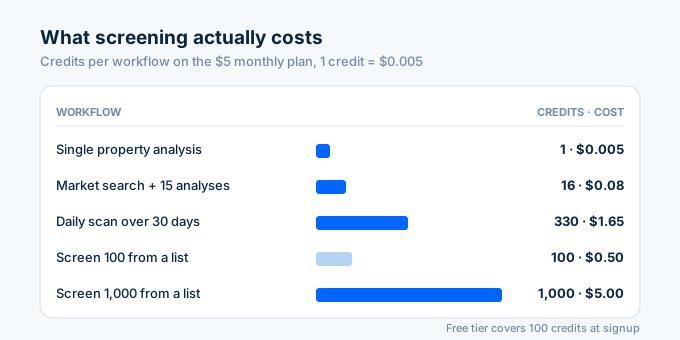
| Workflow | Credits | Cost (monthly plan) |
|---|---|---|
| Single property analysis | 1 | $0.005 |
| Market search + top 15 deep analysis | 16 | $0.08 |
| Screen 100 properties from a list | 100 | $0.50 |
| Screen 1,000 properties from a list | 1,000 | $5.00 |
| Daily market scan (1 search + 10 analyses) × 30 days | 330 | $1.65 |
The free tier gives you 100 credits. That’s enough to screen 100 individual properties or run 6 full pipeline searches. No credit card needed.
| Plan | Credits | Cost | Properties screened |
|---|---|---|---|
| Free | 100 (one-time) | $0 | 100 |
| Monthly | 1,000/month | $5/mo | 1,000 |
| Annual | 12,000/year | $54/yr | 12,000 |
For context, an investor screening 200 properties per month to find 3-5 deals spends $1.00 on the monthly plan. The same analysis through Mashvisor costs $35 per month.
Start screening properties in 60 seconds
Go to zillapi.com. Sign up with your email. Get 100 free credits. No credit card.
Copy the analyze_investment function from above. Run it against a property you’ve been considering. See if the numbers match your underwriting. If they do, scale it up to batch screening.
For the API setup walkthrough, see our step-by-step guide. For code examples in other languages, check the Python tutorial, JavaScript tutorial, or PHP tutorial. For rental-specific analysis, see the rental data API guide.
Frequently asked questions
Can I use the Zillow API for real estate investing?
Yes. The Zillapi REST API returns both the Zestimate (home value) and rent Zestimate (monthly rent) for any U.S. property in a single call. With those two numbers plus the tax assessment, you can calculate gross yield, the 1% rule ratio, cap rate proxy, and estimated cash flow. One API call gives you everything you need to screen a rental investment property.
How do I calculate cap rate with the Zillow API?
Pull a property with the Zillapi /v1/properties/by-address endpoint. Multiply the rentZestimate by 12 to get gross annual rent. Subtract estimated expenses (taxes from taxAnnualAmount, insurance, maintenance at 1% of value, vacancy at 8%). Divide the result by the zestimate or listing price. For a property with $1,850/mo rent and $305,100 value, the gross yield is 7.3% and estimated cap rate is around 4.5%.
Can I screen hundreds of properties at once?
Yes. Loop through a list of addresses and call the Zillapi endpoint for each one. At 200 requests per minute on the monthly plan, you can screen 1,000 properties in 5 minutes. Each call costs 1 credit ($0.005). Use the fields parameter to trim responses to only the investment-relevant fields, which speeds up processing.
How do I find investment properties with the Zillow API?
Use the Zillapi /v1/search endpoint with a bounding box and filters. Set listingStatus to FOR_SALE, filter by homeType and price range, then calculate yield for each result. Sort by gross yield descending to surface the best deals first. One search call costs 1 credit regardless of how many listings come back.
What is the cheapest API for real estate investors?
Zillapi costs $0.005 per call and returns both home value and rent estimates in one request. Mashvisor starts at $35 per month. DealCheck is free for manual entry but has no API. ATTOM starts at $95 per month. Zillapi’s 100 free credits at signup let you test your screening workflow at zero cost.
Does the Zillow API include rental income estimates?
Yes. Every Zillapi property response includes a rentZestimate field as an integer in dollars. This is Zillow’s estimated monthly rent for that property, the same figure shown on Zillow.com. It also returns the zestimate (home value) and taxAnnualAmount (yearly property tax) in the same call, giving you the three core inputs for investment analysis.