Insurance underwriting starts with property data. The underwriter needs to know what the building is made of, how old it is, how big it is, and what it would cost to rebuild. That data determines the premium.
Most small and mid-size insurers still collect this information manually. An agent visits the property, fills out a form, and submits it for review. The process takes days. Some carriers pay enterprise data vendors thousands per month for automated property feeds.
The property data piece of underwriting is straightforward to automate. One API call returns the year built, square footage, home type, lot size, tax assessed value, and Zestimate for any U.S. property. Plug that into your rating engine and the manual data collection step disappears.
Here is how to build insurance data workflows with Python and the Zillow API.
What property data do insurers need?
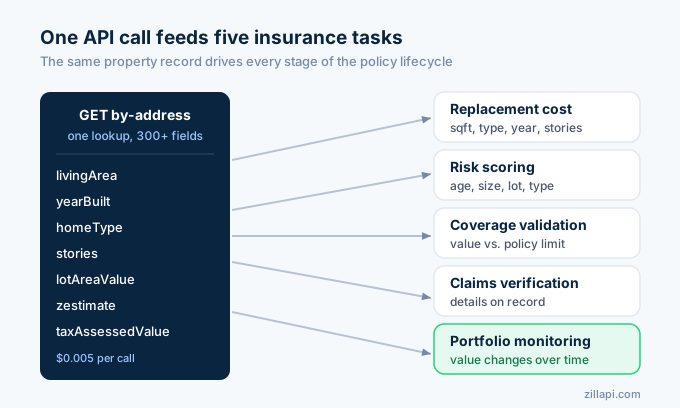
Insurers use property data at every stage: quoting, binding, renewal, claims, and portfolio management. The specific fields vary by stage, but most come from the same API call.
| Insurance task | Data needed | API field |
|---|---|---|
| Replacement cost estimate | Square footage, home type, year built, stories | livingArea, homeType, yearBuilt, stories |
| Risk scoring | Age, size, lot, construction type | yearBuilt, livingArea, lotAreaValue, homeType |
| Coverage validation | Current value vs. policy limit | zestimate, taxAssessedValue |
| Claims verification | Property details on record | All structural fields |
| Portfolio monitoring | Value changes over time | zestimate (periodic pulls) |
| Renewal pricing | Current market value, comps | zestimate, search endpoint |
One call returns 300+ fields per property at $0.005. For API key setup, see the step-by-step guide.
How do I estimate replacement cost?
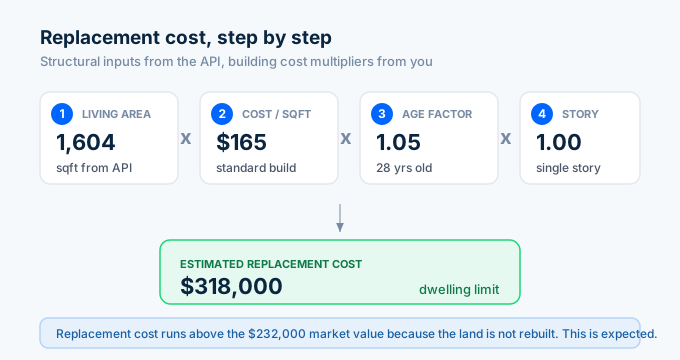
Replacement cost is what it would take to rebuild the structure at current prices. Insurance carriers use this number to set dwelling coverage limits.
The API gives you the structural inputs. You apply regional building cost multipliers.
import requests, os
API_KEY = os.environ["ZILLAPI_KEY"]HEADERS = {"Authorization": f"Bearer {API_KEY}"}
COST_PER_SQFT = {    "economy": 120,    "standard": 165,    "custom": 225,    "luxury": 310,}
def estimate_replacement_cost(address):    """Estimate replacement cost using property data and construction costs."""    data = requests.get(        "https://api.zillapi.com/v1/properties/by-address",        params={            "address": address,            "fields": "address,zestimate,taxAssessedValue,livingArea,homeType,yearBuilt,bedrooms,bathrooms,lotAreaValue,stories",        },        headers=HEADERS,    ).json()["data"]
    sqft = data.get("livingArea", 0)    year = data.get("yearBuilt", 2000)    home_type = data.get("homeType", "SINGLE_FAMILY")    stories = data.get("stories", 1)    zestimate = data.get("zestimate", 0)
    # Determine construction quality from price per sqft    price_per_sqft = zestimate / sqft if sqft else 0    if price_per_sqft > 400:        quality = "luxury"    elif price_per_sqft > 250:        quality = "custom"    elif price_per_sqft > 150:        quality = "standard"    else:        quality = "economy"
    base_cost = sqft * COST_PER_SQFT[quality]
    # Age adjustment (older homes cost more to rebuild to code)    age = 2026 - year    if age > 50:        age_factor = 1.20    elif age > 30:        age_factor = 1.10    elif age > 15:        age_factor = 1.05    else:        age_factor = 1.00
    # Multi-story adjustment    story_factor = 1.0 + (stories - 1) * 0.05 if stories > 1 else 1.0
    replacement_cost = round(base_cost * age_factor * story_factor)
    # Coverage gap check    gap = replacement_cost - zestimate    gap_pct = round(gap / zestimate * 100, 1) if zestimate else 0
    print(f"REPLACEMENT COST ESTIMATE")    print(f"{'='*55}")    print(f"  {data['address']['streetAddress']}")    print(f"  {data.get('bedrooms')}bd/{data.get('bathrooms')}ba | {sqft:,} sqft | Built {year}")    print(f"  Home Type: {home_type} | Stories: {stories}")    print(f"\n  Construction Quality: {quality.title()}")    print(f"  Base Cost ({COST_PER_SQFT[quality]}/sqft): ${base_cost:,}")    print(f"  Age Factor ({age} yrs):  x{age_factor}")    print(f"  Story Factor:          x{story_factor}")    print(f"  Estimated Replacement: ${replacement_cost:,}")    print(f"\n  Zestimate (market):    ${zestimate:,}")    print(f"  Tax Assessed:          ${data.get('taxAssessedValue', 0):,}")
    if replacement_cost > zestimate:        print(f"\n  NOTE: Replacement cost exceeds market value by ${gap:,} ({gap_pct}%)")        print(f"  This is normal. Rebuilding costs more than buying an existing home.")    print(f"{'='*55}")
    return {        "replacement_cost": replacement_cost,        "quality": quality,        "zestimate": zestimate,    }
result = estimate_replacement_cost("1600 Pennsylvania Ave NW, Washington DC 20500")
One API call feeds the entire replacement cost model. The function classifies construction quality based on price per square foot, adjusts for building age and number of stories, and flags when replacement cost exceeds market value.
Replacement cost almost always exceeds market value. The land under the home has value but does not need to be rebuilt. This is expected behavior, not an error.
How do I score property risk?
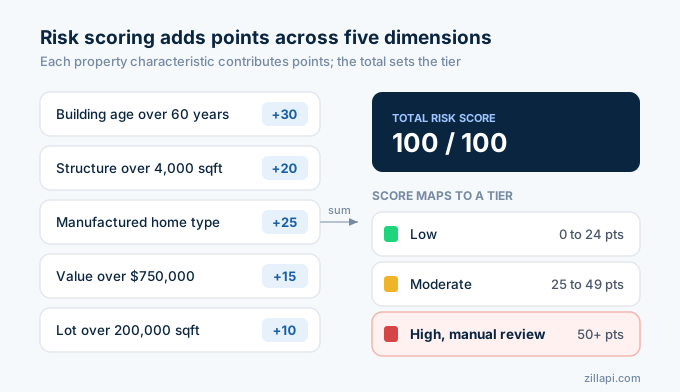
Underwriters assign risk scores based on property characteristics. Older roofs, larger structures, and certain construction types carry higher risk. The API returns the fields you need to build a simple risk model.
def score_property_risk(address):    """Score property risk for insurance underwriting."""    data = requests.get(        "https://api.zillapi.com/v1/properties/by-address",        params={            "address": address,            "fields": "address,zestimate,livingArea,homeType,yearBuilt,lotAreaValue,bedrooms,bathrooms,stories,taxAssessedValue",        },        headers=HEADERS,    ).json()["data"]
    sqft = data.get("livingArea", 0)    year = data.get("yearBuilt", 2000)    home_type = data.get("homeType", "SINGLE_FAMILY")    lot_size = data.get("lotAreaValue", 0)    stories = data.get("stories", 1)    zestimate = data.get("zestimate", 0)
    age = 2026 - year    risk_points = 0    flags = []
    # Age risk (electrical, plumbing, foundation)    if age > 60:        risk_points += 30        flags.append(f"Built {year}: high risk for electrical/plumbing issues")    elif age > 40:        risk_points += 20        flags.append(f"Built {year}: moderate age risk, likely needs roof replacement")    elif age > 20:        risk_points += 10        flags.append(f"Built {year}: standard age risk")
    # Size risk (larger homes cost more to repair)    if sqft > 4000:        risk_points += 20        flags.append(f"{sqft:,} sqft: large structure, high replacement cost")    elif sqft > 2500:        risk_points += 10        flags.append(f"{sqft:,} sqft: above-average size")
    # Construction type risk    high_risk_types = ["MANUFACTURED", "MOBILE_HOME"]    if home_type in high_risk_types:        risk_points += 25        flags.append(f"{home_type}: higher wind and storm damage risk")
    # Multi-story risk    if stories >= 3:        risk_points += 10        flags.append(f"{stories} stories: increased fall and structural risk")
    # Value concentration risk    if zestimate > 750000:        risk_points += 15        flags.append(f"${zestimate:,}: high-value property, large potential claim")    elif zestimate > 500000:        risk_points += 10
    # Lot size (very large lots may indicate rural/wildfire zone)    if lot_size and lot_size > 200000:        risk_points += 10        flags.append(f"Large lot ({lot_size:,} sqft): check wildfire and flood exposure")
    # Risk tier    if risk_points >= 50:        tier = "HIGH"    elif risk_points >= 25:        tier = "MODERATE"    else:        tier = "LOW"
    print(f"PROPERTY RISK ASSESSMENT")    print(f"{'='*55}")    print(f"  {data['address']['streetAddress']}")    print(f"  {data.get('bedrooms')}bd/{data.get('bathrooms')}ba | {sqft:,} sqft | Built {year}")    print(f"  Home Type: {home_type} | Lot: {lot_size:,} sqft")    print(f"\n  Risk Score: {risk_points}/100")    print(f"  Risk Tier: {tier}")    print(f"\n  Risk Factors:")    for flag in flags:        print(f"    - {flag}")    if not flags:        print(f"    - No elevated risk factors detected")    print(f"{'='*55}")
    return {"risk_score": risk_points, "tier": tier, "flags": flags}
risk = score_property_risk("1600 Pennsylvania Ave NW, Washington DC 20500")
The risk scorer evaluates five dimensions: building age, structure size, construction type, value concentration, and lot characteristics. Each dimension adds points. The total determines the risk tier.
This is a starting model. Production insurers layer in catastrophe data (flood zones, wildfire maps, hail corridors) and claims history. But the property characteristics from the API form the foundation of any risk score.
How do I screen policies for underinsurance?
Replacement costs have risen roughly 40% since 2020. Many homeowners carry coverage limits set years ago that no longer match what it would cost to rebuild. Insurers need to find these gaps before a claim hits.
def screen_underinsurance(policies):    """Screen a portfolio of policies for coverage gaps."""    issues = []
    print(f"UNDERINSURANCE SCREENING")    print(f"{'='*65}")
    for policy in policies:        address = policy["address"]        coverage_limit = policy["coverage_limit"]        policy_id = policy["policy_id"]
        data = requests.get(            "https://api.zillapi.com/v1/properties/by-address",            params={                "address": address,                "fields": "address,zestimate,livingArea,homeType,yearBuilt,taxAssessedValue",            },            headers=HEADERS,        ).json()["data"]
        zestimate = data.get("zestimate", 0)        sqft = data.get("livingArea", 0)        year = data.get("yearBuilt", 2000)
        # Estimate replacement cost (simplified)        base_cost_per_sqft = 165        age = 2026 - year        age_factor = 1.20 if age > 50 else 1.10 if age > 30 else 1.05 if age > 15 else 1.0        est_replacement = round(sqft * base_cost_per_sqft * age_factor)
        gap = est_replacement - coverage_limit        gap_pct = round(gap / coverage_limit * 100, 1) if coverage_limit else 0
        status = "OK"        if gap_pct > 30:            status = "CRITICAL"            issues.append({"policy_id": policy_id, "address": address, "gap": gap, "gap_pct": gap_pct})        elif gap_pct > 15:            status = "WARNING"            issues.append({"policy_id": policy_id, "address": address, "gap": gap, "gap_pct": gap_pct})
        print(f"\n  Policy {policy_id}: {data['address']['streetAddress']}")        print(f"    Coverage Limit:     ${coverage_limit:,}")        print(f"    Est. Replacement:   ${est_replacement:,}")        print(f"    Gap:                ${gap:,} ({gap_pct:+}%)")        print(f"    Status:             {status}")
    print(f"\n{'='*65}")    print(f"  SUMMARY: {len(policies)} policies screened")    print(f"  {len(issues)} need review ({sum(1 for i in issues if i['gap_pct'] > 30)} critical)")    print(f"{'='*65}")
    return issues
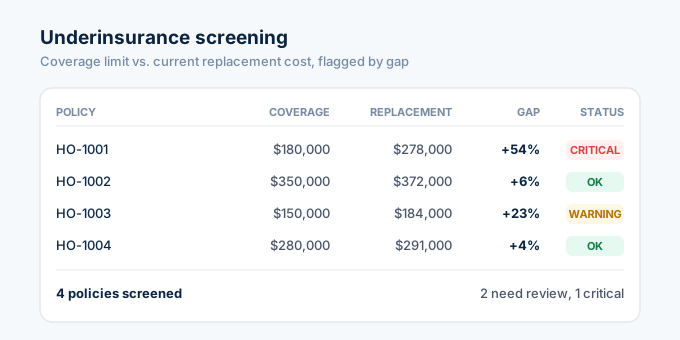
policies = [    {"policy_id": "HO-1001", "address": "1600 Pennsylvania Ave NW, Washington DC 20500", "coverage_limit": 180000},    {"policy_id": "HO-1002", "address": "100 Main St, Washington DC 29601", "coverage_limit": 350000},    {"policy_id": "HO-1003", "address": "45 Oak Ave, Taylors, SC 29687", "coverage_limit": 150000},    {"policy_id": "HO-1004", "address": "200 Church St, Washington DC 29601", "coverage_limit": 280000},]gaps = screen_underinsurance(policies)
The screener pulls current property data for every policy in the batch, estimates replacement cost, and compares it to the coverage limit. Any policy where the gap exceeds 15% gets flagged as a warning. Gaps above 30% are critical.
Run this quarterly or after construction cost spikes. Properties built before 1990 are the most likely to have outdated coverage limits because they were priced using older cost tables.
How do I validate claims with property data?
When a claim comes in, the adjuster needs to verify that the reported property details match reality. The API provides an instant cross-check.
def validate_claim(claim):    """Cross-check a claim against property records."""    address = claim["address"]    reported = claim["reported"]
    data = requests.get(        "https://api.zillapi.com/v1/properties/by-address",        params={            "address": address,            "fields": "address,livingArea,homeType,yearBuilt,bedrooms,bathrooms,stories,zestimate,taxAssessedValue",        },        headers=HEADERS,    ).json()["data"]
    discrepancies = []    checks = [        ("sqft", "livingArea", 0.10),        ("bedrooms", "bedrooms", 0),        ("bathrooms", "bathrooms", 0),        ("year_built", "yearBuilt", 0),    ]
    print(f"CLAIM VALIDATION")    print(f"{'='*55}")    print(f"  Claim #{claim['claim_id']}: {data['address']['streetAddress']}")    print(f"\n  {'Field':<15} {'Reported':<12} {'On Record':<12} {'Match'}")    print(f"  {'-'*51}")
    for label, field, tolerance in checks:        reported_val = reported.get(label, "N/A")        actual_val = data.get(field, "N/A")
        if tolerance > 0 and isinstance(reported_val, (int, float)) and isinstance(actual_val, (int, float)):            diff = abs(reported_val - actual_val) / actual_val if actual_val else 0            match = "YES" if diff <= tolerance else "NO"        else:            match = "YES" if str(reported_val) == str(actual_val) else "NO"
        if match == "NO":            discrepancies.append(f"{label}: reported {reported_val}, actual {actual_val}")
        print(f"  {label:<15} {str(reported_val):<12} {str(actual_val):<12} {match}")
    print(f"\n  Zestimate:       ${data.get('zestimate', 0):,}")    print(f"  Tax Assessed:    ${data.get('taxAssessedValue', 0):,}")    print(f"  Claim Amount:    ${claim.get('amount', 0):,}")
    if claim.get("amount", 0) > data.get("zestimate", 0):        discrepancies.append(f"Claim amount (${claim['amount']:,}) exceeds property value (${data.get('zestimate', 0):,})")
    if discrepancies:        print(f"\n  DISCREPANCIES FOUND:")        for d in discrepancies:            print(f"    - {d}")        print(f"\n  RECOMMENDATION: Manual review required")    else:        print(f"\n  All checks passed. No discrepancies found.")
    print(f"{'='*55}")    return {"valid": len(discrepancies) == 0, "discrepancies": discrepancies}
claim = {    "claim_id": "CLM-2026-4421",    "address": "1600 Pennsylvania Ave NW, Washington DC 20500",    "amount": 85000,    "reported": {"sqft": 2200, "bedrooms": 4, "bathrooms": 2, "year_built": 1985},}result = validate_claim(claim)
The validator compares the claimant’s reported property details against the API record. Square footage allows a 10% tolerance because homeowners often estimate. Bedrooms, bathrooms, and year built must match exactly. If the claim amount exceeds the Zestimate, that also gets flagged.
This does not replace a full investigation. It catches obvious red flags in seconds instead of days.
How does this compare to enterprise insurance data?
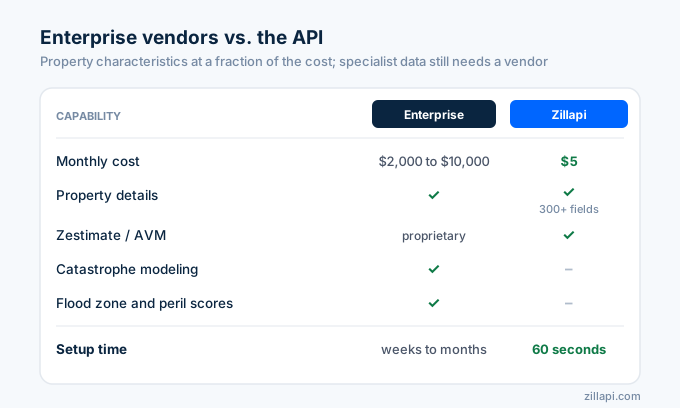
Enterprise property data vendors serve the largest carriers. They offer catastrophe modeling, peril scores, and regulatory compliance tools. The API covers the property characteristics piece at a fraction of the cost.
| Feature | Enterprise (Moody’s, Cotality, Guidewire) | Zillapi |
|---|---|---|
| Monthly cost | $2,000 to $10,000+ | $5 |
| Property details | Yes | Yes (300+ fields) |
| Zestimate / AVM | Proprietary models | Yes |
| Roof age estimate | Yes (some vendors) | Year built (proxy) |
| Catastrophe modeling | Yes | No |
| Flood zone data | Yes | No |
| Peril risk scores | Yes (1-10 scales) | No (build your own from property data) |
| Claims integration | Yes | No |
| Setup time | Weeks to months | 60 seconds |
For catastrophe modeling and peril scores, you still need a specialized vendor. For the core property characteristics that feed into replacement cost, risk scoring, and coverage validation, the API covers that at $0.005 per lookup.
A small insurer writing 200 homeowner policies per month uses 200 API credits. That costs $1. The annual plan at $54 gives you 12,000 lookups, enough for 1,000 policies checked monthly.
What does an insurance data workflow look like?
At quote time, the agent enters the property address. The API returns square footage, year built, home type, and value. The rating engine uses those inputs to calculate the premium. No manual property inspection needed for the initial quote.
At binding, the underwriter pulls the full property record and runs the risk scorer. High-risk properties get flagged for manual review. Low and moderate risk policies bind automatically.
During the policy term, the portfolio screener runs quarterly. It compares current replacement cost estimates to coverage limits and flags any policies that have fallen below the 80% coinsurance threshold.
At claim time, the validator cross-checks the reported property details against the API record. Discrepancies trigger a manual review before the claim pays out.
For automating these scripts on a schedule, see the automation guide. For the full Python setup, see the Python tutorial.
How do I get started?
Go to zillapi.com and sign up. You get 100 free credits with no credit card required.
Start with the replacement cost estimator. Enter a property address from one of your current policies and compare the estimated replacement cost to the coverage limit. If there is a gap, you have already found value from the API.
For property field documentation, see the property data guide. For comparable sales data, see the comps guide. For value-add renovations that affect replacement cost, see the ARV guide.
Frequently asked questions
Can insurance companies use the Zillow API?
Yes. Third-party REST APIs like Zillapi return property details that insurers need for underwriting and risk assessment. Each API call returns the Zestimate, tax assessed value, year built, square footage, home type, lot size, roof type, and 300+ other fields. One call costs 1 credit ($0.005). The free tier gives 100 credits at signup with no credit card required.
How do I estimate replacement cost with the Zillow API?
Pull the square footage, home type, year built, and number of stories from the API. Multiply the square footage by a regional cost-per-sqft factor. Adjust for construction type, age, and quality. The API gives you the structural inputs. You apply local building cost multipliers from sources like Marshall and Swift or RSMeans. One API call per property provides the data you need.
What property data matters for insurance risk scoring?
The five most important fields for risk scoring are year built, square footage, home type, lot size, and tax assessed value. Older homes have higher risk for electrical and plumbing failures. Larger homes cost more to replace. Home type affects construction quality and fire risk. Lot size matters for flood and wildfire exposure. The API returns all of these fields in a single call.
How do I monitor an insurance portfolio with property data?
Store the addresses of all insured properties. Pull current Zestimates and property details quarterly or after major market events. Compare current values to coverage limits to find underinsured properties. Flag homes where the Zestimate exceeds the coverage amount by more than 20%. A portfolio of 500 properties costs $2.50 per monitoring cycle.
How much does property data cost for insurance companies?
Enterprise platforms like Moody’s, Guidewire HazardHub, and Cotality charge thousands per month for property risk data. Zillapi costs $5 per month for 1,000 property lookups or $54 per year for 12,000 lookups. A small insurer underwriting 200 policies per month uses 200 credits. That is $1 per month. The free tier gives 100 credits at signup.
Can I use property data for claims validation?
Yes. When a claim comes in, pull the property details from the API and compare them to the policy. Check if the reported square footage matches the API data. Verify the home type, year built, and number of bedrooms. Flag any discrepancies between the claim and the actual property record. This takes one API call and helps catch errors or fraud before paying out.