
Appraisal work starts with comps. Before an appraiser fills out a single form field, they spend hours pulling recent sales, comparing them to the subject, and working out adjustments.
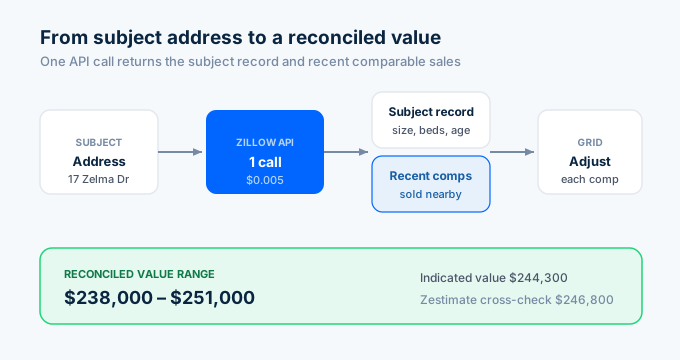
That research stage is where a property data API helps. One call returns recent sales near the subject with the square footage, beds, baths, and sale details you need to build a comp grid.
To be clear about scope: the API supports your research. It does not produce the appraisal. You still apply USPAP standards and professional judgment, and you still render the report in your form software. What changes is how fast you gather and analyze the data.
Here is how to build appraisal comp workflows with Python and the Zillow API.
What data do appraisers need?
The comp grid drives the sales comparison approach. Every field in it comes from the same API call.
| Appraisal task | Data needed | API field |
|---|---|---|
| Subject profile | Size, beds, baths, age, lot | livingArea, bedrooms, bathrooms, yearBuilt, lotAreaValue |
| Comp search | Recent sales near subject | search endpoint (RECENTLY_SOLD) |
| Adjustments | Feature differences | livingArea, bedrooms, bathrooms, lotAreaValue |
| Price per sqft | Sale price and size | price, livingArea |
| Value cross-check | Market estimate | zestimate |
| Sale verification | Sale date and price | dateSold, price |
One call returns 300+ fields per property at $0.005. For API key setup, see the step-by-step guide.
How do I pull comps for a subject property?
Start with the subject. Pull its profile, then search for recent sales nearby and filter them down to the most similar properties.
import requests, os
API_KEY = os.environ["ZILLAPI_KEY"]HEADERS = {"Authorization": f"Bearer {API_KEY}"}
def get_subject(address):    """Pull the subject property profile."""    return requests.get(        "https://api.zillapi.com/v1/properties/by-address",        params={            "address": address,            "fields": "address,zestimate,livingArea,bedrooms,bathrooms,yearBuilt,lotAreaValue",        },        headers=HEADERS,    ).json()["data"]
def find_comps(subject, bbox, max_comps=6):    """Find and rank comparable sales near the subject."""    sold = requests.post(        "https://api.zillapi.com/v1/search",        json={            "bbox": bbox,            "listingStatus": "RECENTLY_SOLD",            "homeType": ["SINGLE_FAMILY"],        },        headers=HEADERS,    ).json()["data"]
    s_sqft = subject.get("livingArea", 0)    s_beds = subject.get("bedrooms", 0)    s_year = subject.get("yearBuilt", 0)
    candidates = []    for comp in sold:        sqft = comp.get("livingArea", 0)        if not sqft or not comp.get("price"):            continue
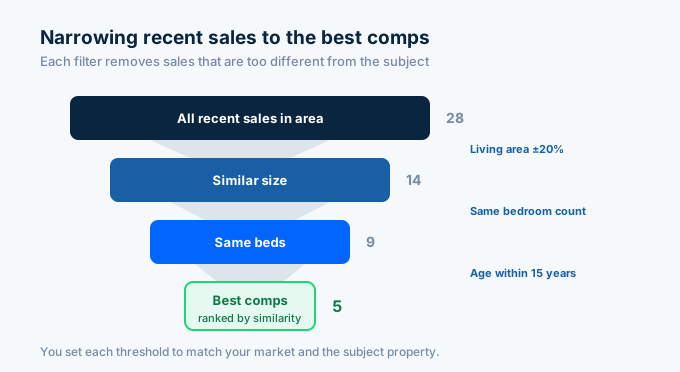
        # Filter: living area within 20%, same bed count, age within 15 years        if abs(sqft - s_sqft) / s_sqft > 0.20:            continue        if comp.get("bedrooms") != s_beds:            continue        if s_year and comp.get("yearBuilt") and abs(comp["yearBuilt"] - s_year) > 15:            continue
        # Similarity score (lower is closer)        score = (            abs(sqft - s_sqft) / s_sqft * 100            + abs((comp.get("yearBuilt") or s_year) - s_year) * 0.5        )        comp["_score"] = round(score, 1)        candidates.append(comp)
    candidates.sort(key=lambda c: c["_score"])    return candidates[:max_comps]
subject = get_subject("1600 Pennsylvania Ave NW, Washington DC 20500")bbox = {"north": 34.90, "south": 34.80, "east": -82.35, "west": -82.45}comps = find_comps(subject, bbox)
print(f"Subject: {subject['livingArea']:,} sqft, {subject['bedrooms']}bd, built {subject['yearBuilt']}")print(f"Found {len(comps)} comparable sales\n")for c in comps:    print(f"  ${c['price']:,} | {c['livingArea']:,} sqft | {c['bedrooms']}bd | built {c.get('yearBuilt')} | score {c['_score']}")
The function pulls recent sales in the bounding box, then filters them to homes within 20% of the subject’s size, with the same bedroom count, and within 15 years of age. It ranks what remains by a similarity score so the closest comps rise to the top.
You set the filters. These are starting thresholds. Tighten or loosen them based on your market and the subject’s characteristics.
How do I calculate adjustments?
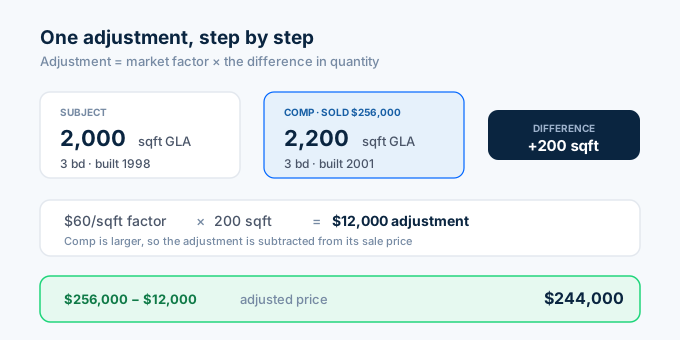
Adjustments are the heart of the sales comparison approach. The formula is simple: multiply your adjustment factor by the difference in quantity between the subject and the comp.
# Market-derived adjustment factors (you set these from paired-sales analysis)FACTORS = {    "gla_per_sqft": 60,      # $ per square foot of living area    "bedroom": 5000,         # $ per bedroom    "bathroom": 7500,        # $ per bathroom    "lot_per_sqft": 3,       # $ per square foot of lot    "year_built": 500,       # $ per year of age difference}
def adjust_comp(subject, comp):    """Adjust a comp's sale price toward the subject."""    adjustments = {}
    # Living area: positive means comp is larger, so adjust the comp down    sqft_diff = comp.get("livingArea", 0) - subject.get("livingArea", 0)    adjustments["GLA"] = -round(sqft_diff * FACTORS["gla_per_sqft"])
    bed_diff = comp.get("bedrooms", 0) - subject.get("bedrooms", 0)    adjustments["Bedrooms"] = -round(bed_diff * FACTORS["bedroom"])
    bath_diff = comp.get("bathrooms", 0) - subject.get("bathrooms", 0)    adjustments["Bathrooms"] = -round(bath_diff * FACTORS["bathroom"])
    lot_diff = comp.get("lotAreaValue", 0) - subject.get("lotAreaValue", 0)    adjustments["Lot"] = -round(lot_diff * FACTORS["lot_per_sqft"])
    year_diff = (comp.get("yearBuilt", 0) or 0) - (subject.get("yearBuilt", 0) or 0)    adjustments["Age"] = round(year_diff * FACTORS["year_built"])
    total_adj = sum(adjustments.values())    adjusted_price = comp["price"] + total_adj
    return {        "sale_price": comp["price"],        "adjustments": adjustments,        "total_adjustment": total_adj,        "adjusted_price": adjusted_price,    }
result = adjust_comp(subject, comps[0])print(f"Comp sale price:    ${result['sale_price']:,}")for label, amt in result["adjustments"].items():    print(f"  {label:<10} {amt:+,}")print(f"Total adjustment:   ${result['total_adjustment']:+,}")print(f"Adjusted price:     ${result['adjusted_price']:,}")
The function compares each feature, multiplies the difference by your factor, and applies the sign. A comp larger than the subject gets adjusted down. A comp with fewer bathrooms gets adjusted up.
The factors come from you. A $60 per square foot living-area factor times a 200 square foot difference produces a $12,000 adjustment. Derive these from paired-sales analysis in your market, not from the API.
How do I cross-check with price per square foot?
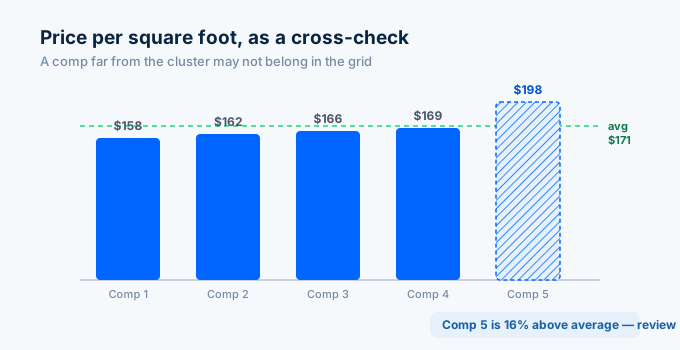
Price per square foot is a quick sanity check on your comp set. If one comp’s rate is far from the others, it may not belong in the grid.
def price_per_sqft_check(comps):    """Compare price per square foot across the comp set."""    rates = []    for c in comps:        if c.get("price") and c.get("livingArea"):            rate = c["price"] / c["livingArea"]            rates.append((c, round(rate)))
    avg = sum(r for _, r in rates) / len(rates) if rates else 0
    print(f"PRICE PER SQUARE FOOT")    print(f"{'='*50}")    for c, rate in sorted(rates, key=lambda x: x[1]):        flag = ""        if abs(rate - avg) / avg > 0.15:            flag = "  <- outlier, review"        print(f"  ${rate}/sqft  (${c['price']:,} / {c['livingArea']:,} sqft){flag}")    print(f"{'='*50}")    print(f"  Average: ${round(avg)}/sqft")    return round(avg)
avg_rate = price_per_sqft_check(comps)
The check flags any comp whose rate is more than 15% off the average. That comp may have a feature the grid does not capture, like a recent renovation or a inferior location. Look closer before you keep it.
How do I build the full comp grid?
The grid puts it together. Pull the subject, find comps, adjust each one, and print a side-by-side comparison with the adjusted value range.
def build_comp_grid(address, bbox):    """Build a complete comp grid for a subject property."""    subject = get_subject(address)    comps = find_comps(subject, bbox, max_comps=5)
    print(f"COMP GRID")    print(f"{'='*60}")    print(f"Subject: {subject['livingArea']:,} sqft | {subject['bedrooms']}bd/"          f"{subject['bathrooms']}ba | built {subject['yearBuilt']}")    print(f"Zestimate: ${subject.get('zestimate', 0):,}")    print(f"{'='*60}")
    adjusted_values = []    for i, comp in enumerate(comps, 1):        result = adjust_comp(subject, comp)        adjusted_values.append(result["adjusted_price"])
        print(f"\nComp {i}: {comp['livingArea']:,} sqft | {comp['bedrooms']}bd/"              f"{comp['bathrooms']}ba | built {comp.get('yearBuilt')}")        print(f"  Sale price:      ${result['sale_price']:,}")        print(f"  Net adjustment:  ${result['total_adjustment']:+,}")        print(f"  Adjusted price:  ${result['adjusted_price']:,}")
    if adjusted_values:        low = min(adjusted_values)        high = max(adjusted_values)        mid = round(sum(adjusted_values) / len(adjusted_values))        print(f"\n{'='*60}")        print(f"  Adjusted value range: ${low:,} to ${high:,}")        print(f"  Indicated value:      ${mid:,}")        print(f"  Zestimate cross-check: ${subject.get('zestimate', 0):,}")        print(f"{'='*60}")
    return adjusted_values
build_comp_grid("1600 Pennsylvania Ave NW, Washington DC 20500", bbox)
The grid shows each comp’s sale price, net adjustment, and adjusted price, then reconciles them into an indicated value range. The Zestimate sits alongside as an independent cross-check, not as the answer.
This output is research, not the appraisal. You take it into your form software, apply your judgment, and document your reasoning to USPAP standards.
How does this compare to appraisal tools?
Appraisers already use form software and analytics platforms. The API does not replace them. It feeds the comp research stage at a lower cost.
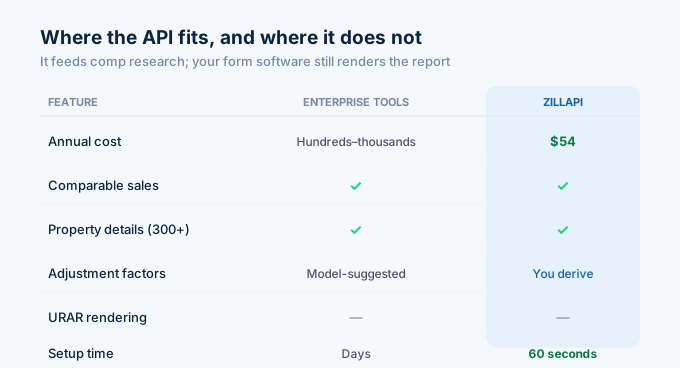
| Feature | Enterprise tools (Redstone, HouseCanary) | Zillapi |
|---|---|---|
| Annual cost | Hundreds to thousands | $54/yr |
| Comparable sales | Yes | Yes (search endpoint) |
| Property details | Yes | Yes (300+ fields) |
| Adjustment factors | Suggested by model | You derive and apply |
| Comp grid | Built-in | Build your own |
| URAR rendering | No (that is form software) | No |
| USPAP workfile | No | No |
| Setup time | Days | 60 seconds |
For market-derived adjustment factors and regression analysis, the analytics platforms do more. For pulling raw comp data into your own scripts and spreadsheets, the API does it for $0.005 a call.
An appraiser completing 40 reports a month, pulling one search plus six comp lookups each, uses about 280 credits. That is under $1.50 a month.
A note on the URAR redesign
The appraisal form is changing. All legacy UAD forms, including the 1004, are retired on November 2, 2026, replaced by a single redesigned URAR. The new form turns more free-form commentary into discrete, standardized data fields.
That shift rewards clean, structured data inputs. Pulling comp characteristics through an API, rather than retyping them, fits the direction the form is moving. The API gives you the raw fields in a structured format from the start.
How do I get started?
Go to zillapi.com and sign up. You get 100 free credits with no credit card required.
Start with the comp grid. Enter a subject address and a bounding box around its neighborhood. Run the script and see the adjusted value range against the Zestimate. That single grid shows what the API does for your research stage.
For comparable sales detail, see the comps guide. For the full Python setup, see the Python tutorial. For property field documentation, see the property data guide. For lender-side valuation, see the lenders guide.
Frequently asked questions
Can appraisers use the Zillow API?
Yes. Appraisers use third-party REST APIs like Zillapi for comp research, not to produce the final appraisal. Each API call returns recent sales, square footage, beds, baths, year built, lot size, and the Zestimate for any U.S. property. This speeds up the data-gathering stage. The appraiser still applies professional judgment and USPAP standards. One call costs 1 credit ($0.005), and the free tier gives 100 credits at signup.
How do I pull comparable sales with the Zillow API?
Use the search endpoint with a RECENTLY_SOLD filter and a bounding box around the subject property. The API returns sold listings with price, square footage, beds, baths, and sale details. Filter the results by similarity to the subject (living area within 20 percent, same bedroom count, similar age) to build a shortlist of comps. Each search call costs 1 credit.
How do I calculate appraisal adjustments from API data?
Pull the square footage and features for the subject and each comp. Multiply your adjustment factor by the quantity difference. For example, a $60 per square foot living-area factor times a 200 square foot difference equals a $12,000 adjustment. Add or subtract the adjustment from the comp sale price. The API supplies the property characteristics; you supply the market-derived adjustment factors.
Does the Zillow API replace appraisal software?
No. The API supplies property data for comp research. It does not render a URAR, store workfiles, or enforce USPAP compliance. Appraisers still use form software like a la mode or ACI to produce the report. The API feeds the data-gathering and analysis stage that happens before the form is filled, and it costs a fraction of enterprise comp tools.
How much does comp data cost for appraisers?
Enterprise appraisal analytics tools like Redstone and HouseCanary cost hundreds to thousands per year. Zillapi costs $5 per month for 1,000 property lookups or $54 per year for 12,000. An appraiser completing 40 reports per month, pulling a search plus six comps each, uses about 280 credits. That is under $1.50 per month. The free tier gives 100 credits at signup.
What property fields matter for a comp grid?
The core comp grid fields are sale price, gross living area, bedrooms, bathrooms, year built, lot size, and sale date. The API returns all of these in one call. You compare each comp to the subject across these fields, apply adjustment factors to the differences, and arrive at an adjusted sale price for each comp. Price per square foot is a useful cross-check.