Most real estate agents use Zillow as a consumer. They check Zestimates, browse listings, and read reviews. But there’s a layer underneath the website that agents rarely touch: the data itself.
Property data from an API lets you build tools that work for your business. Automated CMAs that pull comps in seconds. Listing alerts that hit your client’s inbox before they see it on Zillow. Seller lead capture pages that show homeowners their estimated value. Market reports you can brand and send to your sphere.
You don’t need to be a developer to use these tools. You need an API key and a few lines of code. Or just a Google Sheet.
Here’s how real estate agents are using property data APIs to save time, generate leads, and close more deals.
What happened to the Zillow API for agents?
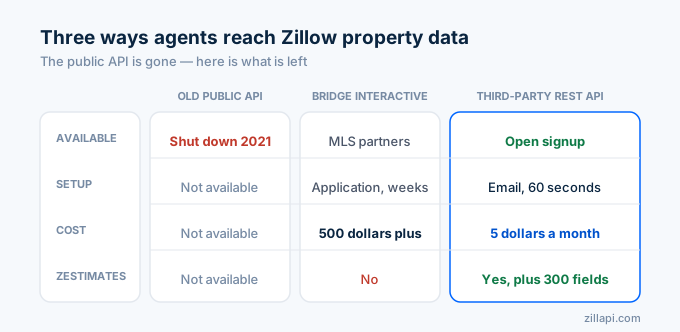
Zillow shut down the public API on September 30, 2021. The old endpoints that returned Zestimates, comps, and property details stopped working overnight. The developer signup page now redirects to Bridge Interactive, which is Zillow’s enterprise platform for MLS-affiliated partners.
Bridge Interactive requires MLS affiliation, a formal application, and weeks of approval. It costs $500+ per month. And it doesn’t even include Zestimates.
For individual agents and small teams, Bridge is not a realistic option.
Third-party REST APIs filled the gap. Zillapi returns the same property data (Zestimates, tax records, price history, photos, school ratings, and 300+ fields) through a simple REST endpoint. You sign up with your email, get 100 free credits, and make your first call in under 60 seconds.
For the full story on what happened, see our detailed breakdown.
How do I build an automated CMA?
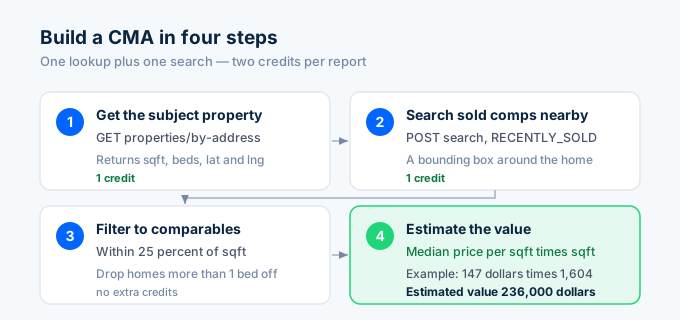
A comparative market analysis is the most common thing agents do with property data. You pull the subject property, find comparable sales nearby, and calculate an estimated value.
Here’s the entire workflow in Python:
import requests, os, statistics
API_KEY = os.environ["ZILLAPI_KEY"]HEADERS = {"Authorization": f"Bearer {API_KEY}"}
def quick_cma(address):    """Generate a CMA for any property in seconds."""    # Step 1: Get the subject property    subject = requests.get(        "https://api.zillapi.com/v1/properties/by-address",        params={"address": address},        headers=HEADERS,    ).json()["data"]
    # Step 2: Search for recently sold comps nearby    lat = subject["latitude"]    lng = subject["longitude"]    offset = 0.015  # roughly 1 mile
    comps_response = requests.post(        "https://api.zillapi.com/v1/search",        json={            "bbox": {                "north": lat + offset,                "south": lat - offset,                "east": lng + offset,                "west": lng - offset,            },            "listingStatus": "RECENTLY_SOLD",            "homeType": [subject.get("homeType", "SINGLE_FAMILY")],        },        headers=HEADERS,    ).json()["data"]
    # Step 3: Filter to comparable properties    sqft = subject.get("livingArea", 0)    beds = subject.get("bedrooms", 0)
    comps = []    for p in comps_response:        p_sqft = p.get("livingArea", 0)        p_beds = p.get("bedrooms", 0)        if not p_sqft or not p.get("price"):            continue        if abs(p_sqft - sqft) > sqft * 0.25:            continue        if abs(p_beds - beds) > 1:            continue        comps.append(p)
    if not comps:        return {"error": "No comparable sales found"}
    # Step 4: Calculate estimated value    prices_per_sqft = [c["price"] / c["livingArea"] for c in comps]    median_ppsf = statistics.median(prices_per_sqft)    estimated_value = round(median_ppsf * sqft, -3)
    return {        "address": subject["address"]["streetAddress"],        "subject_sqft": sqft,        "subject_beds": beds,        "subject_baths": subject.get("bathrooms", 0),        "zestimate": subject.get("zestimate", 0),        "comp_count": len(comps),        "median_price_per_sqft": round(median_ppsf),        "estimated_value": estimated_value,        "comps": [            {                "address": c["address"]["streetAddress"],                "price": c["price"],                "sqft": c["livingArea"],                "price_per_sqft": round(c["price"] / c["livingArea"]),            }            for c in comps[:5]        ],    }
result = quick_cma("1600 Pennsylvania Ave NW, Washington DC 20500")print(f"Subject: {result['address']}")print(f"Beds/Baths: {result['subject_beds']}/{result['subject_baths']}")print(f"Square Feet: {result['subject_sqft']:,}")print(f"Zestimate: ${result['zestimate']:,}")print(f"Estimated Value (CMA): ${result['estimated_value']:,}")print(f"Based on {result['comp_count']} comps")print(f"Median $/sqft: ${result['median_price_per_sqft']}")
This CMA costs 2 credits. One for the subject property lookup, one for the comp search. At $0.005 per credit, that’s one penny per CMA.
Cloud CMA and RPR generate similar reports, but they require MLS logins and manual steps. This script runs in 2 seconds and can be triggered from a web form, a CRM webhook, or a scheduled job.
For a deeper dive into comp analysis, see the comps API guide.
How do I capture seller leads with home values?
The highest-converting real estate landing pages show homeowners their estimated home value. Enter your address, see your number. It’s the same hook Zillow uses on its homepage.
You can build this with a simple web form that calls the API:
from flask import Flask, request, jsonify
app = Flask(__name__)
@app.route("/home-value", methods=["POST"])def home_value():    address = request.json.get("address")    email = request.json.get("email")    name = request.json.get("name")
    # Save the lead to your CRM    save_lead(name, email, address)
    # Pull the property data    r = requests.get(        "https://api.zillapi.com/v1/properties/by-address",        params={            "address": address,            "fields": "zestimate,rentZestimate,bedrooms,bathrooms,livingArea,yearBuilt,address",        },        headers=HEADERS,    )    data = r.json()["data"]
    return jsonify({        "estimated_value": data.get("zestimate"),        "rent_estimate": data.get("rentZestimate"),        "bedrooms": data.get("bedrooms"),        "bathrooms": data.get("bathrooms"),        "sqft": data.get("livingArea"),        "year_built": data.get("yearBuilt"),    })
The visitor enters their address and email. Your backend saves the lead and returns the home value. One API credit per lead.
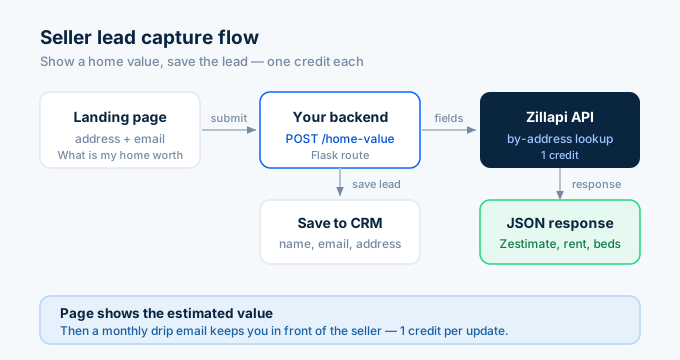
If you generate 100 leads per month from this form, that’s 100 credits ($0.50). Compare that to paying $200+ per month for a Zillow Premier Agent slot in a competitive zip code.
The key is what happens after the lookup. Set up an email drip that sends monthly value updates. Each update costs 1 credit and keeps you in front of the homeowner until they’re ready to sell.
How do I set up listing alerts for clients?
Most agents use Zillow’s built-in saved searches for client alerts. The problem is that those alerts come from Zillow, not from you. The client sees Zillow’s branding, Zillow’s agent recommendations, and Zillow’s ads.
Build your own alerts and every touchpoint has your name on it:
import json, timefrom datetime import datetime
ALERT_FILE = "previous_listings.json"
def load_previous():    try:        with open(ALERT_FILE) as f:            return set(json.load(f))    except FileNotFoundError:        return set()
def save_current(zpids):    with open(ALERT_FILE, "w") as f:        json.dump(list(zpids), f)
def check_new_listings(client_criteria):    """Find new listings matching client criteria."""    r = requests.post(        "https://api.zillapi.com/v1/search",        json={            "bbox": client_criteria["bbox"],            "listingStatus": "FOR_SALE",            "homeType": client_criteria.get("homeType", ["SINGLE_FAMILY"]),            "minPrice": client_criteria.get("minPrice"),            "maxPrice": client_criteria.get("maxPrice"),            "minBeds": client_criteria.get("minBeds"),        },        headers=HEADERS,    )    current_listings = r.json()["data"]    current_zpids = {str(p["zpid"]) for p in current_listings}
    previous_zpids = load_previous()    new_zpids = current_zpids - previous_zpids
    new_listings = [p for p in current_listings if str(p["zpid"]) in new_zpids]    save_current(current_zpids)
    return new_listings
# Example: Washington DC buyer wants 3+ beds under $400Knew = check_new_listings({    "bbox": {"north": 34.90, "south": 34.80, "east": -82.35, "west": -82.45},    "minBeds": 3,    "maxPrice": 400000,})
for listing in new:    addr = listing["address"]["streetAddress"]    price = listing.get("price", 0)    beds = listing.get("bedrooms", "?")    print(f"NEW: {addr} - ${price:,} - {beds} beds")    # send_email(client_email, listing)  # plug in your email service
Run this script once a day with a cron job or a scheduled task. Each run costs 1 credit. That’s 30 credits per month per client alert ($0.15).
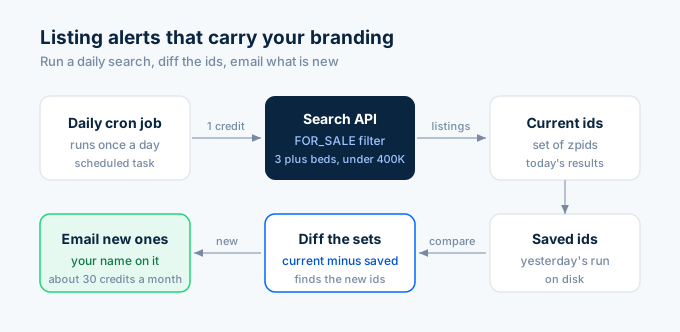
For 20 active buyer clients, you spend $3 per month on listing alerts that carry your branding instead of Zillow’s.
How do I generate market reports?
Agents send market reports to their sphere to stay top of mind. Most agents copy data from Zillow or their MLS portal into a PDF or email template. That takes 30 minutes per report.
An API makes this a 10-second operation:
def market_snapshot(bbox, market_name):    """Generate a market snapshot for a neighborhood or zip code."""    # Pull active listings    active = requests.post(        "https://api.zillapi.com/v1/search",        json={            "bbox": bbox,            "listingStatus": "FOR_SALE",            "homeType": ["SINGLE_FAMILY"],        },        headers=HEADERS,    ).json()["data"]
    # Pull recent sales    sold = requests.post(        "https://api.zillapi.com/v1/search",        json={            "bbox": bbox,            "listingStatus": "RECENTLY_SOLD",            "homeType": ["SINGLE_FAMILY"],        },        headers=HEADERS,    ).json()["data"]
    # Calculate stats    active_prices = [p["price"] for p in active if p.get("price")]    sold_prices = [p["price"] for p in sold if p.get("price")]
    report = {        "market": market_name,        "date": datetime.now().strftime("%B %Y"),        "active_count": len(active),        "sold_count": len(sold),    }
    if active_prices:        report["median_list_price"] = statistics.median(active_prices)        report["avg_list_price"] = round(statistics.mean(active_prices))
    if sold_prices:        report["median_sold_price"] = statistics.median(sold_prices)        report["avg_sold_price"] = round(statistics.mean(sold_prices))
    if active_prices and sold_prices:        report["list_to_sold_ratio"] = round(            statistics.median(sold_prices) / statistics.median(active_prices) * 100, 1        )
    return report
report = market_snapshot(    bbox={"north": 34.88, "south": 34.82, "east": -82.37, "west": -82.43},    market_name="Downtown Washington DC",)
print(f"Market Report: {report['market']}")print(f"Date: {report['date']}")print(f"Active Listings: {report['active_count']}")print(f"Recent Sales: {report['sold_count']}")print(f"Median List Price: ${report.get('median_list_price', 0):,.0f}")print(f"Median Sold Price: ${report.get('median_sold_price', 0):,.0f}")print(f"List-to-Sold Ratio: {report.get('list_to_sold_ratio', 0)}%")
Two API credits per report. One for active listings, one for recent sales. Send this to your email list every month and you become the local market expert in your clients’ inboxes.
Pair this data with a template in Canva or Google Docs and you have a branded market report that takes 2 minutes instead of 30.
How do I track properties for investor clients?
If you work with investor clients, they want numbers. Yield, cash flow, and cap rate. Not just photos and floor plans.
Pull the data once and calculate everything:
def investor_summary(address):    """Generate an investor-focused property summary."""    r = requests.get(        "https://api.zillapi.com/v1/properties/by-address",        params={            "address": address,            "fields": "zestimate,rentZestimate,taxAnnualAmount,bedrooms,bathrooms,livingArea,yearBuilt,homeType,address",        },        headers=HEADERS,    )    d = r.json()["data"]
    zestimate = d.get("zestimate", 0)    rent = d.get("rentZestimate", 0)    tax = d.get("taxAnnualAmount", 0)
    gross_yield = (rent * 12 / zestimate * 100) if zestimate else 0
    # Estimate expenses: taxes + insurance + maintenance + vacancy    insurance = zestimate * 0.004  # 0.4% of value    maintenance = rent * 12 * 0.10  # 10% of gross rent    vacancy = rent * 12 * 0.05  # 5% vacancy rate    total_expenses = tax + insurance + maintenance + vacancy
    noi = (rent * 12) - total_expenses    cap_rate = (noi / zestimate * 100) if zestimate else 0
    return {        "address": d["address"]["streetAddress"],        "type": d.get("homeType", "Unknown"),        "beds": d.get("bedrooms", 0),        "baths": d.get("bathrooms", 0),        "sqft": d.get("livingArea", 0),        "year_built": d.get("yearBuilt", 0),        "zestimate": zestimate,        "monthly_rent": rent,        "annual_tax": tax,        "gross_yield": round(gross_yield, 1),        "cap_rate": round(cap_rate, 1),        "monthly_noi": round(noi / 12),    }
summary = investor_summary("1600 Pennsylvania Ave NW, Washington DC 20500")print(f"Property: {summary['address']}")print(f"Type: {summary['type']} | {summary['beds']}bd/{summary['baths']}ba | {summary['sqft']:,} sqft")print(f"Zestimate: ${summary['zestimate']:,}")print(f"Rent Estimate: ${summary['monthly_rent']:,}/mo")print(f"Gross Yield: {summary['gross_yield']}%")print(f"Cap Rate: {summary['cap_rate']}%")print(f"Monthly NOI: ${summary['monthly_noi']:,}")
One credit per property. Send this to your investor client alongside the MLS listing and you’ve differentiated yourself from every other agent sending the same MLS sheet.
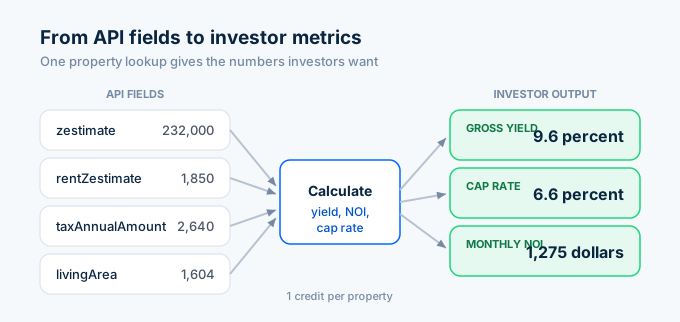
For the complete investment analysis workflow with cash-on-cash returns and deal screening, see the investor API guide.
Can I do this without coding?
Yes. Three paths that don’t require writing Python.
Google Sheets handles the simplest use case. A custom formula lets you type =ZILLOW("123 Main St") and see the Zestimate in the cell. Add more formulas across the row for rent estimates, beds, baths, and square footage. You have a property comparison sheet in 5 minutes. See the Google Sheets tutorial for the complete setup.
Zapier and Make connect the API to your CRM and email tools. Set up a zap that triggers when a new contact enters your CRM, pulls their home value from the API, and sends a branded email with the estimate. No code. The API call runs inside the automation platform.
Excel with Power Query imports property data directly into your spreadsheets. If you already track your business in Excel, this keeps everything in one place. See the Excel tutorial for the step-by-step setup.
How much does this cost for a typical agent?
Most agents use 50 to 200 credits per month depending on their workflow.
| Workflow | Credits per use | Monthly uses | Monthly credits |
|---|---|---|---|
| CMA generation | 2 | 10 | 20 |
| Seller lead capture | 1 | 50 | 50 |
| Listing alerts (per client) | 30 | 5 clients | 150 |
| Monthly market report | 2 | 1 | 2 |
| Investor property analysis | 1 | 20 | 20 |
| Total | 242 |
That’s 242 credits per month. The $5 monthly plan includes 1,000 credits. You’d use less than a quarter of your allocation.
Compare that to what agents pay for similar tools:
| Tool | Monthly cost | What you get |
|---|---|---|
| Zillow Premier Agent | $200-1,000+ | Leads in your zip code |
| Cloud CMA | $45 | Branded CMA reports |
| RPR (via NAR) | Free with NAR dues | Property reports, no API |
| Homebot | $25+ per month | Home value emails to past clients |
| Zillapi | $5 | Raw data for all of the above |
The API gives you the raw data. You decide how to present it. A $5 API plan can replace $200+ per month in point solutions if you’re willing to set up the automations.
How do I get started?
Go to zillapi.com and sign up. You get 100 free credits with no credit card.
Start with the simplest use case. Look up your own home. Check if the Zestimate matches what you’d tell a seller. Then look up a listing you just sold and pull the comp data. If the numbers make sense, build from there.
For your API key setup, follow the step-by-step walkthrough. For the Python basics, start with the Python tutorial. For Google Sheets formulas, see the Sheets guide.
One hundred free lookups is enough to test every workflow on this page. If it saves you time on even one CMA, it’s worth the 60 seconds to sign up.
Frequently asked questions
Can real estate agents use the Zillow API?
Not the original one. Zillow shut down the public API in 2021. Agents can use third-party REST APIs like Zillapi to access the same property data, including Zestimates, tax records, price history, and comparable sales. You sign up with an email, get 100 free credits with no credit card, and start pulling data in under a minute. No MLS affiliation required. No approval process.
How do I build an automated CMA with an API?
Search for recently sold properties near the subject property using the search endpoint with RECENTLY_SOLD status. Filter by home type, bedroom count, and square footage range. Calculate the median price per square foot from the comps. Multiply by the subject property’s square footage for an estimated value. The whole process takes one search call and one property lookup. Two API credits total.
Can I set up listing alerts with a property data API?
Yes. Run a search query on a schedule (daily or hourly) with FOR_SALE status and your client’s criteria like location, price range, and bedrooms. Compare results against previous runs to find new listings. Send the new ones by email or text. A daily scan of one market costs 1 credit per day. Monthly cost is about 30 credits ($0.15) per alert.
How much does a property data API cost for a real estate agent?
Zillapi gives 100 free credits at signup with no credit card. Paid plans start at $5 per month for 1,000 credits. Each credit returns one property lookup with 300+ fields. A typical agent workflow uses 50 to 200 credits per month for CMAs, market reports, and listing alerts. That fits comfortably in the $5 monthly plan.
What can agents do with property data from an API?
Agents use property data APIs for five main workflows. Automated CMAs that pull comps and calculate values in seconds. Listing alerts that notify clients when new properties match their criteria. Market reports with median prices and inventory counts by neighborhood. Seller lead capture tools that show homeowners their estimated home value. Portfolio tracking for investor clients with rental yields and tax data.
Do I need to know how to code to use a property data API?
Basic coding helps, but you don’t need to be a developer. Google Sheets with a custom formula can pull property data without writing a full application. Tools like Zapier and Make connect APIs to email and CRM systems with no code. For agents who want full control, Python scripts handle CMAs and listing alerts in under 50 lines of code.