Airtable is a database that looks like a spreadsheet. Real estate teams use it as a property tracker, a deal pipeline, and a CRM. The problem is the data entry. Someone has to type in the value, the rent, the beds, and the baths for every property.
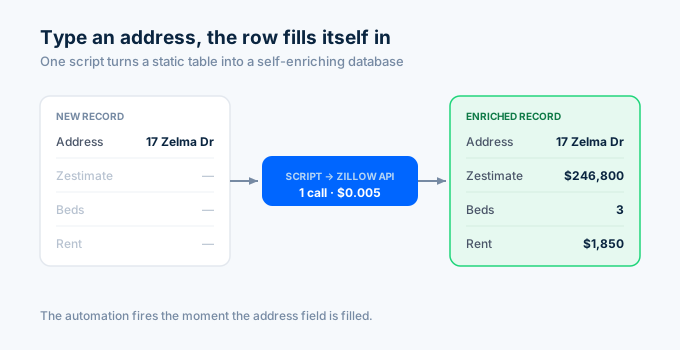
That part can run itself. With a short script, Airtable calls the Zillow API the moment you add an address and fills in the rest of the row.
Here is how to build a self-enriching property database with Airtable and the Zillapi REST API.
What can you build?
Airtable holds the records. The API fills them in. Together they cover the common real estate database jobs.
| Use case | What it does | API field |
|---|---|---|
| Property tracker | Auto-fill value, rent, size | zestimate, rentZestimate, livingArea |
| Deal pipeline | Score deals as they enter | zestimate, price |
| Lead enrichment | Attach property data to a lead | full property record |
| Portfolio base | Monitor values over time | zestimate (periodic) |
| Comp list | Pull recent sales near a subject | search endpoint |
| Owner reports | Value and equity per property | zestimate, taxAssessedValue |
Each API call costs 1 credit ($0.005). For API key setup, see the step-by-step guide.
How does auto-enrichment work?
Airtable automations run on triggers. When a record changes in a certain way, an action fires. One of those actions is “Run a script,” which can call any API.
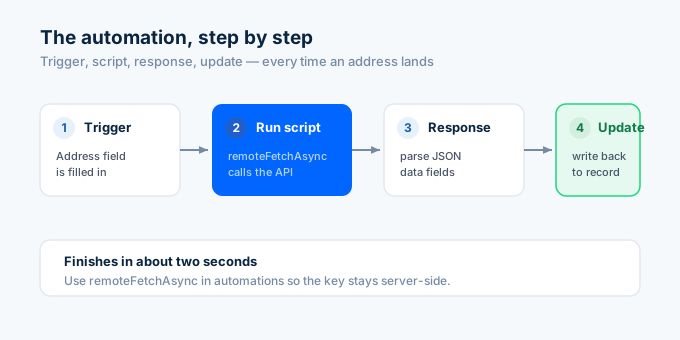
The flow is always the same. A trigger detects a new address. The script calls the API with that address. The API returns the data. The script writes it back to the record. The whole thing finishes in a couple of seconds.
How do I set up the table?
Create a table called Properties. Add these fields, matching the type to the data.
| Field name | Type |
|---|---|
| Address | Single line text |
| Zestimate | Currency or Number |
| Rent Estimate | Currency or Number |
| Beds | Number |
| Baths | Number |
| Sqft | Number |
| Year Built | Number |
The Address field is the input. Everything else gets filled in by the script. Add more fields later for any of the 300+ values the API returns.
How do I write the enrichment automation?
This is the core piece. It runs whenever an address is added and fills in the rest of the record.
In your base, open Automations, create a new automation, and set the trigger to “When a record matches conditions” with the condition that Address is not empty. Then add a “Run a script” action.
In the script action, add two input variables: recordId from the trigger record’s ID, and address from the trigger record’s Address field. Then paste this script.
// Airtable automation: "Run a script" actionlet config = input.config();let table = base.getTable("Properties");
const API_KEY = "YOUR_API_KEY"; // paste your Zillapi key
let url = "https://api.zillapi.com/v1/properties/by-address"  + "?address=" + encodeURIComponent(config.address)  + "&fields=zestimate,rentZestimate,bedrooms,bathrooms,livingArea,yearBuilt";
let response = await remoteFetchAsync(url, {  headers: { Authorization: "Bearer " + API_KEY },});
if (response.ok) {  let data = (await response.json()).data;
  await table.updateRecordAsync(config.recordId, {    "Zestimate": data.zestimate,    "Rent Estimate": data.rentZestimate,    "Beds": data.bedrooms,    "Baths": data.bathrooms,    "Sqft": data.livingArea,    "Year Built": data.yearBuilt,  });  console.log("Enriched: " + config.address);} else {  console.log("Lookup failed for: " + config.address);}
The script reads the address from the trigger, calls the API with remoteFetchAsync, and writes the returned fields back to the same record. Turn the automation on, add a property with an address, and watch the row fill itself in.
Use remoteFetchAsync in automations, not the browser fetch. It runs on Airtable’s servers, so there is no cross-origin restriction and your API key stays off the client.
How do I map the fields?
The API returns far more than the six fields above. You map each value you want to a column by adding a line to the update call.
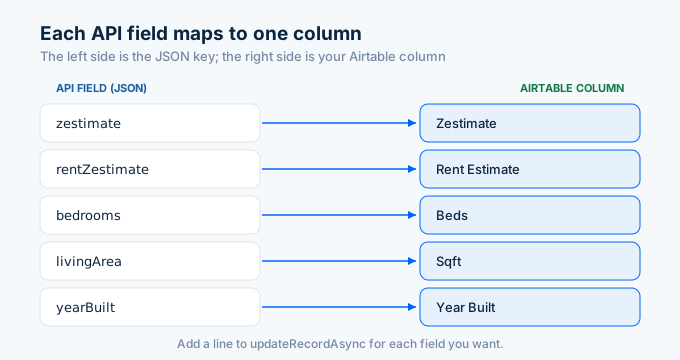
// Map any API field to an Airtable columnawait table.updateRecordAsync(config.recordId, { "Zestimate": data.zestimate, "Rent Estimate": data.rentZestimate, "Beds": data.bedrooms, "Baths": data.bathrooms, "Sqft": data.livingArea, "Year Built": data.yearBuilt, "Lot Size": data.lotAreaValue, "Tax Assessed": data.taxAssessedValue, "Home Type": data.homeType,});The left side is your Airtable column name. The right side is the API field. Add a line for each field you want, and create a matching column in the table. Number fields take numbers, text fields take strings.
Request only the fields you map. Add each one to the fields parameter in the URL so the response stays small and fast.
How do I enrich existing records in bulk?
If you already have a table full of addresses, use the Scripting extension to fill them all in at once. This runs on demand instead of per record.
// Scripting extension: enrich all un-enriched recordslet table = base.getTable("Properties");let query = await table.selectRecordsAsync({ fields: ["Address", "Zestimate"] });
const API_KEY = "YOUR_API_KEY";
// Airtable scripts allow up to 50 fetch calls per runlet pending = query.records  .filter(r => r.getCellValue("Address") && !r.getCellValue("Zestimate"))  .slice(0, 50);
let updates = [];for (let record of pending) {  let address = record.getCellValueAsString("Address");  let url = "https://api.zillapi.com/v1/properties/by-address"    + "?address=" + encodeURIComponent(address)    + "&fields=zestimate,rentZestimate,bedrooms,bathrooms,livingArea";
  let res = await fetch(url, { headers: { Authorization: "Bearer " + API_KEY } });  if (!res.ok) continue;  let data = (await res.json()).data;
  updates.push({    id: record.id,    fields: {      "Zestimate": data.zestimate,      "Rent Estimate": data.rentZestimate,      "Beds": data.bedrooms,      "Baths": data.bathrooms,      "Sqft": data.livingArea,    },  });}
// updateRecordsAsync writes up to 50 records per callwhile (updates.length > 0) {  await table.updateRecordsAsync(updates.slice(0, 50));  updates = updates.slice(50);}
output.text("Enriched " + pending.length + " properties");
The script finds records that have an address but no Zestimate, looks each one up, and batches the updates. It stops at 50 because that is the per-run fetch limit.
How do I handle Airtable’s limits?
Airtable caps a script at 50 fetch requests per run. The API has its own per-minute rate limits by plan. For large tables, work in batches.
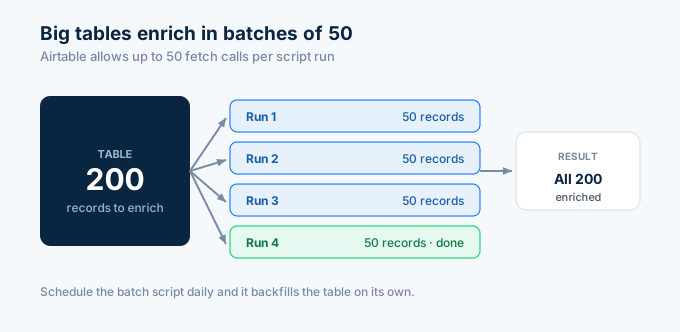
A 200-record table takes four runs of the batch script. Each run handles the next 50 records that still need data, because the filter skips any record that already has a Zestimate.
For a hands-off version, put the batch logic in a scheduled automation that runs daily. It chips away at the table 50 records at a time until everything is filled in.
Keep the per-record automation for new additions and use the batch script for backfills. Together they keep the whole base current without manual work.
How does this compare to property platforms?
Dedicated property management platforms bundle accounting, leasing, and maintenance. Airtable plus the API gives you a flexible property database at a fraction of the cost.
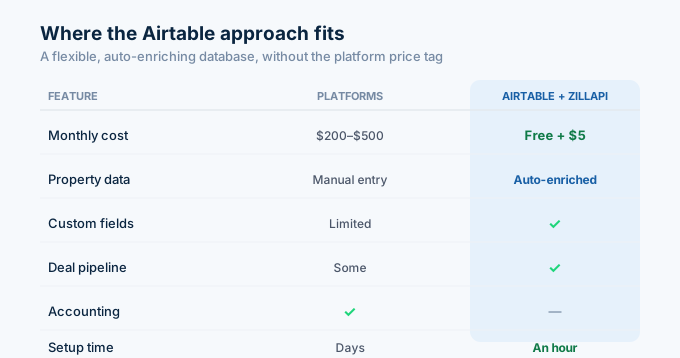
| Feature | Platforms (AppFolio, Buildium) | Airtable + Zillapi |
|---|---|---|
| Monthly cost | $200 to $500 | Free tier + $5 |
| Property data | Manual entry | Auto-enriched |
| Custom fields | Limited | Unlimited |
| Deal pipeline | Some | Yes (Kanban view) |
| Accounting | Yes | No |
| Setup time | Days | An hour |
For full accounting and leasing, the platforms do more. For a flexible, auto-enriching property database, Airtable plus the API does it for the price of a coffee.
Enriching 500 properties costs 500 credits, about $2.50. After that, every new address you add fills itself in for half a cent.
How do I get started?
Go to zillapi.com and sign up. You get 100 free credits with no credit card required. Then open Airtable, create the Properties table, and add the enrichment automation above.
Start with the per-record automation. Add one property with a known address and confirm the row fills in. Then run the batch script on any existing records.
For the no-code automation version with Zapier, see the Zapier guide. For a spreadsheet version, see the Google Sheets guide. For property field documentation, see the property data guide.
Frequently asked questions
Can I connect the Zillow API to Airtable?
Yes. Use Airtable’s scripting feature to call the Zillapi REST API. In an automation, add a “Run a script” action that uses remoteFetchAsync to call the property endpoint with the record’s address, then updates the record with the returned data. The script runs whenever you add or change an address. Each lookup costs 1 credit ($0.005), and the free tier gives 100 credits at signup.
How do I auto-enrich Airtable records with property data?
Create an automation that triggers when a record’s address field is filled. Add a “Run a script” action that calls the Zillapi API with that address and writes the Zestimate, rent estimate, beds, baths, and square footage back to the record. Every new property you add fills in its own data within seconds. No manual lookup needed.
Do I need to code to use the Zillow API in Airtable?
A little. Airtable scripting uses JavaScript, but the scripts are short and you can copy the working examples in this guide. You paste the script into a “Run a script” automation action, set your API key, and map the fields. Once it is set up, the automation runs on its own with no further code.
How many records can I enrich at once in Airtable?
An Airtable script can make up to 50 fetch requests per run, so you enrich about 50 properties per batch run. For larger tables, run the batch script several times or split the work across automation runs. The updateRecordsAsync method writes up to 50 records per call. A 200-record table enriches in four runs.
How much does it cost to enrich an Airtable base?
Property management platforms like AppFolio and Buildium cost $200 to $500 per month. Airtable has a free tier, and the API costs $5 per month for 1,000 lookups or $54 per year for 12,000. Enriching 500 properties costs 500 credits, about $2.50. You get 100 free API credits at signup with no credit card.
What property fields can I pull into Airtable?
One API call returns the Zestimate, rent estimate, bedrooms, bathrooms, square footage, year built, lot size, tax assessed value, home type, and 300+ other fields. You map whichever fields you want to columns in your Airtable table. Add number fields for the values and text fields for details, then write each one in the enrichment script.