Real estate analytics used to mean buying expensive data sets from ATTOM or CoStar, loading them into a database, and hiring a data engineer to build the pipeline. That worked for institutional investors. It didn’t work for independent investors, small funds, or developers building their own tools.
An API changes the math. You pull the data you need, when you need it, for $0.005 per property. No bulk purchases. No data licensing agreements. No stale CSV files.
Here’s how to build real estate analytics dashboards using Python and the Zillow API, from basic market analysis to full portfolio monitoring.
What data do I need for real estate analytics?
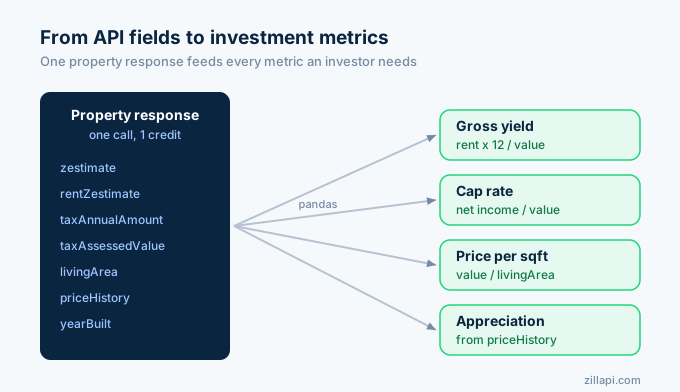
Every real estate analytics workflow starts with the same core data points. The API returns all of them in a single call:
| Data point | API field | Analytics use |
|---|---|---|
| Market value | zestimate | Valuation baseline |
| Rent estimate | rentZestimate | Yield calculation |
| Annual tax | taxAnnualAmount | Expense modeling |
| Assessed value | taxAssessedValue | Assessment ratio |
| Square footage | livingArea | Price per sqft |
| Bedrooms/baths | bedrooms, bathrooms | Comp filtering |
| Year built | yearBuilt | Age-based analysis |
| Home type | homeType | Market segmentation |
| Price history | priceHistory | Appreciation tracking |
| Tax history | taxHistory | Assessment trend |
| Listing price | price | Market vs asking |
| Listing status | homeStatus | Inventory tracking |
One API call per property. One credit ($0.005). You get the raw material for every metric investors care about.
How do I pull property data into pandas?
Start with a single property lookup that loads directly into a pandas DataFrame:
import requests, os, pandas as pd
API_KEY = os.environ["ZILLAPI_KEY"]HEADERS = {"Authorization": f"Bearer {API_KEY}"}
def get_property(address):    """Pull property data and return as a dict."""    r = requests.get(        "https://api.zillapi.com/v1/properties/by-address",        params={"address": address},        headers=HEADERS,    )    return r.json()["data"]
def property_to_row(data):    """Flatten property data into an analytics-ready dict."""    return {        "address": data["address"]["streetAddress"],        "city": data["address"]["city"],        "zip": data["address"]["zipcode"],        "zestimate": data.get("zestimate", 0),        "rent_estimate": data.get("rentZestimate", 0),        "price": data.get("price", 0),        "beds": data.get("bedrooms", 0),        "baths": data.get("bathrooms", 0),        "sqft": data.get("livingArea", 0),        "year_built": data.get("yearBuilt", 0),        "home_type": data.get("homeType", ""),        "tax_assessed": data.get("taxAssessedValue", 0),        "tax_annual": data.get("taxAnnualAmount", 0),        "status": data.get("homeStatus", ""),    }
# Pull a single propertydata = get_property("1600 Pennsylvania Ave NW, Washington DC 20500")row = property_to_row(data)df = pd.DataFrame([row])print(df.to_string(index=False))
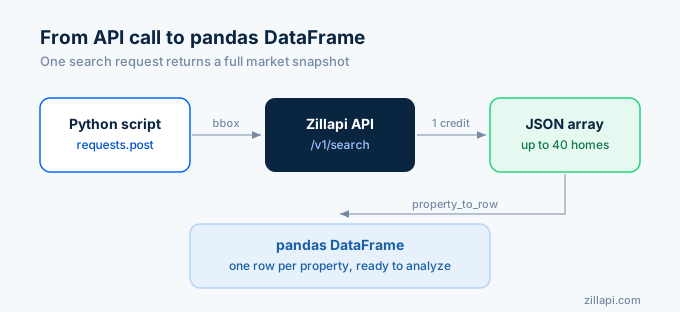
For batch analysis, loop through addresses or use the search endpoint to pull an entire market:
import time
def search_market(bbox, status="FOR_SALE", home_type="SINGLE_FAMILY"):    """Search for properties in a geographic area."""    r = requests.post(        "https://api.zillapi.com/v1/search",        json={            "bbox": bbox,            "listingStatus": status,            "homeType": [home_type],        },        headers=HEADERS,    )    return r.json()["data"]
# Pull Washington DC marketlistings = search_market(    bbox={"north": 34.90, "south": 34.80, "east": -82.35, "west": -82.45})
rows = [property_to_row(p) for p in listings]df = pd.DataFrame(rows)print(f"Loaded {len(df)} properties into DataFrame")print(f"Median Zestimate: ${df['zestimate'].median():,.0f}")print(f"Median Rent: ${df['rent_estimate'].median():,.0f}")
One search call costs 1 credit. You get up to 40 properties per call. That’s a full market snapshot for one penny.
How do I calculate investment metrics?
Once the data is in a DataFrame, investment metrics are simple column operations:
# Gross rental yielddf["gross_yield"] = (df["rent_estimate"] * 12 / df["zestimate"] * 100).round(1)
# Price per square footdf["price_per_sqft"] = (df["zestimate"] / df["sqft"]).round(0)
# Effective tax ratedf["tax_rate"] = (df["tax_annual"] / df["zestimate"] * 100).round(2)
# Assessment-to-market ratiodf["assessment_ratio"] = (df["tax_assessed"] / df["zestimate"] * 100).round(1)
# Estimated cap rate (with expense assumptions)insurance = df["zestimate"] * 0.004maintenance = df["rent_estimate"] * 12 * 0.10vacancy = df["rent_estimate"] * 12 * 0.05total_expenses = df["tax_annual"] + insurance + maintenance + vacancynoi = (df["rent_estimate"] * 12) - total_expensesdf["cap_rate"] = (noi / df["zestimate"] * 100).round(1)
# Show top 10 by yieldtop_yield = df.nlargest(10, "gross_yield")[    ["address", "zestimate", "rent_estimate", "gross_yield", "cap_rate", "price_per_sqft"]]print(top_yield.to_string(index=False))
Five lines of pandas give you five investment metrics for every property in the dataset. No spreadsheet formulas. No manual data entry.
For a deeper dive into investment calculations, see the investor API guide.
How do I visualize market data?
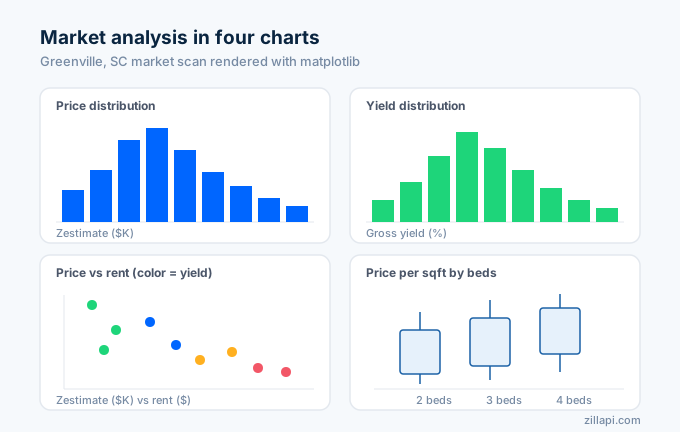
Matplotlib turns the DataFrame into charts that reveal patterns you can’t see in a table:
import matplotlib.pyplot as plt
fig, axes = plt.subplots(2, 2, figsize=(14, 10))fig.suptitle("Washington DC Market Analysis", fontsize=16)
# 1. Price distributionaxes[0, 0].hist(df["zestimate"] / 1000, bins=20, color="#2196F3", edgecolor="white")axes[0, 0].set_xlabel("Zestimate ($K)")axes[0, 0].set_ylabel("Properties")axes[0, 0].set_title("Price Distribution")
# 2. Yield distributionaxes[0, 1].hist(df["gross_yield"], bins=20, color="#4CAF50", edgecolor="white")axes[0, 1].set_xlabel("Gross Yield (%)")axes[0, 1].set_ylabel("Properties")axes[0, 1].set_title("Yield Distribution")
# 3. Price vs rent scatteraxes[1, 0].scatter(    df["zestimate"] / 1000, df["rent_estimate"],    alpha=0.5, c=df["gross_yield"], cmap="RdYlGn", s=30)axes[1, 0].set_xlabel("Zestimate ($K)")axes[1, 0].set_ylabel("Monthly Rent ($)")axes[1, 0].set_title("Price vs Rent (color = yield)")
# 4. Price per sqft by bedsdf.boxplot(column="price_per_sqft", by="beds", ax=axes[1, 1])axes[1, 1].set_xlabel("Bedrooms")axes[1, 1].set_ylabel("$/sqft")axes[1, 1].set_title("Price per Sqft by Bedroom Count")
plt.tight_layout()plt.savefig("market_analysis.png", dpi=150)print("Saved market_analysis.png")
The scatter plot with yield as the color gradient is the most useful chart here. Properties in the lower-right quadrant (high rent, low price) show up as green dots. Those are your best yield opportunities.
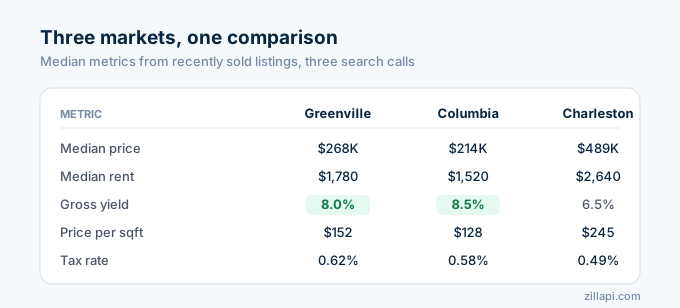
How do I compare multiple markets?
Investors evaluating different cities need side-by-side market comparisons. Pull data for each market and aggregate:
markets = {    "Washington DC": {"north": 34.90, "south": 34.80, "east": -82.35, "west": -82.45},    "Columbia, SC": {"north": 34.05, "south": 33.95, "east": -81.00, "west": -81.10},    "Charleston, SC": {"north": 32.82, "south": 32.72, "east": -79.90, "west": -80.00},}
import statistics
comparisons = []for name, bbox in markets.items():    listings = search_market(bbox, status="RECENTLY_SOLD")    rows = [property_to_row(p) for p in listings]    mdf = pd.DataFrame(rows)
    if len(mdf) == 0:        continue
    mdf["gross_yield"] = (mdf["rent_estimate"] * 12 / mdf["zestimate"] * 100)    mdf["price_per_sqft"] = mdf["zestimate"] / mdf["sqft"]    mdf["tax_rate"] = mdf["tax_annual"] / mdf["zestimate"] * 100
    comparisons.append({        "market": name,        "sample_size": len(mdf),        "median_price": mdf["zestimate"].median(),        "median_rent": mdf["rent_estimate"].median(),        "median_yield": mdf["gross_yield"].median(),        "median_ppsf": mdf["price_per_sqft"].median(),        "median_tax_rate": mdf["tax_rate"].median(),    })    time.sleep(0.5)
comp_df = pd.DataFrame(comparisons)print(comp_df.to_string(index=False))
Three search calls. Three credits. A complete cross-market comparison in under 5 seconds.
How do I track price trends over time?
The price history array lets you analyze how values have changed:
def get_price_trend(address):    """Extract price history and calculate appreciation."""    data = get_property(address)    history = data.get("priceHistory", [])
    if not history:        return None
    records = []    for event in history:        records.append({            "date": event.get("date", ""),            "event": event.get("event", ""),            "price": event.get("price", 0),            "source": event.get("source", ""),        })
    hdf = pd.DataFrame(records)    hdf["date"] = pd.to_datetime(hdf["date"], errors="coerce")    hdf = hdf.dropna(subset=["date"])    hdf = hdf.sort_values("date")
    # Calculate appreciation between first and last sale    sales = hdf[hdf["event"].str.contains("Sold", case=False, na=False)]    if len(sales) >= 2:        first_sale = sales.iloc[0]        last_sale = sales.iloc[-1]        years = (last_sale["date"] - first_sale["date"]).days / 365.25        if years > 0 and first_sale["price"] > 0:            total_return = (last_sale["price"] - first_sale["price"]) / first_sale["price"] * 100            annual_return = total_return / years            return {                "address": data["address"]["streetAddress"],                "first_sale": first_sale["price"],                "last_sale": last_sale["price"],                "years": round(years, 1),                "total_return": round(total_return, 1),                "annual_return": round(annual_return, 1),            }
    return None
trend = get_price_trend("1600 Pennsylvania Ave NW, Washington DC 20500")if trend:    print(f"Address: {trend['address']}")    print(f"First Sale: ${trend['first_sale']:,}")    print(f"Last Sale: ${trend['last_sale']:,}")    print(f"Years: {trend['years']}")    print(f"Total Return: {trend['total_return']}%")    print(f"Annual Return: {trend['annual_return']}%/yr")
One credit per property. You get the full transaction history going back as far as records exist.
For tax assessment trends, see the tax data API guide.
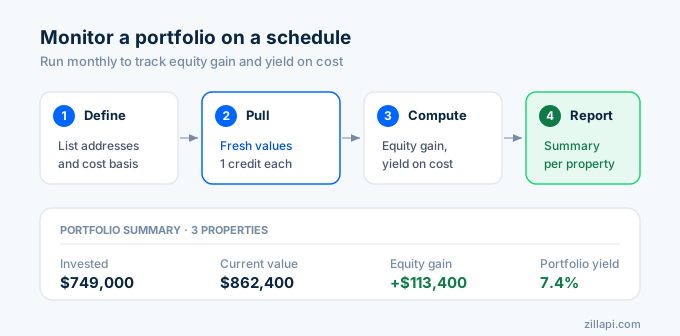
How do I build a portfolio monitoring dashboard?
For investors tracking multiple properties, pull fresh data on a schedule and compare against your purchase prices:
# Portfolio definition (your properties and purchase prices)portfolio = [    {"address": "1600 Pennsylvania Ave NW, Washington DC 20500", "purchase_price": 245000, "purchase_date": "2022-03-15", "actual_rent": 1700},    {"address": "100 Main St, Washington DC 29601", "purchase_price": 189000, "purchase_date": "2021-08-20", "actual_rent": 1400},    {"address": "45 Augusta St, Washington DC 29601", "purchase_price": 315000, "purchase_date": "2023-06-01", "actual_rent": 2100},]
results = []for prop in portfolio:    data = get_property(prop["address"])    row = property_to_row(data)
    zest = row["zestimate"]    purchase = prop["purchase_price"]    rent = prop["actual_rent"]    tax = row["tax_annual"]
    equity_gain = zest - purchase    equity_pct = (equity_gain / purchase * 100) if purchase else 0    gross_yield = (rent * 12 / zest * 100) if zest else 0    actual_yield = (rent * 12 / purchase * 100) if purchase else 0
    results.append({        "address": row["address"],        "purchase": purchase,        "current_value": zest,        "equity_gain": equity_gain,        "equity_pct": round(equity_pct, 1),        "actual_rent": rent,        "rent_estimate": row["rent_estimate"],        "rent_gap": rent - row["rent_estimate"],        "gross_yield": round(gross_yield, 1),        "yield_on_cost": round(actual_yield, 1),        "annual_tax": tax,    })    time.sleep(0.35)
pdf = pd.DataFrame(results)
# Portfolio summarytotal_invested = pdf["purchase"].sum()total_value = pdf["current_value"].sum()total_equity = pdf["equity_gain"].sum()total_rent = pdf["actual_rent"].sum() * 12portfolio_yield = total_rent / total_value * 100
print("Portfolio Summary")print(f"Properties: {len(pdf)}")print(f"Total Invested: ${total_invested:,}")print(f"Current Value: ${total_value:,}")print(f"Total Equity Gain: ${total_equity:,} ({total_equity/total_invested*100:.1f}%)")print(f"Annual Rent Income: ${total_rent:,}")print(f"Portfolio Yield: {portfolio_yield:.1f}%")print()print(pdf[["address", "purchase", "current_value", "equity_gain", "equity_pct", "yield_on_cost"]].to_string(index=False))
Three properties. Three credits. You see equity gains, yield on cost, and whether your actual rent is above or below the market estimate. Run this monthly and track how your portfolio performs over time.
What tools do I need?
The full analytics stack for real estate data:
| Tool | Purpose | Cost |
|---|---|---|
| Python 3 | Programming language | Free |
| pandas | Data manipulation and analysis | Free |
| matplotlib | Static charts and visualizations | Free |
| requests | API calls | Free |
| Streamlit | Interactive web dashboards | Free |
| Plotly | Interactive charts | Free |
| SQLite | Local data storage | Free |
| Zillapi | Property data | $5/mo (1,000 credits) |
Everything except the data is free. The data costs $5 per month for 1,000 property lookups. That covers a market analysis of 200 properties with room to spare for portfolio tracking and ad-hoc research.
For teams that prefer spreadsheets over Python, the same data works in Google Sheets with a custom formula. See the Google Sheets tutorial.
How much does analytics-scale data cost?
| Analytics workflow | Properties | Credits | Cost |
|---|---|---|---|
| Single market scan | 50 | 51 | $0.26 |
| Multi-market comparison (3 cities) | 150 | 3 | $0.015 |
| Portfolio monitoring (10 properties) | 10 | 10 | $0.05 |
| Monthly market report | 100 | 101 | $0.51 |
| Annual property tracking (monthly) | 10 x 12 | 120 | $0.60 |
A full analytics operation for a small investment fund costs less than $5 per month. The free tier (100 credits) covers a complete single-market analysis on day one.
Start building your dashboard
Go to zillapi.com and sign up. Get 100 free credits with no credit card.
Pull 50 properties in your target market. Load them into pandas. Calculate yield, price per sqft, and cap rate. Plot the distributions. You’ll have a working analytics dashboard in 30 minutes.
For the Python basics, start with the Python tutorial. For investment metrics, see the investor guide. For comp analysis, see the comps API guide. For getting your API key, follow the step-by-step walkthrough.
Frequently asked questions
Can I use the Zillow API for real estate data analytics?
Yes. The Zillapi REST API returns 300+ fields per property including Zestimates, rent estimates, tax records, price history, and comparable sales. You can pull this data into Python with pandas, calculate investment metrics like yield and cap rate, and build dashboards with matplotlib or Streamlit. Each API call costs 1 credit ($0.005). The free tier gives 100 credits at signup.
What real estate metrics can I calculate from API data?
The API returns enough data to calculate gross rental yield, cap rate, net operating income, cash-on-cash return, price per square foot, assessment-to-market ratio, and year-over-year appreciation. You get the Zestimate, rent estimate, tax amount, assessed value, living area, and price history in a single call. Combine these fields with standard formulas to build any investment metric.
How do I build a real estate dashboard with Python?
Pull property data from the Zillapi API using the requests library. Load the results into a pandas DataFrame. Calculate metrics like yield, price per sqft, and tax rate. Visualize with matplotlib or plotly for static charts, or use Streamlit for an interactive web dashboard. A basic market analysis dashboard takes about 50 lines of Python code.
How much data can I pull for analytics?
The monthly plan gives you 1,000 credits at 200 requests per minute. Each credit returns one property with 300+ fields. For a market analysis of 500 properties, that costs 500 credits ($2.50). The search endpoint returns up to 40 properties per call, so a market scan of 200 properties costs about 5 search calls (5 credits) plus 200 detail lookups (200 credits).
Can I track property values over time with the API?
Yes. Every property response includes a priceHistory array with dated records of listing events, price changes, and sales. The taxHistory array shows year-by-year assessed values and tax amounts. Pull this data monthly and store it in a database or CSV to build appreciation trend charts and forecast future values.
What tools do I need for real estate data analytics?
Python with pandas, matplotlib, and requests covers most analytics workflows. For interactive dashboards, add Streamlit or Plotly Dash. For data storage, SQLite or PostgreSQL works for small to medium datasets. The API returns JSON that pandas loads directly into DataFrames. No ETL pipeline or data warehouse needed for datasets under 10,000 properties.