You can pull Zillow property data in Python with 10 lines of code: pip install requests, get a free Zillapi key (100 credits, no card), and call the /v1/properties/by-address endpoint with your key in the Authorization header. The full working snippet is below.
You don’t need a Zillow developer account. You don’t need a special SDK. You need pip install requests and an API key.
Here’s what a complete Zillow property lookup looks like in Python. Ten lines. Copy it, paste it, run it. You’ll have Zestimates, tax records, and 300+ fields for any U.S. property in under 5 minutes.
import requests, os
r = requests.get(    "https://api.zillapi.com/v1/properties/by-address",    params={"address": "1600 Pennsylvania Ave NW, Washington DC 20500"},    headers={"Authorization": f"Bearer {os.environ['ZILLAPI_KEY']}"},)data = r.json()["data"]print(f"Zestimate: ${data['zestimate']:,}")print(f"Beds: {data['bedrooms']} | Baths: {data['bathrooms']} | Sqft: {data['livingArea']:,}")
That’s it. The rest of this article shows you how to set up the key, what comes back in the response, how to search for listings, how to export to CSV, and how to avoid the mistakes that trip up most developers.
How do I set up the Zillow API for Python?
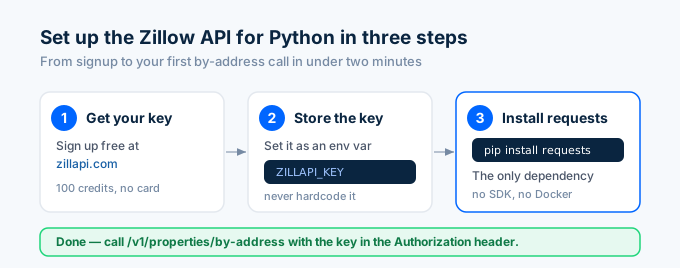
Setting up Zillapi for Python takes three steps: get a key, install requests, and make your first call. The whole process takes under 2 minutes and requires no credit card, no MLS affiliation, and no approval process. You get 100 free API credits once you confirm your email.
Step 1: Get your API key. Go to zillapi.com and sign up with your email and a password. Click the confirmation link in your inbox. It signs you in. In the dashboard, create an API key. It looks like zk_AbCdEf.... Copy it immediately. It won’t show again.
Step 2: Set your key as an environment variable. Don’t hardcode API keys in your scripts. Store them safely:
# Mac/Linuxexport ZILLAPI_KEY="zk_your_key_here"
# Windows PowerShell$env:ZILLAPI_KEY = "zk_your_key_here"
Step 3: Install requests.
pip install requestsThat’s the only dependency. No SDK. No compiled packages. No Docker.
What does the API response look like in Python?
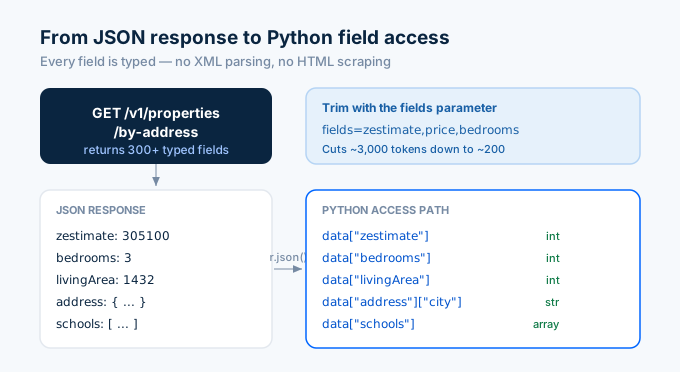
When you call /v1/properties/by-address, you get back a JSON object with 300+ typed fields. Here’s a simplified view of what r.json() returns for a real property:
{ "data": { "zpid": "{zpid}", "address": { "streetAddress": "1600 Pennsylvania Ave NW", "city": "Washington", "state": "SC", "zipcode": "20500" }, "price": 295000, "zestimate": 305100, "rentZestimate": 1850, "bedrooms": 3, "bathrooms": 2, "livingArea": 1432, "lotSize": 8712, "yearBuilt": 1965, "homeType": "SINGLE_FAMILY", "homeStatus": "NOT_LISTED", "taxAssessedValue": 187400, "schools": [...], "priceHistory": [...], "photos": [...] }}Every field is typed. Integers for prices. Strings for addresses. Arrays for schools, price history, and photos. No XML parsing. No HTML scraping. Just r.json()["data"]["zestimate"].
You can trim the response with the fields parameter. If you only need the Zestimate and basic specs:
r = requests.get( "https://api.zillapi.com/v1/properties/by-address", params={ "address": "1600 Pennsylvania Ave NW, Washington DC 20500", "fields": "zestimate,price,bedrooms,bathrooms,livingArea" }, headers={"Authorization": f"Bearer {os.environ['ZILLAPI_KEY']}"},)That cuts the response from ~3,000 tokens to ~200 tokens. Useful when you’re feeding results into an AI agent and want to save context window space.
How do I look up a property by Zillow URL or ZPID?
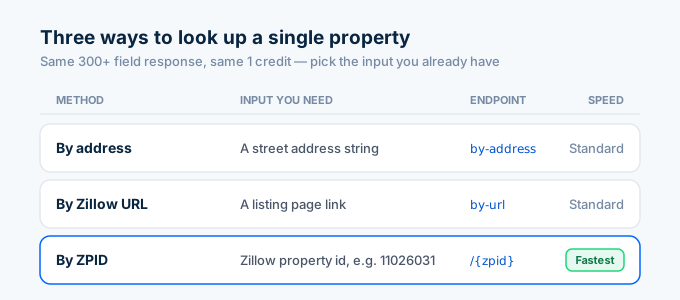
Zillapi offers three ways to look up a single property. Use whichever matches the data you already have.
By address (the example above):
r = requests.get( "https://api.zillapi.com/v1/properties/by-address", params={"address": "1600 Pennsylvania Ave NW, Washington DC 20500"}, headers={"Authorization": f"Bearer {os.environ['ZILLAPI_KEY']}"},)By Zillow URL (when you’ve got a listing link):
r = requests.get( "https://api.zillapi.com/v1/properties/by-url", params={"url": "https://www.zillow.com/homedetails/1600-Pennsylvania-Ave-NW-Washington-DC-20500/{zpid}_zpid/"}, headers={"Authorization": f"Bearer {os.environ['ZILLAPI_KEY']}"},)By ZPID (Zillow’s unique property ID, and the fastest option if you already have it):
r = requests.get( "https://api.zillapi.com/v1/properties/{zpid}", headers={"Authorization": f"Bearer {os.environ['ZILLAPI_KEY']}"},)All three endpoints return the same 300+ field response. Each call costs 1 credit.
How do I search for listings with Python?
Searching is different from looking up a single property. The search endpoint takes filters and returns multiple results.
r = requests.post(    "https://api.zillapi.com/v1/search",    json={        "bbox": {            "west": -82.45,            "south": 34.80,            "east": -82.35,            "north": 34.90        },        "minPrice": 200000,        "maxPrice": 400000,        "minBedrooms": 3,        "homeType": ["SINGLE_FAMILY"]    },    headers={"Authorization": f"Bearer {os.environ['ZILLAPI_KEY']}"},)
results = r.json()["data"]print(f"Found {len(results)} properties")for prop in results[:5]:    print(f"  {prop['address']['streetAddress']}: ${prop.get('price', 'N/A'):,}")
The bbox parameter is required because real estate search needs a precise geographic constraint. You define a bounding box with west, south, east, and north coordinates. Every listing within that rectangle matching your filters comes back.
One search call costs 1 credit regardless of how many results it returns.
How do I export Zillow data to CSV with Python?
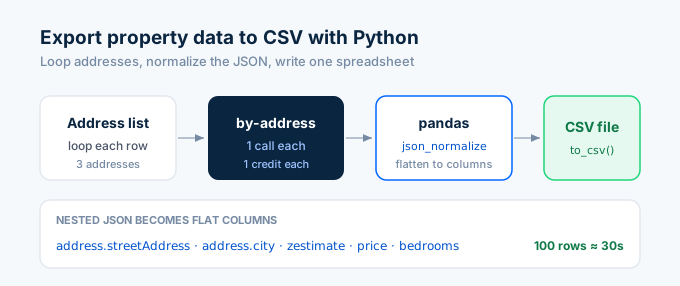
This is the question I get most from data analysts. You want a spreadsheet. Here’s the complete script:
import requests, osimport pandas as pd
HEADERS = {"Authorization": f"Bearer {os.environ['ZILLAPI_KEY']}"}
addresses = [    "1600 Pennsylvania Ave NW, Washington DC 20500",    "100 Main St, Washington DC 29601",    "45 Augusta St, Washington DC 29601",]
properties = []for addr in addresses:    r = requests.get(        "https://api.zillapi.com/v1/properties/by-address",        params={"address": addr},        headers=HEADERS,    )    if r.status_code == 200:        properties.append(r.json()["data"])    else:        print(f"Failed: {addr} ({r.status_code})")
df = pd.json_normalize(properties)df.to_csv("properties.csv", index=False)print(f"Saved {len(df)} properties to properties.csv")
pd.json_normalize() flattens nested JSON into columns. The address object becomes address.streetAddress, address.city, address.state, address.zipcode. Arrays like schools and priceHistory become JSON strings in their columns.
For 100 properties, this script runs in about 30 seconds and costs 100 credits (exactly the free tier).
If you need specific columns, filter the DataFrame before saving:
cols = ["zpid", "address.streetAddress", "address.city", "zestimate", "price", "bedrooms", "bathrooms", "livingArea", "yearBuilt"]df[cols].to_csv("properties_slim.csv", index=False)Why can’t I use pyzillow or python-zillow anymore?
Both libraries are dead. They relied on Zillow’s ZWSID API, which Zillow shut down on September 30, 2021. If you pip install pyzillow today and try to make a call, you’ll get a 403 error. The library’s PyPI page hasn’t been updated since 2020.
The same applies to python-zillow, zillowAPI, and every other Python package built on the old ZWSID endpoints. They all hit dead URLs.
In 2026, the right approach is using Python’s requests library directly with a REST API like Zillapi. No wrapper library needed. The API returns JSON. Python handles JSON natively. Adding a dependency between you and the API just creates a point of failure.
I’ve seen developers waste hours debugging why pyzillow returns errors before realizing the underlying API no longer exists. Save yourself the time. Use requests directly.
What mistakes do Python developers make with real estate APIs?
I’ve watched hundreds of developers integrate Zillapi into Python projects. The same mistakes come up over and over.
The most common one is hardcoding API keys. Never put zk_... directly in your Python file. Use environment variables (os.environ['ZILLAPI_KEY']) or a .env file with python-dotenv. Hardcoded keys end up on GitHub. It happens more than you’d think.
The second mistake is not checking status codes. A 404 means the property wasn’t found. A 402 means you’re out of credits. A 429 means you hit the rate limit. Always check r.status_code before calling r.json().
if r.status_code != 200: print(f"Error {r.status_code}: {r.text}")else: data = r.json()["data"]Third is burning credits on blind retries. If a call fails with a 500, don’t immediately retry in a tight loop. Add exponential backoff. Failed calls (4xx/5xx) don’t consume credits, but hammering the API when it’s having issues helps nobody.
Then there’s ignoring the fields parameter. If you only need 5 fields, don’t pull all 300+. Use fields=zestimate,price,bedrooms,bathrooms,livingArea. Cuts response size by 90%.
Finally, most developers skip requests.Session() when making multiple calls. Sessions give you connection pooling for free:
session = requests.Session()session.headers["Authorization"] = f"Bearer {os.environ['ZILLAPI_KEY']}"
# Now every call reuses the connectionr = session.get("https://api.zillapi.com/v1/properties/by-address",                 params={"address": "1600 Pennsylvania Ave NW, Washington DC 20500"})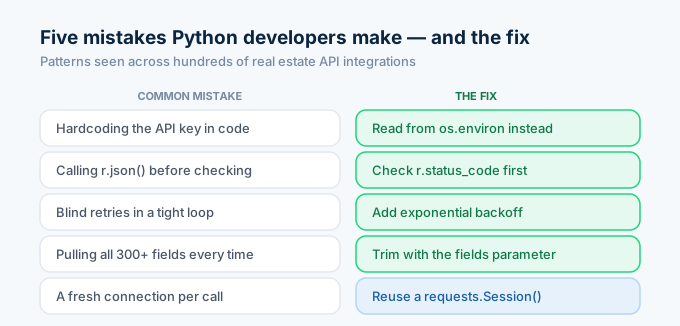
Can I use this API with Jupyter notebooks?
Yes. The code above works identically in Jupyter. The JSON response renders nicely in notebook output cells, and you can inline the DataFrame display.
import requests, osimport pandas as pd
r = requests.get(    "https://api.zillapi.com/v1/properties/by-address",    params={"address": "1600 Pennsylvania Ave NW, Washington DC 20500"},    headers={"Authorization": f"Bearer {os.environ['ZILLAPI_KEY']}"},)
df = pd.json_normalize(r.json()["data"])df[["zpid", "zestimate", "bedrooms", "bathrooms", "livingArea", "yearBuilt"]]
That renders a clean table directly in the notebook. For data exploration, Jupyter plus this API is a fast way to pull real property data without downloading datasets or running scrapers.
Get your API key and start building
Go to zillapi.com. Sign up. Get 100 free credits.
Then open your terminal, paste the 10-line script from the top of this article, and watch real property data come back. You’ll have a working Python integration before your coffee gets cold.
Frequently asked questions
How do I use the Zillow API with Python?
Install the requests library with pip install requests. Sign up at zillapi.com to get a free API key (100 credits, no credit card). Then call the /v1/properties/by-address endpoint with your key in the Authorization header. The response is JSON with 300+ fields including Zestimates, tax records, price history, and school ratings. Ten lines of Python is all you need for a working property lookup.
Is there a Python library for the Zillow API?
The old pyzillow and python-zillow libraries used Zillow’s ZWSID API, which was retired in September 2021. Those libraries no longer work. In 2026, the best approach is using Python’s built-in requests library with a third-party REST API like Zillapi. No special SDK needed. The API returns JSON that works directly with json.loads() or response.json().
Can I get Zestimate data with Python?
Yes. Zillapi’s /v1/properties/by-address endpoint returns the zestimate field as an integer (dollars) for any U.S. property. Call it with Python’s requests library and read response.json()["data"]["zestimate"]. The rent Zestimate is available as rentZestimate. Both update regularly and match the values shown on Zillow.com property pages.
How do I export Zillow data to CSV with Python?
After fetching property data from the API, load it into a pandas DataFrame with pd.json_normalize(data). Then call df.to_csv("properties.csv", index=False). For multiple properties, loop through addresses, collect results in a list, and normalize the entire list at once. A 100-property export takes about 30 seconds and uses 100 API credits.
Is the Zillow API free for Python developers?
Zillapi offers 100 free API credits once you confirm your email, with no credit card required. Each successful API call uses 1 credit regardless of which endpoint you hit or how much data comes back. That is enough to build and test a complete Python integration. After the free credits, paid plans start at $5 per month for 1,000 credits.
What Python version do I need for the Zillow API?
Any Python version 3.7 or later works. The only dependency is the requests library, which supports Python 3.7+. If you want to export data to CSV or do analysis, add pandas. Both install with pip in seconds. No compiled dependencies, no system packages, no Docker required.