You get 100 free API calls. No credit card. No trial expiration. No strings.
That’s what Zillapi’s free tier gives you: 100 credits once you confirm your email, each good for one API call that returns Zestimates, property details, tax records, photos, and 300+ fields across 160M+ U.S. properties. Here’s exactly what you can build with them, which endpoints eat credits, and when it makes sense to upgrade.
The free tier exists because property data APIs are hard to evaluate without using them. Reading docs tells you what the API claims to return. Making 100 real API calls tells you what it actually returns, how fast it responds, and whether the data matches your use case. Zillapi bets that developers who test the API will pay for it. That bet works well enough that the free tier has stayed at 100 credits since launch.
What exactly do 100 credits buy you?
One credit equals one successful API call. Any endpoint. Any response size. A property lookup with 300+ fields costs the same 1 credit as a simple search query. Only successful responses (HTTP 2xx) consume credits. If the API returns a 404 (property not found) or a 500 (server error), you keep your credit.
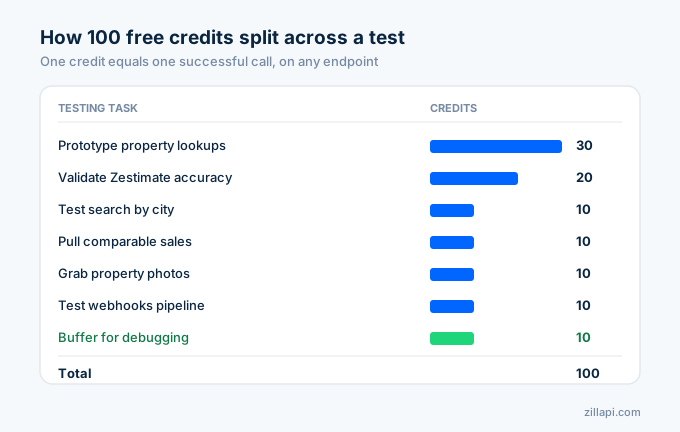
Here’s what 100 credits look like in practice:
Prototype a property lookup tool: 30 credits to look up 30 different properties by address, testing response shape, field availability, and data accuracy across different property types (single family, condo, townhouse, multi-unit).
Test the search endpoint: 10 credits to search listings in 10 different cities, testing filters (price range, bedrooms, status), pagination, and response times.
Pull comparable sales: 10 credits to fetch nearby properties for 10 different zpids, testing the comp quality and radius coverage.
Grab property photos: 10 credits to pull photo URLs for 10 properties, testing image availability and resolution.
Validate Zestimates: 20 credits to spot-check Zestimate accuracy against known sale prices in your target market.
Test webhooks: 10 credits to set up webhook subscriptions and verify the async pipeline works with your infrastructure.
Buffer: 10 credits left over for debugging, retesting, and edge cases.
That’s a complete integration test. You’ll know whether the API fits your product before spending a dollar.
Which endpoints can I call?
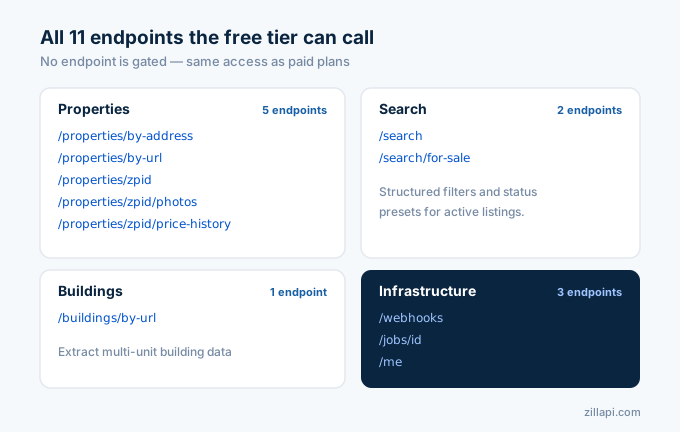
All of them. The free tier doesn’t restrict which endpoints you can access. You get the same 11 endpoints, the same 300+ fields, the same rate limits as paid users.
Properties endpoints:
/v1/properties/by-url- Look up by Zillow listing URL/v1/properties/by-address- Look up by street address/v1/properties/{zpid}- Look up by Zillow property ID/v1/properties/{zpid}/photos- Get property photos/v1/properties/{zpid}/price-history- Get price and tax history
Search endpoints:
/v1/search- Search with structured filters/v1/search/for-sale- Active listings with status presets
Building endpoints:
/v1/buildings/by-url- Extract multi-unit building data
Infrastructure endpoints:
/v1/webhooks- Subscribe to async notifications/v1/jobs/{id}- Track async job results/v1/me- Your account info and usage stats
Every endpoint returns JSON by default. You can also request CSV or NDJSON via the Accept header.
What does a typical API response look like?
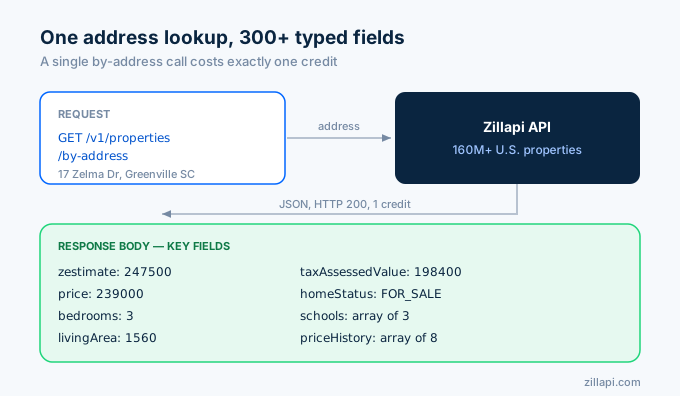
When you call /v1/properties/by-address with a valid U.S. address, you get back a JSON object with 300+ typed fields. The response includes everything Zillow shows on a property page, structured for programmatic use.
Key fields you’ll see:
zestimate- Zillow’s automated home value estimate (integer, dollars)price- Current listing price if actively listedbedrooms,bathrooms,livingArea- Basic property specsyearBuilt- Construction yearlotSize- Lot area in sqfttaxAssessedValue- Most recent tax assessmenthomeStatus- FOR_SALE, SOLD, FOR_RENT, NOT_LISTED, etc.datePostedString- When the listing went liveschools- Nearby schools with ratings and distancespriceHistory- Array of past sales and price changeszpid- Zillow’s unique property identifier (use this for subsequent calls)
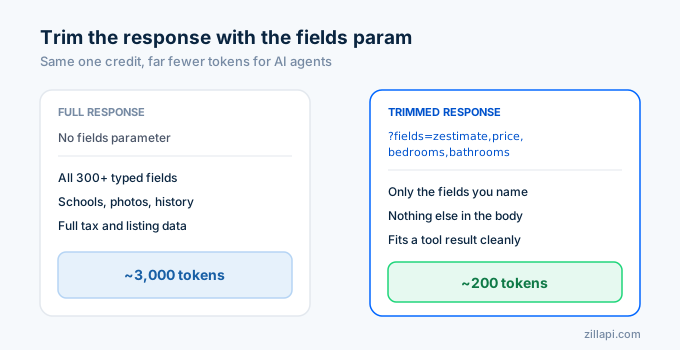
A single property response runs about 2,000-3,000 tokens. If you’re building an AI agent, that’s small enough to fit in a tool result without context-window pressure.
You can trim the response using the ?fields= query parameter. Request only ?fields=zestimate,price,bedrooms,bathrooms,livingArea and you get a 200-token response instead of 3,000.
When should you upgrade from the free tier?
Upgrade when you’ve validated your use case and need more than 100 calls. Three signals that you’re ready:
Signal 1: You’ve built a working prototype. Your integration code works. The data fields match your needs. Response times meet your requirements. Now you need volume to ship to users.
Signal 2: You’re running out of credits during testing. If you burned through 100 credits in a day, your use case is real. A $5 monthly plan gives you 10x the credits.
Signal 3: You need higher rate limits. The free tier is capped at 20 requests per minute. The monthly plan unlocks 200/min, and the annual plan bumps that to 300/min, which is useful when an agent or batch job has bursty traffic.
Here’s the pricing ladder:
| Plan | Credits | Rate limit | Cost per credit | Best for |
|---|---|---|---|---|
| Free | 100 (one-time) | 20/min | $0.00 | Testing and prototyping |
| Monthly | 1,000/month | 200/min | $0.005 | Early-stage products |
| Annual | 12,000/year | 300/min | $0.0045 | Established products |
Top-up credits cost $4 per 1,000 on the monthly plan and $3 per 1,000 on annual. The free plan does not support top-ups. If you consistently buy top-ups, the annual plan saves 25%.
What happens when credits run out?
Nothing bad. Your API calls return a 402 Payment Required status with a clear error message. No surprise charges. No automatic billing. No account suspension.
Your API key stays active. Your account stays active. You just can’t make successful API calls until you add credits.
This is intentional. I’ve seen APIs that auto-charge your card when you hit the limit. That’s how a testing session turns into a $500 surprise bill. Zillapi doesn’t do that.
When you’re ready to add credits, log into the dashboard and upgrade your plan or buy a top-up. Credits appear instantly.
How does the free tier compare to other real estate APIs?
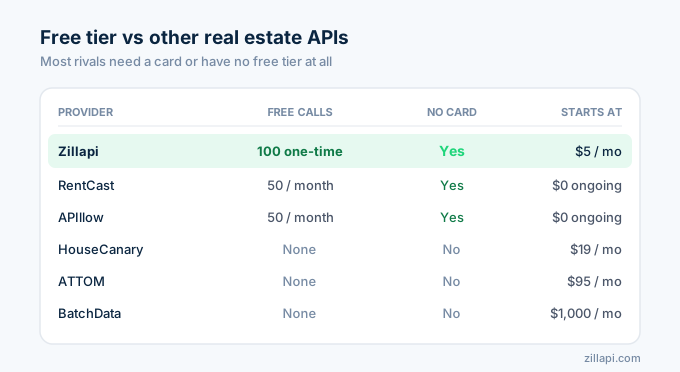
Most real estate APIs either have no free tier or require a credit card to start.
ATTOM starts at $95/month with no free tier. You’re paying before you’ve tested anything.
BatchData starts at $1,000/month. Enterprise pricing only.
HouseCanary starts at $19/month. No free trial.
RentCast offers 50 free API calls per month (ongoing, not one-time). Smaller data set focused on rental valuations.
APIllow offers 50 free requests per month. Covers Zillow data but with a smaller field set.
Zillapi’s 100-credit one-time free tier is the most generous for testing purposes. RentCast and APIllow have smaller ongoing free tiers that work for very low-volume use cases.
Frequently asked questions
Is there a free Zillow API?
There is no free API from Zillow directly. Zillow retired their public API in 2021. Zillapi, an independent third-party service, offers a free tier with 100 API credits once you confirm your email. No credit card required. Each credit equals one successful API call returning Zestimates, property details, listings, and 300+ data fields across 160M+ U.S. properties.
How many API calls do I get for free?
Zillapi gives you 100 free credits once you confirm your email. Each successful API call (any 2xx response) costs exactly 1 credit regardless of endpoint. Failed calls and 4xx/5xx errors do not consume credits. That means 100 guaranteed successful lookups, searches, or comp pulls.
What can I do with 100 free API credits?
You can look up 100 individual properties by address or zpid, search listings in any U.S. city, pull Zestimates and price history, download property photos, fetch tax records and school ratings, test webhooks for batch operations, and hit all 11 endpoints. Most developers use their free credits to build and test a working prototype before upgrading.
Do I need a credit card to try the Zillow API?
No. Zillapi’s free tier requires only your name, email address, a password and your primary use case. You sign up with your email and a password, confirm your email, and get 100 free credits. No credit card, no billing info, no approval process. You only enter payment information when you choose to upgrade.
What happens when I run out of free credits?
Your API calls return a 402 error with a clear message that your credit balance is zero. No surprise charges. No automatic upgrades. You choose to either upgrade to a paid plan ($5/month for 1,000 credits) or stop using the API. Your account and API key remain active indefinitely.
How much does the Zillow API cost after the free tier?
Zillapi has two paid plans. Monthly is $5/month for 1,000 credits at 200 requests/minute, with top-ups at $4 per 1,000 credits. Annual is $54/year for 12,000 credits a year, released 1,000 each month, at 300 requests/minute, with top-ups at $3 per 1,000 credits. The free tier does not support top-ups.
Start with 100 free credits
Go to zillapi.com. Sign up with your email. Get 100 credits. Build something.
No credit card. No trial clock ticking. Just data.