The wrong way to build “new listing in this zip code” alerts is to poll Zillow every 60 seconds. The right way is webhooks plus a small worker.
The polling version burns credits, hits rate limits, and still misses events between polls. The webhook version uses 70 to 80 percent less server load and delivers updates in near-real-time.
This post is the architecture, the working code, and the HMAC verification that keeps the webhook endpoint safe.
Why webhooks beat polling for listing alerts
Polling is a client-driven model where your application periodically calls a third-party API to check whether anything has changed. Webhooks are server-driven. The server pushes a notification when an event happens, and your client receives an HTTP POST.
The cost gap is real. According to research aggregated by Hookdeck and others, event-driven webhook architectures reduce server load by roughly 70 to 80 percent compared to polling for the same workload.
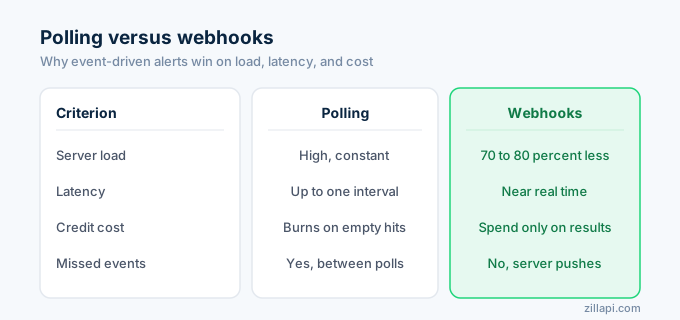
The latency gap is bigger. Polling cannot guarantee immediate updates. If an event happens right after a poll, you do not catch it until the next poll. The Real Estate Standards Organization has recommended webhooks as the path forward for MLS data delivery for exactly this reason.
The exception: if you are scheduling alerts on a sub-five-minute cadence, polling and webhooks converge in usefulness because most MLS feeds refresh every 5 to 15 minutes anyway.
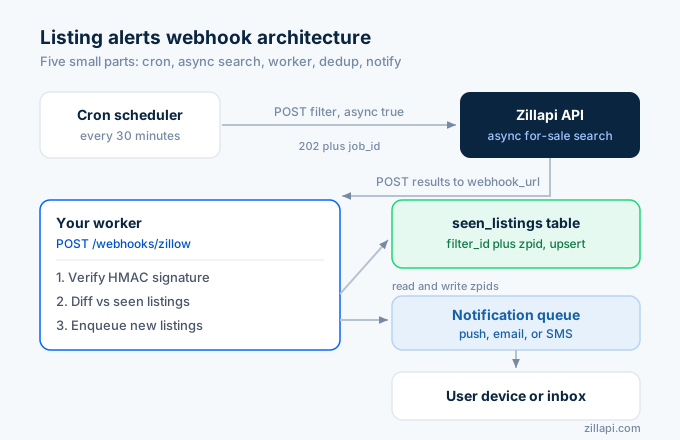
Architecture in one diagram
[cron: every 30 min] │ ▼[POST /v1/listings/for-sale {async: true, webhook_url}] │ │ 202 + job_id ▼[Zillapi runs the search async] │ │ POST results to your /webhooks/zillow ▼[your worker] ├─ verify HMAC signature ├─ diff vs last_seen_zpids in db ├─ for each new zpid → enqueue notification └─ update last_seen_zpids │ ▼[push notification → user device / email / SMS]Five moving parts. Cron, async search, webhook handler, dedup table, notification queue. Each one is small.
Step 1: schedule the async search
Run this on a cron. 30-minute granularity is a reasonable default for most listing-alert use cases.
Zillapi caches search results for a short window, so calling more often is mostly wasted credits. You can tune this lower for premium tiers if your product needs sub-30-minute alerting.
import os, requests
ZILLAPI = "https://api.zillapi.com/v1"HEADERS = {"Authorization": f"Bearer {os.environ['ZILLAPI_KEY']}"}
def schedule_search(filter_id: str, location: str, max_price: int, min_beds: int):    body = {        "filters": {            "status": "for_sale",            "location": location,            "price": {"max": max_price},            "beds": {"min": min_beds},        },        "maxItems": 200,        "async": True,        "webhook_url": f"https://yourapp.example/webhooks/zillow?filter={filter_id}",    }    r = requests.post(        f"{ZILLAPI}/listings/for-sale",        json=body,        headers={**HEADERS, "content-type": "application/json"},        timeout=30,    )    r.raise_for_status()    return r.json()["data"]["job_id"]
The webhook_url query string carries the filter_id so your handler knows which user-saved filter this result belongs to.
Step 2: verify the webhook signature
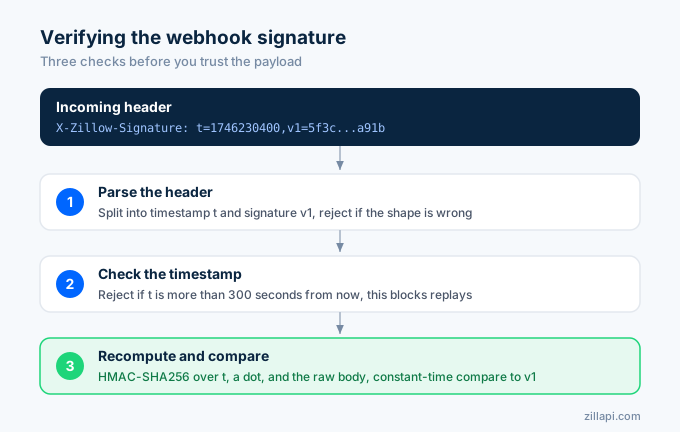
Every Zillapi webhook carries X-Zillow-Signature: t=<unix>,v1=<hex>. The signing scheme follows the same pattern Stripe documents and the same one most major webhook providers use.
Recompute HMAC-SHA256 over <t>.<raw_body> with your webhook secret. Compare the result to the v1 value with a constant-time comparison.
Critical: use the raw bytes of the body, not a parsed JSON object. Whitespace and key order matter. Any framework that re-serializes the JSON before you compute the signature will break verification.
import hmac, hashlib, os, re, time, jsonfrom fastapi import FastAPI, Request, HTTPException
app = FastAPI()SECRET = os.environ["ZILLAPI_WEBHOOK_SECRET"]
@app.post("/webhooks/zillow")async def hook(request: Request):    raw = await request.body()    header = request.headers.get("x-zillow-signature", "")    m = re.match(r"^t=(\d+),v1=([a-f0-9]+)$", header)    if not m:        raise HTTPException(401, "bad signature")    ts, sig = m.group(1), m.group(2)    if abs(time.time() - int(ts)) > 300:        raise HTTPException(401, "stale signature")    expected = hmac.new(        SECRET.encode(),        f"{ts}.{raw.decode()}".encode(),        hashlib.sha256,    ).hexdigest()    if not hmac.compare_digest(sig, expected):        raise HTTPException(401, "bad signature")
    event = json.loads(raw)    filter_id = request.query_params.get("filter")    await process_results(filter_id, event["data"]["results"])    return {"ok": True}
Three checks happen here. The signature header parses cleanly. The timestamp is within 300 seconds of now (replay protection). The recomputed HMAC matches the v1 value (authenticity).
The same verification logic in Node.js, Go, and other runtimes lives in our verify-webhook recipe.
Step 3: diff against the last run
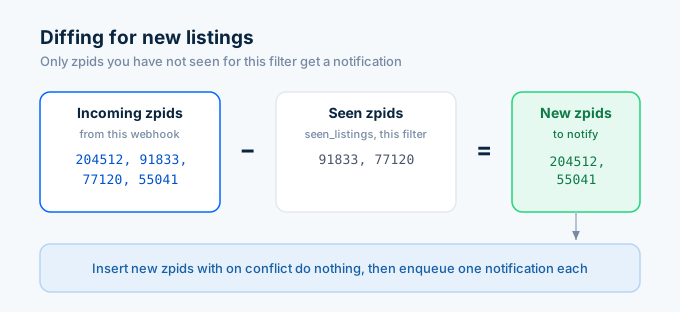
You only want to notify users about properties they have not seen yet. Keep a seen_zpids table per filter.
create table seen_listings ( filter_id text not null, zpid text not null, first_seen_at timestamptz not null default now(), primary key (filter_id, zpid));The diff is set arithmetic.
async def process_results(filter_id: str, results: list[dict]):    incoming_zpids = {r["zpid"] for r in results}
    rows = await db.fetch(        "select zpid from seen_listings where filter_id = $1",        filter_id,    )    seen = {r["zpid"] for r in rows}    new_zpids = incoming_zpids - seen    if not new_zpids:        return
    new_listings = [r for r in results if r["zpid"] in new_zpids]    await db.executemany(        "insert into seen_listings (filter_id, zpid) values ($1, $2) on conflict do nothing",        [(filter_id, z) for z in new_zpids],    )    for listing in new_listings:        await enqueue_notification(filter_id, listing)
The on conflict do nothing is what makes the handler idempotent. If Zillapi retries the webhook (because your endpoint timed out or returned a 5xx), the second call inserts no duplicate rows and queues no duplicate notifications.
Step 4: push the notification
The notification path depends on your stack. A typical flow.
async def enqueue_notification(filter_id: str, listing: dict): user = await get_user_for_filter(filter_id) msg = ( f"New listing in {listing['address']['city']}: " f"${listing['price']:,} • {listing['bedrooms']}bd/{listing['bathrooms']}ba • " f"{listing['livingArea']} sqft\n" f"https://www.zillow.com/homedetails/{listing['zpid']}_zpid/" ) await push.send(user.device_token, title="New listing", body=msg) # or: await sendgrid.send_email(user.email, msg) # or: await twilio.send_sms(user.phone, msg)Push, email, SMS, Slack, anything. The shape is the same. The handler queues the work, returns 200 to Zillapi, and lets a background worker fan out the actual delivery.
Patterns worth knowing
Idempotency. Your webhook handler may be called twice for the same job_id. Use the job_id or event id as a dedup key in your queue.
Respond fast. Zillapi expects a 2xx response within a few seconds. Queue the work and return. Do not run the notification path inside the request handler.
Cap per-filter notification frequency. A user with a wide filter (whole metro, no min beds) might get hundreds of new listings in a hot market. Roll them up into a digest if the count exceeds a threshold (say, 10 new in one batch).
Backfill on first run. When a user creates a new filter, the first webhook will report every match as “new”. Mark all of them as seen without notifying. Notify only on subsequent runs.
Test with a tunnel. While developing, run ngrok http 8000 and pass the ngrok URL as webhook_url. Zillapi will hit it, signature and all. The verification fails fast on bad timestamps, so keep your laptop clock honest.
Rotate the webhook secret without downtime. Support two valid secrets briefly during rotation. Verify against both. Drop the old one once you confirm no in-flight retries are still using it.
Track delivery health. Log which jobs delivered, which retried, and which 4xx-failed. Webhooks fail silently if you do not instrument them.
A complete worker in 100 lines
The Python and FastAPI snippets above are the meat. Glue them with a scheduler (cron, apscheduler, a managed cron product), a Postgres or Redis store, and your push provider, and you have a working Zillow listing alert system.
The realistic scaling path. SQLite on a single VM works for the first hundred filters. Postgres on a managed host works to the first few thousand. Redis sets get you past that with cheaper writes. The webhook handler stays the same the whole way.
Tuning the search frequency
Most teams default to 30 minutes and never touch it again. Some use cases want different cadences.
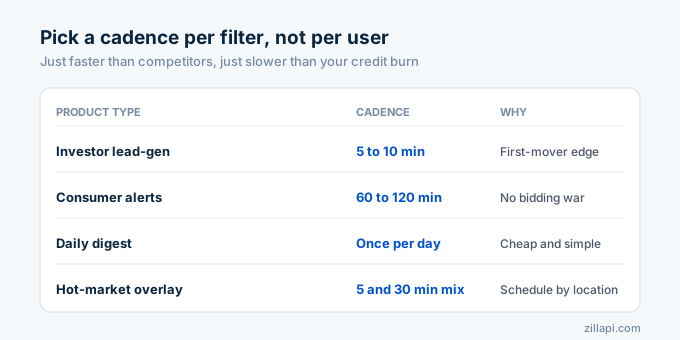
Investor lead-gen products. First-mover advantage is real. 5 to 10 minute cadence on a tight filter (specific zip code, specific price band) is usually worth the extra cost. The credits spent buy you a lead position.
Consumer “homes I would like” alerts. 60 to 120 minutes is fine. Most consumers are not racing other buyers. They want to know about new options, not win a bidding war.
Daily digest products. One scheduled search per day, then the diff goes into an email. Cheap, simple, and reasonable for a lot of “my saved searches” features.
Hot-market overlays. Some teams run a 5-minute cadence in active markets and a 30-minute cadence elsewhere. The dispatch logic looks at the filter’s location and picks the schedule. Worth the complexity once you have hundreds of filters.
The right cadence is the one that is just slightly faster than your competitors’ and just slightly slower than burns your credit balance. Tune to the filter, not the user.
What about new construction or pre-market listings?
This is where Zillow data gets weaker. Pocket listings, off-MLS deals, and pre-market homes do not surface through Zillow’s public listing surface, which means they do not surface through any wrapper either.
If your product needs those, you need a direct MLS feed via Bridge Interactive or a paid pre-MLS data provider. The webhook architecture above does not change. Only the upstream data source does.
Frequently asked questions
Why use webhooks instead of polling for listing alerts?
Webhooks deliver near-real-time notifications and cut server load by 70 to 80 percent versus polling. Polling cannot guarantee immediate updates and either misses events between checks or burns API credits hammering the same endpoint.
How fast do new Zillow listings show up?
Most MLS data feeds refresh every 5 to 15 minutes depending on the MLS, and Zillow ingests at a similar cadence. A 30-minute scheduled search on your side is a reasonable default. More frequent checks rarely surface new inventory.
How do I verify a Zillapi webhook signature?
Recompute HMAC-SHA256 over the string formed by concatenating the timestamp, a period, and the raw request body, using your webhook secret as the key. Compare with constant-time comparison against the v1 signature in the X-Zillow-Signature header.
What happens if my webhook endpoint is down when an event fires?
Zillapi retries with exponential backoff for several hours. To handle longer outages, expose a /webhooks/replay endpoint or trigger a backfill search after recovery. Idempotent handlers keep retries safe.
How do I avoid spamming users with old listings on first run?
Backfill on first run. When a user creates a new filter, mark every match in the first webhook as seen without notifying. Notify only on subsequent runs.
Do I need a Postgres database or is something simpler enough?
Anything with a per-filter set of seen zpids works. Postgres, SQLite, Redis sets, or even a JSON file for low-volume cases. You just need durability and atomic upserts for the dedup step.
Monitoring the alert pipeline
A listing alerts product fails silently if you do not instrument it. Users assume “no alerts means no new listings”, which is sometimes true and sometimes a sign your worker has been broken for two days.
Track three numbers per filter. Count of webhook deliveries received per day. Count of new zpids surfaced per day. Count of notifications sent per day.
When the third number drops to zero across all filters, you have a delivery bug. When the second drops to zero on a filter that historically saw new inventory, the filter is now empty (or the search params went stale). When the first drops to zero, the cron is not firing.
A 5-minute Datadog dashboard covers all three. Do not skip this. The first time a paying user emails you to ask why they have not gotten an alert in a week, you will wish you had built it.
Get started
Sign up for Zillapi, grab your webhook secret from the dashboard, and ship. The full protocol details live in Webhooks and the verification recipe in Verify a webhook signature.
Run the cron, point the webhook_url at your handler, and you have a real-time Zillow listing alerts system before lunch.
Zillapi is an independent service and is not affiliated with, endorsed by, or sponsored by Zillow Group, Inc. “Zillow” is a registered trademark of Zillow Group, Inc. Use of those marks on this site is descriptive (nominative fair use). Read our full trademark posture.